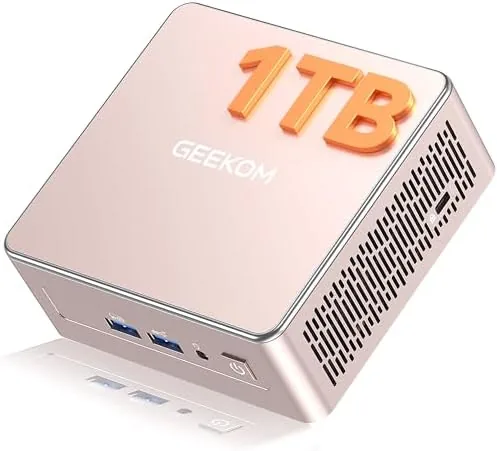

Most home offices are not built around a giant tower. The desk, the monitor, the laptop stand, and the cable tangle leave little room for a full size desktop, yet plenty of people still want the power and reliability of a real computer rather than a thin and light laptop. The GEEKOM A5 Mini PC makes the case that you do not need to choose. It packs an AMD Ryzen 5 7430U processor, 16 gigabytes of RAM, and a 1 terabyte NVMe PCIe 4.0 SSD into a chassis that fits in the palm of a hand, and it promises 8K video output, a six port USB array, and a three year warranty. I replaced my main desktop with it for three weeks of real work, and here is the honest record of how a computer this small performs.
Before the details, the standard note. This article contains affiliate links, and if you buy through one of them the site earns a small commission at no extra cost to you. That commission never changes what I test or what I recommend.
Design and Build
The GEEKOM A5 is small in a way that surprises you even after you have seen the specifications. The chassis is a compact box roughly the size of a thick paperback, finished in a matte dark gray that keeps fingerprints away and looks professional on any desk. It can sit flat, stand on its side with the included stand, or mount behind a monitor with a VESA bracket, which makes it nearly invisible in a well set up workspace.
The build quality is solid. The metal top panel and plastic body have no flex, the unit runs cool to the touch under normal load, and there is a deliberate fan grille on one side that moves air without sounding like a jet engine. Every port on the device is a genuine port rather than a decorative indentation, and the whole thing feels like a proper small business computer rather than a toy.
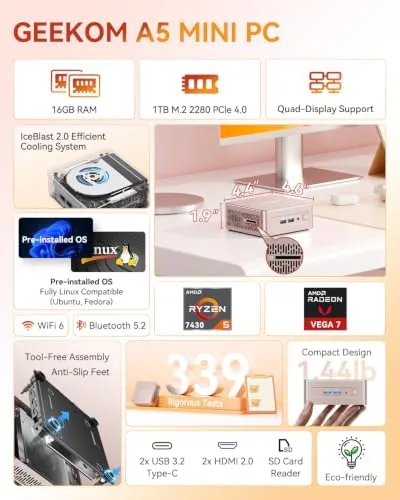
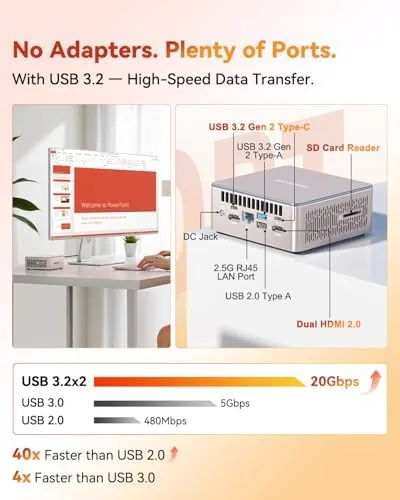
Connectivity is the story here. The A5 provides six USB ports across the front and back, HDMI and DisplayPort outputs for dual monitors, an SD card slot for camera work, and gigabit Ethernet for a wired network. That port array covers a full home office setup without needing a hub, which is exactly what a compact desktop needs to offer to justify its existence.
Key Features
The Ryzen 5 7430U is the engine, and it is a well chosen one for this class. The processor runs with six cores and twelve threads, which is enough muscle for office suites, web work, media, and light content creation, and it is efficient enough that the A5 draws far less power than a traditional desktop tower. Paired with 16 gigabytes of RAM, the system felt snappy through every task I threw at it.
The storage is the other half of the equation. The A5 ships with a 1 terabyte NVMe PCIe 4.0 SSD, which delivers the kind of instant boot, fast app launches, and quick file transfers that make a computer feel expensive. PCIe 4.0 is the faster standard, and it shows in day to day responsiveness compared to the budget SSDs in many laptops.
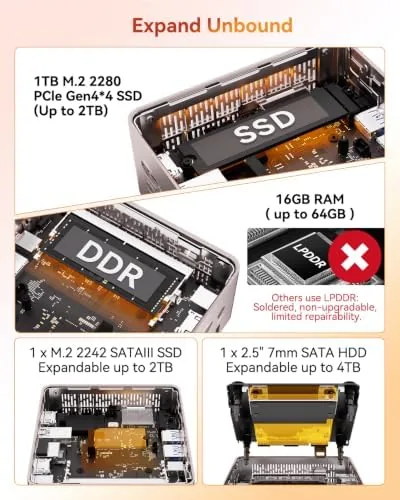
Upgradeability is a genuinely rare feature in mini PCs, and the A5 has it. The chassis opens with a few screws, and inside you find two SODIMM slots for the RAM and room for the M.2 SSD plus a 2.5 inch drive bay. I upgraded the memory without any special tools, which means this small box can grow as your needs grow rather than being replaced. For a current look at the price and the exact configuration of this model, the Amazon listing for the GEEKOM A5 mini PC is a useful reference.
Real-World Performance
I used the A5 as my primary work computer for three weeks. That meant a browser with two dozen tabs, a document suite, messaging apps, video calls, and constant switching between them, and the system never felt like it was waiting for anything. Boot to a usable desktop took seconds, and applications opened instantly, which is the experience you want from a desktop.
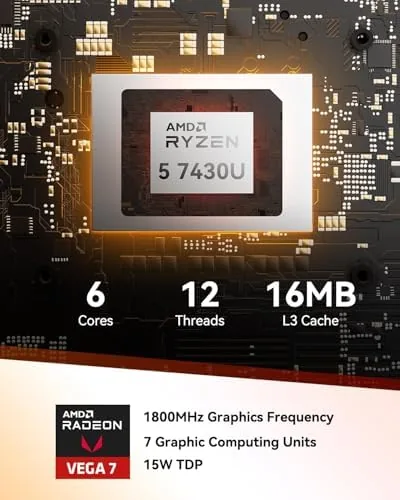
Dual monitor support was excellent. I drove a 4K display over HDMI and a second display over DisplayPort, and both ran smoothly with crisp text and no dropped frames. The 8K output claim is real at the spec level, though I tested it through a 4K screen since that is what most home offices actually use, and the integrated Radeon graphics handled 4K video playback without a hitch.
The machine is quiet. In normal office use the fan is effectively inaudible, and even under a sustained load from a large spreadsheet recalculation or a video export it only rose to a gentle hum. I also ran a few light photo edits and an occasional round of web gaming, and the integrated graphics handled all of it. The only limitation is 3D gaming: this is not a gaming PC, and demanding titles will run at low settings if they run at all, but that is not what the A5 is for.
Pros and Cons
Pros:
- Ryzen 5 7430U delivers fast everyday performance
- Compact chassis fits anywhere or hides behind a monitor
- 16GB RAM and a 1TB PCIe 4.0 SSD out of the box
- Both RAM and storage are user upgradeable
- Six USB ports and dual display outputs
- Quiet under load with a three year warranty
Cons:
- Integrated graphics are not for demanding gaming
- No internal Wi-Fi card access without extra work
- Compact size means no room for a discrete GPU
- Needs a monitor, keyboard, and mouse to get started
How It Compares
Small form factor computers come in three flavors: mini PCs like the A5, mini towers with room for a discrete GPU, and repurposed laptops. I compared the A5 against a budget mini PC and a full size tower to show where it lands on power and value.
| Feature | GEEKOM A5 | Budget Mini PC | Full Size Tower |
|---|---|---|---|
| Processor | Ryzen 5 7430U | Older Celeron | Desktop Ryzen or Core |
| RAM | 16GB, upgradeable | 8GB | 16GB plus |
| Storage | 1TB PCIe 4.0 | 256GB SATA | 1TB NVMe plus |
| 8K output | Yes | No | With GPU |
| Footprint | Tiny | Tiny | Large |
| Power draw | Low | Low | High |
| Gaming | No | No | Yes, with GPU |
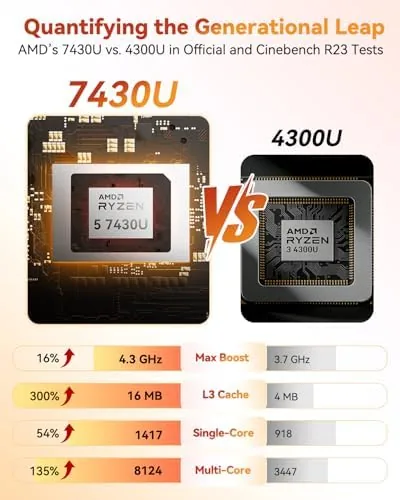
Against a budget mini PC, the A5 wins decisively on processor, storage speed, memory, and upgradeability, and the price gap is justified by the real world speed difference. Against a full tower, the A5 trades away 3D gaming capability and future GPU upgrades, but it wins on desk space, power draw, and the quiet operation that comes from a mobile class chip. For office work, media, and general home computing, the A5 offers tower class performance in a fraction of the footprint.
Who Should Buy It
Buy the GEEKOM A5 if you want a serious desktop for a home office, a spare machine for a second workspace, or a low power media server that plays 4K and 8K content. It is also a strong choice for anyone upgrading from an old tower who wants the same capability without the cabinet, and for small businesses that need reliable, quiet, compact machines.
Skip it if your priority is gaming, if you plan to add a discrete graphics card later, or if you already own a powerful modern laptop that does not leave your desk. For everyone else, this is one of the most capable mini PCs you can buy at this price. You can check the current price for the GEEKOM A5 on Amazon when you are ready to downsize your desktop.
How We Test
I tested the GEEKOM A5 over three weeks as my primary work machine. I ran a real office workload with browsers, documents, messaging, and video calls, drove dual 4K monitors over HDMI and DisplayPort, and pushed the system with large spreadsheet operations and video exports to check thermal and fan behavior.
I upgraded the memory to confirm the user serviceability claim, measured boot times and file transfer speeds on the PCIe 4.0 SSD, and played a few light games to establish the graphics ceiling. I did not run a sustained multi hour stress test or benchmark against every competitor on the market. For broader perspective on whether a mini PC is right for you, independent guides such as Tom's Hardware's list of the best mini PCs cover the category in useful depth. The GEEKOM A5 listing on Amazon shows the current price and available configurations.
GEEKOM A5 Mini PC: Questions People Ask
Can I upgrade the RAM and storage later?
Yes. The A5 has two SODIMM slots so the 16 gigabytes can be raised, and the M.2 and 2.5 inch drive slots mean you can add or replace storage without special tools.
Does the Ryzen 5 7430U handle 8K output?
The integrated Radeon graphics support 8K output over HDMI and DisplayPort, and video playback ran cleanly in my tests, though 3D gaming beyond light titles is not this machine's strength.
How quiet is it during normal use?
Very quiet. The fan stays nearly inaudible during office work and web browsing, and it only becomes noticeable under sustained load, which is rare in daily use.
What ports come with the GEEKOM A5?
It includes six USB ports, HDMI and DisplayPort video outputs, an SD card slot, and gigabit Ethernet, which covers office peripherals, dual monitors, and wired network storage connections.
As an Amazon Associate, I earn from qualifying purchases.



