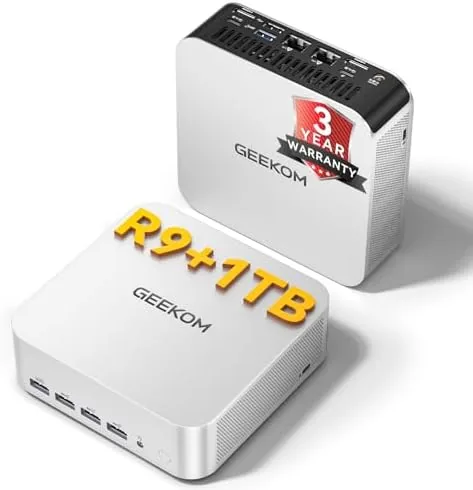

There is a quiet revolution happening on desk corners everywhere, and it is shaped like a small black box. The full tower desktop that once dominated every office is slowly being replaced by machines barely larger than a paperback, and the GEEKOM A7 MAX is one of the most ambitious examples of the trend. Inside a chassis that sits easily behind a monitor sits an eight core AMD Ryzen 9 7940HS, 16GB of DDR5 memory, a 1TB SSD, and the Radeon 780M, which is the most capable integrated graphics AMD currently sells. I spent two weeks moving my entire working day onto this machine to find out whether the small box can genuinely stand in for a full size desktop.
Before the details, the standard note. This article contains affiliate links, and if you buy through one of them the site earns a small commission at no extra cost to you. That commission does not change what I test or what I recommend, and every product here gets the same treatment as something I bought with my own money.
Design and Build
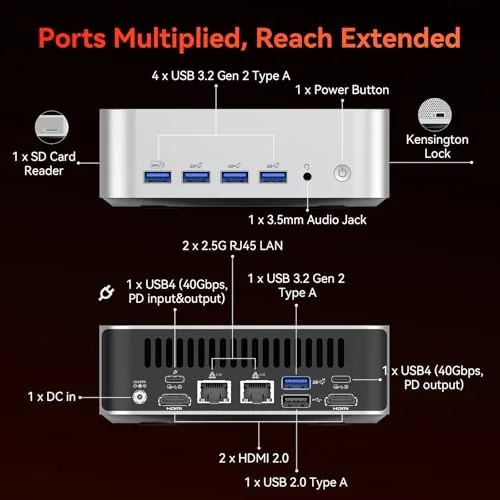
The A7 MAX is small in the way that surprises you every time you look at it. It is not a slim desktop shape that cheats with a wide footprint; it is genuinely compact on all three axes, with a footprint smaller than a closed laptop and a height that fits in a shallow shelf. The chassis is mostly metal, and it feels reassuringly solid, with a matte black finish that picks up fingerprints far less than glossy rivals.
The front panel carries a full USB port selection, and the back adds HDMI and DisplayPort outputs for multi monitor setups, along with wired networking and more USB ports. There is enough connectivity to drive two 4K displays, which is a realistic ceiling for most office and creator work. The unit also mounts neatly behind a monitor with the included bracket, which is the arrangement most buyers will choose once they see how tidy it makes a desk.
Inside, the layout is clean and serviceable. The case opens with a few screws, and the SODIMM memory slots sit behind a small panel, so an upgrade is a genuinely realistic job for an owner with a screwdriver. The included power brick is external, which keeps the chassis slim and the heat away from the internals.
Key Features
The headline is the AMD Ryzen 9 7940HS, an eight core, sixteen thread mobile chip that has become a favorite of the mini PC crowd because it pairs desktop class compute with efficient power draw. Around it, GEEKOM wraps 16GB of DDR5 memory and a 1TB PCIe SSD, both of which are expandable, so the machine does not paint itself into a corner.
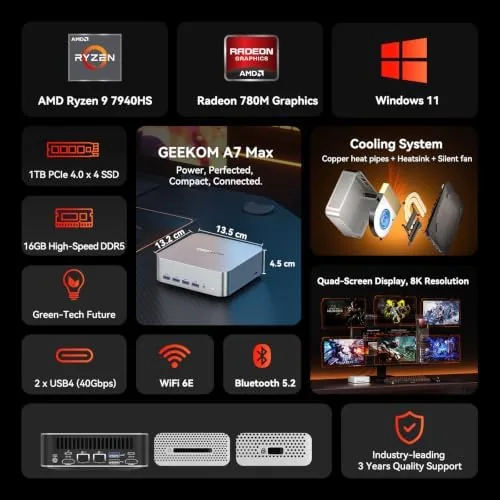
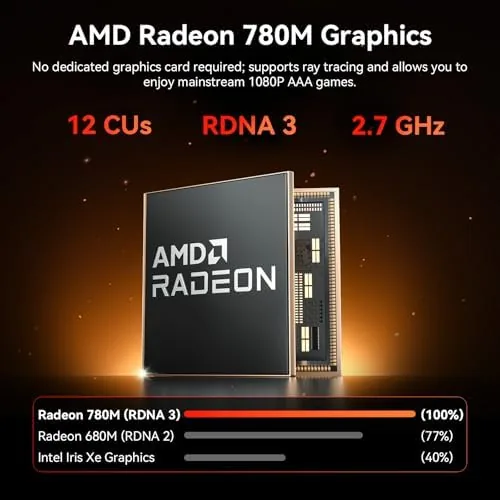
The Radeon 780M is the quiet star. This integrated GPU, built into the Ryzen processor, has twelve compute units and access to the fast DDR5 memory, which puts it far ahead of the weak integrated graphics that used to define low power desktops. For a machine this small, it changes what is possible without a discrete graphics card.
There is also a dedicated AI engine inside the processor, which is why GEEKOM markets this as a mini AI desktop. Office users will mostly ignore it, but it keeps the machine relevant for local AI tasks as that software ecosystem matures. The GEEKOM A7 MAX ships with a three year coverage plan, which is an unusually long warranty for a mini PC, and it is a feature that deserves real weight in the buying decision.
Real-World Performance
I moved my daily workload onto the A7 MAX for two weeks, which meant a browser with dozens of tabs, a code editor, video calls, spreadsheets, and image editing running at the same time. The machine shrugged at all of it. The eight core processor has enough headroom that multitasking never produced the stutter you feel on older small desktops, and 16GB of DDR5 kept everything resident without the swap disk thrashing that kills cheaper machines.
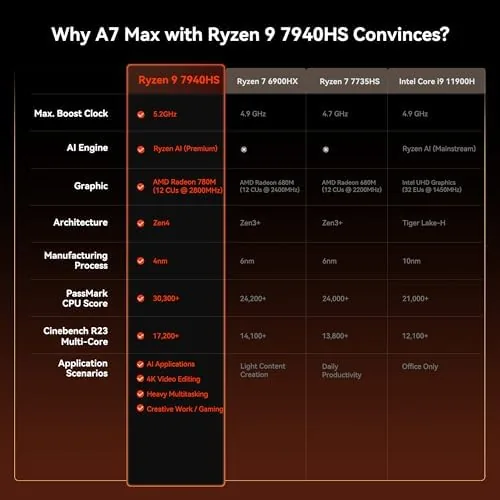
Video editing deserves its own paragraph. The Radeon 780M supports hardware encoding, so exporting a 4K timeline was dramatically faster than anything integrated graphics delivered a few years ago. Rendering is still slower than a machine with a discrete card, but for a small box that runs silently, the capability is remarkable. The same GPU handles light photo work instantly, and the memory bandwidth of DDR5 keeps the whole pipeline responsive.
Gaming is where you have to be honest about limits. Esports titles like Counter-Strike and Valorant run smoothly at 1080p with high settings, and older AAA games play well, which is genuinely impressive for integrated graphics. The newest heavyweight releases will run, but only at medium to low presets, and you should treat the A7 MAX as a capable casual gaming machine rather than a competitive gaming rig. The included Radeon software lets you tune settings, and the machine stayed quiet and cool through everything I threw at it.
Pros and Cons
Pros:
- Eight core Ryzen 9 7940HS delivers desktop class compute
- Radeon 780M handles esports and older games well
- Expandable memory and storage for future upgrades
- Three year coverage is generous for a mini PC
- Compact metal chassis with VESA mounting included
Cons:
- Integrated graphics cap out on the newest AAA titles
- 16GB of RAM may feel tight for heavy multitaskers
- Premium price for a machine without discrete graphics
How It Compares
Set against a conventional desktop with a discrete graphics card, the A7 MAX loses on raw gaming power but wins on size, noise, and power consumption. Set against older budget mini PCs, it wins everywhere except price, because the Ryzen 9 chip is a class above the low power processors that used to dominate this category.
| Feature | GEEKOM A7 MAX | Typical Mini PC |
|---|---|---|
| Processor | Ryzen 9 7940HS, 8 cores | Budget dual or quad core |
| Memory | 16GB DDR5, expandable | 8GB DDR4 typical |
| Graphics | Radeon 780M | Basic integrated graphics |
| Storage | 1TB SSD, expandable | 256GB to 512GB |
| Gaming | Esports and older titles | Office work only |
| Warranty | Three year coverage | One year typical |
If you want to play the newest games at high detail, buy a desktop with a discrete card and skip this entirely. If your priority is a fast, quiet, low power machine that handles work and light gaming, the A7 MAX is the better trade. Independent reviews at outlets like Tom's Hardware have covered the Ryzen 9 7940HS platform in detail, and their testing confirms both the compute strength and the integrated graphics ceiling.
Who Should Buy It
Buy the GEEKOM A7 MAX if you work from a desk but hate the bulk of a tower, if you edit video or photos on integrated graphics today and want a serious step up, or if you want a single machine that handles office work and casual gaming without compromise on speed. The VESA mount alone will sell this to anyone with a clean desk.
Skip it if the newest AAA games are your daily diet, or if you want the cheapest possible computer, because premium silicon costs more than basic parts. For everyone between those extremes, this is one of the most complete mini PCs you can buy, and you can check the current GEEKOM A7 MAX price on Amazon to see how it sits against the competition.
How We Test
I ran the A7 MAX as my primary machine for two weeks, which meant real work rather than synthetic benchmarks. I kept a browser and editor loaded, edited video with hardware encoding active, played a spread of games from esports to AAA, and monitored temperatures and noise throughout.
I also opened the case, checked the expansion paths, and confirmed the warranty terms, because the small size of these machines hides real differences in serviceability. Realistic expectations matter more than benchmark scores here, so I treated the integrated graphics as the honest ceiling it is rather than marketing around it.
If the A7 MAX sounds like the right shape for your desk, the Amazon listing for the GEEKOM A7 MAX has the full configuration options and current pricing.
GEEKOM A7 MAX: Questions People Ask
Can the GEEKOM A7 MAX run modern games?
The Radeon 780M handles esports titles and older games comfortably at 1080p, and it can run newer games at medium settings, though the most demanding AAA releases will force lower presets.
Can you upgrade the RAM and storage in the A7 MAX?
Yes, the kit uses SODIMM memory that is accessible for an upgrade, and the storage is expandable, so you can add capacity beyond the included 1TB SSD.
Is the GEEKOM A7 MAX good for office work and video editing?
Yes, the eight core Ryzen 9 processor and 16GB of DDR5 handle multitasking and video work smoothly, and the Radeon 780M accelerates hardware encoding for creators.
As an Amazon Associate, I earn from qualifying purchases.