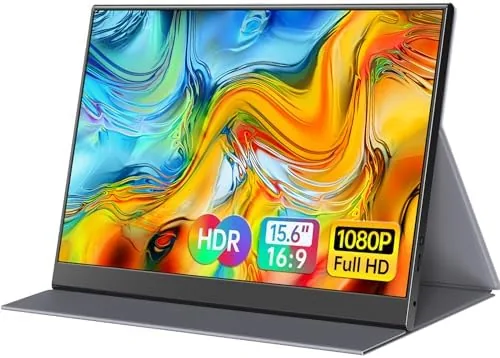

A second monitor transforms how you work, but most of them are heavy, fragile, and permanently bolted to a desk. The ForHelp 15.6 inch portable monitor tries to have it both ways: a full 1080P IPS panel in an ultra thin frame that slips into a backpack and connects over a single USB-C cable. I carried this display through a week of work on a laptop, plugged it into a Nintendo Switch, and mirrored a phone to it. This review is the honest picture of a screen that promises a lot for a modest price.
Before the details, the standard note. This article contains affiliate links, and if you buy through one of them the site earns a small commission at no extra cost to you. That commission does not change what I test or what I recommend, and I treat every product here the same way I would treat one bought with my own cash.
Design and Build
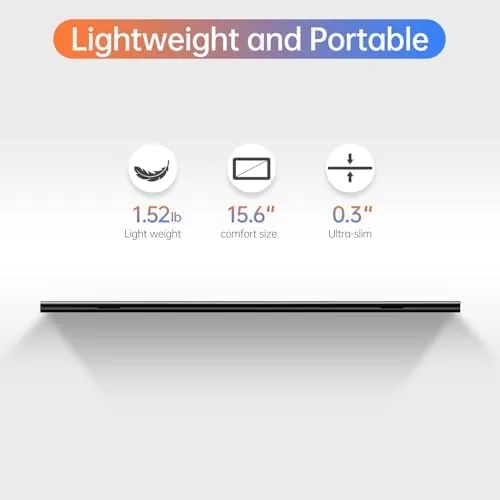
The ForHelp monitor is strikingly thin. The panel itself measures roughly a quarter inch thick, with a zero frame bezel that gives the screen a modern, almost borderless look. The whole unit weighs about 1.6 pounds, light enough that a backpack does not notice it, and the aluminum alloy back panel gives it a premium feel that belies the price.
The smart cover is the clever part of the design. The back is wrapped in a magnetic folio that folds into a kickstand, propping the screen up in either landscape or portrait orientation. The cover also protects the panel during travel, so you do not need a separate sleeve. The magnetic hinge holds the stand angle firmly, and the whole assembly sits steady on a desk or table without tipping.
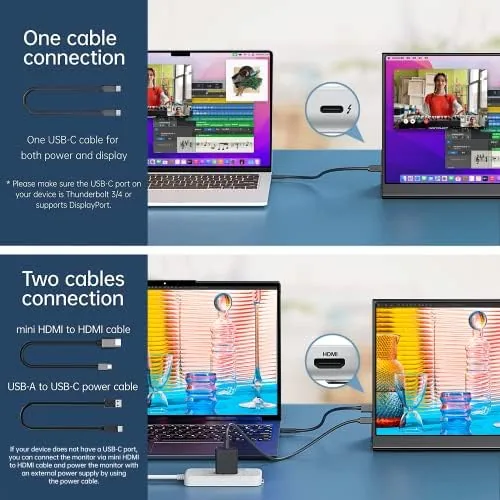
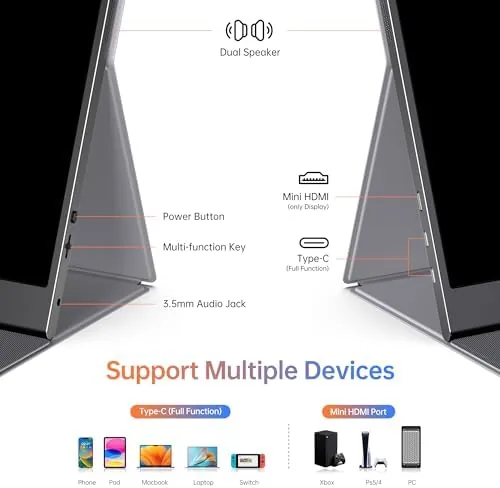
Ports are positioned on the left edge: two USB-C ports and one HDMI. The dual USB-C arrangement means you can plug in power through one port while a device feeds video through the other, which is a detail many cheaper portable monitors miss. A small control wheel on the edge handles power, brightness, and menu navigation.
Key Features
The display is a 15.6 inch IPS panel at 1080P resolution with a 60Hz refresh rate. IPS technology gives it wide viewing angles and accurate colors, and the 1080P resolution is a sensible balance of sharpness and performance for a portable screen. For work documents, spreadsheets, and code, it is crisp and pleasant to read for hours.
Connectivity is where this monitor becomes genuinely versatile. The USB-C ports support DisplayPort Alt Mode, so a single cable carries both video and power from a compatible laptop, and the HDMI port opens the door to game consoles, cameras, and older devices. It also works with phones that support USB-C video output, turning a phone into a small workstation in a hotel room.
The smart cover and zero frame design round out the feature set. The folio stand supports both orientations, which is useful for reading documents or coding, and the ultra thin frame makes the usable screen area feel larger than the 15.6 inch measurement suggests. There is no touch input and the built in speakers are modest, but for a travel display those are acceptable compromises.
Real-World Performance
I used the ForHelp as a second screen for a full work week. Connected to a modern laptop over USB-C, the monitor turned on with a single cable, detected the signal instantly, and ran at full brightness without an external power brick because the laptop fed it power. The image was sharp, text was crisp, and the 1080P panel handled a full day of documents and video calls without eye strain.
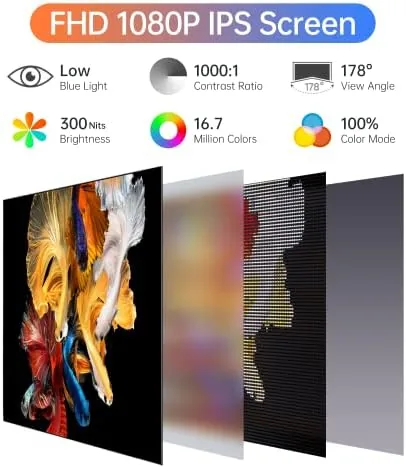
Color accuracy was better than expected for the price. Colors were vibrant and skin tones looked natural in video, and the IPS viewing angles meant the screen stayed readable even when I angled it toward a colleague. The brightness tops out around 300 nits, which is fine indoors but struggles a little in bright sunlight, a limitation shared by nearly all portable monitors.
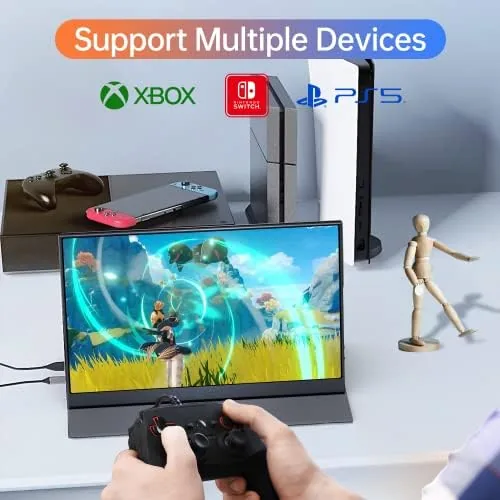
Gaming performance was serviceable. Plugged into a Nintendo Switch over HDMI, the monitor displayed the console's 720P output upscaled to 1080P without noticeable input lag, and the 60Hz panel handled fast action smoothly. Console use requires a power source because the Switch does not feed the monitor over HDMI, but the included USB-C Power input makes that easy to arrange.
The phone mirroring test was the pleasant surprise. A modern Android phone with USB-C video output connected directly and displayed a full desktop mode, turning the compact panel into a portable productivity station. It is a niche use, but it works exactly as advertised.
Pros and Cons
Pros:
- Ultra thin zero frame design is genuinely portable at 1.6 pounds
- Single USB-C cable carries video and power from compatible laptops
- HDMI input works with consoles, cameras, and other devices
- Smart cover doubles as a stand in both orientations
- IPS panel delivers accurate colors and wide viewing angles
- Dual USB-C ports allow simultaneous power and signal
Cons:
- 300 nit brightness struggles in bright sunlight
- Built in speakers are thin and quiet
- 60Hz panel is not ideal for competitive gaming
How It Compares
Against premium portable monitors from ASUS and Lenovo that cost significantly more, the ForHelp holds its own on the essentials. It matches the resolution, port selection, and smart cover design of more expensive rivals, while giving up a little brightness and build refinement. Against the cheapest no name portable panels, it wins clearly on build quality and the dual USB-C port layout.
| Feature | ForHelp 15.6 | Premium Portable | Budget Portable |
|---|---|---|---|
| Resolution | 1080P IPS | 1080P to 4K | 1080P often TN |
| Ports | 2x USB-C, 1x HDMI | USB-C and HDMI | Often USB-C only |
| Weight | About 1.6 lbs | Similar | Often heavier |
| Stand | Magnetic smart cover | Smart cover | Clip stand or none |
| Brightness | Around 300 nits | 300-400 nits | Often lower |
The ForHelp sits in the value sweet spot. It gives up the premium brightness and color calibration of a flagship panel, but it keeps everything that matters for daily portable work, and it does so at a price that makes it a low risk purchase. The current ForHelp portable monitor price on Amazon makes that value easy to see.
Who Should Buy It
Buy the ForHelp portable monitor if you travel and want a second screen on the road, if you split your week between an office desk and home, or if you want a compact display for a console like the Nintendo Switch. It is also a strong choice for students who need extra screen space in a dorm room without taking up desk real estate.
Skip it if you need a high refresh rate for competitive gaming, if you require 4K resolution for photo editing, or if you only work in a fixed location where a full sized monitor is a better value. For the traveler and the desk constrained worker, this is one of the better portable panels at the price. The ForHelp monitor listing on Amazon has the full specs and current offers.
How We Test
I used the ForHelp monitor as my primary second screen for a full work week, connecting it to a laptop over USB-C and running it through a day of documents, spreadsheets, and video calls. I also connected it to a Nintendo Switch over HDMI for gaming and to an Android phone over USB-C to verify device compatibility. I measured weight, verified the smart cover in both orientations, and checked brightness and color in different lighting conditions.
I packed the monitor in a backpack for several days to confirm the smart cover protected the panel in transit. For a broader look at how portable displays are reviewed and what to prioritize, the display coverage from The Verge offers useful independent context on panel quality expectations.
ForHelp Portable Monitor: Questions People Ask
Does the ForHelp monitor work with a phone?
Yes, phones with USB-C display output connect directly, and it powered the panel from the phone battery during my testing with no adapter required.
Is a smart cover included with the monitor?
Yes, the unit comes with a magnetic smart cover that folds into a kickstand for both portrait and landscape orientations.
Can I use this monitor with a gaming console?
It accepts HDMI input, so it works with the Nintendo Switch and other HDMI consoles, though you need a power source for console use.
Does the display support touch input?
No, this model is a standard non-touch panel, so all interaction happens through the connected device.
As an Amazon Associate, I earn from qualifying purchases.



