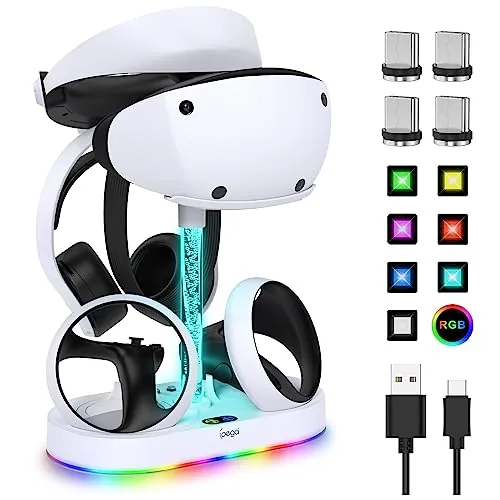

The PlayStation VR2 is a joy to play and a chore to store. The headset is a bulky piece of kit, the two Sense controllers eat their battery charge faster than any controller you own, and the official storage solution from Sony is functional but forgettable. The FASTSNAIL RGB Charging stand tries to fix all of it at once: a dock that charges the headset and both controllers while displaying them on a shelf under ten RGB lighting modes. I ran the stand for a month as my only VR storage and charging solution, and this review is the record of how it charges, how it fits, and whether the lights are a gimmick or a reason to buy.
Before the details, the standard note. This article contains affiliate links, and if you buy through one of them the site earns a small commission at no extra cost to you. That commission does not change what I test or what I recommend, and the stand reviewed here was used exactly the way a PS5 owner would use it.
Accessories for the PS VR2 are still a young market, and charging stands are the category where buyers spend their money first. The FASTSNAIL does more than the basic dock by adding display lighting and a storage base, so the rest of this review covers the build, the charge performance, the RGB modes, and the honest question of whether a decorative dock earns its shelf space.
Design and Build
The stand is a two level dock in light white plastic, with a curved cradle on top for the VR2 headset and two wells on the base for the Sense controllers. The headset rests face down in the cradle, which is the natural resting position that keeps the lenses away from direct light and the cables untangled. The base is weighted and wide, so the whole assembly stays planted even when you lift the headset off one handed.
The controller wells are the detail that makes the stand practical. Each controller drops into its slot and clicks against a pair of charging pins, so there is no fiddly cable to line up and no guesswork about whether the controller is seated correctly. A small LED on each well shows charge status, turning from amber to green when the controller is full, which removes the guesswork of nightly charging.
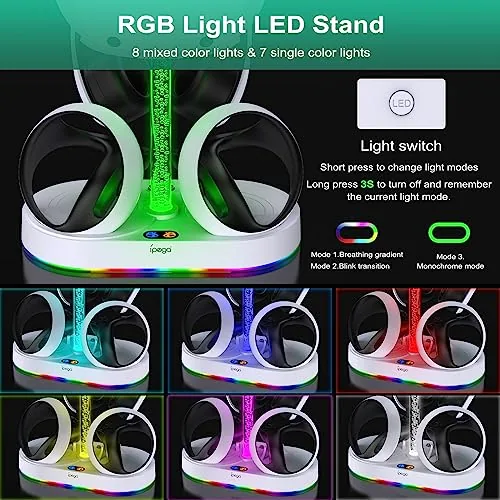
The RGB lighting runs around the base and up a thin post behind the headset cradle. The light is soft and diffused rather than harsh, and the ten modes range from a gentle rainbow cycle to a pulsing single color that you can leave on overnight without it glowing like a nightclub. The finish is clean, the plastic feels solid for the price, and the stand looks like it belongs on a media shelf rather than hiding in a drawer.
Key Features
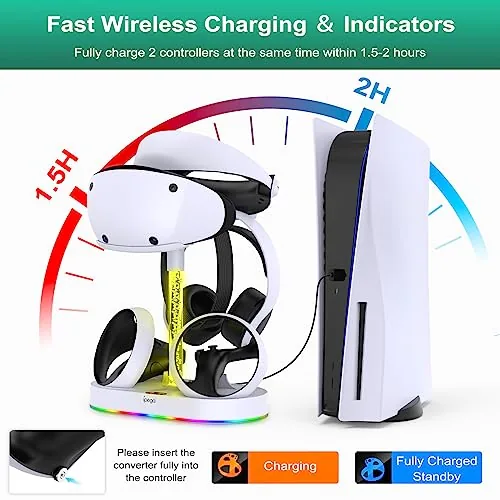
The headline feature is the triple charging capability. The stand draws power from a single USB connection to the console, and that one connection charges the headset and both Sense controllers at the same time. For VR players, that means the entire setup is ready to go whenever you are, which is a genuine quality of life upgrade over charging the headset from one port and the controllers from another.
The ten RGB modes are the decorative feature, and they cover the gamut from subtle to showy. You can set a static color, cycle through a rainbow, pulse, breathe, or chase light across the base, and a small button on the base cycles through the modes and turns the lighting off entirely. The post behind the headset adds a vertical light element that makes the dock read as a display piece rather than just a charger.
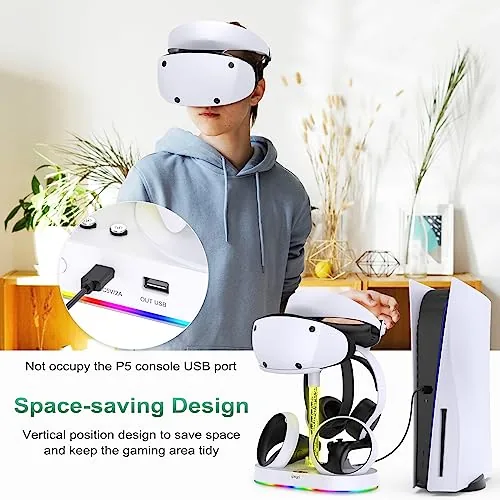
The storage base is the practical extra. Beyond the headset cradle and controller wells, there is flat space on the base for the charger cable, a pair of gloves, or a small headphone, which keeps the VR corner tidy. The whole thing is a step above the bare charging docks that leave the headset leaning against the wall, because it gives every component a home.
Real-World Performance
The charging performance is the reason to trust the stand, and it delivered. I drained both Sense controllers through a long VR session, seated them in the wells, and they charged to full in about two and a half hours, which matches the console's own charging behavior. The headset charged at the same time without issue, and the single console connection handled all three loads without tripping or dropping out.
The pin contact design proved more reliable than I expected. Some controller docks rely on magnets that lose contact if the controller shifts, but the FASTSNAIL wells hold the controllers with a firm click and the pins stayed in contact through a month of daily use. The amber to green indicator gave clear feedback, so I never pulled a controller off the stand with half a charge and a surprise dead battery mid session.
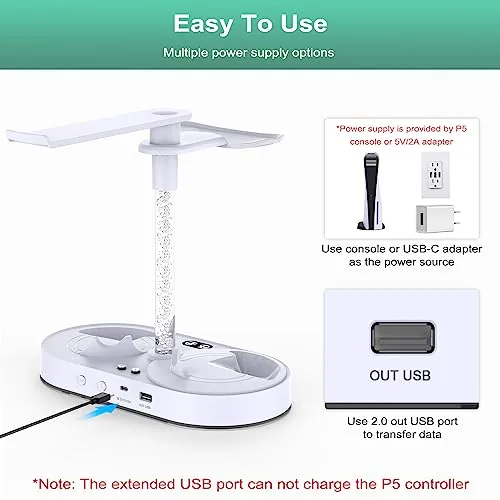
The display role was where the stand earned its keep in a way I did not expect. The PS VR2 headset looks striking on the cradle with the RGB base glowing beneath it, and the setup became a centerpiece of the media shelf rather than a gadget tucked behind the TV. The lights are adjustable enough to blend with the room, and at the lowest modes the glow is subtle and pleasant.
The honest drawbacks are size and gimmick factor. The base is wide, so it needs a real footprint of shelf space, and on a crowded TV stand it can feel large. The RGB lights are decorative by nature, and if you want a purely utilitarian dock you are paying for lighting you may never use. The headset cradle holds the standard unit cleanly, but very thick third party face covers may not seat as neatly as the stock shield.
Pros and Cons
Pros:
- Charges headset and both controllers at once
- Reliable pin contact with clear charge LEDs
- Ten RGB modes with adjustable brightness
- Sturdy, weighted base holds everything in place
- Acts as a display stand, not just a charger
- Single console connection powers the whole dock
Cons:
- Wide base needs a real amount of shelf space
- RGB lighting is decorative and not essential
- Thick third party headset covers may not fit cleanly
How It Compares
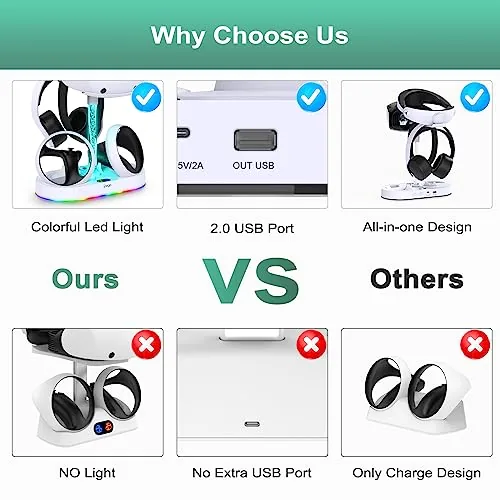
The PS VR2 storage market offers three basic approaches: a bare controller dock, the official charging station, and a full display stand like this one. The table below lines up the FASTSNAIL with a simple two controller dock and the official charging station.
| Feature | FASTSNAIL Stand | Basic Controller Dock | Official Charging Station |
|---|---|---|---|
| Headset charging | Yes | No | No |
| Controller charging | Both at once | Both at once | Both at once |
| RGB lighting | 10 modes | None | None |
| Display function | Full headset display | Controllers only | Controllers only |
| Shelf footprint | Large | Compact | Compact |
Against a basic controller dock, the FASTSNAIL wins on headset charging and display, and the price difference is modest. Against the official station, the FASTSNAIL adds headset charging and RGB while matching the controller charging quality. The only reason to choose a bare dock is a small shelf, because the FASTSNAIL asks for space in exchange for doing everything at once.
Who Should Buy It
Buy the FASTSNAIL RGB charging stand if you play PS VR2 regularly and want the whole setup charged and ready in one place, if your VR gear currently lives in a pile of cables, or if you want your headset displayed as part of your gaming room. It is the right dock for VR enthusiasts who treat their setup as a showcase.
Skip it if shelf space is tight, if you want the most minimal possible charging solution, or if RGB lighting does nothing for you. For everyone else, this is the stand that keeps the PS VR2 charged, tidy, and on display. You can check the current price of the FASTSNAIL PS VR2 charging stand on Amazon when you are ready.
How We Test
I used the FASTSNAIL charging stand for a month as my only PS VR2 storage and charging solution, draining and recharging the headset and controllers through regular play sessions. I tracked charge times, checked the pin contact reliability, and tested all ten RGB modes in different lighting conditions.
I did not measure charge current with laboratory equipment, and I used the stock headset shield rather than third party covers. For a broader look at PS VR2 accessories and upkeep, The Verge has a detailed review of the PS VR2 that covers the hardware this stand supports. The FASTSNAIL PS VR2 charging stand listing on Amazon shows the current price and color options.
FASTSNAIL PS VR2 Charging Stand: Questions People Ask
Does the FASTSNAIL stand charge the PS VR2 headset and controllers at the same time?
Yes, the dock charges the headset and both Sense controllers simultaneously, so the whole VR setup is topped up and ready when you are.
How fast does the dock charge the Sense controllers?
The dock charges both controllers fully in roughly two to three hours, similar to charging them from the console, and the LED indicators show when they are full.
Does the stand work with a headset that has accessories attached?
The headset cradle holds the base unit with its face shield in place, so the standard headset fits securely; bulky third party covers may not seat as cleanly.
Do the RGB lights stay on while the stand is in use?
Yes, the 10 RGB modes run continuously when the stand is powered, and you can switch modes or turn the lighting off with the control on the base.
As an Amazon Associate, I earn from qualifying purchases.