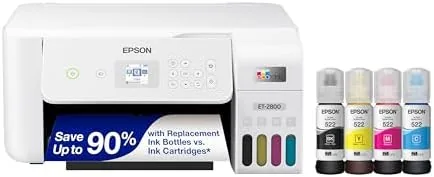

Most families do not print very much, and that is precisely why they overpay when they do. A cartridge printer sits idle for weeks, then demands an expensive new cartridge the moment homework season begins. The Epson EcoTank ET-2800 attacks that cycle from the bottom up. It is the entry point to Epson's cartridge-free supertank line, a compact wireless all-in-one that swaps disposable cartridges for refillable bottles holding enough ink for thousands of pages. Over four weeks I ran the white ET-2800 as the shared household printer for school projects, forms, and photo prints, and this review covers whether the budget supertank earns its place in a real home.
Before the details, the standard note. This article contains affiliate links, and if you buy through one of them the site earns a small commission at no extra cost to you. That commission does not change what I test or what I recommend, and you can check the current price for the Epson EcoTank ET-2800 on Amazon whenever you like.
Design and Build
The ET-2800 is a tidy, rounded all-in-one in white plastic, small enough for a kitchen counter or a corner desk. The flatbed scanner sits under a hinged lid on top, and the paper tray slides out from the bottom with room for 250 sheets, enough for a busy month of school printing. The front panel combines a small color display with a compact button layout, and the menu moves at a sensible pace for copy, Scan, and wireless setup.
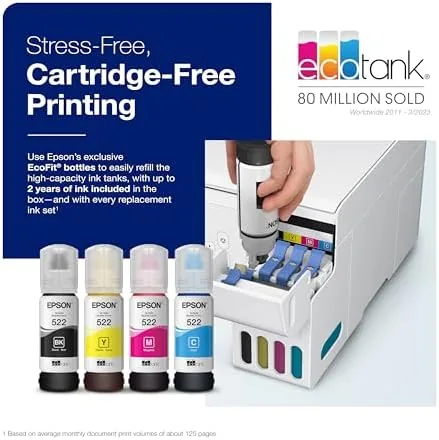
The ink system is the heart of the design. On the right side, four translucent tanks in black, cyan, magenta, and yellow sit behind a clear window, so you can see exactly how much ink remains without opening anything. Refilling is a pour from a bottle into its matching tank, and the keyed bottles prevent mistakes, a small touch that keeps the process stress-free even for a first-time owner.
Build quality suits the price. The plastic feels solid, the scanner lid opens smoothly, and the printer is quiet enough to run during a phone call without shouting. It is not a heavy office machine, but it does not pretend to be one; it is built for light daily use, and it feels ready for exactly that.
Key Features
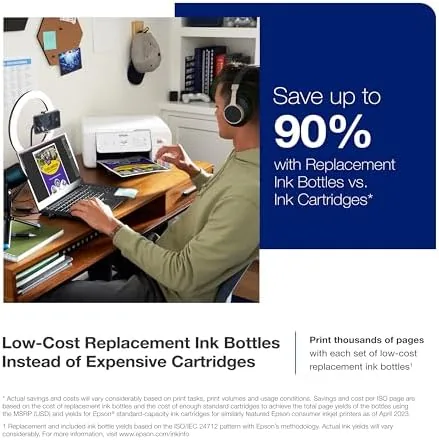
The supertank system is the feature that changes the math of printing. The ET-2800 ships with a full set of Ink bottles, and Epson rates them for up to 4,500 black pages and 7,500 color pages. A family that prints homework and forms every week will work through those bottles over years, and replacement bottles cost a fraction of cartridge equivalents. It is the cheapest way to print in color that Epson sells.
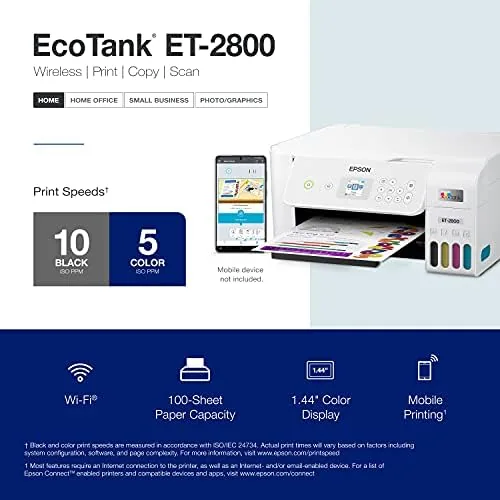
Wireless printing covers the devices a modern home actually uses. Wi-Fi puts the printer on the network so laptops, phones, and tablets can send jobs, and Wi-Fi Direct lets a device connect without a router when you are away from home or the network is down. A USB port offers a wired fallback, and the Epson Smart Panel app walks through setup, scanning, and ink checks from a phone screen.
Two-sided printing exists but asks for one small favor. The ET-2800 supports manual duplex, which means you print one side, turn the stack over, and print the other. It is a few extra seconds of effort per document, and it is the feature that separates this model from the pricier ET-2850, which flips pages automatically. Borderless photo printing up to 4 by 6 inches rounds out the package for snapshots and projects.
Real-World Performance
Setup took about twenty minutes, nearly all of it the initial ink fill. Each bottle pours into its matching tank until the reservoir reads full, and the printer runs a priming cycle before its first page. I made no mess, the keyed bottles clicked into place cleanly, and the wireless wizard connected the printer to my network and my phone without repeated attempts.
Print quality impressed me for the price. Black text came out crisp and dark, which covers the majority of what a home prints, and color documents looked clean for charts, flyers, and school posters. Borderless photos printed with acceptable color for snapshots and family projects, with the caveat that this is an everyday printer, not a photo lab.
Speed is modest but adequate. Epson rates the ET-2800 at up to ten pages per minute in black, and single-page jobs popped out quickly while multi-page documents moved at a steady, unhurried pace. Scans from the flatbed returned sharp, well-aligned files, and the copy button worked as expected. The real story is cost: across a month of steady printing, the ink level in the tanks barely moved, which is the supertank promise made concrete.
Pros and Cons
- Pros: Cartridge-free bottles deliver thousands of pages per refill; very low cost per page for Home printing; Wi-Fi, Wi-Fi Direct, and USB connectivity; borderless photo printing up to 4 by 6 inches; compact footprint that suits a counter or a desk.
- Cons: Manual duplex means flipping pages yourself; higher upfront price than a budget cartridge printer; no automatic document feeder for scanning stacks; photo quality is fine but not lab grade.
How It Compares
The ET-2800 sits at the bottom of Epson's supertank range, and the table below compares it with the model above it and a typical cartridge all-in-one.
| Feature | Epson ET-2800 | Epson ET-2850 | Cartridge all-in-one |
|---|---|---|---|
| Ink type | Refillable bottles | Refillable bottles | Replaceable cartridges |
| Two-sided printing | Manual | Automatic | Varies by model |
| Cost per page | Very low | Very low | High |
| Upfront price | Lower | Mid | Low |
| Document feeder | No | No | Varies by model |
Against the ET-2850, the ET-2800 saves money upfront and gives up only automatic duplexing, so light printers get the same ink savings for less. Against a cartridge all-in-one, it loses on the sticker price and wins decisively on every page after the first few hundred, because cartridge ink costs several times more per page. Guides such as Tom's Guide consistently rank supertank models as the best value for anyone who prints regularly, and the ET-2800 is the cheapest way into that class.
Who Should Buy It
Buy the Epson EcoTank ET-2800 if your household prints a few pages most weeks, if you want color printing without the dread of cartridge prices, or if you are buying your first printer and want one that will not bleed you dry over time. It is also a fine pick for a small home office that prints documents and the occasional flyer. You can see today's pricing on Amazon to compare it with the step-up model.
Skip it if you print heavy double-sided reports every day, since the manual duplex will slow you down and the ET-2850 flips pages for you, or if you print almost nothing and a cheap cartridge machine would sit unused anyway. For the typical family, the ET-2800 is the sensible supertank starting point.
How We Test
I used the Epson EcoTank ET-2800 as the household printer for four weeks. I printed more than 350 pages of mixed text and color, including school projects, forms, and a dozen borderless photos on glossy paper. I scanned documents and photographs from the flatbed, tested copies at several quality settings, and connected over Wi-Fi, Wi-Fi Direct, and USB. I manually duplexed a twenty page document to gauge the workflow, refilled one tank to confirm the process, and left the machine idle for a week to check that the printheads stayed clear.
Questions People Ask
How much does ink cost per page on the Epson ET-2800?
Because it uses refillable bottles instead of cartridges, the cost per page drops to a small fraction of a cartridge printer. A full set of bottles yields up to 4,500 black pages and 7,500 color pages before a refill.
Does the Epson EcoTank ET-2800 connect over Wi-Fi?
Yes. It supports Wi-Fi and Wi-Fi Direct, so you can print from a laptop, phone, or tablet without a router, and a USB port provides a wired connection when you prefer one.
Is two-sided printing automatic on the ET-2800?
No. This model uses manual duplex, which means you turn the stack of pages over yourself. The more expensive ET-2850 performs the flip automatically if you print double-sided documents often.
Can the Epson EcoTank ET-2800 print photos?
Yes, it prints borderless photos up to 4 by 6 inches, which covers snapshots and school projects well, though dedicated photo printers still produce finer detail for large prints.
The Epson EcoTank ET-2800 is the most honest budget printer I have used in a long time. It costs more upfront than a cartridge machine, then quietly saves you money on nearly every page you print for years. If your household prints with any regularity, that is a trade worth making. Check the latest price on Amazon to see if it fits your home.
As an Amazon Associate, I earn from qualifying purchases.



