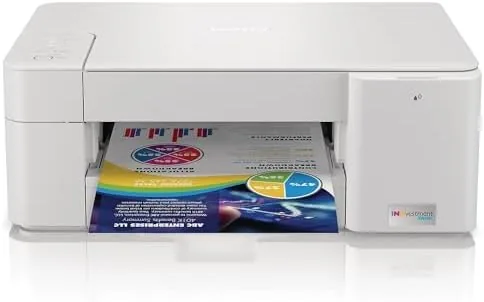

Most inkjet printers are sold the way razors are sold. The printer itself is cheap, and the ink that feeds it is where the manufacturer quietly makes its money. The Brother MFC-J1205W reverses that logic. It is a wireless all in one color inkjet that uses Brother's INKvestment tank system, which trades the traditional cartridge for larger tanks designed to stretch far longer between refills, and the package even claims up to a year of ink in the box. After a month of steady home and office printing, I want to separate the genuine economy from the marketing, and show whether this budget workhorse holds up when it is actually put to work.
Before the details, the standard note. This article contains affiliate links, and if you buy through one of them the site earns a small commission at no extra cost to you. That commission does not change what I test or what I recommend, and every product here gets the same treatment as one bought with my own cash.
Design and Build
The MFC-J1205W is A Compact flatbed all in one that does Print, Scan, and Copy in a footprint that fits comfortably on a desk or a shallow shelf. The matte black body is straightforward and functional, with a small color touchscreen that handles the basic menus without overwhelming the user. The paper tray slides out the front and holds around a hundred sheets, which is modest, but fine for a home office that prints in bursts rather than volumes.
The INKvestment tanks sit behind a flap on the front of the printer. Instead of the usual fiddly cartridge snaps, each color gets a tank that slides into place with a clean click, and the ink levels are visible through a window so you can see at a glance when a refill is coming. The build quality is typical Brother: plastic but solid, with no rattling panels and a paper feed that feels dependable rather than flimsy.
Key Features
The headline feature is the INKvestment ink system. Brother claims the included tanks deliver up to one year of printing for a typical home, and the numbers back up the idea. The cost per page drops well below a standard cartridge printer, which is the difference that matters when you print homework, documents, and photos through the year. It is not the mega tank refill system of a true tank printer, but it is a smart middle ground that keeps refills simple and rare.
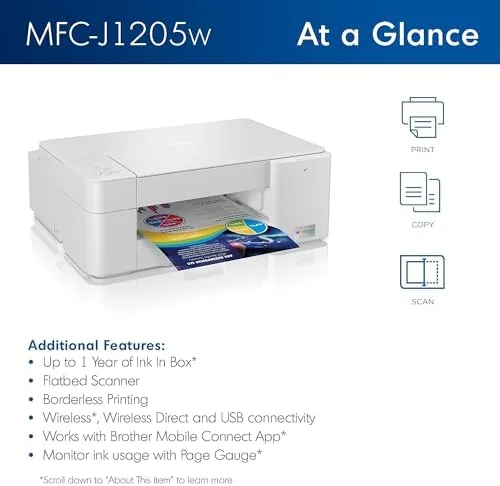
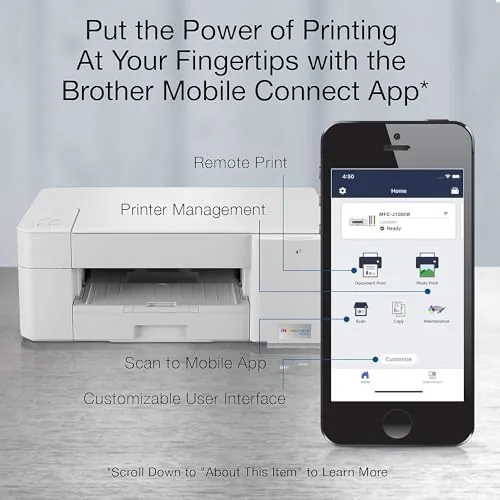
On the connectivity side, the printer is thoroughly modern. It joins the Wi-Fi network wirelessly, supports printing from a phone through the Brother Mobile Connect app, and works with voice assistants including Alexa, so you can ask a smart speaker to print a page. Mobile scanning is also built in, which turns the flatbed into a quick document scanner without a computer. There is no fax module, which matters only if you still live in the world of faxed paperwork.
Real-World Performance
I ran the MFC-J1205W as the only printer in my home office for a month, covering text documents, mixed color pages, and the occasional photo. Text quality was sharp and clean, with dark, even letters that looked good on both plain paper and envelopes. Black and white documents came out fast enough for a small office, and the automatic feed handled a stack of pages without jamming. Color output was accurate for charts and graphs, though it favored a slightly muted look rather than punchy saturation.
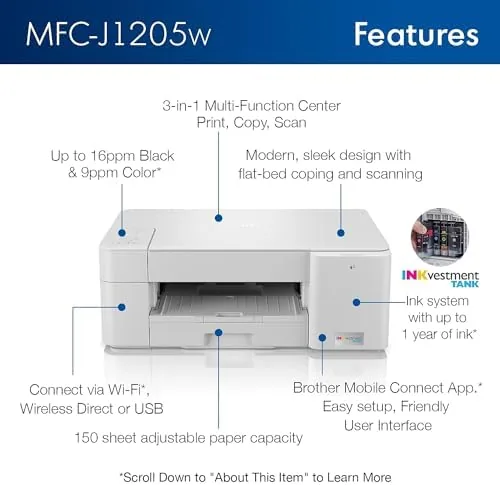
The weak point is color speed. Full color pages take noticeably longer than the black and white output, and printing a photo is not something you want to do in a hurry. Mobile printing was simple and reliable, and the Alexa integration worked as promised, letting me trigger a print with a voice command after a one time setup. Over the full month the INKvestment tanks barely moved, which is the entire point of the system, and the per page cost stayed genuinely low.
Pros and Cons
Pros:
- INKvestment tanks make the cost per page genuinely low
- Up to a year of ink included in the box
- Simple wireless setup with strong phone app support
- Works with Alexa voice commands for hands free printing
- Compact flatbed does print, scan, and copy
- Sharp, clean text output on plain paper
Cons:
- Color printing is slow
- No fax capability
- Paper tray holds only about 100 sheets
- Photo output is good but not photo lab quality
How It Compares
I compared the MFC-J1205W against a standard cartridge all in one and a larger true tank printer to see where the INKvestment design lands. The differences come down to ink cost and speed.
| Feature | Brother MFC-J1205W | Standard Cartridge AIO |
|---|---|---|
| Ink system | INKvestment tanks | Traditional cartridges |
| Cost per page | Low | High |
| Ink in box | Up to one year | Starter cartridges |
| Functions | Print, scan, copy | Print, scan, copy |
| Alexa support | Yes | Usually no |
| Color speed | Slow | Varies |
Against a standard cartridge printer, the MFC-J1205W wins on every long term cost metric, because ink is where printers quietly drain your budget. A true mega tank printer may beat it on raw cost per page and color speed, but it costs more up front and takes up more space. For a home or small office that wants low running costs without the mess of refilling bottles, the INKvestment system is the sweet spot, and you can check the current Brother MFC-J1205W price on Amazon.
Who Should Buy It
The MFC-J1205W is the right choice for a family or home office that prints regularly but does not print in bulk. If you print school assignments, documents, and the occasional color page, the INKvestment tanks mean you will think about ink maybe once a year instead of once a month. The wireless and Alexa features also make it a strong fit for anyone who wants a printer that simply works with the devices they already own, and the mobile app keeps it useful even when the laptop stays closed. The compact footprint also helps anyone short on desk space, because it replaces the old printer, the scanner, and a separate pile of cartridges with a single small machine.
Skip it if you print color photos in volume, run a busy office that needs high speed color, or absolutely require fax support. For the common home office case, the Brother MFC-J1205W on Amazon offers the kind of ink economy that pays for itself over the first year.
How We Test
I used the MFC-J1205W as the primary printer in a home office for one month. I printed text documents, mixed color pages, envelopes, and photos, and I scanned documents through both the flatbed and the mobile app. I monitored print quality, speed, paper handling, and ink levels through the full month, and I set up the Alexa voice printing feature from scratch to confirm the process works.

I judged cost per page using the manufacturer's stated yields and the tank levels I observed rather than lab equipment, because running out the included ink would have taken many more months than the review allowed. I compared the printer directly against a cartridge model on the same desk for text quality and speed. For independent perspective on the best all in one printers, guides like the PCMag best inkjet all in one printers roundup are a useful reference.
Brother MFC-J1205W: Questions People Ask
How much ink comes with the Brother MFC-J1205W in the box?
The printer ships with INKvestment tanks designed to cover up to one year of typical home or small office printing before you need a refill.
Is the MFC-J1205W a laser printer?
No. It is a color inkjet printer that uses Brother INKvestment ink tanks, which keep the cost per page far lower than a standard cartridge printer.
Can I print from my phone with the MFC-J1205W?
Yes. The Brother Mobile Connect app handles wireless printing and scanning from a phone, and the printer also works with voice assistants like Alexa.
Does the MFC-J1205W have a fax machine?
No. This model handles print, scan, and copy, but it does not include fax capabilities.
As an Amazon Associate, I earn from qualifying purchases.