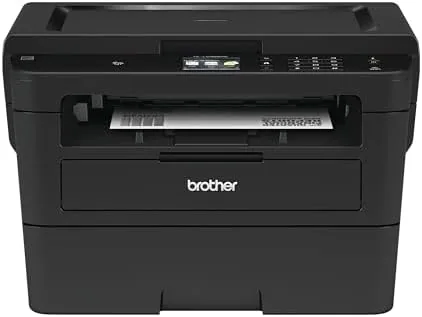

The hardest part of choosing a home office printer is deciding how many boxes you want to plug in. Some people want a single machine that prints, scans, and copies, while others are happy with a dedicated printer that sits out of the way. The Brother HLL2395DW is aimed at the first group, a compact monochrome laser that adds a flatbed scanner and copier to the fast, low cost printing Brother is known for. I tested it for several weeks, running it through printing, scanning, and copying workloads to see if one small machine can really replace two.
A quick disclosure before the review. This article contains affiliate links, and if you buy through them I may earn a commission at no extra cost to you. That never changes my verdict.
Design and Build
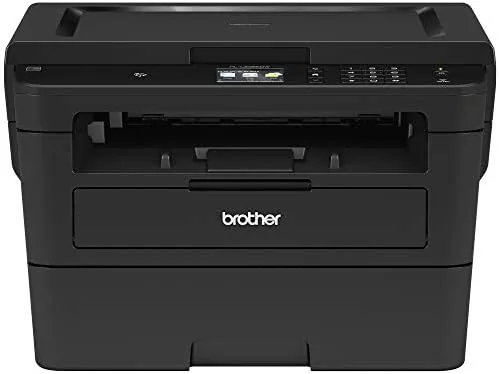
The HLL2395DW is a boxy, businesslike machine that shares the compact proportions of the HL-L2350DW but swaps the sheet feeder area for a flatbed scanner lid. It is short enough to fit on a shelf, and the extra height of the scanner bed keeps it from feeling cramped. The front panel carries a small LCD and the usual buttons for jobs and setup, all of it laid out simply enough to use without the manual.
Build quality is consistent with the rest of the Brother compact line: sturdy plastic, solid paper tray, and a chassis that feels like it will tolerate years of daily use. The 250 sheet tray handles the typical home office volume, and the flatbed scanner glass is large enough for documents and modest sized books. It is not a flashy machine, but it is the kind of equipment you stop noticing because it simply works.
Key Features
The defining feature is the flatbed scanner and copier, which turn this from a plain printer into a genuine all in one. The scanner produces clean black and white scans of documents, and the copy function duplicates them without needing a computer in the loop. That means the printer can sit in a corner and handle quick copies on its own, which is a convenience the HL-L2350DW simply does not offer.
Printing is where the HLL2395DW matches its sibling. It prints up to 32 pages per minute in black and white, with automatic duplex for two sided documents. Wireless networking handles jobs from laptops, phones, and tablets, and NFC tap to print lets a compatible Android device send a job by touching the machine. It also supports the same Refresh subscription trial and Amazon Dash Replenishment toner reordering as the rest of the line, so running out of toner stops being a thought.
Setup took about twenty minutes from unboxing to first print. The toner cartridge slides in cleanly, the paper tray fills easily, and the wireless assistant walks you through connecting the printer to your network. I have set up enough printers to dread the onboarding process, and the HLL2395DW is one of the least painful of the lot. Both my Windows laptop and my phone found the printer without me typing in the IP address, which is more than I can say for some older models in this class.
Real-World Performance
I ran the HLL2395DW through a realistic home office week, printing contracts and study notes, scanning receipts and signed pages, and making quick copies of the forms that always need three copies. Print output was identical in quality to the HL-L2350DW: crisp, dense black text with no smudging and no banding across dozens of pages. Duplex jobs ran cleanly, and the first page came out fast enough that I did not find myself staring at a warm up screen.
Because the scanner sits on top of the printer, the machine ends up noticeably deeper than the print only model, and you need a few extra inches of shelf space behind it to open the lid fully. That is the only real space consideration, and it is a fair trade for the convenience of not owning a second device. The lid hinges feel sturdy enough for years of lifting, and the glass stays clean with a normal wipe down.
The scanner was the pleasant surprise. It produced sharp, correctly aligned scans of documents, and the scanning software captured both sides cleanly when I used it correctly. Copying was a one button affair, and the output was fast and legible, which is all most people want from a copier. NFC printing worked on the first try with a modern Android phone, sending a document to the printer just by tapping the panel.
One limitation to be honest about: the flatbed is not an automatic document feeder. If you regularly scan multi page stacks, you will be lifting the lid and placing pages one at a time, which gets tedious. Brother sells models with an ADF for that workload, but they cost more. For the occasional scan and copy, the flatbed is perfectly fine.
I also left the printer idle for several days between uses to see how it behaved on wake up. Laser printers are not prone to the dried ink problems that plague inkjets, and the HLL2395DW proved the point by printing a clean page immediately after a long idle period with no streaks or banding. That is one of the quiet advantages of going monochrome laser, and it is worth remembering when you compare running costs. A machine that needs no cleaning cycles and no nozzle checks simply wastes less of your time.
Pros and Cons
Pros:
- Fast, crisp monochrome printing at up to 32 pages per minute
- Flatbed scanner and copier built into the same unit
- Automatic duplex printing saves paper
- Wireless and NFC connectivity with mobile apps
- Refresh and Dash Replenishment handle toner refills
- Compact size suits a home office desk
Cons:
- No automatic document feeder for big scan jobs
- Monochrome only, so no color output
- Scanner lid is manual rather than motorized
How It Compares
The HLL2395DW is best understood next to the HL-L2350DW, which drops the scanner and copier to save money, and next to a full color inkjet all in one, which adds color but raises running costs. The table below shows how they stack up for a typical text heavy home office.
| Feature | Brother HLL2395DW | Brother HL-L2350DW | Color Inkjet All In One |
|---|---|---|---|
| Print speed | Up to 32 ppm | Up to 32 ppm | 8 to 12 ppm |
| Scanner and copier | Yes, flatbed | No | Yes |
| Automatic duplex | Yes | Yes | Often no |
| Color printing | No | No | Yes |
| Cost per page | Low | Low | High |
| NFC printing | Yes | No | Rare |
The HLL2395DW is the right pick if you need scan and copy in the same machine, while the HL-L2350DW saves you money if you only print. The inkjet adds color but makes you pay for it on every page. You can check the current price of the Brother HLL2395DW on Amazon to compare.
Who Should Buy It
The HLL2395DW suits anyone who prints, scans, and copies from home without needing a fleet of machines. Students and remote workers who handle documents, forms, and the occasional receipt will find the flatbed scanner genuinely useful, and the fast, low cost printing covers the text side of the workload. It is also a smart pick for a small office that wants one reliable box instead of a printer and a separate scanner.
Skip it if you never scan or copy, in which case the HL-L2350DW is cheaper for the same print quality, or if you scan multi page stacks regularly, where an automatic document feeder matters. For most home offices, the HLL2395DW is the more capable single box. The Brother HLL2395DW listing on Amazon has the full compatibility and spec details.
How We Test
I tested the HLL2395DW over several weeks, printing hundreds of text pages, scanning single documents and small stacks via the flatbed, and running a steady stream of quick copies. I timed print speed and duplex output, checked scan sharpness and alignment, and verified wireless and NFC printing from multiple devices. I also monitored toner use and confirmed the Refresh subscription trial tracked cartridge levels as advertised.
I did not measure scanner color accuracy because this is a monochrome unit, and I did not run the printer beyond normal duty cycles. For independent printer coverage, Tom's Hardware reviews office hardware with a lot of testing detail.
Brother HLL2395DW: Questions People Ask
Can the Brother HLL2395DW scan documents?
Yes, it includes a flatbed scanner, so you can digitize documents, photos, and cards directly to your computer.
Does the Brother HLL2395DW work with NFC printing?
Yes, compatible Android devices can tap the printer to send a job without hunting for the printer in settings.
Is the Brother HLL2395DW a color printer?
No, it is monochrome and prints sharp black and white text, which is ideal for documents rather than photos.
Does the Brother HLL2395DW support duplex printing?
Yes, automatic two sided printing is built in, cutting paper use in half for multi page documents.
As an Amazon Associate, I earn from qualifying purchases.