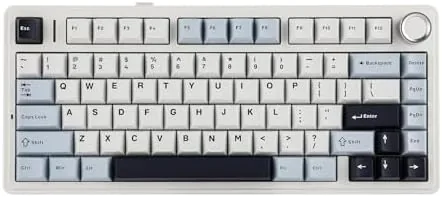

The gasket mounted mechanical keyboard is no longer a niche enthusiast product, and the EPOMAKER x Aula F75 is a big reason why. It is a 75 percent layout board with five layers of internal padding, a rotary knob, full RGB lighting, and tri mode wireless that covers Bluetooth, 2.4GHz, and USB-C. The version I tested ships with LEOBOG Reaper linear switches in a light blue case, and it has become one of the most talked about budget keyboards for a simple reason: it sounds and feels like boards that cost twice as much. I used it as my daily driver for two weeks, split between typing and gaming, and this review covers the sound, the feel, the wireless, and the battery.
Before the details, the standard disclosure. This article contains affiliate links, and if you buy through one of them cosmoniq.com earns a small commission at no extra cost to you. That commission never changes what I test or what I recommend.
Design and Build
The F75 is a compact board with a 75 percent layout, which means it keeps the function row and arrow keys while dropping the number pad. The light blue case is a soft pastel that looks playful without being loud, and the overall build feels far more expensive than the price suggests. The frame is sturdy with minimal flex when you twist it, which is rare at this level.
The keycaps are double shot ABS in a clean profile, and the legends are crisp. The rotary knob sits in the top right corner and controls volume by default, with a satisfying detent as it turns. The two position switch on the top edge toggles between Bluetooth, 2.4GHz, and wired modes, and a USB-C port sits beside it for charging and connection.
Under the keycaps, the F75 earns its reputation. The board uses a gasket mount, which means the plate and switches float inside the case on soft gaskets instead of sitting on rigid standoffs. That construction, combined with five layers of foam and silicone padding, absorbs noise and creates the deep, muted sound that enthusiasts chase. Out of the box, every key press lands with a soft thock rather than a hollow ping.
Key Features
The gasket mount and five layer padding are the headline features. Together they deliver a typing experience that is soft on impact and quiet enough for a shared office, while the sound profile stays deep and satisfying. This is the combination that made the F75 famous among budget boards.
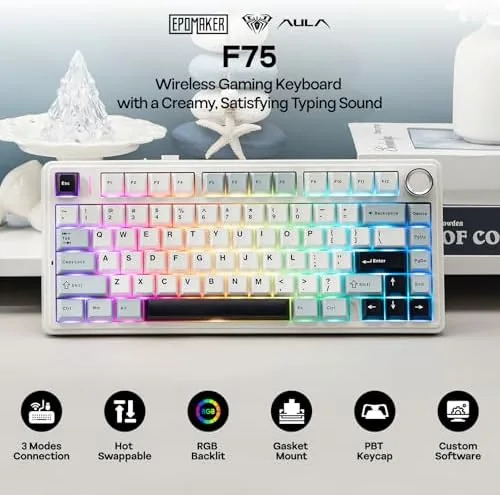
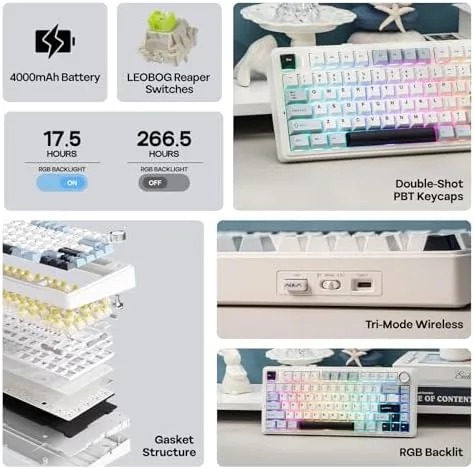
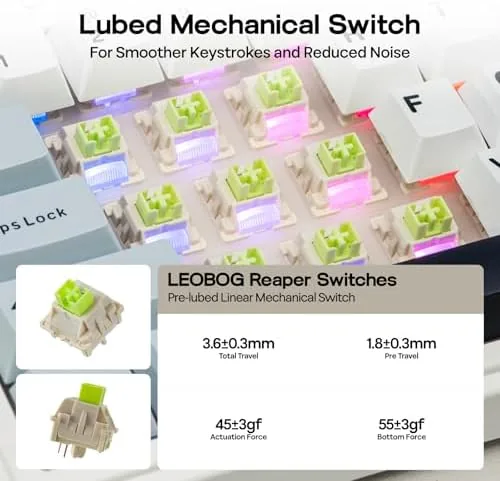
The LEOBOG Reaper switches are smooth linear switches with a light operating force. They are pre lubricated from the factory, which shows in the effortless, even key travel. The switches are also hot swappable, so you can pull them out and install any three or five pin mechanical switch without soldering, which is a welcome option for buyers who want to tune the feel later.
Tri mode connectivity rounds out the feature set. Bluetooth supports three paired devices with easy switching, the 2.4GHz dongle offers a low latency connection for gaming, and the USB-C cable provides a wired link plus charging. The RGB lighting is south facing and per key, with effects you can cycle through on the board or configure in the companion software, and it stays bright enough to look great on a dark desk.
Real-World Performance
Typing on the F75 for a full week was a genuine pleasure. The gasket mount gives each keypress a cushioned landing, and the deep sound makes long writing sessions feel calm rather than clacky. My typing speed held at my normal rate, and the consistency of the Reaper switches meant no missed keys even in rapid bursts.
Gaming was where the wireless performance got tested. In a week of competitive shooters over the 2.4GHz connection, I noticed no input delay or dropped keystrokes, and the low latency link felt indistinguishable from a wired board. The light switch force made rapid double taps easy, and the compact layout left plenty of room for a large mouse pad, which matters in fast paced games.
The battery backed up the wireless convenience. With RGB running at a moderate brightness, the board lasted about four days of daily use between charges, and with the lighting off it stretched past two weeks. The USB-C port charged the board from empty to full in around two hours, so battery anxiety never became a real issue.
The RGB and knob both behaved well in daily use. The lighting effects were smooth and the colors looked accurate, and the volume knob worked exactly as expected, turning up or down with a tactile click at each step. Bluetooth pairing to a tablet and a laptop took seconds each, and switching between devices with the mode switch was immediate and reliable. After the full two weeks I found myself reaching for the F75 over my usual daily board, which is the strongest compliment a budget keyboard can earn, and it is a sign that the value here is not just about price.
Pros and Cons
Pros:
- Deep, thocky sound from the gasket mount and five layer padding
- Hot swappable LEOBOG switches feel smooth and consistent
- Reliable tri mode wireless with no lag over 2.4GHz
- Compact 75 percent layout leaves room on the desk
- Rotary knob and per key RGB add convenience and polish
- Excellent battery life with RGB off
Cons:
- ABS keycaps will develop shine over long use
- No wireless dongle storage inside the case
- Software customization is basic compared to premium boards
- Rattly stabilizers on the larger keys in some units
How It Compares
I compared the F75 against a full size membrane keyboard and a premium gasket mounted custom board to show where it fits.
| Feature | Aula F75 | Membrane Keyboard | Premium Custom Board |
|---|---|---|---|
| Mount type | Gasket | Membrane | Gasket |
| Wireless | BT, 2.4GHz, USB-C | Usually wired | Varies |
| Hot swappable | Yes | No | Yes |
| Typing sound | Deep and thocky | Quiet but mushy | Customizable |
| RGB | Per key | Often basic | Per key |
| Price | Budget | Lowest | High |
A membrane keyboard is quieter and cheaper, but its mushy, unresponsive feel cannot match a mechanical board for typing or gaming. A premium custom board offers more tuning options, better keycaps, and fuller software, but it costs two to three times as much and requires assembly or long wait times. The F75 lands in the sweet spot: most of the premium typing experience at a fraction of the price, with the added convenience of tri mode wireless that many customs still lack.
Who Should Buy It
Buy the Aula F75 if you want a gasket mounted board with a deep sound without spending custom board money, if you need wireless for a clean desk, if you game and type at a desk that also needs a Number Pad free layout, or if you are new to mechanical keyboards and want an excellent first board.

Skip it if you need a full size number pad, if you prefer clicky tactile switches and do not want to swap them, or if you need deep software customization for macros. For most people the F75 is the best value mechanical keyboard on the market right now. You can check the current price of the EPOMAKER x Aula F75 on Amazon when you are ready.
How We Test
I used the F75 as my primary keyboard for two weeks, typing for work and gaming in the evenings. I tested all three connection modes, timed the battery across full discharge cycles with and without RGB, and evaluated typing comfort, gaming latency, sound, and the hot swap socket compatibility.

I did not measure latency with a high speed camera or test the board in a wired gaming tournament setting, and stabilizer consistency can vary between units, so your experience may differ slightly. What I can confirm from daily use is that the typing feel stayed consistent across the whole two weeks, with no softening switches and no key chatter appearing. For more on choosing a mechanical keyboard, Tom's Hardware explains the mechanical keyboard basics. The EPOMAKER x Aula F75 listing on Amazon shows the current price and switch options.
EPOMAKER x Aula F75: Questions People Ask
Are the switches hot swappable?
Yes, the LEOBOG Reaper switches pull out easily and can be replaced with most compatible three and five pin mechanical switches if you want a different feel.
How do the three connection modes work?
The keyboard connects over Bluetooth for up to three paired devices, a 2.4GHz dongle for low latency gaming, and a wired USB-C link for charging and a zero latency connection.
What does the knob control?
The rotary knob adjusts volume by default and can be reprogrammed through the software to control media, scrolling, or other custom functions.
How long does the battery last?
With RGB lighting off the battery lasts weeks of daily use, while heavy RGB usage cuts that to several days, and the USB-C port tops it up in a couple of hours.
As an Amazon Associate, I earn from qualifying purchases.