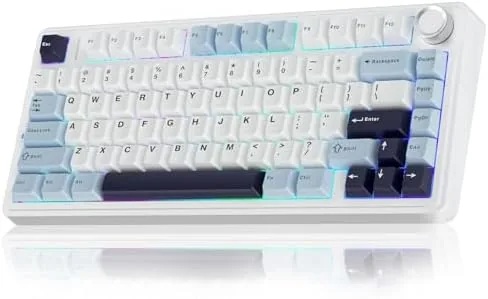

Mechanical keyboards used to split the world into two camps: enthusiasts who built custom boards and everyone else who typed on whatever came with the desk. The AULA F75 sits right at the seam between those worlds, a 75 percent wireless board with pre-lubed Reaper switches, hot swap sockets, and tri-mode connectivity, offered at a price that does not demand an enthusiast budget. I typed on it daily for three weeks, played games over all three connection modes, and pulled the switches out to see how the hot swap really works. This review covers the sound, the feel, the wireless performance, and where a compact board asks you to compromise.
Before the details, the standard note. This article contains affiliate links, and if you buy through one of them the site earns a small commission at no extra cost to you. That commission does not change what I test or what I recommend. The keyboard reviewed here was used exactly the way you would use it, as a daily driver for work and play.
The 75 percent form factor is the middle ground of layouts, keeping the function row and arrow keys while dropping the number pad. The rest of this review walks through the build, the switch feel, the wireless modes, and how this board compares with full size and sixty percent alternatives.
Design and Build
The F75 is a white and blue board with a compact footprint that leaves generous room on a desk for a mouse and a drink. The case is a dense plastic with a subtle two tone finish, and the whole board has a reassuring weight that keeps it planted during fast typing. The keycaps are double shot, so the legends are molded in rather than printed on, and they feel smooth without the slick shine that cheap ABS develops after a few weeks.
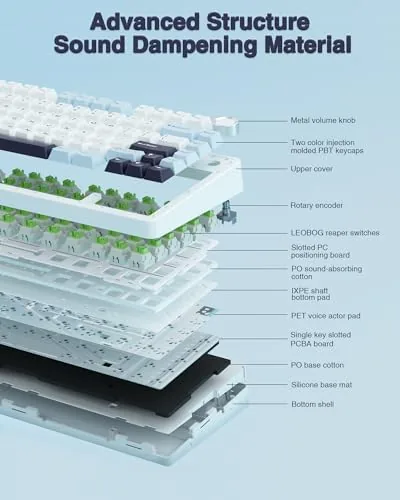
Under the keycaps, the board has a gasket mount, foam layers, and pre-lubed Reaper switches, which is a stack of features you usually have to build yourself to get. The result is a board that absorbs the hollowness of a bare tray, and the typing sound comes out rounded and soft rather than sharp and clacky. The white keycaps pick up the RGB from below and glow evenly, and the exposed switch top makes the board feel custom without any work.
Key Features
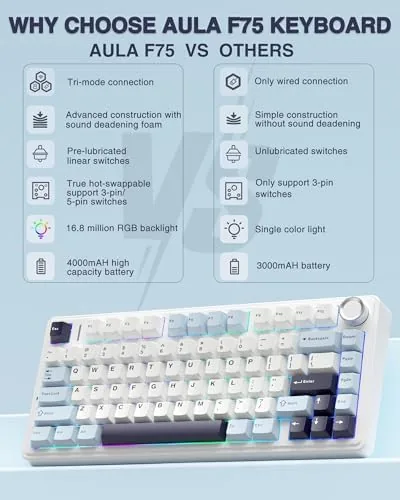
The pre-lubed Reaper switches are the headline. They are linear switches, smooth with no tactile bump, and the factory lubrication makes them glide through the press with none of the scratchy feel that budget boards ship with. They bottom out softly thanks to the foam and gasket layers, and the whole package produces the creamy, thocky sound that the board is known for, straight out of the box with no modification.
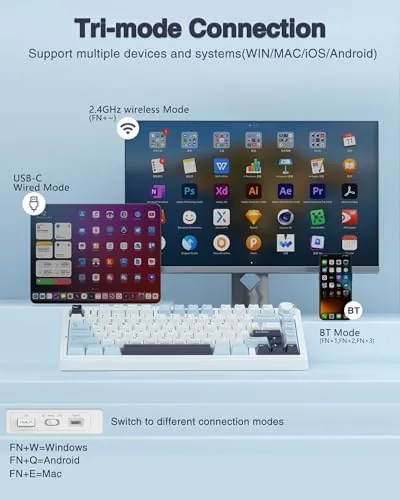
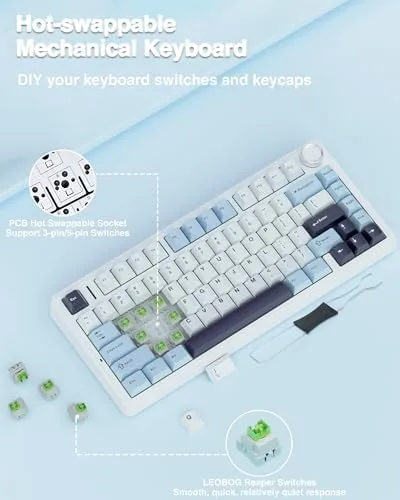
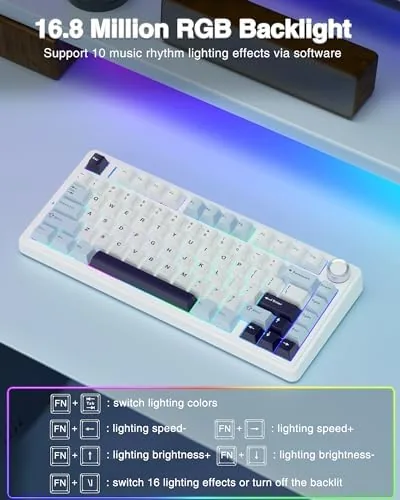
Hot swap sockets are the feature that gives the board its future. Every switch sits in a socket that accepts a standard mechanical switch, so you can pull the Reapers out with a tool and drop in clicky or tactile switches of your choice without touching a soldering iron. Tri-mode connectivity rounds out the package: Bluetooth 5.0 for laptops and tablets, a 2.4GHz receiver for gaming, and a USB C cable for wired play and charging. The RGB backlighting is fully addressable, and the board runs on a built in battery that handles days of wireless use.
Real-World Performance
Typing on the F75 is the first thing you notice, and the second thing is that you keep noticing it because it feels good. Long writing sessions produce the familiar rhythm of a well dampened linear board, and the sound is genuinely creamy, closer to a much more expensive custom build than the typical budget office board. The gasket mount gives the plate a slight flex that absorbs the landing, and the pre-lubed switches mean every keypress feels the same as the one before it.
Gaming over the 2.4GHz receiver was clean and lag free. I played fast paced shooters and a round of a rhythm game, and the board kept up without any perceptible delay or dropped input. The Bluetooth mode worked fine for typing on a tablet and a laptop, with the usual multi device pairing that lets you hop between machines with a shortcut. The wired mode charged the battery and kept the board responsive for a long wired session without any of the subtle wireless jitter some boards show.
Battery life held up through a full work week on the 2.4GHz connection with the RGB at a moderate brightness, which is a solid result for a board this size. With the lighting off, the board stretches much further, and the low battery warning gives you time to plug in before it dies mid game. The hot swap experiment confirmed the marketing: I pulled out a Reaper switch and clicked in a tactile switch in under a minute, and it worked immediately, which is the whole point of the feature.
The honest limits are about the compact layout. There is no number pad, so anyone who types numbers all day will miss the dedicated keys, and the top row doubles up on functions with a modifier key that takes a session to learn. The AULA software handles remapping, lighting, and macros, but it is a Windows utility, so Mac users get the basic on board functions and not the full customization. The white case also shows dust and fingerprints faster than a black board would.
Pros and Cons
Pros:
- Creamy, dampened sound straight out of the box
- Pre-lubed linear Reaper switches are smooth and consistent
- Hot swap sockets make switch swapping effortless
- Tri-mode connectivity covers gaming, laptop, and wired use
- Long battery life on the wireless connections
- Gasket mount and foam give a premium feel at a budget price
Cons:
- No dedicated number pad for heavy data entry
- Full software customization is Windows only
- White case shows dust and fingerprints
How It Compares
The main decision in a compact wireless board is the layout, and the 75 percent F75 sits between a full size board and a sixty percent board. The table below lines up the three.
| Feature | AULA F75 75% | Full Size Board | 60% Board |
|---|---|---|---|
| Number pad | No | Yes | No |
| Function row | Yes | Yes | No |
| Arrow keys | Yes | Yes | Layered |
| Desk space | Compact | Large | Smallest |
| Best for | Gaming and typing balance | Data entry, desk work | Minimal setups, travel |
If you want the function row and arrow keys without giving up desk space, the 75 percent layout is the sweet spot. If you type numbers all day, a full size board keeps its pad, and if you want the smallest footprint possible, sixty percent shaves off the F row. For most gamers and writers, the F75 hits the balance they actually want.
Who Should Buy
Buy the AULA F75 if you want a Wireless mechanical board with a premium sound without paying custom build prices, if you switch between a PC, a laptop, and a tablet and want one board for all of them, or if you want to experiment with switches thanks to the hot swap sockets. It is a natural fit for gamers who want low latency wireless and writers who want a board that feels good for long sessions.
Skip it if you need a number pad for work, if you run a Mac and want full remapping software, or if a sixty percent board is already as small as you need. For a compact board that sounds and feels above its price, this is one of the strongest picks on the list. You can check the current price of the AULA F75 keyboard on Amazon when you are ready.
How We Test
I used the AULA F75 as my main keyboard for three weeks, typing daily documents and chatting, and I gamed over the 2.4GHz, Bluetooth, and wired modes to compare latency and stability. I pulled out the Reaper switches and installed a set of tactile switches to verify the hot swap, and I tracked battery drain across a full work week with the RGB on and off.
I did not open the case to examine the foam layers or measure battery capacity with lab equipment, and I tested the software on Windows only. For a deeper look at switch types and what the sound and feel differences mean, Tom's Hardware has a solid guide to mechanical keyboard switches that is worth a read. The AULA F75 listing on Amazon shows the current price and full specifications.
Questions People Ask
What switches does the AULA F75 come with?
It ships with pre-lubed Reaper switches, which are linear and smooth, and the hot swap design means you can pull them out and replace them without soldering.
How do I connect the keyboard wirelessly?
The board connects over Bluetooth 5.0, a 2.4GHz USB receiver, or a USB C cable, and you switch between modes with a shortcut on the keyboard itself.
Is a 75 percent layout good for gaming?
Yes, the compact layout keeps the arrow keys and F row while saving desk space, and the low latency wireless modes handle gaming without noticeable delay.
Does the RGB lighting require software?
Basic lighting effects work straight from the keyboard, while the deeper customization, remapping, and macro options live in the AULA software.
As an Amazon Associate, I earn from qualifying purchases.