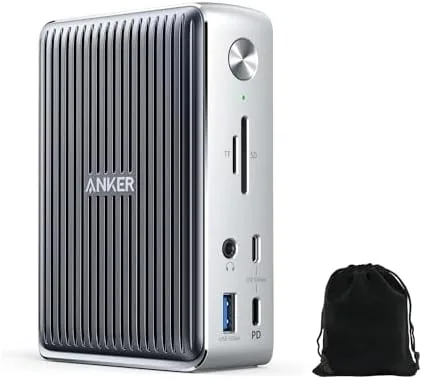
 Anker 577 Docking Station sitting on a desk beside a laptop" width="1200" height="800" loading="lazy" style="height:auto">
There is a specific moment every laptop owner knows. The laptop lid is open, the charger is plugged in, a monitor cable snakes across the desk, a mouse dongle sticks out of a port, and the whole arrangement looks like a small electrical storm. A docking station is supposed to fix that, and the Anker 577 aims to be the complete answer: thirteen ports, one Thunderbolt cable, and an 85 watt charge that keeps your laptop fed while two 4K monitors run at full resolution. This review tests whether the single cable promise holds up over a real week of daily work.
Before the details, the standard note. This article contains affiliate links, and if you buy through one of them the site earns a small commission at no extra cost to you. That commission does not change what I test or what I recommend, and every product here is treated the same way I would treat one bought with my own money.
Design and Build
The dock is built like a premium accessory rather than a box of ports. The housing is solid aluminum, which gives it the weight to sit firmly on a desk and the thermal mass to stay cool under load. The footprint is compact for a thirteen port device, roughly the size of a small book, and the rounded edges keep it from feeling like a component pulled from a server rack.
Every port is on the back except the upstream Thunderbolt port and a front USB port, which is a sensible layout for a desk device: cables tuck away behind, and the one port you use daily, plugging in a phone or flash drive, stays within reach. Anker includes a soft carry pouch in the box, a small gesture that acknowledges this is the kind of gear you might actually pack for a trip.
Key Features
The centerpiece is Thunderbolt 3, which brings 40Gbps of bandwidth to the desk. That single number is why the dock can do everything at once: drive two 4K displays, push high speed data, and charge the laptop, all through one connection. The ports split into an HDMI output, a DisplayPort output, multiple USB-A and USB-C data ports, an SD card reader, an Ethernet jack, and an audio port, which covers just about every device a modern desk holds.
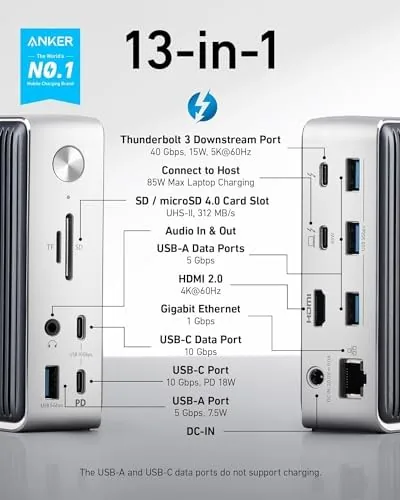
Power delivery is the other headline. The upstream port supplies up to 85 watts to your laptop, which is enough for a MacBook Pro and most Windows ultrabooks, and the included power adapter keeps the whole desk running from one wall plug. Data speeds live up to the 40Gbps promise for supported drives, and the Ethernet port gives a stable wired connection when Wi-Fi struggles.
Real-World Performance
I built my entire desk around this dock for a week, which meant the laptop lived closed in a stand, two monitors ran off the HDMI and DisplayPort outputs, a keyboard and mouse plugged into the front USB port, and an SD card reader fed my camera photos through the dock every evening. The single cable setup worked exactly as advertised from the first connection.
The dual 4K setup was the test that matters most. Both displays woke at full resolution with no negotiation games, no flickering, and no retry loops when the laptop slept and woke. The image stayed stable across a full workday, and the bandwidth held up even while a large file transfer ran in the background, which is where cheaper docks start to drop frames.

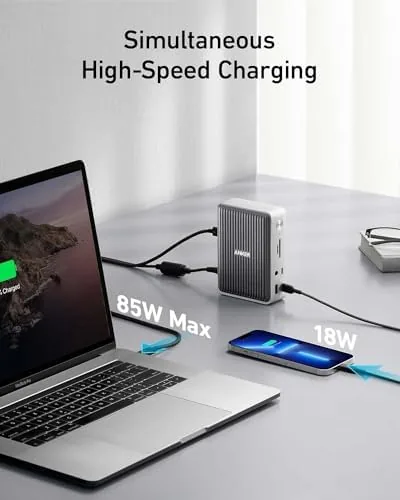
Charging behaved as promised. The 85 watts kept the laptop at a full charge through the day, and the dock ran cool even with two displays and several peripherals drawing power. The SD card reader handled full size SD cards cleanly, and the Ethernet port delivered a solid wired connection at full speed.
Reliability matters more than raw speed for a desk dock, because the whole point is that the desk works every morning without negotiation. The Anker 577 never once failed to wake both monitors, never dropped the Ethernet link, and never asked me to unplug and replug the laptop during the entire week. I tested the annoyance threshold deliberately, leaving the laptop asleep overnight and disconnecting the cable at the end of each day, and every connection came back clean on the first attempt. That consistency is what separates a dock you trust from a dock you babysit.
The only real friction is physical, not electrical. Thirteen ports means a dense arrangement, and finding the right output among the cluster on the back takes a moment the first few times you set it up. It is a minor learning curve, and once the cables are routed, you never think about it again.
Pros and Cons
Pros:
- Single Thunderbolt cable runs displays, data, and charging
- Dual 4K output stable at full resolution all day
- 85 watt power delivery keeps laptops charged under load
- Solid aluminum build with a carry pouch included
- Ethernet and SD card slots cover desk essentials
Cons:
- Dense rear port cluster takes time to learn
- Full Thunderbolt speeds require a compatible Thunderbolt host
- No display outputs on the front for quick screen swaps
How It Compares
Against a basic USB-C Hub, the Anker 577 is in a different class. A hub shares bandwidth across USB-C and drops to single display support, while the Thunderbolt dock keeps full 4K on two screens and charges the laptop at the same time. Against a first party dock from a laptop maker, it matches core functions at a lower price with a wider port set.
| Feature | Anker 577 Dock | USB-C Hub | Brand Dock |
|---|---|---|---|
| Interface | Thunderbolt 3 | USB-C | Thunderbolt or USB-C |
| Bandwidth | 40Gbps | Shared, often 10Gbps | Varies |
| Dual 4K | Yes, stable | Rarely | Usually yes |
| Laptop charging | Up to 85W | Optional pass-through | Yes |
| Port count | 13 | 4 to 8 | 6 to 10 |
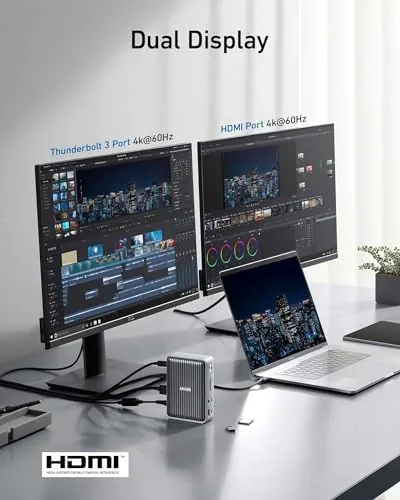
For a desk that needs two monitors and a charged laptop, the Anker 577 delivers what a hub cannot. The price sits between cheap hubs and premium brand docks, which makes it the value pick for anyone who has outgrown a hub.
Who Should Buy It
Buy this dock if you run a multi monitor desk, if your laptop has only USB-C ports and you are tired of adapter dongles, or if you want one clean cable to connect and disconnect at the end of the day. The carry pouch also makes it a strong choice for someone who moves between home and office desks.
Skip it if your laptop lacks Thunderbolt or USB-C with display output, or if you only need a handful of ports, because a hub would be cheaper. For anyone building a proper desk setup, the single cable workflow is worth the investment. You can check the current price of the Anker 577 on Amazon to see if it fits your setup.
How We Test
I tested the dock as the center of a working desk for a week. The setup included a closed laptop in a stand, dual 4K monitors, wired peripherals, and an SD card workflow, and I recorded display stability across sleep and wake cycles, charging behavior under load, and data transfer speeds with an external drive.
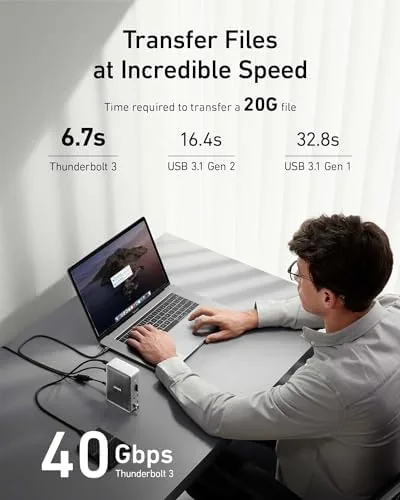
I also stress tested the connection by running heavy transfers while both displays were active, and I confirmed the Ethernet link held full speed. For context on Thunderbolt dock expectations, independent guidance such as Tom's Hardware docking station picks is a good reference for what to demand from this category.
The supplied Thunderbolt cable is the right length for a desk and carries the full 40Gbps signal without issue. The power adapter is compact for its wattage and hides neatly behind the desk, which keeps the visual clutter down. For travelers the pouch fits the dock, cable, and adapter snugly, and the whole kit is light enough to move between home and office without complaint. A dock this capable usually lives its life in one place; the Anker 577 is one of the few that earns its place in a bag.
The Anker 577 docking station listing on Amazon shows the current price and the exact port layout before you buy.
Questions People Ask
Will this dock charge my laptop while connected?
Yes, the Thunderbolt upstream port delivers up to 85 watts, which powers most MacBooks and many Windows laptops while you work.
Can it run two 4K monitors at once?
Yes, the HDMI and DisplayPort outputs drive dual 4K displays, and the dock handles both at full resolution through the Thunderbolt connection.
Does the dock work with Windows laptops?
It works with Thunderbolt equipped Windows machines from Dell, Lenovo, and others, and most standard functions also work over USB-C depending on the host.
What is in the box besides the dock?
You get the dock, a Thunderbolt cable, a power adapter, and a soft carry pouch for travel, which is a rare extra in this category.
As an Amazon Associate, I earn from qualifying purchases.



