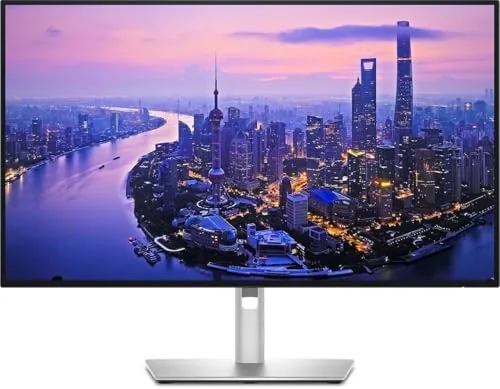

A great monitor should do more than display a picture, it should make the desk around it cleaner and the work on it easier. The Dell UltraSharp U2725QE understands that assignment. This 27 inch 4K UHD display uses an IPS Black panel, which is Dell's improved IPS technology that delivers deeper blacks and richer contrast, and it pairs that panel with a genuinely useful connectivity hub: HDMI 2.1, USB-C, USB-A ports, and even a built in Ethernet jack. I worked on it as my single display for two weeks, plugged in a laptop through one cable, and let it quietly change how my whole setup behaved.
Before the details, the standard note. This article contains affiliate links, and if you buy through one of them the site earns a small commission at no extra cost to you. That commission does not change what I test or what I recommend.
Design and Build
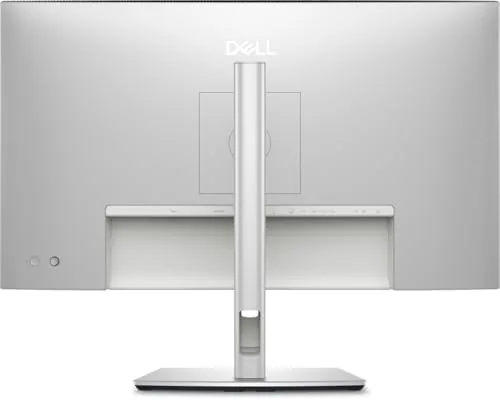
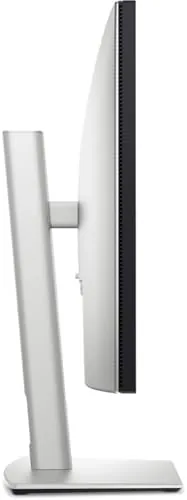
The UltraSharp line has a reputation for clean, professional design, and the U2725QE earns it. The bezels are thin on three sides, the stand is solid and fully adjustable with height, tilt, swivel, and pivot, and the aluminum backed finish looks expensive on any desk. The stand locks into place with no wobble, and the panel itself feels premium in the way only a well built display can.
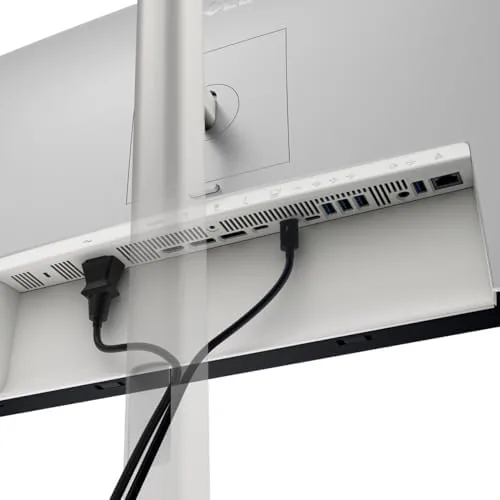
The connectivity is the real build story. The rear panel carries an HDMI 2.1 port, a DisplayPort, a USB-C port that delivers video, power, and data, several USB-A ports, a 3.5mm audio out, and an RJ45 Ethernet jack. That combination turns the monitor into a hub, so a single USB-C cable from a laptop can carry the display signal, charge the laptop, drive the connected peripherals, and even provide a wired network connection. It is the closest thing to a cable free desk that exists without going fully wireless.
Key Features
The IPS Black panel is the visual centerpiece. Compared with a standard IPS display, it produces noticeably deeper blacks and less backlight bleed, which makes dark scenes in video and dark themes in software look richer. The 4K UHD resolution at 27 inches delivers sharp, detailed text, and the panel ships calibrated for accurate color, which is why the UltraSharp line remains a favorite among photo editors and designers.

The USB-C hub is the functional centerpiece. It supports power delivery to a laptop, which means most ultralight notebooks charge through the monitor alone, and the Ethernet port gives a stable wired connection to the same laptop without an adapter. The monitor also includes a handy KVM style benefit, because the connected peripherals can follow the active input source. All of this is managed through the on screen menu, which remains one of the cleaner and more responsive implementations available.
Real-World Performance
I ran the U2725QE as my sole display for two weeks, working with documents, spreadsheets, video calls, and photo editing. The text quality at 4K on 27 inches is excellent, with crisp edges that make long reading sessions comfortable, and the IPS Black contrast showed immediately in dark themed applications and video. Colors looked accurate out of the box, and a quick check against a color reference showed no obvious drift that would matter for most work.
One detail that grew on me over the test period was how little eye strain I felt by the end of each day. The panel offers a range of comfort modes that cut blue light without washing the image into a yellow haze, and the adjustable stand made it easy to place the display at the correct height from the first morning. These are the small things that rarely appear in a spec sheet, but they are exactly what makes a long working day on a monitor feel manageable.
The USB-C hub worked exactly as advertised. My laptop connected through a single cable, received power, drove the monitor, fed a wired mouse and keyboard, and used the Ethernet port for a stable connection, and I never touched another cable on the desk for the entire test period. The panel runs at 60Hz, which is the right choice for this kind of productivity focused display, though gamers will want to look elsewhere. The one genuine shortcoming is that buyers on a tight budget will find cheaper 27 inch 4K panels, but those panels will not offer the color accuracy, the hub, or the build quality that define this monitor.
Pros and Cons
Pros:
- IPS Black panel delivers noticeably deeper blacks and contrast
- 4K resolution at 27 inches makes text razor sharp
- USB-C hub provides video, power, data, and Ethernet in one cable
- Accurate color straight out of the box
- Fully adjustable stand with pivot for portrait work
Cons:
- 60Hz refresh rate is not suited to high speed gaming
- Premium price over basic 27 inch 4K panels
- Ethernet and power delivery require a capable USB-C source
How It Compares
Against a basic 27 inch 4K monitor, the U2725QE costs more and earns it through the panel and the hub. Where a budget panel is a display and little else, the UltraSharp becomes the center of a workspace. Compared with an Apple Studio Display, it offers a more flexible port selection, a height adjustable stand in the box, and a lower price, while the Studio Display still wins on macOS integration and speaker quality. Both deliver excellent images, but the Dell is the more practical choice for a mixed device desk.
| Feature | Dell UltraSharp U2725QE | Budget 27" 4K Panel | Apple Studio Display |
|---|---|---|---|
| Panel type | IPS Black | Standard IPS | IPS |
| USB-C hub | Yes, with Ethernet | Rarely | Yes |
| Power delivery | Yes | No | Yes |
| Height adjustable stand | Included | Basic | Optional |
| Refresh rate | 60Hz | 60Hz | 60Hz |
| Price | Mid premium | Budget | Premium |
The table makes the positioning clear. The UltraSharp is not the cheapest 4K monitor, but it is the one that does the most with the desk around it, and for a single monitor workspace that is a meaningful advantage.
It is also worth noting the longevity angle. Dell's UltraSharp line has a reputation for building displays that outlast their ownership cycle, and the port selection here is future proof enough to survive a laptop Upgrade or two. A budget panel will likely be replaced when your next computer changes its connectors, while this monitor is designed to stay put and keep working. For a buyer who thinks of a monitor as a five year purchase rather than a seasonal accessory, that difference is part of the value.
Who Should Buy It
Buy the Dell UltraSharp U2725QE if you work with documents and color accurate content, if you run a laptop that you want to connect and charge with one cable, or if you want a wired Ethernet connection without a separate adapter. It is also the right monitor for a professional desk where the display is the centerpiece, because the hub functionality and adjustability change how the whole setup works.
Skip it if you are a competitive gamer who needs a high refresh rate, or if a basic 4K panel fits your budget and you do not care about the hub. For everyone else, this is one of the best productivity monitors money can buy. You can check the current Dell UltraSharp U2725QE price on Amazon when you are ready.
How We Test
I used the U2725QE as my only display for two weeks, covering document work, spreadsheets, photo editing, and video calls. I connected a laptop through USB-C and verified power delivery, data, and Ethernet all worked through the single cable, and I tested the KVM style input switching with two devices. I also reviewed the panel for uniformity, backlight bleed, and color accuracy against a reference, and I confirmed the stand adjustments held position throughout.

I checked the on screen menu for responsiveness and confirmed the hub ports delivered the expected data speeds. I did not test gaming performance, because this is a productivity display by design. For independent context on the IPS Black technology and how it compares across monitors, PCMag's best 4K monitors guide is a useful reference.
The Dell UltraSharp U2725QE listing on Amazon shows the current price and what is included in the box.
Dell UltraSharp U2725QE: Questions People Ask
Does the U2725QE work as a laptop dock?
Yes, the USB-C port carries video, power delivery, and data, and the built in Ethernet port gives a wired connection through a single cable.
Is the IPS Black panel noticeably better than a standard IPS?
In my testing the deeper blacks and reduced glow were clearly visible, especially in dark scenes and low light rooms.
What refresh rate does the monitor support?
It is a 60 Hz panel designed for color accurate work rather than high speed gaming, though it still feels smooth for everyday use.
Is the stand adjustable?
Yes, it offers height, tilt, swivel, and pivot adjustments, so the panel can be positioned comfortably for long sessions.
As an Amazon Associate, I earn from qualifying purchases.