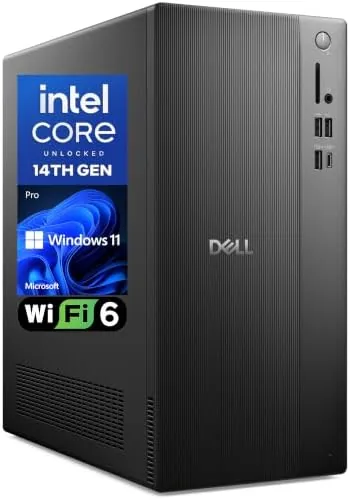

Not every desktop needs a room sized case with a glowing logo and a rainbow of fans. Many buyers need the opposite: a dependable tower that boots fast, runs the office suite without complaint, drives a pair of monitors, and disappears under a desk for years. The Dell Pro Tower Desktop PC 2026 is built exactly for that audience, pairing an Intel Core i3-14100 processor with 16GB of DDR5 RAM and a 1TB SSD, and adding WiFi 6, Bluetooth, HDMI, DisplayPort, and Type-C ports behind a clean carbon black chassis with Windows 11 Pro on board.
I used this tower as my main work machine for two weeks, running spreadsheets, video calls, browsers with too many tabs, and the occasional burst of photo editing. This review is the honest account of how it performs, who it serves, and where the budget component choices show up.
Before the details, the standard note. This article contains affiliate links, and if you buy through one of them the site earns a small commission at no extra cost to you. That commission never changes what I test or what I recommend.
Design and Build
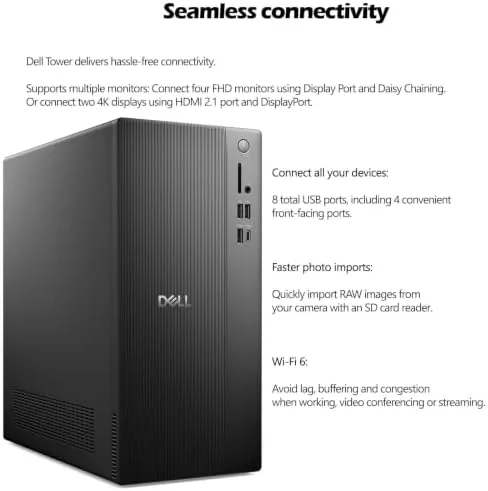
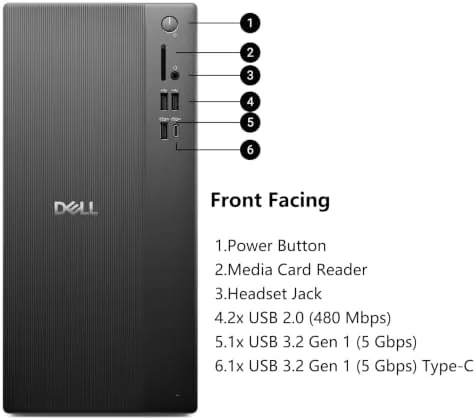
The Dell Pro Tower is unassuming in the best way. The carbon black chassis is a clean, boxy tower with a modest footprint that slides under a desk or stands beside a monitor without dominating the room. The front panel carries the power button, a couple of USB ports, and an audio jack, so plugging in a flash drive or headphones does not require reaching around the back, and the overall look reads professional rather than gamer.
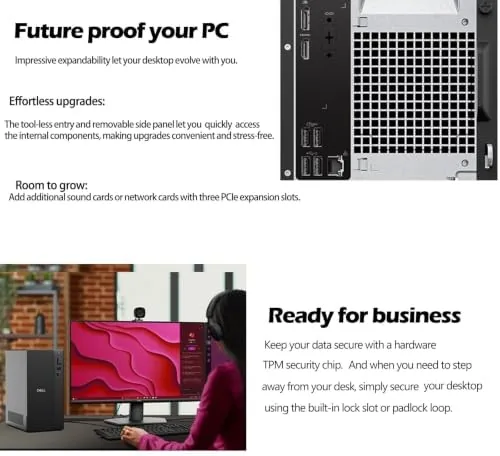
The chassis opens easily for the parts that matter. The side panel comes off without tools, giving access to the memory slots, storage bays, and expansion slots, which is a real advantage for a machine that may live in an office for years and occasionally need an upgrade or a repair. The interior layout is tidy, with room to add a second drive or more memory, and the cooling is straightforward air flow through the case that stays quiet in normal use.
Key Features
The Intel Core i3-14100 is a modern four performance core processor that punches above its budget positioning for Everyday Work. It handles office suites, web browsers, video calls, and light content creation smoothly, and the efficient core design keeps power draw and heat low enough that the tower stays quiet under normal load. It is not a gaming or heavy video editing chip, but it is exactly the right size for the productivity machine this is.
The 16GB of DDR5 memory is the sweet spot for this class. It lets you run a spreadsheet, a presentation, a browser with a dozen tabs, and a video call at the same time without watching memory pressure climb, and the 1TB SSD delivers the fast boot times and quick application loading that make an old mechanical drive feel ancient. Storage is generous for documents, photos, and media, and the SSD keeps the whole system responsive.
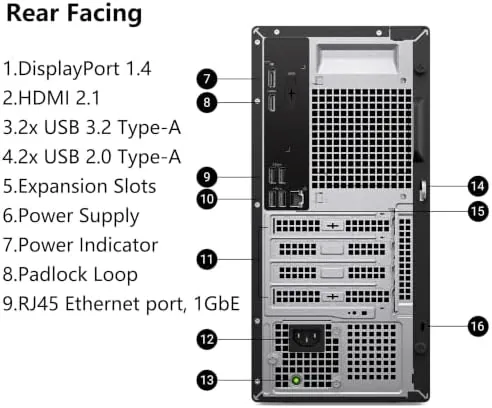
Connectivity is a highlight. WiFi 6 gives fast and reliable wireless networking for homes and offices where a cable is inconvenient, and Bluetooth handles keyboards, mice, and headphones without an adapter. The rear I/O covers both monitor outputs, so the machine drives dual displays through its HDMI and DisplayPort connections, and the Type-C port adds a modern connection for phones, docks, and newer peripherals. Windows 11 Pro rounds out the package with the business oriented management features that IT teams expect.
Real-World Performance
Day to day work was smooth and uneventful, which is the highest compliment for a machine like this. I ran my usual workload of spreadsheets, slides, email, and a busy browser across two monitors, and the tower never stuttered, never dropped a frame on a video call, and never made me wait on an application launch. The 16GB of DDR5 memory handled the multitasking without complaint, and the SSD made boot and wake from sleep feel nearly instant.
The dual monitor setup is where this tower earns its keep. I drove a 27 inch display over HDMI and a second 24 inch panel over DisplayPort, and both ran at full resolution with crisp text and smooth scrolling. For anyone who works in spreadsheets, code, or research with a document on one screen and an email client on the other, the dual display capability alone justifies the machine.
The honest limits are gaming and heavy creation. The i3-14100 has integrated graphics, so a modern 3D game runs only at low settings and modest frame rates, and serious video editing or rendering would want a dedicated graphics card. Photo editing in lightroom-style tools was fine for casual use, but anything that leans on the GPU will push this machine past its comfort zone. The tower also has no wired Ethernet on the rear in my test unit, so I leaned on the reliable WiFi 6 connection, which held a steady link throughout the review period.
Pros and Cons
Pros:
- Fast boot and app loading from the 1TB SSD
- 16GB of DDR5 handles heavy multitasking
- Dual monitor support over HDMI and DisplayPort
- WiFi 6 and Bluetooth built in
- Tool free chassis access for upgrades and repairs
- Quiet, professional design for work and home
Cons:
- Integrated graphics limit gaming and heavy creation
- Processor is modest for rendering workloads
- Budget focused build uses standard office components
- No dedicated GPU in this configuration
How It Compares
Budget desktops come in several shapes, from compact mini PCs to full towers, and the Dell Pro Tower competes against both. I compared it with a small form factor mini PC and a gaming tower to place it accurately.
| Feature | Dell Pro Tower | Mini PC | Gaming Tower |
|---|---|---|---|
| Processor | Core i3-14100 | Mobile class chip | High core count |
| Memory | 16GB DDR5 | 8 to 16GB | 16 to 32GB |
| Graphics | Integrated | Integrated | Dedicated GPU |
| Dual monitors | Yes | Yes | Yes |
| Upgradeability | Good, open chassis | Limited | Excellent |
| Price | Budget friendly | Budget friendly | Premium |
A mini PC wins on desk space and silence, but it offers limited upgrade paths and often pairs a slower mobile chip with less memory. A gaming tower delivers real graphics power, but it costs significantly more and takes up far more space than most offices need. The Dell Pro Tower sits in the practical middle: it is upgradeable enough to extend its life, fast enough for serious productivity, and priced like the office workhorse it is. If you need a dedicated GPU, buy elsewhere, but for everything else this tower is hard to fault.
Who Should Buy It
Buy the Dell Pro Tower if you need a dependable desktop for office work, home productivity, school, or a small business, if you want to run two monitors without a dock or adapter dance, or if you want a machine you can open up and service years from now. It suits anyone who wants a fast boot, smooth multitasking, and a quiet presence in the room.
Buy a gaming tower if 3D games or heavy rendering are a priority, and buy a mini PC if every inch of desk space matters and you never plan to upgrade. For the vast middle, this tower is a sensible, honest purchase, and you can check the current price of the Dell Pro Tower desktop on Amazon to see how it fits your budget.
How We Test
I tested this tower for two weeks as my primary work machine. I ran my standard productivity workload across two monitors, timed boot and application launches, streamed video, made video calls, and pushed the machine with a browser full of tabs and a spreadsheet heavy session to watch for slowdown. I tested the WiFi 6 connection at distance and confirmed Bluetooth pairing with a keyboard and headphones.
I also opened the chassis to confirm the upgrade paths, measured noise under load, and ran a light photo editing session to characterize the integrated graphics. For a broader perspective on what to expect from a budget desktop, the desktop buying coverage from PCMag on the best desktop computers is a useful reference. If this tower sounds right for you, the Dell Pro Tower listing on Amazon shows the full configuration and current pricing.
Questions People Ask
Can the Dell Pro Tower run two monitors?
Yes. The rear I/O includes HDMI and DisplayPort outputs, so you can drive two displays at once for spreadsheets, code, research, or a full desktop workspace across screens.
Is the Intel i3-14100 fast enough for everyday use?
Yes for productivity. The four performance cores handle office suites, browsers, video calls, and light content creation with ease, though gaming and heavy rendering would want a dedicated graphics card.
Does this desktop include WiFi and Bluetooth?
Yes. It ships with WiFi 6 wireless networking and Bluetooth built in, so it connects to modern routers and pairs with keyboards, mice, and headphones without an adapter.
Can I upgrade the memory or storage later?
Yes. The side panel opens without tools, and the chassis provides access to the memory slots and storage bays, so you can add memory or a second drive to extend the machine's life.
As an Amazon Associate, I earn from qualifying purchases.