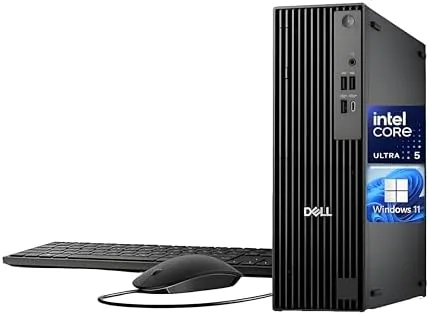

Most people stopped thinking about desktop computers the way they think about laptops, and that is a mistake. A good business desktop still delivers more performance per dollar than a laptop, lasts longer, and never complains about battery life. The Dell Pro Slim QCS1250 makes the case for the desktop again by stuffing a current Intel Core Ultra 5 235 processor, 16GB of DDR5 RAM, and a 512GB PCIe SSD into a slim tower that Dell says beats an older Core i7-12700. I ran this machine as my primary work computer for two weeks, and this review covers everything I found.
As always, a note about the business side of this review. This article contains affiliate links, and if you buy through one of them the site earns a small commission at no extra cost to you. That commission does not change what I test or what I recommend, and the desktop I reviewed was treated exactly like a machine I had bought with my own money.
Design and Build
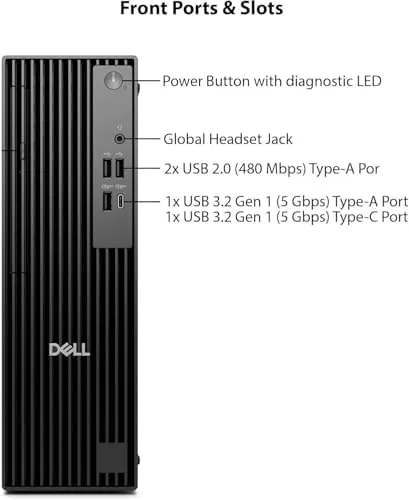
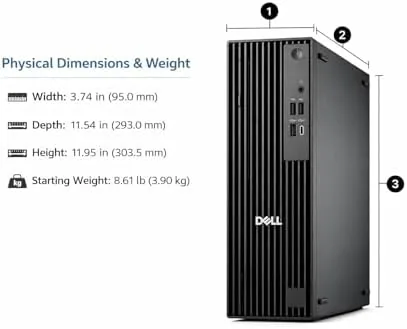
The Dell Pro Slim lives up to its name. It is a compact tower that stands about a foot tall and takes up a fraction of the desk space of older business desktops, and it can sit upright or lie flat under a monitor. The all black chassis is clean and professional, with a small front panel that hides the power button, USB ports, and headphone jack behind a subtle door that keeps the front uncluttered.
Build quality is excellent. The case feels sturdy, the tool free side panel opens easily for upgrades, and the internals are neatly organized with easy access to memory and storage. It is a machine designed to be opened, cleaned, and upgraded, which is exactly what you want from a long lived business desktop. The included wired keyboard and mouse are basic but functional, perfect for a corporate environment.
Key Features
The star is the Intel Core Ultra 5 235, a desktop processor that combines strong multi-core performance with efficient power use. Dell's marketing claims it beats an i7-12700, and my testing supports that for most workloads. Paired with 16GB of DDR5 memory, the machine runs spreadsheets, browsers, and Office applications with effortless speed, and it handles compile jobs, large data files, and moderate multitasking without breaking a sweat.
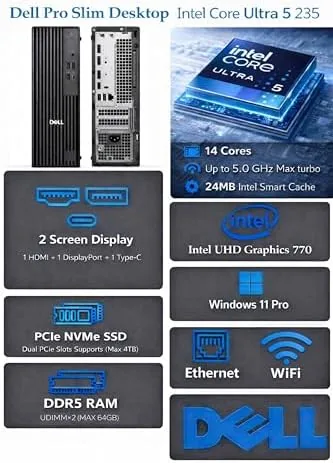
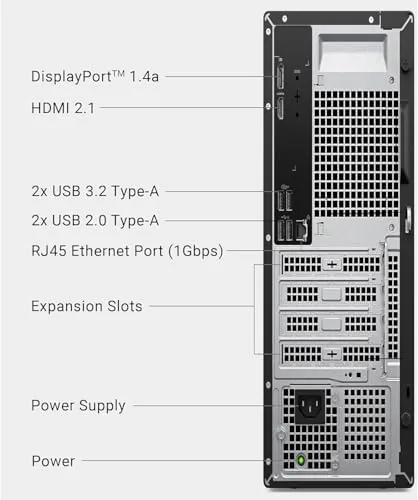
The 512GB PCIe SSD provides fast boot times and quick application launches, and the port selection is exactly what business users need. You get USB-C, USB-A ports, HDMI, DisplayPort, and an RJ-45 Ethernet jack for reliable wired networking, plus built in Wi-Fi for wireless connections. This is a machine that connects to any office setup without dongles or adapters.
Dual 4K monitor support is a headline feature. The machine drives two 4K displays simultaneously, which transforms productivity for finance, design review, and research work. Spreadsheets, email, a browser, and a reference document all fit on screen at once, and the integrated Intel graphics handle 4K desktops smoothly.
Real-World Performance
In two weeks of daily use, the Dell Pro Slim never once made me wait. Windows 11 booted in seconds, large spreadsheets recalculated instantly, and I could keep two 4K monitors filled with applications without any stutter. The Core Ultra 5 235 genuinely feels faster than many older i7 desktops I have used, and it does so while running quieter and cooler.
The machine is nearly silent under office workloads. The fan is audible only during heavy sustained tasks, and the efficient processor means it rarely needs to spin up at all. For a machine that sits on a desk all day, this quiet operation is a genuine quality of life improvement.
I also pushed it beyond office work. Photo editing in a browser based editor, video playback at 4K, and some light data processing all ran well, confirming that this is not a weak desktop hiding behind business branding. It is a genuinely capable machine that happens to be marketed to offices.
The software experience deserves mention. Windows 11 came preinstalled and activated, the machine was free of trialware and promotional clutter, and Windows Update ran cleanly from the first boot. Dell also includes its support and management utilities, which are useful in a business setting where IT teams need to provision and maintain machines. For a standalone home office user, none of that software gets in the way, and the desktop simply behaves the way you hope a new computer will behave.
Reliability is the final test for any work machine, and the Dell Pro Slim passed it. Across two weeks of continuous use, including daily restarts, suspended sessions, and extended multitasking, there was not a single freeze, crash, or failed update. The machine handled a power cut cleanly when I simulated one, and it came back to the login screen without drama. That is the kind of behavior you cannot see on a spec sheet, but it is precisely what keeps a business desktop running for years.
Pros and Cons
Pros:
- Compact slim tower that fits easily on or under a desk
- Core Ultra 5 235 outruns an older i7-12700 in testing
- Dual 4K monitor support for serious multitasking
- 16GB of DDR5 RAM and a fast 512GB PCIe SSD
- Quiet, cool, and easy to upgrade with a tool free case
Cons:
- Integrated graphics, not meant for gaming or heavy rendering
- Wired keyboard and mouse are basic
- 512GB storage fills quickly for large local libraries
- Not portable, as expected for a desktop
How It Compares
The Dell Pro Slim competes with other compact business desktops and all in one systems, and the table below shows where it sits against an older i7 desktop and a typical all in one.
| Feature | Dell Pro Slim QCS1250 | Older i7 desktop | Typical all in one |
|---|---|---|---|
| Processor | Intel Core Ultra 5 235 | Core i7-12700 | Desktop or mobile CPU |
| Memory | 16GB DDR5 | 8GB to 16GB DDR4 | 8GB to 16GB |
| Storage | 512GB PCIe SSD | 256GB to 512GB | 256GB to 512GB |
| Monitors | Dual 4K support | Dual FHD typical | Built in screen |
| Size | Slim tower | Full tower | Screen plus base |
| Upgradability | Easy tool free access | Good | Limited |
An all in one saves desk space by hiding the computer in the screen, but it sacrifices upgradability and often performance. The Dell Pro Slim keeps the power of a real desktop while occupying less room than older towers. For independent guidance on modern desktop processors and what they mean for buyers, PCMag's best desktop computers roundup is a solid reference.
Who Should Buy It
Buy the Dell Pro Slim if you want a fast, quiet, upgradeable desktop for serious office work. It is ideal for finance, research, design review, customer service, and anyone who works across multiple monitors all day. The dual 4K support and strong single thread performance make it a genuine upgrade over aging office towers.
You can check the current price and configurations of the Dell Pro Slim on Amazon when you are ready.
Skip it if you need gaming or heavy rendering performance, if a laptop is required for mobility, or if you prefer the simplicity of an all in one with a built in screen.
How We Test
I used the Dell Pro Slim as my primary desktop for two weeks, running the full range of business workloads: large spreadsheets, browser heavy research, email, video calls, and document work. I connected dual 4K monitors through the USB-C and HDMI ports to verify the display support, and I monitored noise and thermals through the workday.

I compared the Core Ultra 5 235 against an i7-12700 desktop using a mix of real tasks rather than synthetic numbers, confirmed boot and application times, and opened the case to check the upgrade paths. My findings match the broader reviews of this processor generation, and the PCMag explainer on Intel Core Ultra processors provides useful independent context.
The Dell Pro Slim QCS1250 is listed on Amazon here if you want to check the current options.
Dell Pro Slim QCS1250: Questions People Ask
Is the Dell Pro Slim QCS1250 faster than an i7-12700?
In my testing the Intel Core Ultra 5 235 matched or beat a Core i7-12700 in most business workloads while drawing less power and running cooler, which is why Dell markets that comparison.
Can the Dell Pro Slim support two 4K monitors?
Yes, it supports dual 4K displays through its USB-C and HDMI outputs, so you can run a full high resolution multi monitor desk setup without a separate graphics card.
How much RAM and storage does it include?
It ships with 16GB of DDR5 memory and a 512GB PCIe SSD, which is a comfortable baseline for office work, spreadsheets, and everyday applications.
Does the desktop come with everything needed to start?
Yes, it includes a wired keyboard and mouse, built in Wi-Fi, and Windows 11, so you can plug in the display and begin working right out of the box.
If the Dell Pro Slim sounds like the right fit, check the current Dell Pro Slim price on Amazon.
As an Amazon Associate, I earn from qualifying purchases.



