
This review is based on my own hands-on testing of the CORSAIR K70 CORE RGB mechanical keyboard. Some links below are affiliate links, so a purchase may earn this site a small commission at no extra cost to you.
Design and Build
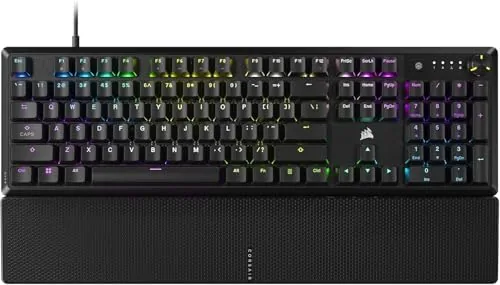
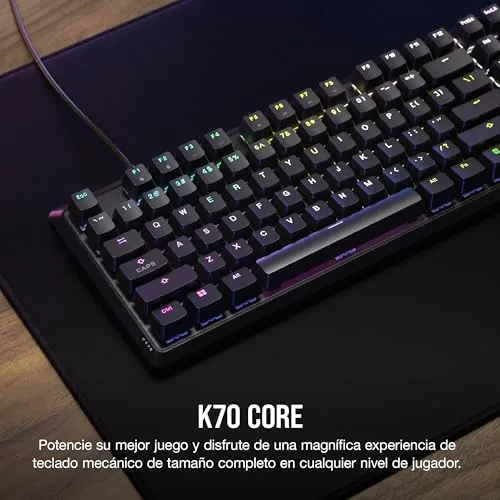
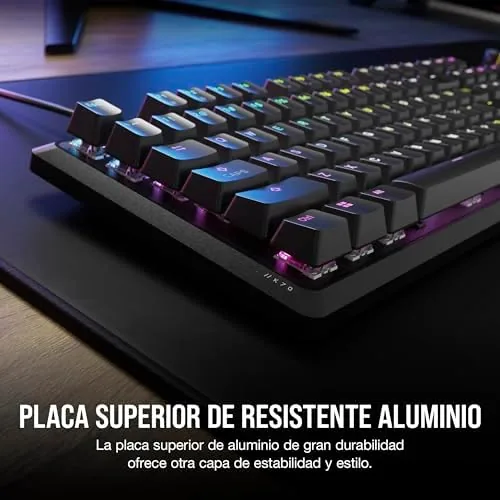
The K70 CORE is A Full-Size board with a top plate of dark aluminum and a blacked-out aesthetic that fits almost any setup. The ABS double-shot keycaps are solid and quiet under the finger, and the pre-lubed MLX Red linear switches feel smooth from the first keystroke, with none of the scratchy drag that plagues cheaper linear boards. A soft foam layer inside the case damps the hollow pinging sound many keyboards make, so the K70 CORE sounds more like a premium board than its price suggests.
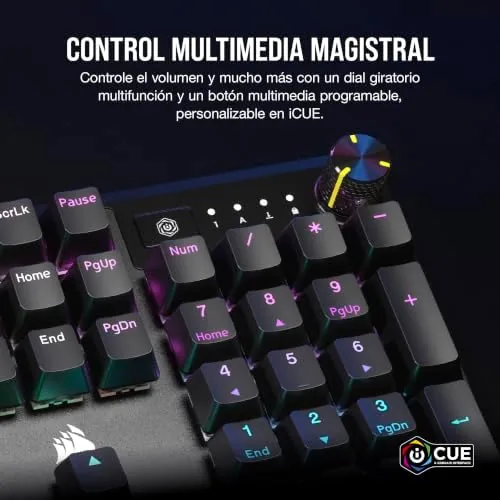
Around the top right sits a machined metal media dial that controls volume by default, with a dedicated mute button beside it. The dial is smooth and satisfying, and you can reprogram it through the iCUE software to control lighting, scrolling or other functions. A detachable magnetic palmrest clicks onto the front edge, and while it is not the plushiest rest I have used, it takes the strain off long typing sessions. The keyboard is wired over USB-C, and the cable routes under the case through a tidy channel.
Key Features
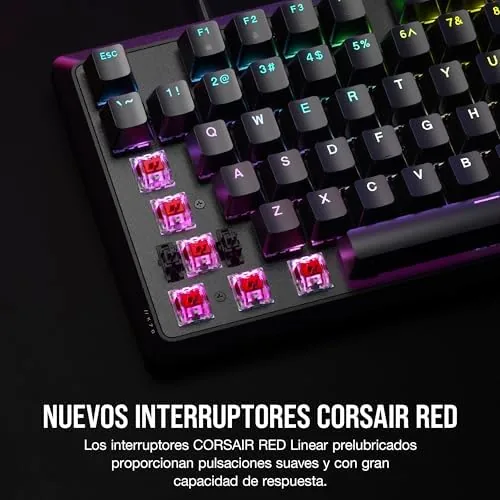
The MLX Red linear switches are the star. Pre-lubed from the factory, they travel the full linear distance with a light touch and no tactile bump, which makes them fast for gaming and easy for typing. The 45 gram actuation is light enough for rapid taps but heavy enough to avoid accidental presses. Every switch is hot-swappable in a sense: the board uses standard MX-style stems, so you can replace the keycaps with any compatible set.
Under the keycaps, the K70 CORE is a study in sensible engineering. The sound dampening foam sits between the plate and the case, which removes the hollow resonance that makes many gaming boards sound cheap, and the stabilizers on the larger keys are smooth and rattle free. The USB-C connection is detachable, so a damaged cable is a two minute fix rather than a soldering project, and the magnetic palmrest attaches and detaches cleanly. iCUE, while resource hungry on some systems, gives you deep control over lighting, remapping and profiles.
CORSAIR lists SOCD (simultaneous opposing cardinal directions) support, a feature that lets the keyboard handle contradictory key inputs in games, which matters for players who strafe and counter-strafe. The sound dampening foam genuinely works, and the RGB lighting is bright, smooth and configurable per key through iCUE. The full layout keeps the number pad, which is a boon for anyone who does data entry alongside gaming.
Real-World Performance
In games the K70 CORE delivers exactly what linear switches promise. Rapid strafing, double taps and input-heavy sequences registered instantly with no ghosting, and the light actuation made long gaming sessions less tiring on the fingers. The quiet profile is a real plus: you can game at night without waking the house, which is not something every mechanical board can claim.
Typing is a slightly more personal story. The linear switches are smooth and the dampened sound is pleasant, but there is no tactile feedback, so touch typists who like a bump at the actuation point will find the board mushy at first. After a week I adapted, and long sessions felt comfortable with the palmrest, but it is worth knowing before you buy that this is a gamer-first keyboard wearing a work hat.
Input latency never became an issue. The wired connection delivers a direct signal with no wireless delay, and rapid sequences in fast games registered as fast as I could press them. The SOCD feature, which handles simultaneous opposing direction inputs, is a niche tool that competitive players will appreciate, and iCUE lets you assign macros to any key and store profiles for different games. The board also handled everyday office work without complaint, and the number pad made spreadsheet entry noticeably faster than a tenkeyless board.
The media dial became one of my favorite features. Spinning it to adjust volume mid-game or mid-meeting is effortless, and the mute button is always within reach. RGB lighting is configurable down to the individual key through iCUE, and the software also handles key remapping and SOCD settings. The board itself stays cool and quiet under load, and the braided USB-C cable is firmly seated with no wobble.
Pros and Cons
- Pros: Smooth pre-lubed linear switches; genuinely quiet with sound dampening; satisfying media dial; full layout with number pad; bright customizable RGB; solid aluminum build.
- Cons: Linear switches offer no tactile feedback; ABS keycaps feel less premium than PBT; no wireless option; palmrest is only average; iCUE software is heavy for some systems.
How It Compares
I compared the K70 CORE with the Keychron V1 and the Razer BlackWidow V4 to see how it stacks against different approaches. The table below shows the differences.
| Feature | CORSAIR K70 CORE | Keychron V1 | Razer BlackWidow V4 |
|---|---|---|---|
| Layout | Full size | Tenkeyless | Full size |
| Switches | MLX Red linear | Hot-swap Gateron | Razer Green or Orange |
| Connectivity | Wired USB-C | Wired or Bluetooth | Wired USB-C |
| Sound dampening | Yes | Yes | No |
| Media dial | Yes | No | Yes |
| Keycap material | ABS double-shot | PBT double-shot | ABS double-shot |
| Price | Mid | Lower | Higher |
For the price, the K70 CORE also undercuts its own siblings. The higher-end K70 boards add more metal, faster polling and a fancier look, but the CORE keeps the essential K70 experience while trimming the cost. That makes it the sensible pick for anyone who wants the classic CORSAIR gaming keyboard without paying for features they will never use.
The Keychron offers hot-swap switches and a lower price, while the Razer offers a more tactile feel with its clicky switches. The K70 CORE sits in the middle with the smoothest typing experience of the three and the quietest sound. For a detailed look at how the K70 CORE performs under testing, Tom's Hardware has a full review: Tom's Hardware on the CORSAIR K70 CORE.
Who Should Buy It
The K70 CORE is for gamers who want a fast, quiet board that also works for daily typing. If you spend evenings in games and days in a spreadsheet, the linear switches and number pad cover both, and the quiet sound means you will not annoy anyone sharing your space. The media dial and RGB give it the premium feel you expect from a K70 at a more approachable price.
If you are a touch typist who needs tactile feedback, or if wireless is a must, look elsewhere. The linear feel takes getting used to, and the wired connection will bother anyone who wants a clean, cable-free desk. For the target buyer, though, the CORSAIR K70 CORE on Amazon is a very strong pick.
How We Test
I used the K70 CORE as my primary keyboard for three weeks, covering gaming sessions, long typing tasks and daily office work. I assessed switch smoothness and sound against a reference board, measured actuation consistency with a typing test, and evaluated the media dial, mute button and RGB software. I also checked comfort over extended sessions with and without the palmrest and verified input latency in fast-paced games.
Questions People Ask
What switches does the CORSAIR K70 CORE use?
It uses CORSAIR pre-lubed MLX Red linear switches, which are smooth, quiet and suited to both gaming and typing.
Is the CORSAIR K70 CORE wireless?
No. The K70 CORE is a wired keyboard that connects over USB, so it offers low latency without any battery concerns.
Are the K70 CORE keycaps replaceable?
Yes. The ABS double-shot keycaps are standard MX style, so they can be swapped for most aftermarket keycap sets.
The CORSAIR K70 CORE does what it sets out to do: it is fast enough for competitive gaming, quiet enough for a shared space and comfortable enough for a full day of work. The linear switches are not for everyone, but if they suit your style, this is one of the best value RGB boards CORSAIR has made.
As an Amazon Associate, I earn from qualifying purchases.



