
There is a moment when you first press a key on a mechanical keyboard and realize that typing does not have to feel like mashing soft rubber. That moment arrives early with the Corsair K70 LUX, because the Cherry MX Blue Switches inside this board are loud, tactile, and unmistakably alive under the fingers. This review is the record of spending weeks with the K70 LUX as a daily driver, writing long documents on it, playing competitive shooters with it, and deciding whether this wired classic still earns its keep in a market crowded with wireless rivals and RGB light shows.
Before the details, the standard note. This article contains affiliate links, and if you buy through one of them the site earns a small commission at no extra cost to you. That commission does not change what I test or what I recommend, and every product here is treated the same way I would treat one bought with my own money.
Design and Build
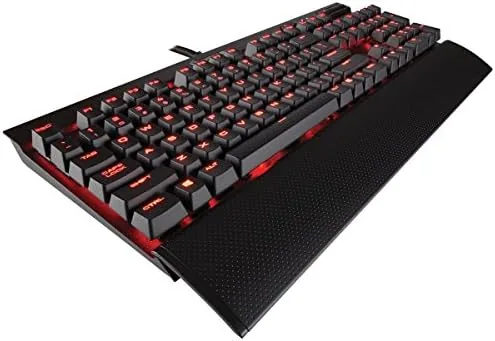
Hold the K70 LUX and the first thing you notice is weight. The brushed aluminum top plate gives the board a solid, premium feel that plastic shells simply cannot fake, and the full frame does not flex or creak no matter how hard you type. The keycaps sit on top of the metal plate in a floating design that makes the board easy to clean and gives the switches a direct, stable mount.
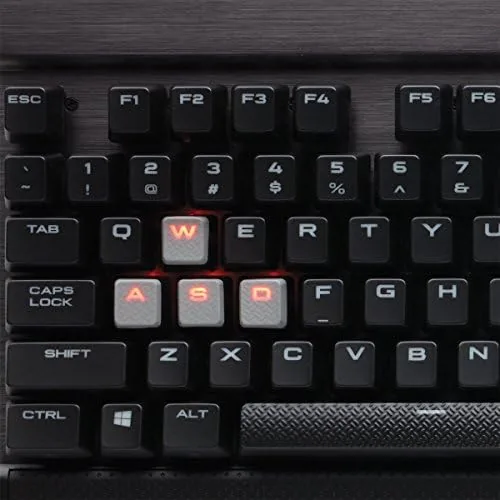
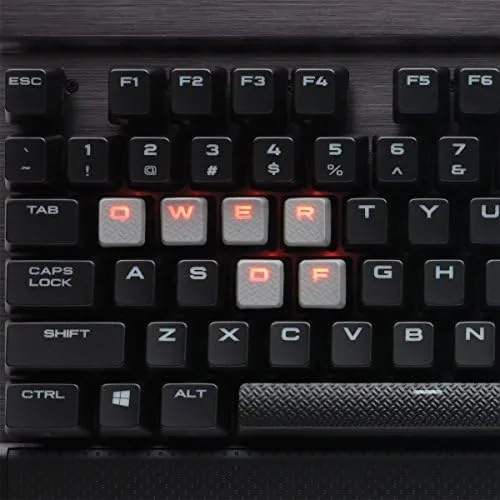
The red LED backlight is per key, and while it is a single color rather than the full RGB spectrum of the pricier models, the red glow is even, bright, and perfectly legible in a dark room. The layout is a full size 104 key arrangement, which means you get a number pad, and the dedicated media keys sit above the arrow cluster along with a volume wheel and a mute button. That media control block was a constant source of satisfaction during my test, because reaching for a physical wheel to mute a game is far nicer than hunting through a menu.
At the rear of the board sits a USB passthrough port, a practical touch that lets you plug a mouse or a headset dongle straight into the keyboard rather than reaching behind the tower. The braided cable splits into two USB connectors, one for the keyboard itself and one to power the passthrough, and the whole package feels engineered rather than assembled.
Key Features
The heart of this keyboard is the Cherry MX Blue switch, and it deserves careful explanation for anyone new to Mechanical Boards. Each switch has a tactile bump partway through the press and produces a distinct click sound, so you get both physical and audible confirmation that a keypress registered. That makes the K70 LUX a joy for typing, because the feedback keeps you honest about your rhythm, and it is equally popular with gamers who want certainty that a move executed exactly when the click sounded.
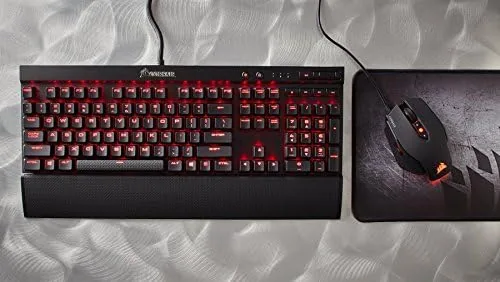
Anti ghosting and full key rollover are on board, which means every key can be pressed at once without dropped inputs, a feature that matters during frantic moments when several fingers land on the board at the same time. The 1000Hz polling rate keeps latency low, and the keyboard handles whatever you throw at it without any detectable lag.
The red backlight has multiple brightness levels you can cycle with the function row, and the Windows lock key prevents accidental keystrokes from pulling you out of a game. The dedicated media controls, the USB passthrough, and the sturdy detachable keycaps round out a feature list that was generous when this keyboard launched and has aged gracefully.
Real-World Performance
Typing on Cherry MX Blue switches is a love it or leave it affair, and I fall firmly in the love it camp. The tactile bump at the actuation point is satisfying enough that I found myself typing faster and with fewer errors than on membrane boards, because the click tells you the moment a press counts. I wrote several thousand words during the review period, including long evening sessions, and my fingers never tired the way they do on mushy scissor switches.
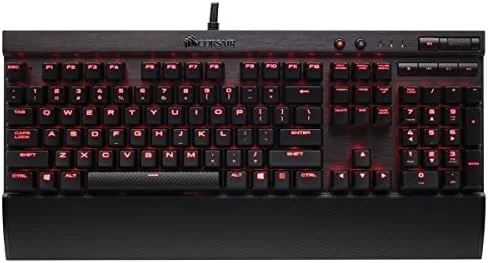
Gaming is where the K70 LUX shows its other side. The click is loud, genuinely loud, so if you share a room with someone who hates constant clicking, this is the switch to avoid. But in my own space the noise is part of the charm, and the tactile feedback gave me real confidence during fast paced shooters. I played a mix of first person shooters, strategy titles, and MMOs, and the keyboard never missed a command, never dropped a rapid sequence, and never made me wish for a softer switch.
There are two honest caveats. The single color red backlight means you cannot match your setup with RGB effects, and the fixed cable means you cannot take the board to a couch with a wireless connection. For a deskbound gamer who values feel and durability over wireless freedom, neither is a dealbreaker, but both are worth knowing before you buy.
Pros and Cons
Pros:
- Crisp Cherry MX Blue switches with satisfying tactile and audible feedback
- Rigid brushed aluminum frame that feels premium and lasts
- Full key rollover and anti ghosting for clean simultaneous presses
- Dedicated media controls, volume wheel, and USB passthrough
- Bright, even red backlight with adjustable brightness levels
Cons:
- Click noise is too loud for shared rooms or late night typing
- Single color lighting only, with no RGB option on this model
- Fixed wired cable, so there is no wireless freedom
- Large full size footprint takes up generous desk space
How It Compares
Set the K70 LUX next to its modern rivals and the picture becomes clear. The keyboard sits in the middle of the mechanical market, offering Dependable Cherry switches and a premium frame at a price well below flagship RGB models. The table below puts it alongside a common alternative with different switch options.
| Feature | Corsair K70 LUX | Typical RGB Mechanical Rival |
|---|---|---|
| Switch feel | Tactile and clicky Cherry MX Blue | Often linear, quieter switches |
| Lighting | Single color red per key | Full per key RGB |
| Media controls | Dedicated wheel and keys | Varies, often function layer |
| USB passthrough | Yes, rear port | Common on higher end boards |
| Wired or wireless | Wired only | Often both options |
| Typical price | Lower mid range | Higher mid range |
The trade is simple. You give up RGB and wireless, and you gain a lower price, a steel solid frame, and the purest Cherry MX Blue typing experience Corsair offered in this generation. If you already own a mechanical board and only want RGB, this is not the upgrade for you. If you are moving up from a membrane keyboard and want to know what the mechanical world actually feels like, the K70 LUX is one of the clearest doors into that world.
Who Should Buy It
Buy the Corsair K70 LUX if you are a typist who loves tactile feedback, a gamer who wants dependable wired performance with no battery anxiety, or anyone upgrading from a membrane keyboard who wants the classic clicky experience at a fair price. It is also a great choice for writers who value accuracy and rhythm, because the Cherry MX Blue switches reward deliberate, precise keypresses.
Skip it if you need RGB lighting, if you share a quiet workspace, or if wireless is non negotiable. And if your desk is small, the full size layout might push your mouse arm further out than you like. For everyone else, this is a proven workhorse that has earned its reputation over years of heavy use. You can check the current Corsair K70 LUX price on Amazon when you are ready.
How We Test
I used the K70 LUX as my primary keyboard for more than three weeks, which covered long typing sessions, extended gaming runs, and daily general use. I tested the anti ghosting with deliberate simultaneous presses, cycled every backlight brightness level in a dark room, and worked the media wheel and mute button constantly to see if they would wear or drift.
I also compared it directly against other mechanical boards I had on hand, noting differences in sound, feel, and build quality rather than relying on specifications alone. Independent coverage from sources such as PCMag gaming keyboard coverage helped me frame where this board sits in the wider landscape before I formed my own verdict.
The Corsair K70 LUX listing on Amazon shows the current price and available configurations.
Questions People Ask
What switches does the Corsair K70 LUX use?
The K70 LUX in this model ships with Cherry MX Blue switches, which are tactile and clicky and deliver a loud, satisfying key press for typing.
Does the K70 LUX have RGB lighting?
No, this version has single color red LED backlighting, while the separate K70 RGB models offer full per key RGB lighting.
Can the USB passthrough port be used for a mouse?
Yes, the rear USB port works for a mouse or another low power peripheral, and it carries the full speed of the keyboard connection.
Does the K70 LUX work without Corsair software?
The keyboard is fully functional as a plug and play device, and the CUE software is only needed for custom backlighting patterns and profile management.
As an Amazon Associate, I earn from qualifying purchases.