
Mechanical keyboards used to be a niche obsession, and now they are the default for anyone who types for a living or games for fun. The trick is that a great keyboard is more than a box of switches, because the sound, the feel, and the keycaps all have to land together. The ASUS ROG Strix Scope II X makes a serious attempt at all of it: full size layout, hot swappable sockets, factory pre-lubed NX Snow V2 linear switches, and doubleshot PBT keycaps. I used it for a month as my daily typing board and my gaming board, and this review covers whether it earns the ROG price tag.
Before the details, the standard disclosure. This article contains affiliate links, and if you buy through one of them the site earns a small commission at no extra cost to you. That commission does not change what I test or recommend, and the keyboard reviewed here was used exactly as its owners will use it.
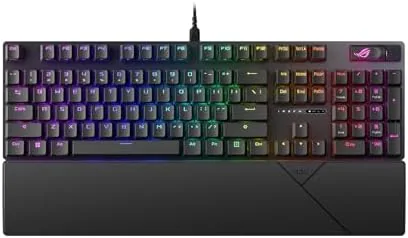
The Strix Scope II X is a wired full size mechanical keyboard with ROG NX Snow V2 linear switches, hot swap sockets, PBT keycaps, and per key RGB. The rest of this review covers the build, the typing feel, the gaming performance, and the customization options.
Design and Build
The first thing you notice is the weight. The Strix Scope II X uses an aluminum top plate that gives the whole board a dense, planted feel, and the deck barely flexes when you press on it. The black finish is understated for a gaming product, with the ROG styling kept to the top right corner and the function row rather than splashed everywhere. This is a keyboard that would not look out of place on a serious desk, and that restraint is a feature.
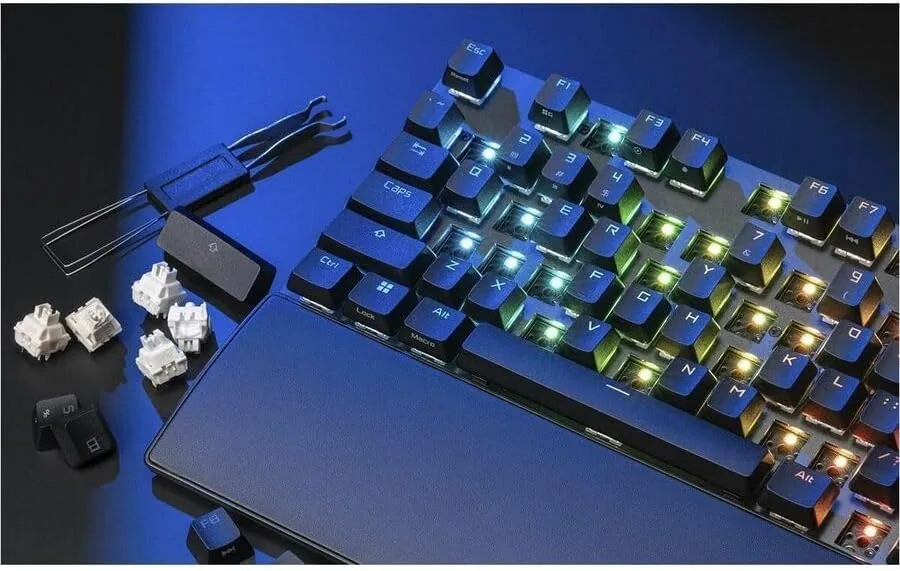
The layout is the full size classic: alphanumeric cluster, arrow keys, and a full numpad. ASUS adds a small touch in the form of the stealth key, a quick way to hide all open windows, and the rest of the board is familiar. The included accessories are generous, with a braided USB-C cable, a puller for keycaps, a switch puller, and a few extra switches so you can try hot swapping on day one.
Key Features
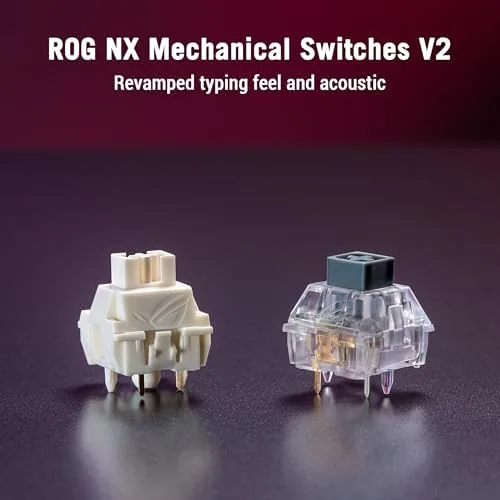
The switches are the heart of the board. The NX Snow V2 are linear switches, meaning a smooth straight press with no tactile bump, and they arrive factory pre-lubed, which removes the scratchiness that plagues cheaper stock switches. The result is a silky, consistent press across the whole board, with the kind of smoothness that enthusiasts normally achieve only by hand lubing every switch themselves.
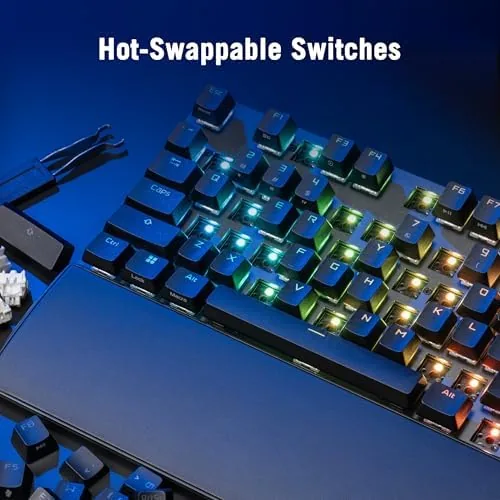
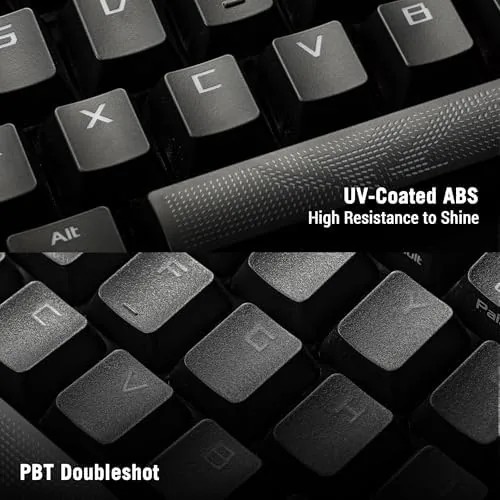
Hot swap support is the second big feature. Pull the cap, pull the switch, press in a new one, and it is done in seconds with no soldering iron in sight. The board accepts any standard 3 or 5 pin switch, so you can experiment with tactile or clicky switches or drop in your favorite boutique switch without buying a new keyboard. The doubleshot PBT keycaps complete the package, with a dense texture that resists the shiny wear that cheap caps develop.
Real-World Performance
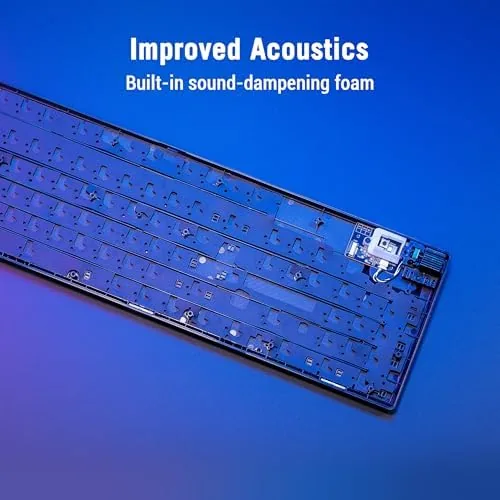
Typing on the Strix Scope II X is a quiet pleasure. The pre-lubed linears are smooth and the sound is a soft, contained thock rather than a hollow clack, and the board has enough sound dampening that it does not ring or ping. I typed thousands of words a week on it and never once wished for a different switch. The linear action is fast and forgiving for rapid typing, and the actuation point sits early enough to keep up with a fast typing rhythm without bottoming out fatigue.
Gaming is where the board shows its pedigree. The full size layout means the numpad is there for the games and workflows that use it, and the 1000Hz polling rate delivers the input response that competitive players want. In shooters the keys registered instantly and consistently, and the stealth key proved genuinely handy during office hours. The keyboard is wired, which in this context is a feature: no battery, no Wireless lag, and a connection that never drops mid match.
Customization through the Armoury Crate software is comprehensive. You can remap keys, set macros, program the RGB per key, and save profiles, and the keyboard keeps its settings in onboard memory, so your lighting and macros survive moving between machines. The PC and Mac support means the same board works on both platforms, with the software adapting to whichever system you connect to.
The typing experience also improved my workflow outside games, because the numpad made data entry and spreadsheet work noticeably faster, and the layout left no learning curve for anyone who grew up on a full size board.
The compromises are few. The full size layout means a wider footprint on the desk, which matters if your mouse space is tight. The wired connection is exactly the point for latency, but anyone who has gone fully wireless will notice the cable. And while the pre-lubed switches are excellent, the factory lube will eventually wear, at which point the hot swap sockets make re-lubing or replacing a switch trivial, which is the whole reason the feature exists.
Pros and Cons
Pros:
- Smooth factory pre-lubed NX Snow V2 switches
- Tool free hot swap for any 3 or 5 pin switch
- Doubleshot PBT keycaps resist shine and wear
- Dense aluminum top plate with minimal flex
- 1000Hz polling with a reliable wired connection
- Full software control with onboard memory
Cons:
- Full size footprint takes up desk space
- Wired only, no wireless option
- Factory lubrication will need refreshing over time
- RGB brightness is good but not the brightest around
How It Compares
The Strix Scope II X competes with other premium full size mechanical boards. The table below compares it with a typical budget mechanical keyboard and a boutique enthusiast board.
| Feature | ROG Strix Scope II X | Budget Mechanical | Boutique Custom Board |
|---|---|---|---|
| Switches | Pre-lubed NX Snow V2 | Stock budget switches | Your choice, hand lubed |
| Hot swap | Yes, tool free | Often no | Usually yes |
| Keycaps | Doubleshot PBT | ABS | Premium sets |
| Software | Full Armoury Crate | Basic | None or VIA |
| Price | Mid range | Low | High |
Against a budget board, the Scope II X wins on switch smoothness, keycap quality, and software depth. Against a boutique custom board, it gives up some personalization but gains convenience, warranty, and a ready to use experience. For most people, it sits in the sweet spot.
Who Should Buy
Buy the Strix Scope II X if you want a premium full size mechanical keyboard without learning to solder or assembling one from parts. It suits typists who spend all day at the keys, gamers who want reliable wired performance, and anyone who wants to try different switches later without buying a new board. You can check the current price of the ASUS ROG Strix Scope II X on Amazon.
Skip it if your desk space is at a premium, because the full size layout needs room, or if you insist on wireless. If you want to build your own board from scratch, a kit will give you more personalization. For a premium out of the box experience, this keyboard delivers.
How We Test
I used the Strix Scope II X for a month as both my typing and gaming keyboard. I typed long documents and emails to judge comfort and sound, played shooters and strategy games to test input reliability, and pulled and replaced switches to verify the hot swap sockets work cleanly with third party switches. I also configured profiles, macros, and RGB through the software and checked that settings survived a reboot and a move between machines.
For a deeper look at what makes a mechanical keyboard worth the money, Tom's Hardware has a guide to the best gaming keyboards that explains switch types and hot swap support in detail. The ROG Strix Scope II X listing on Amazon shows the current price and included accessories.
ASUS ROG Strix Scope II X: Questions People Ask
What switches come in the Strix Scope II X?
It ships with ROG NX Snow V2 linear switches that are factory pre-lubed, and the hot swap sockets let you install any compatible 3 or 5 pin switch in seconds.
Are the keycaps good quality?
Yes, the board uses doubleshot PBT keycaps, which feel dense and resist the shine and wear that cheap ABS caps develop over time, so they stay looking new longer.
Can I change switches without soldering?
Yes, the keyboard is hot swappable, so you pull a cap and a switch with the included tools and press in a new switch, with no soldering iron or technical skill needed.
Does it work with Mac and PC?
Yes, the keyboard supports both Windows and macOS, with the Armoury Crate software handling lighting and key remapping on either platform and storing profiles onboard.
As an Amazon Associate, I earn from qualifying purchases.