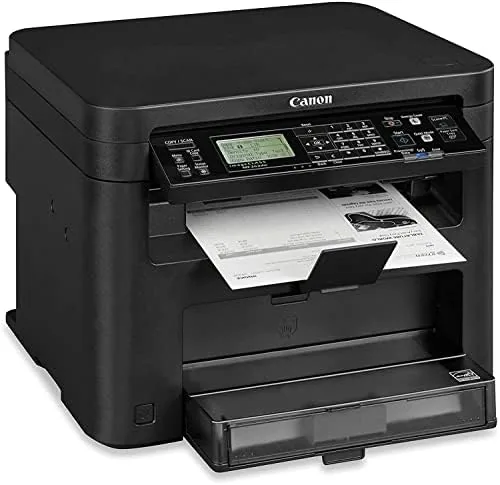

There is a quiet joy in a printer that simply does its job. Most of the drama in modern printing comes from color inkjet machines that clog, nag, and empty cartridges faster than you expect. The Canon imageCLASS MF242dw takes the opposite path. It is a monochrome laser all-in-one, built to Print, Scan, and Copy black and white documents quickly, and it asks for very little attention in return. This review is the record of a month of steady use in a small home office, covering setup, print speed, duplexing, and the honest limits of a machine aimed at serious document work.
Before the details, the standard note. This article contains affiliate links, and if you buy through one of them the site earns a small commission at no extra cost to you. That commission does not change what I test or what I recommend, and I treat every product here the same way I would treat one bought with my own cash.
Design and Build
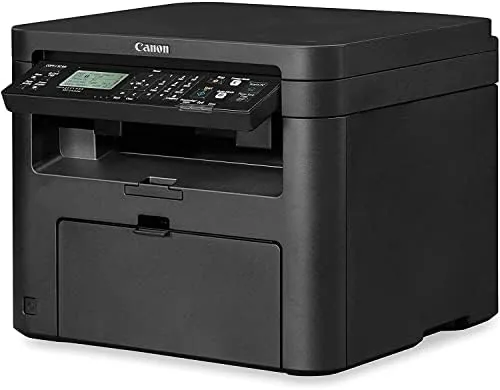
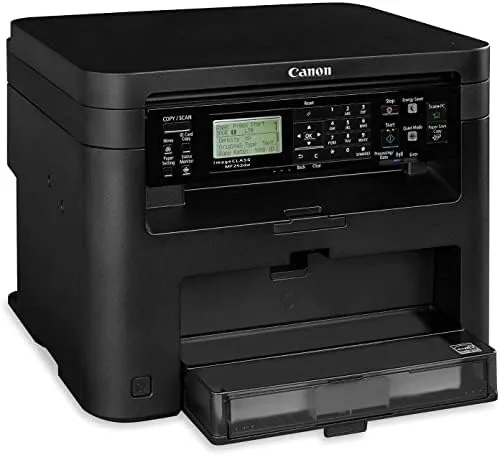
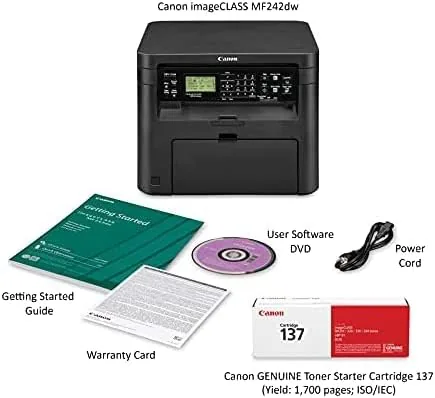
The MF242dw is a boxy black slab that does not try to hide its office roots. It is compact for a laser all-in-one, with a footprint that fits on a standard desk without swallowing the whole surface, though it is still a substantial piece of hardware at roughly thirty two pounds. The plastic body is sturdy enough for daily use, and the matte finish shrugs off fingerprints and the occasional paper dust smudge.
The control panel is the notable piece of design. A five line LCD sits above the controls, flanked by physical buttons for the most common tasks. The screen shows print status, wireless settings, and scan previews in clear text, and it makes the machine feel approachable in a way that touchscreen menus on other printers do not. You can navigate the menus with the D pad and confirm actions with one button, and the whole layout is learnable in a single session.
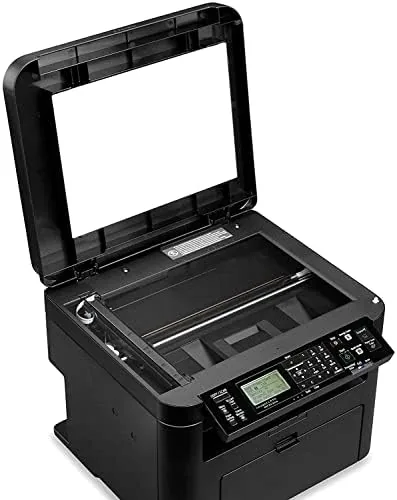
Up top, the flatbed scanner and the automatic document feeder handle the copying and scanning duties. The 250 sheet cassette slides out from the front and holds a full ream, and the paper path is straight enough to reduce the paper jams that plague cheaper machines.
Key Features
The core spec sheet is built for volume. The MF242dw prints at 28 pages per minute in black and white, which is genuinely fast for this class, and the 600 by 600 dpi output is crisp for text, forms, and business documents. The 512MB of memory keeps queued jobs moving, so a long print run does not stall the next document.
Automatic duplexing is one of the strongest features. The built in duplexer flips pages on its own, so two sided printing costs you nothing in effort and halves paper consumption. In a small office that prints invoices, reports, and contracts, that saving adds up quickly across a year.
Connectivity covers every common route. Wireless networking lets every laptop and phone on the network send jobs, wired Ethernet keeps things fast and stable for the busiest setups, and a USB port handles a direct connection when you just want one machine tied to the printer. The wireless setup uses the LCD panel and a simple button routine, and it was running in a few minutes.
Real-World Performance
Print speed held up exactly as advertised. A twenty page document landed in the output tray in under a minute, and the first page appeared almost instantly from sleep, which matters more than the headline pages per minute number for people who print intermittently. Text came out sharp and black, with no streaking and no toner smudging even on cheap office paper.
The scanner did real work during the month. I scanned receipts, contracts, and a small stack of signed forms through the automatic document feeder, and the results were clean and legible at the default settings. The copier handled the same tasks, and the five line LCD made scanning to email or to a folder on the network a straightforward process once the addresses were configured.
Duplex printing proved flawless in practice. A two sided contract came out properly aligned, with page numbers landing in the right corners and no reversed orientation. The 250 sheet tray ran through full print jobs without a single misfeed in my testing, and when the toner finally needed attention, the LCD showed the status clearly.
Mobile printing rounded out the experience. The MF242dw appeared in the Canon printing app on my phone, and a photo, a receipt, and a travel document all reached the printer through the wireless network without a cable or a desktop driver. That convenience is the quiet benefit of a well networked office machine, because it removes the step of transferring a file to a computer just to put it on paper. The setup also handled paper types sensibly, with settings for envelopes and heavier card stock available through the driver when I needed them. It is not a machine you will think about, and for a small office that is precisely the point.
The honest complaints are modest. The machine is loud enough to notice during a big job, the plastic shell feels workmanlike rather than premium, and the 250 sheet tray is fine for a home office but small for a busy shared office. None of these are deal breakers, but they set expectations correctly.
Pros and Cons
Pros:
- Fast 28 ppm Monochrome Laser Printing
- Automatic duplexing cuts paper use in half
- Crisp 600 by 600 dpi text output
- Wireless, Ethernet, and USB connectivity options
- Five line LCD makes setup and scanning simple
Cons:
- Monochrome only, no color printing
- 250 sheet tray is small for shared Offices
- Plastic build and noticeable noise during big jobs
How It Compares
The MF242dw sits in a crowded field of compact laser all-in-ones. Its main rivals are a color laser jet model at a higher price and a smaller monochrome model with a shorter feature list. The table below compares the three.
| Feature | Canon MF242dw | Color Laser All-in-One | Compact Mono Printer |
|---|---|---|---|
| Print speed | 28 ppm | Up to 27 ppm | Up to 22 ppm |
| Color printing | No | Yes | No |
| Automatic duplex | Yes | Yes | Often no |
| Scan and copy | Yes | Yes | No |
| Paper capacity | 250 sheets | 250 sheets | 150 sheets |
| Cost per page | Low | Higher | Low |
The color laser adds color at a higher purchase price and a higher cost per page, which only pays off if you genuinely need color documents. The compact mono model is cheaper and smaller but drops the scanner and automatic duplexing. The MF242dw is the balanced choice for anyone who prints a lot of black and white and needs the full all-in-one package.
Who Should Buy It
Buy the Canon imageCLASS MF242dw if you run a small office, a home business, or a busy household that prints mostly text documents, forms, and reports. If your week involves printing contracts, scanning receipts, and copying paperwork, this machine covers all three without complaint and keeps running costs low. You can check the current price of the Canon imageCLASS MF242dw on Amazon and see whether it fits your budget.
Skip it if you need color printing for marketing materials or photos, or if a shared office of several people will outgrow the 250 sheet tray. For the monochrome document office, this is one of the most dependable machines in its class, and it will earn its place on the desk.
How We Test
I ran the MF242dw as the primary printer in a small office for a month. I printed single and double sided documents, long runs, envelopes, and multi page contracts. I scanned documents through both the flatbed and the automatic feeder, copied pages, and used the wireless connection from laptops and a phone. I timed first page output, watched for paper jams across hundreds of pages, and monitored the LCD for toner and error reporting. Independent coverage such as PCMag printer reviews is a good place to compare the MF242dw against the wider field before you spend.
The Canon imageCLASS MF242dw listing on Amazon shows the current price and the included toner yield, which matters for working out your long term running costs.
Canon imageCLASS MF242dw: Questions People Ask
Is the Canon imageCLASS MF242dw a laser or an inkjet printer?
It is a monochrome laser printer, which means crisp black text, low cost per page, and no ink cartridges to run dry in the middle of a job.
Does the MF242dw support automatic two sided printing?
Yes. The automatic duplexer prints on both sides of the page without manual flipping, which cuts paper use in half.
How much paper does the MF242dw hold?
The main tray holds 250 sheets, which covers a small office or a busy home office before it needs a refill.
Can the MF242dw be used wirelessly?
Yes. It supports wireless networking as well as wired Ethernet and USB, so it fits any desk setup.
As an Amazon Associate, I earn from qualifying purchases.