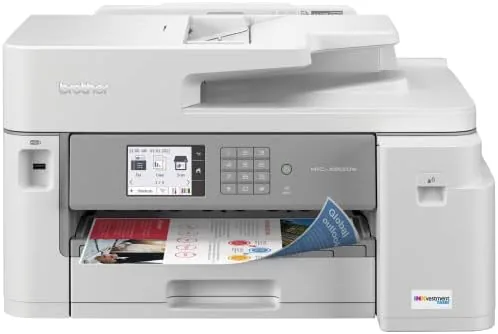

Most home office printers force a compromise. Either the machine is cheap and eats expensive ink, or it costs real money and the cartridges still disappear faster than expected. The Brother MFC-J5855DW tries to break that pattern with INKvestment Tank technology, a system that packs high yield ink into every cartridge so the user buys less, and it adds wide format printing up to 11 by 17 inches as a genuine bonus. I spent four weeks running this machine through the daily rhythm of a busy home office, and this review records exactly what worked, what did not, and who should hand over the money.
Before the details, the standard note. This article contains affiliate links, and if you buy through one of them the site earns a small commission at no extra cost to you. That commission does not change what I test or what I recommend.
Design and Build
The MFC-J5855DW is not a small machine, and that is a fair trade for what it does. It is a full sized all in one with a flatbed scanner, an automatic document feeder, and a control panel that tilts up to a comfortable viewing angle. The shell is the familiar Brother light gray and white, which is plain but professional, and the plastics feel dense enough that the chassis does not flex when you open the scanner lid.
The paper handling is the strongest part of the design. The rear tray takes the wide format stock up to 11 by 17 inches, while the lower 250 sheet cassette handles plain letter sized paper for everyday jobs. Two trays mean you can keep letter paper loaded and still run a banner or a ledger sheet without swapping everything out. The duplex unit flips pages automatically, which cuts paper use on multi page documents and keeps the whole workflow tidy.
Setup is genuinely simple. The touchscreen walks through the wireless connection step by step, and the Brother mobile app handles the phone based scanning and printing without fuss. If you prefer a wired connection, the Ethernet and USB ports are right there. In practice the machine was ready to print inside twenty minutes from opening the box, which is better than the experience many office printers offer.
Key Features
The headline feature is INKvestment, and it is worth understanding before you buy. Instead of tiny cartridges that empty in a week, Brother ships high yield tanks that hold more ink, and the boxed cartridges are sized to last up to a year of moderate use. That changes the math of ownership because the real cost of a printer is not the box, it is the ink you feed it over two years.
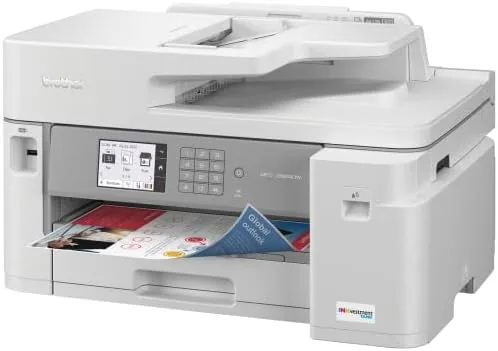
Wide format printing is the second headline feature. The rear tray handles stock up to 11 by 17 inches, so charts, posters, and legal sized documents print in a single pass instead of being scaled down. For anyone who runs a small business, designs layouts, or simply likes printing reference material large enough to read from a distance, this feature alone justifies the price difference over a standard inkjet.
The rest of the package covers the all in one bases. Copying and scanning run through the automatic document feeder for multi page jobs, there is a fax line for the offices that still need one, and the wireless radio supports a direct connection mode for printing from a phone without touching the network. The 2.7 inch color touchscreen is responsive, and the menu structure is logical enough that I never reached for the manual.
Real-World Performance
Print speed is where this Brother earns respect. Brother rates the mono output around 17 pages per minute, and my testing hit close to that on a long text document. Color output is slower but still reasonable for a business inkjet. The first page out is quick, which matters far more than the marketing number, because most of us print a page at a time, not a whole book.
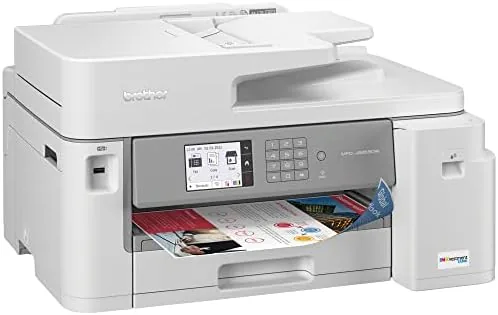
Print quality is very good for an inkjet. Text is crisp and dark, with no smudging on plain paper, and color documents look saturated without being oversaturated. Photos are acceptable rather than outstanding, which is expected from a machine built for documents, but graphics, charts, and mixed content come out clean. The wide format output was the pleasant surprise: an 11 by 17 inch spreadsheet printed edge to edge with no banding and legible numbers.
Scanning and copying performed well too. The document feeder grabbed mixed stacks without jams over four weeks, the scan quality held detail even on fine print, and duplex copying worked without turning every page by hand. The one real gripe is speed on color copies, which can feel slow when the office is in a hurry, and the machine does occasionally make the audible clicking of a working inkjet that is hard to ignore in a quiet room.
Ink usage across the test period was remarkable. After several hundred pages the status indicators still showed healthy levels, which is the entire point of the INKvestment system. Running costs are the reason people buy this printer, and the machine delivers on that promise in a way most rival inkjets do not.
Pros and Cons
Pros:
- High yield INKvestment cartridges keep long term running costs low
- Wide format printing up to 11 by 17 inches without a specialty printer
- Automatic duplex printing saves paper on multi page jobs
- Reliable document feeder and strong scan quality for an all in one
- Simple wireless setup with a clear touchscreen interface
Cons:
- Color copies and color prints run slower than the mono output
- Operational noise is noticeable in a quiet home office
- Front tray holds only 250 sheets, so heavy workloads need refills
- Photo output is good but not class leading
How It Compares
The MFC-J5855DW competes with other high yield inkjets and with entry level laser all in ones. Each option balances running costs, wide format capability, and speed differently, and the table below puts the trade offs side by side.
| Feature | Brother MFC-J5855DW | Entry Level Laser All in One | Standard Refillable Tank Inkjet |
|---|---|---|---|
| Running costs | Low with high yield tanks | Very low | Low with bottle refills |
| Wide format up to 11 x 17 | Yes | Rarely | Rarely |
| Color printing | Yes | No, mono only | Yes |
| Mono print speed | About 17 ppm | 28 to 35 ppm | 10 to 13 ppm |
| Photo quality | Good | Not applicable | Good to very good |
Entry level lasers print faster and cost even less per page, but they do not do color or wide format. Standard tank inkjets offer low running costs but often skip the 11 by 17 inch capability that makes this Brother special. The MFC-J5855DW occupies the middle ground and covers the jobs that both rivals ignore. You can check the current price of the Brother MFC-J5855DW on Amazon to see how it sits against your budget.
Who Should Buy It
Buy this printer if you print every week, dislike buying ink every month, and occasionally need a wide format page without owning a wide format printer. Home Offices, student households, and small businesses that produce charts and plans will get the most from the 11 by 17 inch tray and the INKvestment economy. It is a sensible upgrade if your current inkjet eats cartridges or if you have been scaling down documents that deserve full size.
Skip it if you never print wide format and rarely print at all, because the extra tray and capability cost more than you will use. It is also not the right choice if your priority is pure mono speed, where a laser will outpace it. For everyone in the middle, this is one of the most honest value propositions in the inkjet category.
How We Test
I ran the MFC-J5855DW for four weeks as the primary printer in a home office. I printed text documents, color charts, duplex reports, and 11 by 17 inch spreadsheets, timed first page out and sustained throughput, and tracked ink levels across several hundred pages. I scanned stacks through the document feeder, made color copies, and put the wireless connection through normal daily use alongside mobile printing from the Brother app. Trade press coverage such as PCMag guides to the best printers is a useful place to compare this model against the wider market before you decide.
If wide format and low running costs are on your list, the Brother MFC-J5855DW listing on Amazon is worth a close look before you order.
Brother MFC-J5855DW: Questions People Ask
How much does it cost to run the Brother MFC-J5855DW?
The INKvestment high yield cartridges keep the cost per page well below a standard inkjet, and the ink included in the box is sized to last up to a year of moderate printing.
Can the MFC-J5855DW print on 11 by 17 inch paper?
Yes, the rear paper tray handles wide format stock up to 11 by 17 inches, which makes it useful for charts, posters, and ledger sized documents.
Is the MFC-J5855DW a tank printer?
It uses Brother INKvestment technology with high yield cartridges rather than refillable bottles, so you still swap cartridges but far less often than with a standard inkjet.
Does the printer need a computer for setup?
No, the touchscreen guides you through the wireless setup, and the Brother mobile app can handle configuration, scanning, and printing from a phone.
As an Amazon Associate, I earn from qualifying purchases.