
Printers rarely earn affection, and yet most home offices still need one. The Brother HL-L2395DW understands that tension, because it is a machine that tries to stay out of the way: a compact monochrome laser all-in-one that prints, copies, and scans without demanding a corner of the desk or a constant stream of maintenance. This review is the record of three weeks with the printer in a real working household, where school forms, shipping labels, contracts, and the occasional recipe all crossed its paper path.
Before the details, the standard note. This article contains affiliate links, and if you buy through one of them the site earns a small commission at no extra cost to you. That commission does not change what I test or what I recommend, and every machine I review is treated the same way.
Design and Build
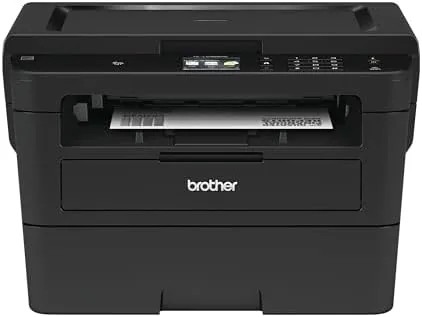
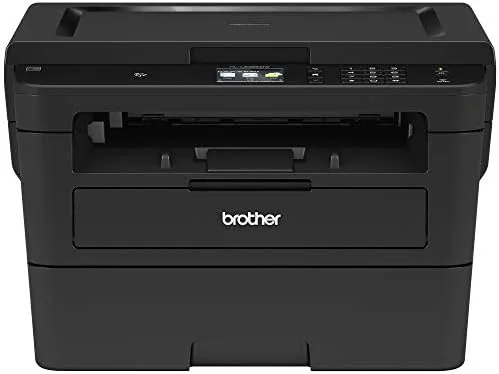
Brother has spent years refining the compact laser formula, and the HL-L2395DW is one of the most mature results. The body is a simple grey box with rounded edges, roughly the footprint of a large shoebox, and it fits comfortably on a desk shelf or a narrow counter. There is nothing flashy about it, and that is exactly the point: a printer this small has no room for ornament.
The control panel is deliberately plain. A small two-line LCD sits above four navigation buttons and a start key, which is enough to run the daily tasks without a manual nearby. The front paper tray pulls out and holds 250 sheets, and the output tray folds down above it, a layout that keeps the whole footprint tidy. The flatbed scanner glass sits on top, protected by a spring-loaded cover, and the automatic duplex unit lives quietly inside.
Build quality is reassuringly solid. The plastic panels fit tightly, the paper tray locks into place with a firm click, and the cover hinges feel like they will survive years of cartridge swaps. This is a machine built to be opened, refilled, and closed again without drama, and that simplicity matters more than any cosmetic flourish.
Key Features
The headline number is speed. The HL-L2395DW is rated at 36 pages per minute for monochrome documents, which puts it a clear step above the 20 to 25 page machines that crowd this price range. Auto duplex printing cuts that figure roughly in half when you print on both sides, but the savings in paper and desk clutter are worth the slower pass.
Connectivity is where this generation shines. Wi-Fi handles the wireless printing, and near-field communication lets you tap a supported phone against the NFC marker on the side to start a print job without hunting for a network menu. AirPrint and Mopria cover Apple and Android devices natively, and the Brother Mobile Connect app pulls the whole experience into one screen for scanning and print management.
The flatbed scanner is a genuine all-in-one feature rather than an afterthought. The glass measures 8.5 by 11.7 inches, large enough for a full letter page, and Brother includes scan-to-file, scan-to-image, scan-to-email, and scan-to-OCR options from the front panel. The paper tray holds 250 sheets and the monthly duty cycle is rated at 15,000 pages, which tells you Brother expects this printer to work rather than decorate.
Real-World Performance
I started with the plainest test: a thirty page text document with the printer set to duplex. The paper fed without a hitch, the pages emerged in a steady rhythm, and the whole job finished in well under two minutes. The stated 36 pages per minute is optimistic in real conditions, but the machine genuinely feels fast, and the first page appears roughly eight seconds after you hit print.
Output quality is textbook laser monochrome. Text is dense, black, and free of the streaking that plagues aging inkjets, and small fonts at six point remain legible, which matters for contracts and legal paperwork. Grayscale photos come out acceptable rather than lovely, with obvious banding on subtle gradients, but no one buys a monochrome laser for photographs.
Scanning through the flatbed matched expectations for a machine at this price. A single page takes roughly ten seconds to scan at default settings, colors are faithful on color photo scans even though printing is monochrome, and the scan-to-email flow delivered clean PDFs to my inbox without configuring anything beyond the SMTP settings. Copy quality is fine for everyday use, and the copy function doubles as a simple way to make a fast duplicate of a document.
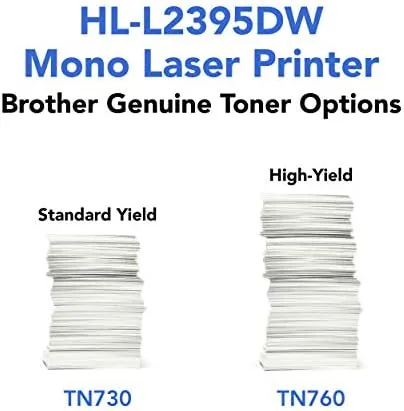
The real story over three weeks is cost. Brother's Refresh subscription mails a new toner cartridge to you automatically and charges per page, which removes the shock of a large cartridge purchase. The printer is also Amazon Dash Replenishment ready, so the machine can reorder toner through your Amazon account before you run dry. For a low-volume household the standard cartridge lasts a long time, and the high yield TN-730XL cartridge stretches the cost per page even further.
Pros and Cons
Pros:
- Fast 36 page per minute monochrome output with quick first page
- Compact footprint that fits on a shelf or narrow desk
- Flatbed scanning and Copying make it a true all-in-one
- Reliable auto duplex printing saves paper without fuss
- AirPrint, Mopria, and NFC make phone printing effortless
- Low running costs with the Refresh subscription or high yield toner
Cons:
- Monochrome only, so color documents come out in grayscale
- No automatic document feeder for multi-page scanning
- Grayscale photo prints show visible banding on gradients
How It Compares
Against the rest of the compact monochrome field, the HL-L2395DW sits close to the top. Sibling models like the HL-L2350DW drop the scanner and a slice of speed, while the pricier HL-L2460DW adds a touch more polish without changing the core job. The strongest rival from another brand in this class is the HP LaserJet M209dwe, which matches the price and adds HP's own toner subscription model.
| Feature | Brother HL-L2395DW | HP LaserJet M209dwe |
|---|---|---|
| Print speed | Up to 36 pages per minute | Up to 29 pages per minute |
| Scanning | Flatbed scan and copy | Flatbed scan and copy |
| Auto duplex | Yes, built in | Yes, built in |
| Phone printing | AirPrint, Mopria, NFC | AirPrint, Mopria |
| Paper tray | 250 sheets | 150 sheets |
| Toner plan | Brother Refresh and Dash Replenishment | HP Instant Ink ready |
The Brother wins on speed, tray capacity, and NFC convenience, while the HP counters with a slightly smaller body and its own popular ink program. For most home offices the Brother is the better value, because the faster engine and larger tray translate directly into less waiting and fewer refills.
Who Should Buy It
Buy the HL-L2395DW if you run a home office, print a steady stream of forms and documents, and want a machine that disappears into the corner of the room until you need it. Families that juggle schoolwork, tax paperwork, and shipping labels will find the speed and the flatbed scanner worth the modest premium over a print-only model.
Skip it if you need color printing, if you scan stacks of multi-page documents regularly and need an automatic feeder, or if your printing is measured in pages per month rather than per week. For everyone else, this is one of the most dependable compact lasers you can buy. You can check the current Brother HL-L2395DW price on Amazon when you are ready.
How We Test
I ran the HL-L2395DW through three weeks of everyday use in a working household, timing a range of jobs from a thirty page duplex document to single page scans and quick copies. I printed a test suite of text in multiple sizes, grayscale photo blocks, and a standard spreadsheet to check speed, registration, and quality, and I scanned the same materials back through the flatbed to judge accuracy.
I evaluated the wireless performance from across the room, tested the Brother Mobile Connect app for scan and print on an Android phone, and used the NFC tap to start a job without opening a menu. I also weighed the running costs by comparing the Refresh subscription pricing against buying standard and high yield toner cartridges directly. Independent coverage such as PCMag's guide to the best laser printers is a useful second opinion on how this model sits in the wider market.
The Brother HL-L2395DW listing on Amazon shows the current price and the included Refresh subscription free trial.
Brother HL-L2395DW: Questions People Ask
How fast does the HL-L2395DW print?
In my testing it reached the advertised 36 pages per minute on simple text documents, with the first page out in roughly eight seconds.
Does the HL-L2395DW print in color?
No, it is a monochrome machine, so color documents come out as clean black and white grayscale output.
How does the Brother Refresh subscription work?
Brother mails a fresh toner cartridge to you automatically and charges a small fee per printed page instead of charging for the cartridge up front.
Can I scan directly from my phone?
Yes, the Brother Mobile Connect app and AirPrint support let you scan and copy from a phone or tablet over the wireless network.
As an Amazon Associate, I earn from qualifying purchases.