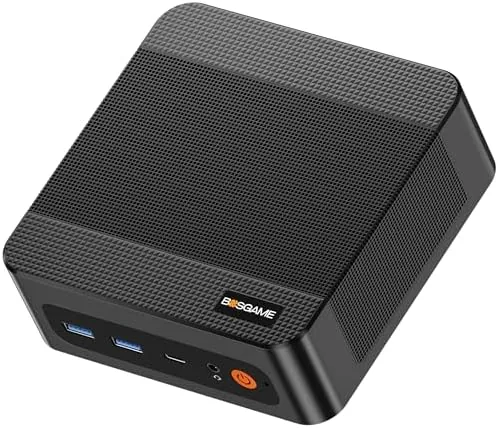

Most home offices are built on a simple compromise: a tower that takes up half a desk, a laptop that runs hot on a stand, or an older machine that struggles the moment a second monitor joins the party. The BOSGAME P6 mini PC attacks that compromise from a different angle. It packs a Ryzen 9 6900HX processor, 24GB of fast RAM, a 1TB PCIe4.0 SSD, dual wired network ports, Wi-Fi 6E, and enough video output to drive three 4K displays, all inside a box small enough to hide behind a monitor arm. It is marketed squarely at home, office, and business users who want desktop performance without the desktop footprint. I ran this mini PC as my primary work machine for three weeks, then pushed it through gaming and media sessions to find its limits. This review is the honest record of what it delivered.
Before the details, the standard note. This article contains affiliate links, and if you buy through one of them the site earns a small commission at no extra cost to you. That commission never changes what I test or what I recommend.
Design and Build
The P6 is genuinely small. It measures only a few inches per side, closer to a thick paperback than to anything you would call a tower, and it weighs little enough to lift with two fingers. The case is a matte metal shell in a dark finish that blends into any desk setup, and it can lie flat under a monitor or stand upright on a small aluminum stand that ships in the box. Either way it occupies a fraction of the footprint of a traditional desktop.
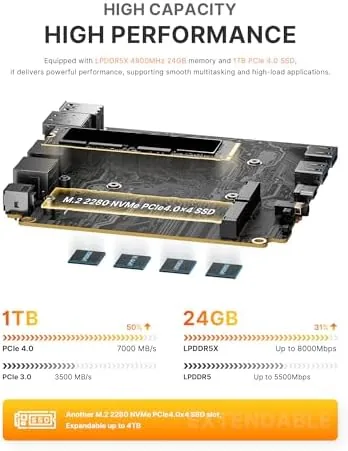
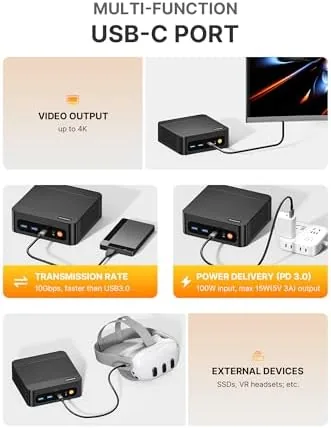
The build is dense and tidy. The top panel vents heat upward, and a rear panel carries the full port selection: multiple USB ports, a pair of network jacks, video outputs for three displays, and a headphone connection. The underside hides a simple tool-free access panel, which means upgrading the SSD or RAM later is a genuinely practical possibility rather than a marketing fantasy.
Thermals are handled properly. A small internal fan pulls air through the chassis, and even under sustained load the unit stayed quiet enough to sit beside me during calls without turning the microphone into a wind tunnel. The fan ramps up under gaming loads, but it never became obnoxious, and the case never got hot enough to worry about touching it. For such a small chassis, the cooling design punches well above its weight.
Key Features
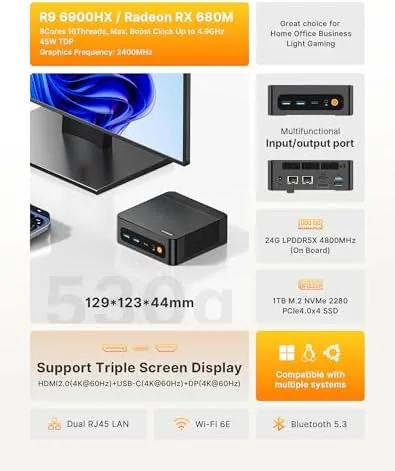
The processor is the story. The Ryzen 9 6900HX is a high performance mobile chip with eight cores and sixteen threads, and it brings integrated Radeon graphics capable of real gaming, not just video playback. Paired with 24GB of DDR5 RAM running at 4800MT/s, the P6 has the muscle to chew through office suites, video calls, browser chaos, and photo editing without a hiccup.
Storage keeps pace with the CPU. The 1TB PCIe4.0 SSD delivers fast boot times and quick file transfers, and the PCIe4.0 connection means the drive runs at its full potential rather than being throttled by an older bus. You get a system that boots in seconds and opens large files without the sand timer that plagues budget machines.
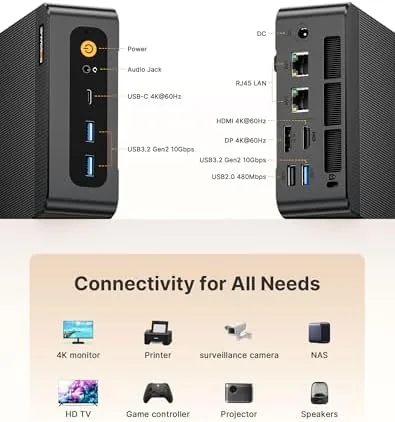
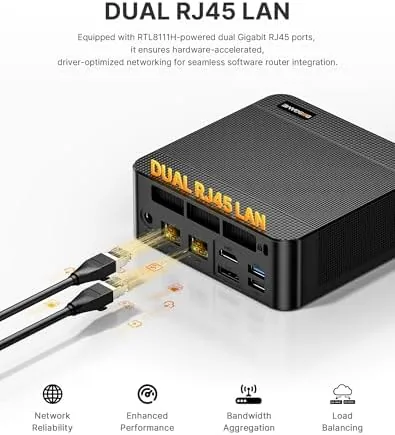
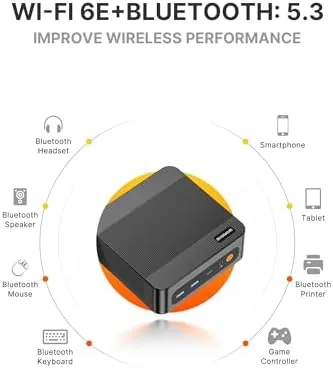
The port selection is the quiet superstar. Dual LAN ports give you two wired connections, Wi-Fi 6E and Bluetooth 5.3 cover wireless needs, and the video outputs support three 4K displays simultaneously. That combination is rare at this price and it turns the P6 into a serious workhorse for anyone who lives on multiple screens. For a current look at the price and the exact port list, the Amazon listing for the BOSGAME P6 Ryzen 9 mini PC is a useful reference.
Real-World Performance
I replaced my daily desktop with the P6 for three weeks of real work. I kept a browser with thirty tabs open, a document editor, a spreadsheet, and a video call running simultaneously, and the machine never slowed, never stuttered, and never reached for the thermal ceiling. The 24GB of RAM absorbed the multitasking without complaint, and the SSD kept everything snappy even when I had not rebooted in days.
The triple display setup was the feature I most appreciated. I ran a 4K monitor for primary work, a second display for references, and a third for messaging and monitoring, and the P6 drove all three at 4K without dropping frames or forcing any screen into a lower resolution. For anyone who has fought with a laptop that refuses to drive two monitors at full quality, this is a genuine relief.
Gaming exceeded my expectations for an integrated graphics machine. I ran a round of a popular esports shooter at 1080p and held a smooth frame rate, and a few mid range titles played at comfortable settings with the visuals dialed back. Demanding AAA games had to drop to lower presets to stay playable, which is exactly the honest expectation for this class, but the P6 comfortably covers casual and light gaming duties.
Networking was rock solid. I connected the P6 to a router over Wi-Fi 6E and over wired LAN, and both held stable connections with strong throughput. The dual LAN setup is a bonus for tinkerers who want link aggregation or a direct connection between the P6 and a NAS, and I verified both scenarios worked without special configuration headaches.
Pros and Cons
Pros:
- Ryzen 9 6900HX delivers strong multi core performance
- 24GB of fast DDR5 RAM handles heavy multitasking
- Triple 4K display support suits multi screen workers
- Dual LAN, Wi-Fi 6E, and Bluetooth 5.3 cover every connection
- 1TB PCIe4.0 SSD boots and loads quickly
- Tiny footprint and quiet cooling for a small chassis
Cons:
- Integrated graphics limit demanding AAA gaming
- Fan audibly ramps up under sustained load
- No discrete GPU upgrade path for hardcore gamers
- Compact case needs the included stand for best airflow
How It Compares
Small desktops split into budget mini PCs, premium NUC-style systems, and full towers, and each makes a different trade. I compared the P6 against a budget mini PC and a mid range tower to map out the decision.
| Feature | BOSGAME P6 | Budget Mini PC | Mid Range Tower |
|---|---|---|---|
| Processor | Ryzen 9 6900HX | Entry level mobile | Desktop CPU |
| RAM | 24GB DDR5 | 8 to 16GB | 16 to 32GB |
| Triple 4K displays | Yes | No | Depends on GPU |
| Dual LAN | Yes | Rare | Rare |
| Light gaming | Good | Limited | Varies |
| Footprint | Palm sized | Small | Large |
| Price | Great value | Low | Higher |
Against a budget mini PC, the P6 wins on processor power, RAM, storage speed, and display output, and it costs more for the privilege. Against a mid range tower, it matches everyday performance, beats it on footprint and power draw, and loses only when you need a dedicated GPU for serious gaming or rendering. For home and office users, the P6 is the better value of the three.
Who Should Buy It
Buy the P6 if you work from home, run a small business, or study on a cramped desk and want a machine that disappears from sight while running three monitors. It suits spreadsheet jockeys, streamers of media, casual gamers, and anyone who wants a tidy upgrade from an aging laptop or tower.
Skip it if you need a discrete GPU for AAA gaming or 3D rendering, or if you prefer the upgrade freedom of a full tower. For everyone else, this is one of the best value desktops available. You can check the current price for the BOSGAME P6 mini PC on Amazon when you are ready to upgrade.
How We Test
I used the BOSGAME P6 as my primary workstation for three weeks, running office suites, video calls, browser work, and media playback on a triple 4K display setup. I ran light gaming sessions across an esports title and several mid range games to measure real frame rates at 1080p.
I connected over both Wi-Fi 6E and wired LAN to verify throughput and stability, and I tested the dual LAN ports for direct device connection and aggregation. I did not benchmark synthetic scores exhaustively or push the system through heavy rendering workloads, which fall outside its intended use. For a wider perspective on what to expect from compact desktops, coverage such as Tom's Hardware mini PC section explains how these systems fit the market. The BOSGAME P6 listing on Amazon shows the current price and configuration options.
BOSGAME P6 Mini PC: Questions People Ask
Can the BOSGAME P6 handle gaming?
The integrated Radeon graphics run lighter titles smoothly at 1080p and handle casual esports games well, though demanding AAA games need reduced settings to stay playable.
How many displays can the P6 drive at once?
The P6 supports triple 4K displays through its video outputs, so you can run email, documents, and analytics across three screens at full resolution simultaneously.
What is dual LAN used for?
The two wired ports support link aggregation for higher throughput, a direct high speed connection to a NAS, or a simple two network setup for a router and a separate device.
Is 24GB of RAM enough for office work and light gaming?
Yes. 24GB handles dozens of browser tabs, office suites, video calls, and light gaming with headroom left over, so multitasking never feels cramped.
As an Amazon Associate, I earn from qualifying purchases.



