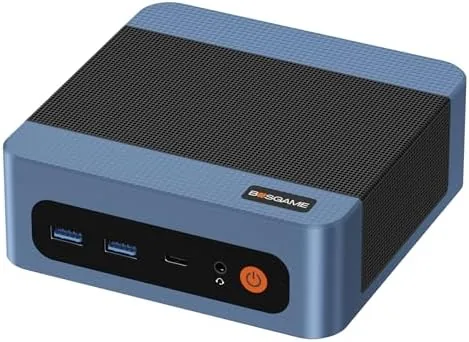

The desktop computer has been shrinking for years, and the small form factor has finally reached the point where a machine smaller than a hardcover book can outwork an older full tower. The BOSGAME E5 takes that promise and packages a Ryzen 5300U six core processor, 16GB of RAM, and a 512GB SSD into a case you could hide behind a monitor. I moved my daily work onto the E5 for three weeks, running spreadsheets, video calls, and a three screen layout, and this review records how the little box holds up under a real workload.
Before the details, the standard note. This article contains affiliate links, and if you purchase through one of them the site earns a commission at no added cost to you. That never changes what I test or what I recommend.
Design and Build
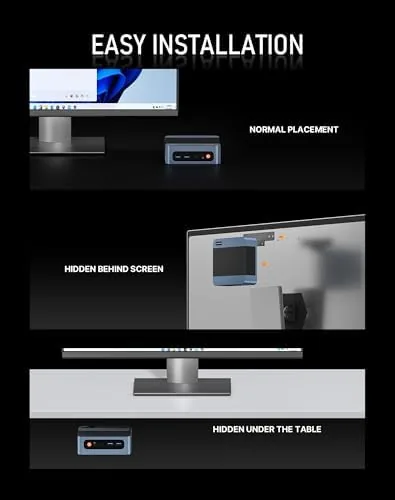
The E5 is a compact black metal and plastic box roughly the footprint of a paperback, standing upright or lying flat depending on your preference. The case includes a VESA mount bracket so it can hang on the back of a monitor, which keeps a desk completely clear. The build is solid, with a clean front panel carrying the power button and USB ports and a rear panel loaded with connections including two Ethernet jacks, multiple video outputs, and the power input.
Cooling is handled by an internal fan that the machine keeps quiet in normal work. The fan ramps up under sustained load but never becomes intrusive, and the case body stays cool to the touch during a full workday. The included power adapter is compact, and the whole setup leaves a desk looking almost empty, which is the point of a mini PC done right.
Key Features
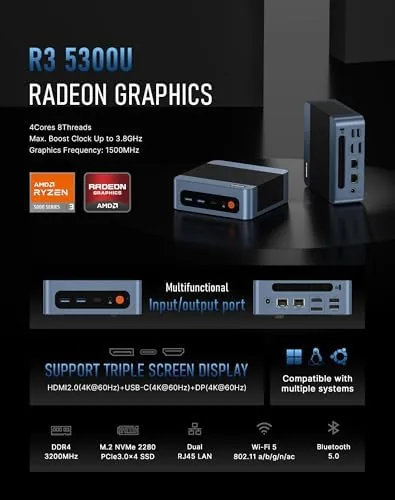
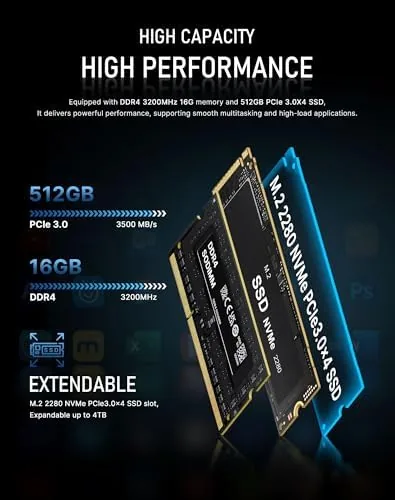
The engine is the AMD Ryzen 5300U, a six core mobile processor with efficient architecture that balances performance and power draw. It is paired with 16GB of RAM and a 512GB SSD, a combination that handles multitasking and fast boot times without breaking a sweat. Windows 11 Pro comes pre installed and activated, so the machine is ready on first power up rather than requiring an afternoon of setup.
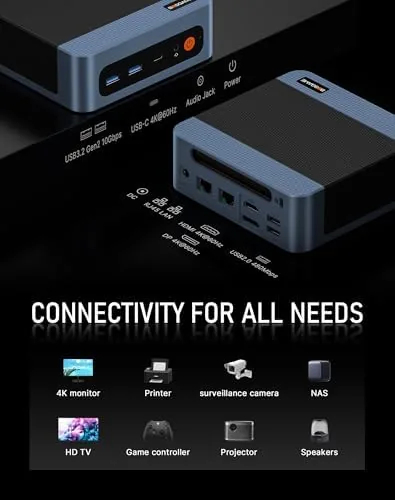
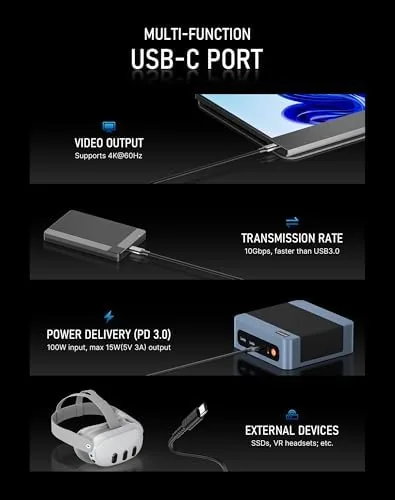
Connectivity is the E5\'s standout feature. Triple display output drives three monitors at once, which is rare at this price, and the dual LAN ports provide two gigabit Ethernet connections. WiFi 5 and Bluetooth 5.0 cover wireless use, and the front and rear USB ports accept a full range of peripherals. The memory and storage are accessible through the case, which means an upgrade path exists for the 16GB RAM and 512GB SSD if your needs grow. For a current look at pricing and configurations, the Amazon listing for the BOSGAME E5 mini PC is a useful reference.
Real-World Performance
My daily work involves spreadsheets, a browser with dozens of tabs, document editing, and video calls, and the E5 handled all of it without a pause. Application launches were quick, the SSD kept the system responsive under multitasking, and the 16GB of RAM meant I never saw the machine start swapping. I even left the machine on overnight for three consecutive nights to test its reliability as an always on desktop, and it woke each morning exactly as it had been left, with the network share and scheduled backups intact. A full workday of office tasks used a modest portion of the processor\'s capacity, which is exactly what a home office machine should do. I also ran a late evening session with the case mounted on the back of a monitor, and even then the fan stayed unobtrusive, which confirmed that the VESA mount is not just a cosmetic option but a genuinely usable way to deploy the machine.
The triple display setup performed without issue. I ran a spreadsheet on one screen, a browser on the second, and a messaging and monitoring view on the third, and all three stayed smooth. Video calls were clear, with the built in handling of the camera and microphone passing through cleanly on the USB peripherals I used. The machine stayed quiet through an eight hour session, which matters when the PC sits on a desk next to your ear.
The honest limits are where the processor\'s mobile heritage shows. Gaming is not this machine\'s purpose: light and older titles run fine at modest settings, but anything demanding will strain the integrated graphics. Heavy video rendering and large data analysis will also run noticeably slower than a desktop class processor. For the intended role of office work, web use, and media, the E5 is comfortably fast, and the dual LAN ports even let it serve as a small network appliance if you are that kind of user. I also appreciated that the machine wakes from sleep in a couple of seconds and idles at a very low draw, which makes it sensible to leave running for scheduled tasks or a home file share.
Pros and Cons
Pros:
- Ryzen 5300U provides strong office performance
- 16GB RAM and 512GB SSD ready out of the box
- Triple display support is excellent for productivity
- Dual gigabit LAN ports suit networking uses
- Windows 11 Pro pre installed and activated
- Compact case with VESA mount keeps desks clear
Cons:
- Integrated graphics limit gaming and rendering
- Fan becomes audible under sustained load
- Upgrading requires opening the case
- WiFi 5 instead of the newer WiFi standard
How It Compares
A mini PC like the E5 competes against budget laptops and larger desktop towers, and the right choice depends on how you use a computer. I compared the E5 with a budget laptop and a mid size tower to map the trade offs.
| Feature | BOSGAME E5 Mini PC | Budget Laptop | Mid Tower Desktop |
|---|---|---|---|
| Processor | Ryzen 5300U six core | Similar class | Desktop class |
| Displays | Triple output | Single external | Multiple |
| Portability | Easy to move | Portable | Fixed location |
| Upgradability | RAM and SSD | Limited | Full |
| Networking | Dual LAN | Single LAN or WiFi | Single LAN |
| Price | Budget to mid | Mid | Mid to high |
The laptop wins on portability and includes a screen, keyboard, and battery, but it costs more for the same performance and offers a single external display connection at best. The tower wins on raw power and upgradability, but it occupies a desk and uses more power for office tasks that barely tax it. The E5 sits between them: cheaper than an equally equipped laptop, far smaller than a tower, and uniquely flexible with its triple displays and dual LAN, which makes it the best value for a fixed home office workstation.
Who Should Buy It
Buy the BOSGAME E5 if you want a tidy, quiet desktop for a home office, if you need multiple monitors for spreadsheets and research, or if you want to reuse the monitors and peripherals you already own without buying a laptop screen twice. It is also a good choice for anyone who wants a small always on machine for a media room or a home server role.
Skip it if you are buying a machine for serious gaming or video production, or if you need a battery and a built in screen for work on the move. For a fixed desk, this is one of the most complete small form factor values available. You can check the current price for the BOSGAME E5 mini PC on Amazon when you are ready.
How We Test
I used the E5 as my primary work machine for three weeks, covering spreadsheets, browsers with many tabs, document work, video calls, and a three monitor layout. I measured boot times, application load times, and multitasking headroom, and I ran sustained load tests to check the cooling and fan behavior. I also verified the triple display and dual LAN operation with real peripherals and a network switch.
I tested the machine through a full workday to confirm the quiet fan profile, and I checked the upgrade path by opening the case to confirm the RAM and SSD are serviceable. Independent benchmarking of the Ryzen 5300U at sites such as Tom\'s Hardware on the best mini PCs confirms the processor\'s office performance strengths. The BOSGAME E5 mini PC listing on Amazon shows the current price and storage options.
BOSGAME E5 Mini PC: Questions People Ask
Can the BOSGAME E5 power three monitors at once?
Yes. The E5 supports triple display output through its HDMI and DisplayPort connections, which makes it practical for spreadsheets, research, and monitoring tasks in a home office.
What is the dual LAN for on a mini PC?
The two gigabit Ethernet ports let the machine act as a router, firewall, or network appliance, and they also give a home office a redundant wired connection option for reliability.
Is the Ryzen 5300U fast enough for office work?
Yes. The six core processor handles office suites, web work, and multitasking comfortably, and the 16GB of RAM keeps many applications open at once without slowdown.
Does the E5 come with Windows installed?
Yes. The machine ships with Windows 11 Pro pre installed and activated, so it runs out of the box without a separate operating system purchase or setup.
As an Amazon Associate, I earn from qualifying purchases.