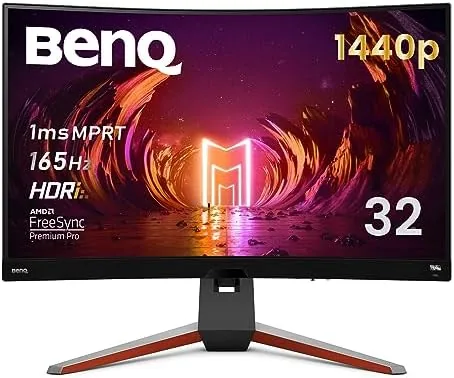

Most gaming monitors arrive in a box with a stand, a cable, and a promise of fast refresh rates, and then expect you to spend an hour in the on-screen menu. The BenQ MOBIUZ EX3210R takes a different view. It is a 32 inch curved 1440p monitor with a 165Hz refresh and a remote control that sits on the arm of your chair, plus an ambient light sensor that adjusts the picture to the room around you. This review is the record of two weeks with the EX3210R on a desk that doubles as a PC battlestation and a console corner.
Before the details, the standard note. This article contains affiliate links, and if you buy through one of them the site earns a small commission at no extra cost to you. That commission does not change what I test or what I recommend.
Design and Build
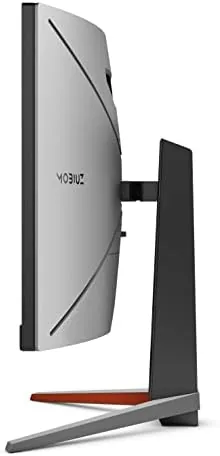
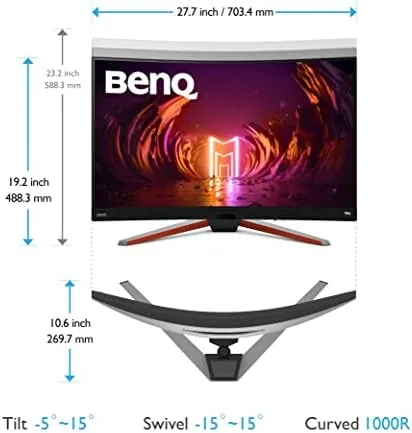
BenQ commits fully to the curved format here, wrapping the 32 inch VA panel around a 1000R radius that pulls the edges toward your eyes. It is the most aggressive curvature in common use, and after a few hours the immersion is real: the image wraps around your peripheral vision in a way a flat panel cannot match. The bezels are thin on three sides, and the whole assembly is finished in a dark charcoal that disappears when the screen is dark.
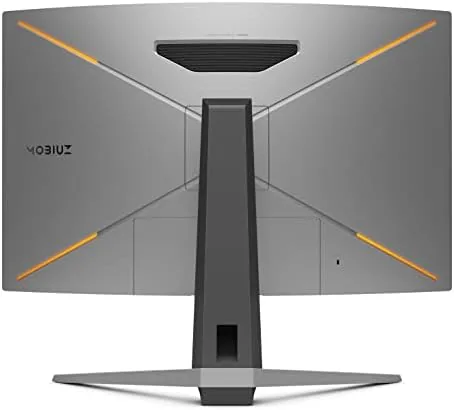
The stand is a heavy C-shaped base that gives the monitor a surprisingly small footprint for its size. Height adjustment, swivel, and tilt all work smoothly, and the panel stays rock solid once set, with none of the wobble that plagues cheaper stands. There is a cable management notch in the neck, a small touch that keeps a desk with a keyboard, mouse, and console looking orderly.
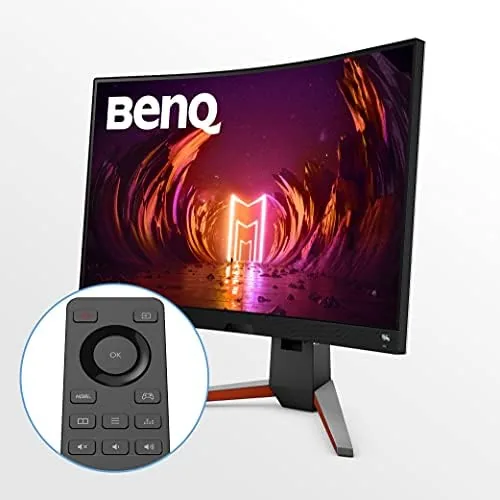
The headline design feature is the remote. A slim clicker lives in a magnetic slot on the bottom edge of the panel, and it controls everything from brightness to input switching to the HDRi modes without you ever reaching for the rear joystick. It is a genuinely useful idea on a monitor this large, because the on-screen menu buttons are a stretch from a typical seating position.
Key Features
The panel is a 32 inch VA display at 2560 by 1440 pixels with a 165Hz refresh and a 1 millisecond MPRT response rating. The VA technology delivers the deep blacks and strong contrast that make dark scenes in games look right, and the 1440p resolution is the sweet spot for modern GPUs, dense enough to look sharp without demanding the horsepower of 4K.
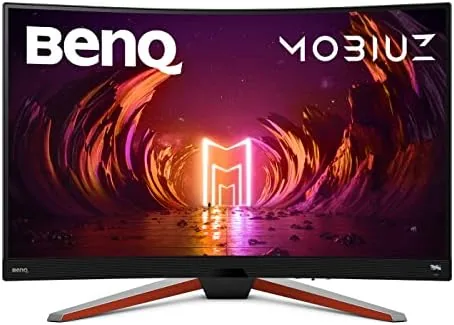
HDRi is the feature BenQ wants to talk about. A small sensor on the front edge reads the ambient light in the room and adjusts the picture in real time, balancing brightness and color so a bright window does not wash out a dark game. It is not a substitute for full-array local dimming, but it is a clever software answer to the number one real-world HDR problem: the room you play in.
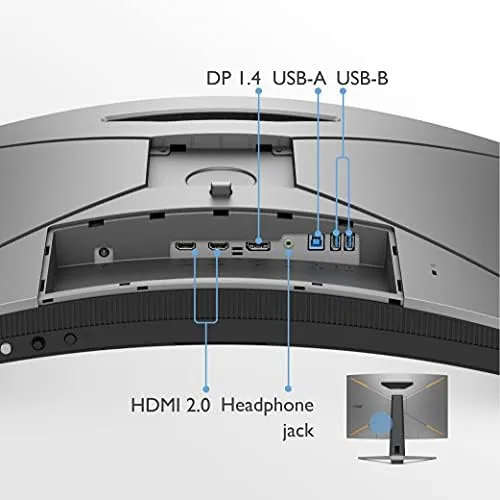
FreeSync Premium Pro keeps the 165Hz refresh in sync with an AMD graphics card or a compatible console, and the panel covers a wide color gamut for a monitor at this price. On the audio side, the EX3210R packs a 2.1 channel system with two main drivers and a small subwoofer, powered by the same circuitry BenQ puts in its dedicated speakers. A USB hub on the rear adds two ports for peripherals, which is a welcome convenience on a desk that runs out of sockets quickly.
Real-World Performance
I ran the EX3210R with a desktop PC driving it at 1440p and, separately, a PlayStation 5 through an HDMI input. On the PC, fast shooters at 165 frames per second felt fluid, and the VA panel handled motion without the ghosting that used to plague curved panels. The 1 millisecond rating is a marketing figure, but in practice I saw none of the smearing that older VA displays suffered, which is what matters.
The remote transformed how I used the monitor. Switching from the PC input to the console, adjusting brightness when the sun dropped, and flipping HDRi between its cinema and gaming presets all took a button press instead of a hunt through a menu. It sounds minor, but across a week of constant switching it saved real friction, and it is the feature that separates this monitor from a dozen otherwise similar panels.
HDRi delivered its best work in a dim evening room. With the lights low, the sensor darkened the image to match, and highlights in a neon-lit game stayed punchy without crushing the shadows. In bright daylight it raised the overall brightness to fight the glare. It will not replace a proper HDR display with local dimming, but for a Monitor That mostly plays in one room it is a practical, noticeable improvement.
The built in audio deserves genuine praise. The 2.1 channel system is loud and full-bodied for desktop speakers, with the little subwoofer adding weight to explosions and music that most monitor speakers completely miss. Dialogue stays clear at moderate volume. It is not a replacement for a good headset in competitive play, but for single-player games and streaming it meant I never reached for separate speakers.
Color accuracy is strong out of the box, with the wide gamut giving games and movies a rich, saturated look. The Color Optimizer menu lets you tune hue and saturation per color channel, which is a nice middle ground between full calibration and a simple picture mode. Calibrated review work is not this monitor's purpose, but for content consumption and gaming it looks excellent.
Pros and Cons
Pros:
- Deep blacks and strong contrast from the VA panel
- Remote control makes inputs and settings genuinely easier
- HDRi adapts the picture to the light in your room
- Surprisingly good 2.1 channel built in audio
- Fully adjustable stand with a small footprint
- FreeSync Premium Pro and a wide color gamut
Cons:
- VA panel is not the fastest for hardcore esports at high settings
- HDRi is a smart tone mapping tool, not true HDR hardware
- Aggressive 1000R curvature is not for everyone
- 1440p is capped at 60Hz over HDMI on some consoles
How It Compares
The EX3210R competes with the middle tier of large curved gaming monitors, where the usual rivals are the Gigabyte M32QC, the Samsung Odyssey G5 series, and the Acer Nitro ED320QR. Each offers a similar 32 inch curved 1440p panel, so the differences come down to extras, response feel, and price.
| Feature | BenQ MOBIUZ EX3210R | Gigabyte M32QC | Samsung Odyssey G5 |
|---|---|---|---|
| Panel | 32 inch curved VA | 31.5 inch curved VA | 32 inch curved VA |
| Resolution and refresh | 1440p, 165Hz | 1440p, 170Hz | 1440p, 165Hz |
| Remote control | Yes, included | No | No |
| Ambient HDR tuning | Yes, HDRi sensor | No | No |
| Built in audio | 2.1 channel with sub | Basic stereo | Basic stereo |
| USB hub | Yes, two ports | Yes | Limited |
The BenQ is the most feature-complete of the three on paper, and the remote and HDRi are things the others simply do not offer at any price. The Gigabyte counters with a slightly higher refresh, and the Samsung undercuts on price in frequent sales. For buyers who value convenience and built in audio, the EX3210R justifies its premium.
Who Should Buy It
Buy the EX3210R if you split your time between a PC and a console, if you want a large curved panel without the GPU demands of 4K, or if the idea of adjusting your monitor from the couch with a remote sounds appealing. The built in speakers make it a strong choice for a small setup where separate audio would clutter the desk.
Skip it if you play nothing but fast competitive shooters where every millisecond counts, if true HDR with local dimming is a must, or if you dislike aggressive curvature. For everyone else, it is one of the most thoughtfully equipped monitors in its class. You can check the current BenQ MOBIUZ EX3210R price on Amazon when you are ready.
How We Test
I tested the EX3210R across two weeks with a desktop PC driving it at 1440p and a PlayStation 5 connected over HDMI, covering shooters, single-player action games, and streamed movies. I ran a set of color and contrast test patterns to judge out-of-box accuracy, then spent time in the Color Optimizer menu to see how far the tuning options go.
I used the remote as my only control surface for the second week to test whether the convenience holds up, and I measured how the HDRi sensor reacted as room lighting changed through the day. I did not run a hardware colorimeter for this review, so treat the color notes as subjective rather than lab results. Independent coverage such as Tom's Guide roundups of gaming monitors is a good second opinion on how the EX3210R ranks against the wider field.
The BenQ MOBIUZ EX3210R listing on Amazon shows the current price and included accessories.
BenQ MOBIUZ EX3210R: Questions People Ask
Is the EX3210R good for console gaming?
Yes, the 1440p panel and HDMI inputs let a PlayStation 5 or Xbox run at 1440p with high refresh, and the remote makes switching between console and PC painless.
What does the HDRi mode actually do?
A built in ambient light sensor reads the room and tunes brightness, contrast, and color so the image stays balanced whether you play in sunlight or a dark room.
Are the built in speakers good enough to skip a headset?
The 2.1 channel setup with a subwoofer is genuinely listenable for games and movies, though serious play still benefits from a dedicated headset.
Can the monitor be wall mounted?
Yes, the panel carries a standard 100 by 100 millimeter VESA mount if you want to remove the height adjustable stand.
As an Amazon Associate, I earn from qualifying purchases.



