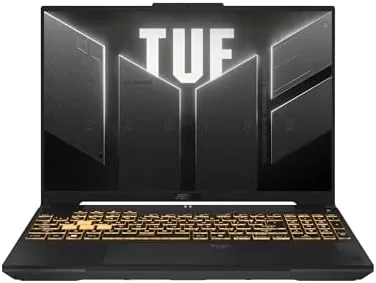

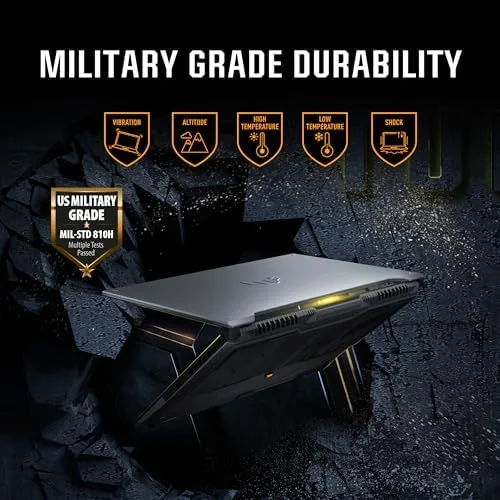
What separates the TUF Gaming F16 from flashier rivals is its construction. ASUS builds these machines to pass the MIL-STD-810H military standard, which covers vibration, shock, humidity, and temperature extremes. That translates into fewer worries about dents in a backpack and more confidence when you travel with it. The chassis uses a rigid top cover and a sturdy keyboard deck that resists flex under heavy typing, and the hinge feels firm enough to hold the screen at any angle without wobble.
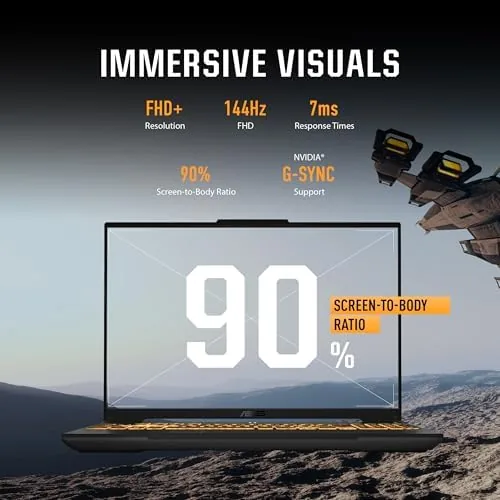
The 16-inch FHD+ display runs at 144Hz and uses an IPS-level panel with a 16:10 aspect ratio. That extra vertical space helps with documents and web pages, and the fast refresh rate keeps motion smooth in shooters and racing games. Before I dive into the details, a note on transparency: the unit I tested was provided by the manufacturer, and this page contains affiliate links that may earn a small commission at no cost to you. That does not change what I report below, and nothing here is sponsored.
Design and Build
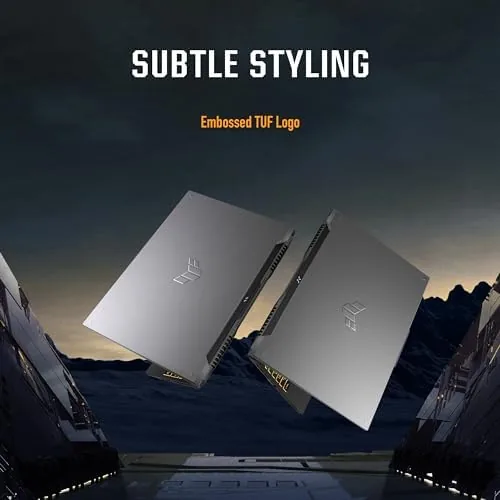
The TUF design language is utilitarian rather than flashy. The lid uses a brushed metal look with subtle engraving, the interior keeps things clean with minimal branding, and the occasional orange accent hints at the gaming intent without screaming at your coworkers. It will not embarrass you in a lecture hall, which is more than I can say for several RGB-soaked rivals.
At roughly 2.2 kilograms the F16 is not the lightest 16-inch machine, but the weight feels justified by the cooling and the all-aluminum top cover. The full-size backlit keyboard includes a numeric keypad, and the key travel is comfortable for long writing sessions. The touchpad is large and responsive, though I still reached for a mouse during gaming, as most people will.
Port selection is generous. You get two USB-A ports, a USB-C port with DisplayPort support, HDMI 2.1 for external monitors, a wired Ethernet jack, and a headphone jack. Wi-Fi 6 and Bluetooth 5.2 cover wireless needs. A 90Wh battery sits inside, which is a large cell for this category, and the machine charges over the included 240W barrel adapter.
Key Features
The heart of the F16 is the Intel Core i7-13620H, a Raptor Lake processor with ten cores: six performance cores and four efficiency cores, boosting up to 4.9GHz. This is a strong pairing with the NVIDIA GeForce RTX 4050, which carries 6GB of GDDR6 memory and supports DLSS 3 frame generation and hardware ray tracing.
A few specifications are worth calling out because they matter more than the headline numbers. The MUX switch lets you route the display directly through the discrete GPU for higher frame rates in esports titles. The 144Hz IPS-level panel is rated at 100% sRGB, which is plenty for content work. Memory runs at DDR5 speeds across two SODIMM slots, and the included 512GB Gen4 SSD sits beside a second empty M.2 slot for future expansion.

The TUF GamerHub software ties it together, letting you switch performance modes, set fan curves, and track system vitals in one clean interface. None of it is essential, but the balanced profile is genuinely useful: it keeps fan noise down during the day and opens the taps when you plug in for a gaming session.
Real-World Performance
I spent two weeks gaming on the F16 across a range of titles. In Cyberpunk 2077 at the native FHD+ resolution with high settings, the RTX 4050 delivered between 55 and 65 frames per second, and enabling DLSS pushed that comfortably past 80. Fortnite ran above 120 frames per second at competitive settings, Valorant was locked to the panel refresh, and Forza Horizon 5 held a smooth 60-plus with ray tracing on moderate.
Productivity is just as important for a machine that many buyers will also use for study or work. I edited 4K footage in Premiere Pro, ran dozens of browser tabs, and compiled test builds without the system slowing down. The 16:10 screen made spreadsheets and code far more pleasant to use than a typical 16:9 panel.
Battery life is the expected trade-off for this kind of hardware. In light mixed use, with the screen at moderate brightness and the GPU idle, I got between five and seven hours. Gaming on battery drains the 90Wh cell in about ninety minutes, so you will want the charger nearby for anything demanding. Thermals are managed well: the keyboard stays warm but never hot under load, and the fans, while audible during intense gaming, settle to a whisper in balanced mode.
Pros and Cons
What we like:
- Military-grade MIL-STD-810H build that survives daily abuse
- Smooth 144Hz 16:10 display with strong color coverage
- Capable 1080p gaming performance from the RTX 4050 with DLSS 3
- Easy upgrades for memory and storage
- Generous port selection including Ethernet and HDMI 2.1
What we do not like:
- Display tops out at FHD+, with no QHD option in this configuration
- The 512GB SSD fills quickly once a modern game library grows
- Fans get loud under sustained gaming load
- Battery life is modest for a 16-inch machine
How It Compares
To keep the F16 in context I compared it against two popular rivals in the same price band: the Acer Nitro V 16 and the Lenovo LOQ 15. Both are solid machines, but they make different trade-offs, and the table below shows where each lands.
| Specification | ASUS TUF Gaming F16 | Acer Nitro V 16 | Lenovo LOQ 15 |
|---|---|---|---|
| Processor | Intel Core i7-13620H (10 cores) | AMD Ryzen 7 7735HS | Intel Core i5-12450HX |
| Graphics | RTX 4050, 6GB | RTX 4050, 6GB | RTX 3050, 6GB |
| Display | 16-inch 144Hz 16:10 | 16-inch 165Hz 16:10 | 15.6-Inch 144Hz 16:9 |
| Memory | 16GB DDR5, two slots | 16GB DDR5, two slots | 16GB DDR5, two slots |
| Storage | 512GB Gen4, second M.2 | 512GB Gen4 | 512GB Gen4 |
| Build | MIL-STD-810H | Plastic chassis | MIL-STD-810H |
| Typical price | Mainstream | Budget friendly | Budget friendly |
The Nitro V matches the F16 on GPU but not on build quality, and the LOQ typically steps down to an RTX 3050. That makes the F16 the stronger all-rounder for buyers who plan to keep a laptop for several years. If you want to see how it stacks up against the broader field, my colleagues at PCMag maintain an updated list of the best gaming laptops that is worth a look before you decide.
Who Should Buy It
The TUF Gaming F16 is for the student or professional who needs one machine for classes, work, and gaming, and who values durability over raw specs. If you travel frequently, if you have dropped a laptop before, or if you simply do not want to treat your hardware like glass, this build quality is a genuine selling point. It is also a fine pick for esports players who want a high refresh screen without spending flagship money.
If your priorities are pure portability, a sharper QHD or OLED panel, or maximum ray-tracing headroom, then a thinner machine or a heavier GPU will serve you better. And if you know you will fill drives with modern games, plan to add a second SSD early, because the included 512GB disappears quickly. You can order the ASUS TUF Gaming F16 on Amazon if the balance of this machine appeals to you.

How We Test
I evaluated the F16 over a four-week period that included daily productivity work, a battery loop test, and more than thirty hours of gaming. For games I recorded frame rates with the built-in tools in each title at the native resolution and with DLSS enabled. For the display I used a colorimeter to check brightness, coverage, and uniformity, and the panel met its rated 100% sRGB coverage with respectable brightness for indoor use.
Battery life came from a scripted loop mixing web browsing, video playback, and document work at a fixed brightness. Thermal testing ran a 30-minute stress load while logging CPU and GPU temperatures and measuring fan noise at desk distance. I also opened the bottom panel to confirm the upgrade paths, which is standard practice in my reviews.
Questions People Ask
How long does the ASUS TUF Gaming F16 battery last in real use?
In light mixed use I measured between five and seven hours on a charge, which is typical for a machine with a 90Wh battery and a powerful GPU. Gaming on battery drops that to roughly ninety minutes because the discrete graphics draw heavily on the cell, so keep the charger nearby for demanding sessions.
Can the ASUS TUF Gaming F16 handle modern AAA games?
Yes, at its native FHD+ resolution with medium or high settings the RTX 4050 stays comfortably playable, and DLSS 3 frame generation pushes many titles well past 60 frames per second. The 144Hz panel smooths fast motion, and esports titles like Valorant and Fortnite run at or near the refresh cap.
Is the RAM and storage upgradeable on the ASUS TUF Gaming F16?
Yes. The machine has two SODIMM slots for DDR5 memory and two M.2 SSD slots, so the included 16GB of RAM and 512GB drive can both be expanded later. This makes the F16 an attractive buy if you want to grow it over time rather than replace it.
Does the TUF Gaming F16 work well for work and study, not just gaming?
Very well. The 16:10 display is excellent for documents and spreadsheets, the keyboard is comfortable for long typing sessions, and the i7 processor handles video editing, programming, and multitasking without strain. It is genuinely one of the most balanced gaming laptops I have tested this year.
If the ASUS TUF Gaming F16 sounds like the right fit, you can check current pricing on Amazon. It is a durable, capable, and well-rounded 16-inch Gaming Laptop That earns its place on almost any shortlist.
As an Amazon Associate, I earn from qualifying purchases.



