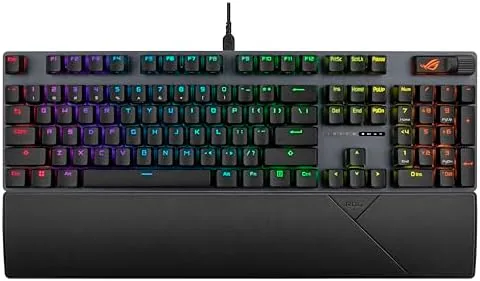

Mechanical keyboards are judged by the sound they make almost as much as the feel they deliver. A loud, clacky board can fill a room with noise, which is exciting for the first week and exhausting for the person who has to listen to it every day. The ASUS ROG Strix Scope II arrives with a different goal in mind. It pairs Snow Linear switches with internal sound-dampening foam, and the result is a keyboard that types with a soft, contained thump rather than a sharp crack. I spent two weeks with this board on my desk, running it through long gaming sessions, heavy typing days, and Wireless use, and I kept a detailed record of how it performed.
Before the details, the standard note. This article contains affiliate links, and if you buy through one of them the site earns a small commission at no extra cost to you. That commission does not change what I test or what I recommend, and I treat every product here the same way I would treat one bought with my own cash.
Design and Build
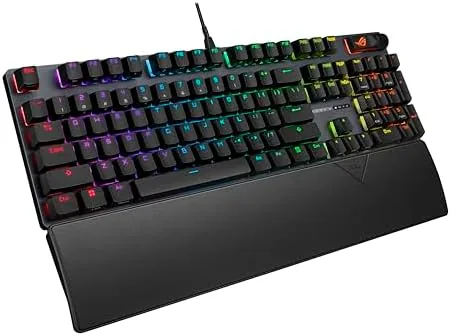
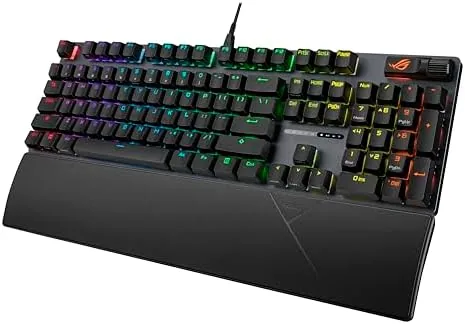
The Strix Scope II has a full tenkeyless-sized layout with a dedicated arrow cluster and a full row of navigation keys, which puts it at a practical middle point between compact and full size. The frame is finished in a matte black that keeps fingerprints mostly at bay, and the brushed metal top plate adds a layer of rigidity that prevents any flex when you press hard near the edges. Lifting the board from the desk, the weight is reassuring without being excessive, and the build feels solid in a way that cheaper boards cannot match.
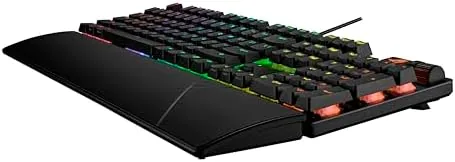
The included wrist rest is magnetic and clips on with a firm snap, holding the keyboard at a comfortable angle for long sessions. On the back edge you find a three-way toggle for switching between wired, 2.4GHz wireless, and Bluetooth modes, which means you do not have to fish through menus to change how the board connects. The cable detaches at the rear for clean storage, and the USB port on the left edge doubles as a passthrough for a wired mouse or a headset dongle.
The keycaps are PBT doubleshot plastic rather than the cheaper ABS you often find at this price, which means the legends are molded into the cap instead of printed on top. After two weeks of constant use there is no shine on the keycaps and no fading on the letters, which is a small detail that makes a real difference over the life of the product.
Key Features
The headline feature is the pair of technologies that control sound. The ROG NX Snow Linear switches are pre-lubricated at the factory, so the stem glides through its travel with almost no audible scratch, and a layer of sound-dampening foam sits inside the case to swallow the echo of each bottom-out. The result is a board that is noticeably quieter than a typical linear mechanical keyboard, which makes it a strong candidate for shared rooms, open offices, and late-night gaming sessions.
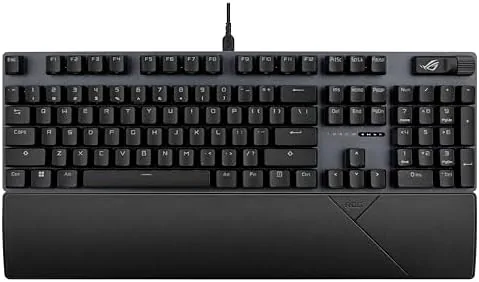
ROG NX Snow switches have a smooth linear travel and a short actuation point, which suits fast games where keystrokes need to register without extra force. Because there is no tactile bump, you can bottom out quickly and rhythmically, and the factory lubrication keeps the feel consistent across every key. The spacebar and stablilizers on the large keys are tuned to produce a clean thock instead of a rattle, and the difference is audible within the first minute of typing.
For streamers, the board includes a set of media controls and a dedicated mute button that sits above the top-right corner of the number pad area. The multi-function controls let you adjust volume, skip tracks, and mute your microphone without reaching for software, and the scroll wheel is smooth and responsive. The F-row also carries secondary functions for lighting, windows lock, and key remapping, all accessible through the ASUS Armoury Crate software.
Real-World Performance
I tested the Strix Scope II across three environments: a competitive shooter, a long typing day, and a week of wireless use on a laptop. In the shooter, the linear switches registered fast and the short actuation distance meant my fingers did not have to travel far, which translated to quicker reaction in chaotic moments. The sound-dampening foam did its job, because the board stayed quiet even when I was mashing keys under pressure.
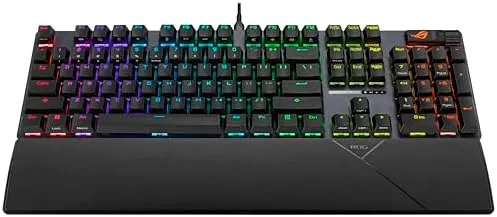
For typing, the results were more mixed, and I want to be honest about that. Linear switches with no tactile feedback are superb for gaming but require a period of adjustment for touch typists, because there is no bump to confirm that a key has engaged. After a few hours I found my rhythm, and the smoothness of the switches made the board pleasant to write on, but a tactile or clicky switch remains the better choice if typing is your primary use.
Wireless performance deserves its own note. Over the 2.4GHz dongle, I noticed zero input delay in gameplay, and battery life stretched across the entire two-week test with the RGB lighting at a modest brightness. Bluetooth worked cleanly for switching between a laptop and a tablet, and the pairing process was straightforward. If you game competitively, use the 2.4GHz mode; if you want to hop between devices, Bluetooth is a welcome bonus.
Pros and Cons
Pros:
- Quiet, thocky sound from the pre-lubricated Snow Linear switches and foam
- Tri-mode connectivity across wired, 2.4GHz, and Bluetooth
- PBT doubleshot keycaps resist shine and fading
- Magnetic wrist rest that holds firm under heavy use
- Handy media and mute controls for streaming and daily use
Cons:
- Linear switches lack tactile feedback for confident typing
- RGB lighting is bright but the software adds setup friction
- Wrist rest is comfortable but not adjustable in height
How It Compares
I set the Strix Scope II next to a typical full-size mechanical gaming keyboard in the same price band to see where the differences land. The comparison below covers the areas that matter most to a buyer deciding between the two.
| Feature | ASUS ROG Strix Scope II | Standard Gaming Keyboard |
|---|---|---|
| Switch type | Pre-lubed linear, foam-damped | Budget linear or clicky |
| Connectivity | Wired, 2.4GHz, Bluetooth | Wired only |
| Keycaps | PBT doubleshot | ABS, printed legends |
| Noise level | Quiet, contained thock | Loud, clacky |
| Extra controls | Media wheel and mute button | Usually none |
| Wrist rest | Magnetic, included | Often separate or absent |
The Strix Scope II earns its premium by bundling wireless connectivity, better keycaps, and quieter acoustics into one package. A basic wired board still has a place if you want the simplest possible setup and the lowest price, but you give up the flexibility of tri-mode switching and the refinement of the damped build. For most buyers, the extra cost of the ROG board buys a meaningfully better daily experience.
Who Should Buy It
The ASUS ROG Strix Scope II is the right choice if you game in a shared space and want a mechanical feel without the noise, if you want one keyboard that moves between a desktop and a laptop without cable clutter, or if you stream and need quick access to mute and media controls. It is equally at home in an office that permits mechanical boards, because the sound profile is polite enough not to irritate the people around you.
Skip it if you are a touch typist who needs a tactile bump to type confidently, or if you prefer the thunk of a heavy clicky switch. For everyone else, this is a well-rounded board that covers gaming, typing, and streaming in one package. You can check the current ASUS ROG Strix Scope II price on Amazon when you are ready.
How We Test
I evaluated the Strix Scope II over a two-week period in three roles. For gaming, I played a competitive shooter and a slower strategy title to judge both fast reaction and steady sustained use. For typing, I wrote this review and several other long documents on the board to assess comfort, accuracy, and the adjustment curve of linear switches. For wireless, I used the 2.4GHz dongle and Bluetooth across a desktop and a laptop, timing battery life and checking for input lag in gameplay.
I measured the noise output subjectively against a standard mechanical board rather than with a decibel meter, and I judged build quality by flex, stability, and how the keycaps and switches held up over repeated use. Independent coverage such as Tom's Hardware keyboard testing is a useful place to cross-check switch behavior and long-term durability before you spend.
The ASUS ROG Strix Scope II listing on Amazon shows the current price, color options, and package contents.
ASUS ROG Strix Scope II: Questions People Ask
What switches does the ROG Strix Scope II use?
This version ships with ROG NX Snow Linear switches, which move in a straight line with no tactile bump and arrive pre-lubricated from the factory, and the sound-dampening foam keeps the board noticeably quiet.
Does the Strix Scope II work without a cable?
Yes, the keyboard connects over the 2.4GHz wireless dongle or Bluetooth, and it can also be used wired, so it works with a desktop, a laptop, or a console that accepts keyboard input.
Is the keyboard compatible with PlayStation and Xbox?
The wired USB connection works on consoles that accept keyboard input, and the wireless modes are designed for PC use first, so check your console support before buying.
Are the keycaps easy to replace?
The PBT doubleshot keycaps sit on standard switches with a familiar stem layout, so they come off cleanly with a puller and can be swapped for a custom set if you want a different look.
As an Amazon Associate, I earn from qualifying purchases.