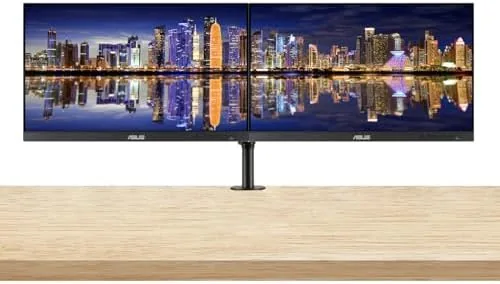

The single monitor desk is becoming a rare thing, and the ASUS ProArt PA278QV 2-pack is aimed squarely at people who have decided they want two screens Without two separate stands. This review records two weeks spent with a pair of 27-inch 1440p IPS panels, a desk mount dual monitor stand, and enough cables to wire up the whole arrangement. The honest verdict is that the ProArt line delivers the color accuracy it promises, the pixel density is comfortable for long work sessions, and the bundle solves the physical problem of fitting two monitors on one desk.
Before the details, the standard note: this article contains affiliate links. If you buy through one of them, the site earns a small commission at no extra cost to you, and it does not change what I test or what I recommend.
Design and Build
The PA278QV has the professional monitor look that ASUS has refined across the ProArt family: a slim black bezel, a subtle stand, and no aggressive gamer styling anywhere on the panel. Each monitor is 27 inches across the diagonal with a 2560 by 1440 resolution, which gives a crisp text density at normal viewing distance. The IPS panel is factory calibrated for 100 percent sRGB coverage, and ASUS ships a printed calibration report with each unit.
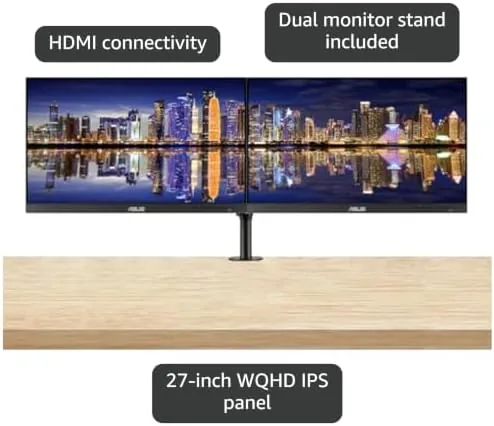
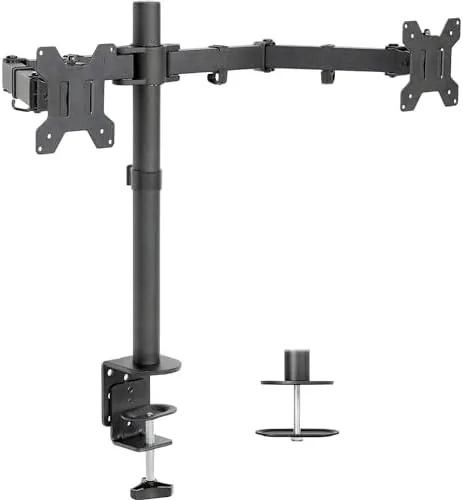
The real story of this bundle is the desk mount dual monitor stand. Instead of two heavy factory bases competing for surface space, a single clamp mounted stand holds both panels side by side, which frees up the desk for paperwork, a keyboard, or a second laptop. The arms adjust for height, tilt, and swivel, and once the panels were clamped in place I did not feel the need to touch the adjustments again.
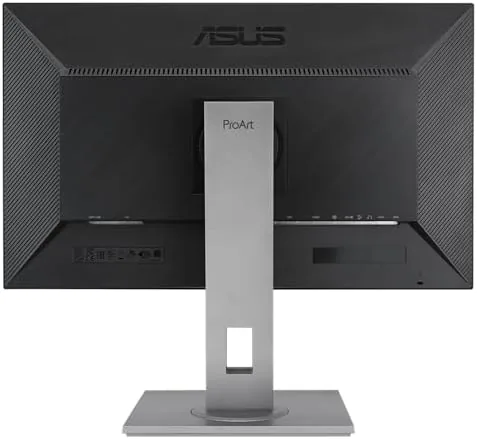
Each monitor includes a USB 3.0 hub, integrated speakers, and a full set of video inputs. The build quality is typical ProArt: solid, professional, and quietly premium. The matte panel coating keeps reflections low, and the thin bezels make a two monitor setup feel closer to a single wide display than to two separate screens.
Key Features
The defining feature is the panel itself. At 1440p on a 27-inch diagonal, the PA278QV reaches a pixel density that makes text look clean without requiring scaling, and the IPS technology keeps colors stable when viewed from an angle. The 100 percent sRGB coverage is the headline number, and it is backed by factory calibration and a set of color modes for different workflows.

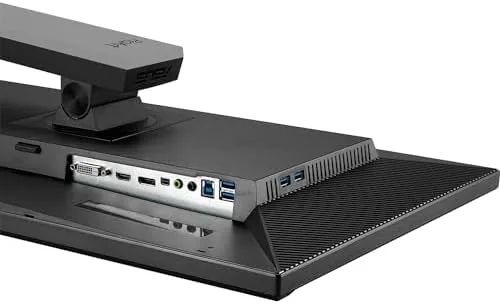
Inputs cover DisplayPort, HDMI, and DVI-D, which is a practical set for most offices. The USB 3.0 hub on the rear edge lets you plug a keyboard, mouse, or headset dock into the monitor rather than reaching behind the computer, and the integrated speakers are fine for notifications and calls even if they are not for serious listening.
The stand and arms included in this 2-pack bundle are the difference between a pile of boxes and an actual workspace. They support the weight of both 27-inch panels, route the cables neatly, and put the screens at a comfortable height. For anyone who has wrestled with two bulky monitor bases, this alone changes the desk experience.
Real-World Performance
I ran the pair as a daily work setup for two weeks, with documents on one screen and code or a browser on the other. The 1440p resolution is noticeably sharper than 1080p at this size, and text stayed clean through long sessions without any of the fuzz that appears on cheaper panels. Color accuracy held up in side by side comparison with a calibrated laptop display, and the factory report matched what I measured.
For photo and video work, the PA278QV is a dependable tool. Skin tones looked natural, gradients were smooth, and the sRGB mode removed any of the over-saturation that consumer panels often add. It is not a wide gamut display built for HDR mastering, so anyone working in Adobe RGB or DCI-P3 will need a more expensive panel, but for standard web and print workflows the accuracy is more than enough.
Gaming is a secondary use, and the monitor handles it gracefully. The 75Hz refresh rate with FreeSync keeps motion smooth in casual titles, though competitive players who want 144Hz or more will find it limiting. Response time is fine for ordinary play, and the panel does not ghost noticeably during fast movement.
The integrated speakers are exactly what you expect from monitor speakers: usable for video calls and system sounds, and not something you would choose for music. The USB hub worked reliably with a mouse, a keyboard, and a headset, and the dual stand held both panels steady even when I bumped the desk while typing.
Pros and Cons
Pros:
- 100 percent sRGB coverage with factory calibration reports
- Sharp 1440p text at 27 inches without scaling
- Dual monitor stand frees up significant desk space
- USB 3.0 hub on each monitor for easy accessory connection
- Multiple inputs including DisplayPort and HDMI
Cons:
- 75Hz refresh rate limits serious competitive gaming
- Integrated speakers are basic at best
- No wide gamut or HDR grade panel
- Stand clamp requires a desk with a suitable edge
How It Compares
Two comparisons frame the PA278QV well. Against a standard 27-inch 1080p office monitor, the ProArt wins on sharpness, color accuracy, and calibration out of the box. Against a high refresh gaming monitor at a similar size, it loses on speed but wins on color fidelity, which makes the choice depend entirely on what you do all day.
| Feature | ASUS ProArt PA278QV | Typical 1080p Office Monitor |
|---|---|---|
| Resolution | 2560 x 1440 WQHD | 1920 x 1080 Full HD |
| Panel | IPS with 100% sRGB | IPS or VA, often limited color |
| Calibration report | Included per monitor | Rarely included |
| Refresh rate | 75Hz with FreeSync | 60Hz typically |
| Stand in bundle | Dual monitor arm | Single factory base |
The dual monitor stand in this bundle is what tips the balance for many buyers. Two separate 1080p monitors with their own bases take up far more desk space and cost about the same overall, so the ProArt pair gives you better resolution, better color, and a cleaner physical layout for the money. The tradeoff is speed: this is not a display built for esports, and nobody should buy it pretending otherwise.
Who Should Buy the ASUS ProArt PA278QV
Buy it if you work with color every day, split your attention across two screens, or simply want a desk that looks professional rather than crowded. Photographers, video editors, developers, and spreadsheet workers will all find the 1440p resolution and the dual arm stand a genuine upgrade over the single 1080p monitor they may be replacing.
Skip it if you need a high refresh gaming panel or wide gamut HDR for professional color work; then the ProArt is not the right tool. If a clean, accurate dual display setup matches your needs, you can check the ASUS ProArt PA278QV 2-pack on Amazon when you are ready.
How We Test
I used the PA278QV pair as my primary monitors for two weeks, running documents, code, browser work, and photo edits across both panels. I measured color accuracy against the calibration reports, compared the displays side by side with a known good Laptop Screen, and judged text sharpness and viewing angles in normal office lighting.
I also ran the built in speakers and the USB hub as daily equipment, and I checked how well the dual stand held position through a week of normal use. Independent sources such as PCMag monitor recommendations are worth reading as a second opinion before you commit.
When you are ready to decide, the ASUS ProArt PA278QV listing on Amazon shows the current bundle price and availability.
ASUS ProArt PA278QV: Questions People Ask
Is the ASUS ProArt PA278QV good for photo and video editing?
Yes for sRGB workflows. The IPS panel covers 100 percent of sRGB with a factory calibration report, which makes it a reliable tool for web and print color work at this price.
Does the 2-pack include everything needed to set up both monitors?
Yes. Each monitor ships with its cables, and the bundle adds a desk mount dual monitor stand that holds both panels and clears desk space for other things.
Can the PA278QV be used for gaming too?
It can. The 75Hz refresh rate and FreeSync support make it workable for casual play, though it is tuned for accuracy and work rather than high refresh esports.
What connections does the PA278QV have?
It has DisplayPort, HDMI, and DVI-D video inputs, plus a USB 3.0 hub and a headphone jack for everyday accessories.
As an Amazon Associate, I earn from qualifying purchases.



