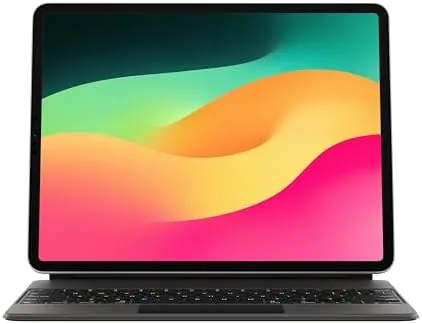

The iPad is a remarkable machine, but its accessories have always struggled to close the gap between a tablet and a laptop. The Apple Magic Keyboard was the product that finally made a credible case that an iPad could replace a computer for real work. It is a keyboard case with a floating cantilever design, backlit keys, and a built-in trackpad, and it connects to the iPad through the Smart Connector, so there are no batteries to charge and no Bluetooth pairing to manage. This review records several weeks of using this keyboard with an iPad Pro and an iPad Air, testing typing, navigation, and the daily rhythm of portable work.
Before the details, the standard note. This article contains affiliate links, and if you buy through one of them the site earns a small commission at no extra cost to you. That commission does not influence what I test or what I recommend, and every product here is judged with the same standards I would apply to my own purchase.
Design and Build
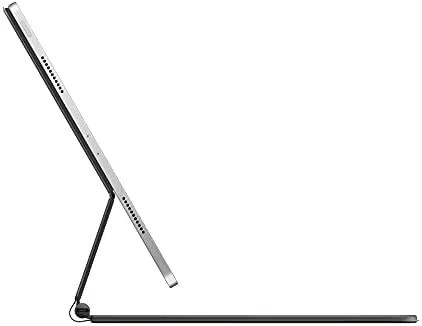
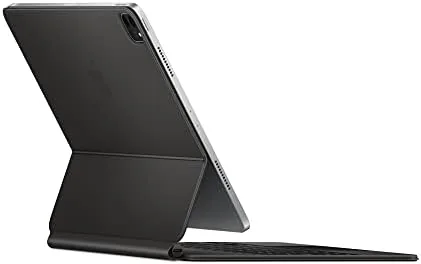
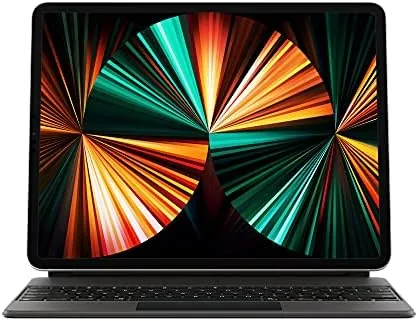
The Magic Keyboard is instantly recognizable for its floating design. The iPad attaches magnetically and hovers above the keyboard, held in place by a hinged arm that also lets you adjust the viewing angle. It is a genuinely striking piece of industrial design, and the white colorway keeps the whole assembly looking clean and modern on a desk.
The build quality is what you expect from Apple at a premium price. The outer shell is a soft, slightly rubberized material that protects the back and edges of the iPad, and the hinge feels sturdy and precise. The keyboard is a scissor mechanism with 1mm of travel, the same general design Apple uses in its standalone Magic Keyboard, and it types beautifully. There is also a pass-through USB-C port on the hinge, which frees up the iPad's own port for other accessories.
The weight is the honest trade-off. The Magic Keyboard adds roughly 600 grams to the iPad, which makes the combination heavier than many laptops and noticeably top heavy in handheld use. This is a keyboard that wants to stay on a desk or a lap, not one you hold in one hand while walking.
Key Features
The built-in trackpad is the reason this product matters. It brings a real cursor to iPadOS, complete with hover effects, precise text selection, and all the pointing gestures you expect from a laptop. That single addition changes how you interact with the iPad, making it feasible to run a word processor, a spreadsheet, or a code editor without reaching up to touch the screen.
The backlit keys adapt to ambient light automatically, which makes the keyboard usable in a dark room or on an evening flight. The Smart Connector provides both power and data, so the keyboard is always charged by the iPad and ready to go the instant you snap the tablet into place. There is no pairing process and no battery anxiety, which is a genuine convenience after years of Bluetooth keyboards.
The cantilever design also means the iPad stays at a comfortable typing angle, with a range of adjustability for finding the right position. When it is time to move, the whole assembly folds down into a compact package that protects the iPad during transit.
Real-World Performance
I used the Magic Keyboard as my primary input method with an iPad Air for several weeks, including full workdays of writing, email, and web research. The typing experience is excellent. The keys have a crisp feel with a satisfying amount of travel, and after a short adjustment period I was typing at my usual speed with my usual accuracy. The backlighting worked flawlessly, and the key layout is familiar to anyone who has used a MacBook.
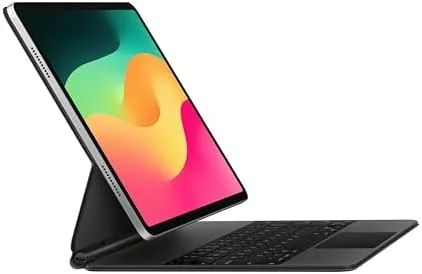
The trackpad was the biggest revelation. Editing a paragraph of text with a precise cursor, selecting cells in a spreadsheet, and hovering over interface elements all felt natural, and it eliminated the constant reach up to the screen that makes typing on a bare iPad so tiring. Gestures for app switching, scrolling, and the home screen all worked reliably. The one adjustment is that iPadOS still relies heavily on touch, so a hybrid approach, trackpad for text and touch for quick taps, is the most efficient way to work. In practice that hybrid became automatic, and I stopped thinking about which input method I was using, which is exactly the seamless experience a productivity accessory should deliver.
The Smart Connector connection was flawless throughout the test. I never once thought about pairing, charging, or connectivity, which is exactly what a good accessory should achieve. The battery impact on the iPad was minimal, and the pass-through USB-C port meant I could charge the iPad and connect peripherals at the same time without juggling cables.
The honest weaknesses are the weight and the price. The Magic Keyboard is expensive, and the added heft makes the iPad feel less portable than its tablet form suggests. The lack of a function row is also notable on this version, since you cannot control brightness or volume without reaching for the iPad's control center. In daily use, however, the core experience of typing and tracking on a stable, well built base was consistently excellent.
Pros and Cons
Pros:
- Excellent scissor keys with crisp, comfortable typing
- Built-in trackpad transforms iPadOS navigation
- Smart Connector means no pairing or charging
- Backlit keys that adapt to ambient light
- Premium build quality and a striking floating design
Cons:
- Expensive relative to comparable keyboards
- Adds significant weight to the iPad
- No function row on this version
How It Compares
The Magic Keyboard competes most directly with Logitech's Combo Touch and with Apple's own Smart Keyboard Folio. Each offers a different trade-off between typing quality, protection, and price.
| Feature | Apple Magic Keyboard | Logitech Combo Touch | Smart Keyboard Folio |
|---|---|---|---|
| Trackpad | Yes, built in | Yes, built in | No |
| Backlit keys | Yes | Yes | No |
| Connection | Smart Connector | Smart Connector | Smart Connector |
| Kickstand | Cantilever hinge | Built in kickstand | Folding stand |
| Typing feel | Excellent | Very good | Shallow |
Against the Logitech Combo Touch, the Magic Keyboard wins on typing feel, backlighting, and a sturdier, more polished hinge, while the Logitech adds a kickstand and full protection at a lower price. Against the Smart Keyboard Folio, the Magic Keyboard is in a different league, adding a trackpad and real key travel that the Folio simply lacks. For anyone who types a lot, the Magic Keyboard justifies its premium.
Who Should Buy It
Buy the Magic Keyboard if you use your iPad for serious writing, note taking, or any task that involves sustained typing, and especially if you want the convenience of a trackpad. It is the accessory that turns an iPad into a genuine laptop replacement, and it pays for itself in daily productivity for students, writers, and professionals on the move.
It is also the right choice if you already live in the Apple ecosystem and value seamless integration over price. Skip it if you want a light case more than a keyboard, or if the cost is simply too high for your budget, in which case the Logitech Combo Touch is a credible alternative. For the best typing experience available on an iPad, the Apple Magic Keyboard on Amazon is the standard.
How We Test
I used the Magic Keyboard with both an iPad Pro 11 and an iPad Air over several weeks, logging full workdays of writing, email, and research to judge typing comfort and trackpad accuracy. I tested the backlighting in low light, verified the Smart Connector connection over extended sessions, and measured the practical impact on the iPad's battery life.
I also compared the typing experience directly against the Logitech Combo Touch and the Smart Keyboard Folio, and I carried the folded configuration in a bag to assess portability. For an independent technical assessment, The Verge's review of the Magic Keyboard is an authoritative reference. The Magic Keyboard listing on Amazon shows current pricing and compatibility details.
Apple Magic Keyboard for iPad: Questions People Ask
Which iPads work with this Magic Keyboard?
It fits the iPad Pro 11-inch across the first through fourth generations and the iPad Air fourth, fifth, and M2 generations, attaching magnetically through the Smart Connector.
Does the Magic Keyboard charge through the Smart Connector?
Yes, the keyboard draws power from the iPad itself through the Smart Connector, so there are no batteries to charge, and the pass-through USB-C port lets you charge the iPad simultaneously.
Is the trackpad useful on iPadOS?
Very much so. The trackpad brings a precise cursor, hover effects, and laptop style gestures, which makes text editing and navigation dramatically more efficient.
Does this version have the function row?
No, this generation of the Magic Keyboard uses the standard top row without the dedicated function keys that the newer models added, so brightness and volume are adjusted through the iPad itself.
As an Amazon Associate, I earn from qualifying purchases.