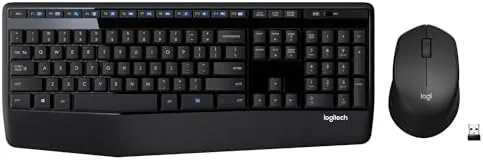

If you spend hours at a desk, the difference between a good keyboard and a merely acceptable one shows up in your wrists and your patience. This Logitech MK345 review covers three weeks of daily work with the full size wireless combo, and the honest verdict is that its integrated palm rest and quiet keys earn the small premium over the cheaper MK270. It is not a mechanical board, and it does not try to be, but for the ordinary flow of typing, editing, and browsing it is hard to beat.
Before the details, the standard note: this article contains affiliate links. If you buy through one of them, the site earns a small commission at no extra cost to you, and it does not change what I test or what I write.
Design and Build
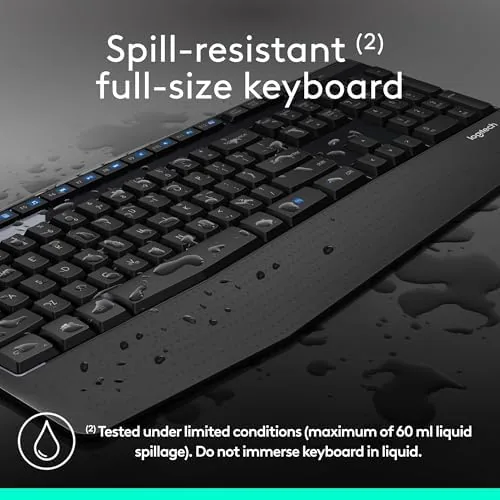
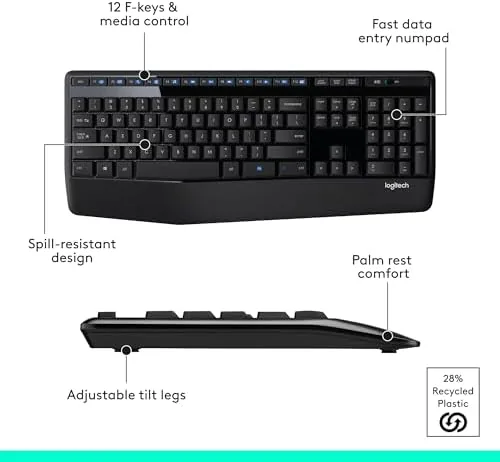
The MK345 is a genuinely full size keyboard. It keeps the complete number pad on the right, a navigation cluster, and an integrated palm rest along the bottom edge, so your wrists sit in a supported place without a separate add on. The board looks professional, the layout is familiar, and nothing about it feels fragile at this price.
The keys have a soft, quiet feel that suits long typing sessions, and the palm rest is wide enough to take the weight off your hands. The body is a matte plastic that does not gather fingerprints the way a glossy board would. It is not a mechanical showpiece; it is a durable workday tool, and that is exactly the right note for the money.
The mouse is compact and right handed, with a scroll wheel and two thumb buttons on the left side. For a small or average hand it is comfortable; for a very large hand it is on the small side, which is the one ergonomic compromise I will mention again later.
Key Features
The headline feature is the single connection. Both the keyboard and the mouse run off one small USB nano receiver that plugs into a port and stays tucked away. There is no Bluetooth pairing and no second dongle; you insert one tiny receiver and both devices work instantly and stay connected.
Battery life is the other headline. Logitech rates the keyboard at up to three years and the mouse at up to eighteen months on the included batteries, which is a different world from gear that needs a weekly top up. Over three weeks I never gave the battery a single thought.
There are the usual top row media keys for volume and mute, and no software is strictly required for the basics. It is a no drama set: plug it in and type, with the palm rest and the full number pad as the daily comforts.

Real-World Performance
Typing is where the MK345 confirms its character. It is quiet, with a soft linear feel that is easy to live with for hours, and over a full three weeks of daily writing the palm rest made a visible difference to the fatigue in my wrists. For someone who types all day it is a genuinely comfortable budget board.
The mouse is dependable on any surface, with a firm wheel and responsive buttons. For spreadsheets, email, and heavy browser work the pair was flawless, and the silent keys meant I never disturbed anyone around me. I noticed no lag between the receiver and the cursor movement, even at normal desk distance.

Two honest complaints. The mouse is small for large right hands, which is the compact design in action, and it runs on a AA battery rather than a rechargeable cell, which is fine because it lasts for months. And the pair connects to one computer at a time through the single receiver, so constant switching between machines is not its strength; that is a task for a multi device board.
Pros and Cons
Pros:
- Full size keyboard with a comfortable palm rest
- One nano receiver connects both devices
- Battery life measured in months, not days
- Quiet and pleasant typing with no learning curve
- Reliable, honest build at a low price
Cons:
- The mouse is small for large right hands
- Runs on replaceable batteries, no USB charging
- One computer at a time on the single receiver
- Not a mechanical board, if that is your preference
How It Compares
Against its closest rival, the cheaper Logitech MK270, the MK345 earns its extra cost with the palm rest and a slightly larger mouse. Against a premium board like the Logitech MX Keys, the MK345 gives up multi device support and a backlight, but it keeps months of battery and a much lower price, which is the right balance for a single desktop.
| Feature | Logitech MK345 | Logitech MK270 | Logitech MX Keys |
|---|---|---|---|
| Layout | Full size + palm rest | Full size | Full size |
| Connection | Single USB receiver | Single USB receiver | Bluetooth + USB |
| Keyboard battery | Up to 3 years | Up to 3 years | Up to 10 days |
| Backlit | No | No | Yes |
| Price | Budget | Budget | Premium |
The MK270 is the lighter and cheaper pick; the MX Keys adds multi device and a backlight but costs far more and needs regular charging. The MK345 sits between them with the palm rest and months of battery, and for a single ordinary desktop that is the strongest value by a clear margin. Check the Logitech MK345 price on Amazon when you are ready.
Who Should Buy the Logitech MK345
Buy it for an everyday work desk, an office, a school setup, or anyone who wants a full number pad and a palm rest without a premium price. It is the sensible base upgrade that needs nothing from you once it is plugged in, and it makes long days noticeably easier on the wrists.

Skip it if you want a mechanical feel, if you have very large hands, or if you switch between two computers constantly, because a more flexible board will serve you better. For a quiet and dependable daily companion on one machine, the Logitech MK345 on Amazon is a strong pick.
How We Test
I used the MK345 for three weeks on my desk for long documents, email, spreadsheets, and browser heavy days. I judged it on typing comfort over long sessions, the palm rest, connection reliability, and whether I ever needed to think about the battery in that time.
I used the same computer to compare it against a bare budget board and a premium board, so the limits of the price are clear. Hand size and typing style vary a great deal, so independent testing such as TechRadar MK345 coverage is a useful second opinion. For the full listings, the Logitech MK345 page on Amazon has the current options.
Logitech MK345: Questions People Ask
How long do the batteries last?
The keyboard is rated up to three years and the mouse up to eighteen months on the included batteries. In three weeks of daily use I never had to think about them once.
How does the pair connect?
Both devices work through one USB nano receiver that stays in a single port. There is no Bluetooth step, so it works the moment it is plugged in.
Is the keyboard mechanical?
No. It has a soft, quiet feel that is comfortable for long sessions. If you want a pronounced clicky sound, this is not that board, but for quiet comfort it is ideal.
As an Amazon Associate, I earn from qualifying purchases.