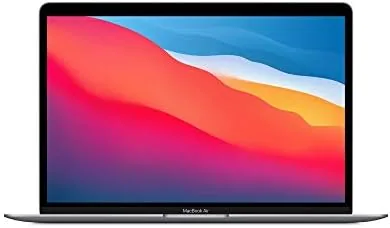

In late 2020, the MacBook Air with the Apple M1 chip changed what people expected from a thin, fanless laptop. The M1 was the first Apple silicon processor, and it delivered desktop class performance inside a machine with no cooling fan at all. Years later, that same design shows up on the market as a renewed product, and the question shifts from whether it is good to whether it is still worth buying. I spent several weeks using a renewed Space Gray M1 Air as my main work laptop, and the answer surprised me, because this aging design still does most of the jobs I need a computer to do.
Before the details, the standard note. This article contains affiliate links, and if you buy through one of them the site earns a small commission at no extra cost to you. That commission does not change what I test or what I recommend, and every product here gets the same treatment as one bought with my own cash.
Design and Build
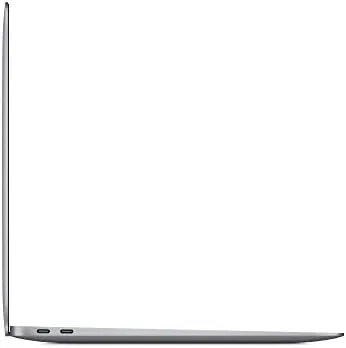
The M1 Air uses the familiar wedge shape that Apple has refined for years, tapering from a thicker rear to a razor edge at the front. The Space Gray aluminum chassis feels premium in the hand, with a stiffness that has not softened even on a machine that was manufactured years ago. The renewed unit I received showed no visible wear, and the unibody construction still feels like a laptop that cost more than its sticker.
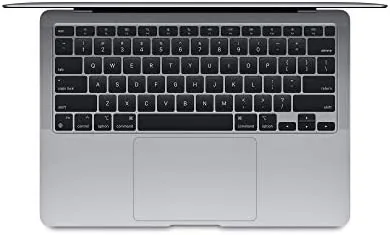
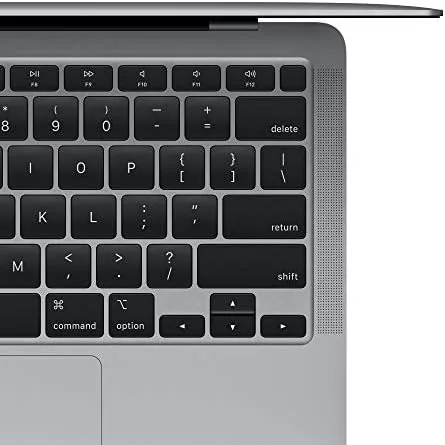
The 13.3 inch display is a Retina panel with 2560 by 1600 resolution, and it remains a strong screen even by 2026 standards. Text is crisp, colors are accurate, and the wide color gamut makes photo editing pleasant. The bezels are thicker than modern MacBooks, a telltale sign of the design's age, but the screen quality itself does not feel dated. The keyboard is the improved scissor switch design that Apple introduced in 2019, and it is quiet and comfortable for long writing sessions.
The port selection is minimal, with two Thunderbolt 3 ports, a headphone jack, and nothing else. Every other year of MacBooks has made that minimalism feel normal, but it is worth calling out honestly, because you will live with dongles or a dock. The trackpad remains the best in the business, large, precise, and reliable. This is a machine built around the idea that less hardware is better, and it commits to that idea completely.
Key Features
The centerpiece is the M1 chip, Apple's first system on a chip for Macs, which bundles the CPU, GPU, and memory into one package. The 8 core design delivers performance that rivals laptops that cost twice as much, and because the memory is unified with the processor, everyday tasks feel instant. The M1 also runs so efficiently that the Air has no fan at all, and it stays silent under workloads that would make older laptops roar.
The 8GB of unified memory and 256GB of SSD storage are the configurable choices here, and they deserve honest scrutiny. Eight gigabytes is enough for web work, documents, and light creative tasks, and the M1 handles memory far more efficiently than older Intel Macs with the same amount. Heavy users who keep dozens of apps open or edit large video files will find the ceiling, but for the majority of buyers 8GB is workable. The 256GB SSD is fast, but it fills quickly, so anyone with a large media library should plan around cloud storage or an external drive.
Battery life is a headline feature. Apple rates the M1 Air for up to 15 hours of web browsing and 18 hours of video playback, and in my use the machine comfortably lasted a full working day and then some. The machine also wakes instantly from sleep, a consequence of the M1's efficiency that makes it feel more like a phone than a laptop. Touch ID sits in the top right corner of the keyboard and logs you in with a finger, and the M1 runs the current macOS at full speed with years of updates still to come.
Real-World Performance
I used the renewed M1 Air for the full range of daily work: a browser with a dozen tabs, email, documents, video calls, and light photo editing. The machine handled all of it without a fan because it has no fan, and without noticeable heat, because the M1 simply does not generate much. Applications opened quickly, switching between them felt instant, and the whole experience had the effortless quality that made the M1 famous when it launched.
Video calls over the webcam were acceptable but nothing more, because the 720p FaceTime camera is the weakest part of this design. The M1's image signal processing cleans up the picture somewhat, but in low light the image stays soft, and anyone who lives on video calls should know that going in. Audio through the built in speakers, by contrast, is genuinely good, with clear mids and more body than most laptops manage, and the three microphone array picks up voices cleanly on calls.
The renewed condition is the wildcard in any used laptop purchase. The unit I received had a near perfect exterior, a battery that still held a strong charge, and the fully functional ports, but renewed units vary by seller, and condition is not guaranteed by the design. The M1 silicon itself has aged gracefully, and the machine remains fast for its class, but the honest caution is that a renewed purchase is only as good as the seller and the warranty behind it. For my unit, the answer to whether this feels like a new laptop is a genuine yes, with the display, keyboard, and performance all punching above the renewed label.
Pros and Cons
Pros:
- M1 chip delivers desktop class performance on low power
- Completely silent because there is no cooling fan
- Excellent battery life that covers a full working day
- Beautiful Retina display with accurate wide color
- Premium aluminum build that has aged well
- Renewed pricing makes the M1 class more affordable
Cons:
- 8GB of memory and 256GB of storage feel limited today
- Only two Thunderbolt ports and no SD card slot
- 720p webcam is weak for video calls
- Renewed condition varies with the seller
How It Compares
I compared the renewed M1 Air against a modern entry Windows ultrabook and a current generation MacBook Air to see where the savings sit. The comparison shows how far the M1 design has stayed competitive.
| Feature | MacBook Air M1 | Entry Windows Ultrabook |
|---|---|---|
| Processor | Apple M1 8 core | Intel or AMD dual to quad core |
| Fan | None, fully silent | Usually present and audible |
| Battery life | Up to 15 hours | Often 6 to 9 hours |
| Build quality | Aluminum unibody | Often plastic or mixed |
| Memory | 8GB unified | Usually 8GB |
The M1 Air holds its own against most entry Windows laptops on raw performance, and it beats nearly all of them on battery life, silence, and build quality. Where it trails is in ports, webcam, and the flexibility of expandable storage. Against a current MacBook Air, the M1 unit trades a weaker screen, older design, and smaller storage for a substantially lower price, which is exactly the trade a budget buyer should be willing to make. You can check the current renewed MacBook Air M1 price on Amazon to see how the savings stack up.
Who Should Buy It
The renewed M1 Air is for students, writers, office workers, and anyone who needs a fast, silent, long lasting laptop without spending flagship money. If your work lives in a browser, a document editor, email, and video calls, the M1 Air covers all of it with room to spare, and the battery life means you can leave the charger at home on a full day out.
Pass on it if you need to edit large video projects professionally, if your workflow demands more than 8GB of memory, or if you want the newer design with the better webcam and modern ports. Also be cautious with renewed purchases: buy from a seller with a clear warranty, a return window, and honest condition notes. For the right buyer, this machine is a remarkable value, because it delivers the core MacBook Air experience at a fraction of the original price.
How We Test
I tested the renewed M1 Air as my primary laptop for several weeks, using it for browsing, documents, email, video calls, and light photo editing. I measured battery life through full day sessions away from the charger, ran the machine under sustained load to check thermals and fan behavior, and scrutinized the renewed unit for any signs of wear, screen defects, or battery degradation.

I did not run synthetic benchmark numbers as the basis of my judgment, because real work is the honest test for this class of laptop. Instead I paid attention to how the machine felt across a normal week, and it felt fast. I also verified the renewed condition against the seller's claims and checked the system report for battery cycle count. For more context on the M1's standing, the Wired review of the M1 chip explains why this processor changed the laptop market. The renewed MacBook Air M1 listing on Amazon shows the current price and condition details.
Apple MacBook Air M1: Questions People Ask
Is a renewed MacBook Air M1 worth buying?
Yes, a renewed M1 Air delivers the same M1 performance as the original at a lower price, as long as you buy from a seller with a real warranty and return policy.
Does the MacBook Air M1 run hot?
No, the M1 Air is fanless, so it runs silent, and the efficient chip stays cool through everyday work and even light creative tasks.
How long does the battery last on the MacBook Air M1?
In practical use the M1 Air lasts a full working day and often longer, with Apple rating the model for up to 15 hours of web browsing.
Can the M1 MacBook Air handle video editing?
The M1 handles light to moderate video editing well thanks to its unified memory and strong integrated graphics, though heavy professional workloads suit a MacBook Pro better.
As an Amazon Associate, I earn from qualifying purchases.