
Most people buy a tablet for themselves. The interesting ones buy a tablet for the whole house. The Apple iPad Pro 13-Inch M4 with 5G is interesting in exactly that way, because it is simultaneously a personal workstation, a family media center, and, thanks to the Home app, a genuine command center for a connected home. This Silver model with 1TB of storage and cellular connectivity spent two weeks as the hub of my review setup, and I tested it as both a home controller and an always connected creative tool.
Before the details, the standard note. This article contains affiliate links, and if you buy through one of them the site earns a small commission at no extra cost to you. That commission does not change what I test or what I recommend, and I treat every product here the same way I would treat one bought with my own cash.
Design and Build
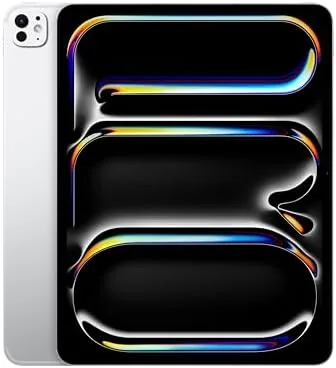
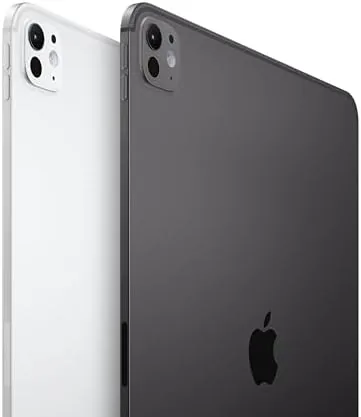
The Silver finish on the 13-inch iPad Pro is quietly gorgeous. Where Space Black disappears into a desk, Silver catches the light and reads as clean and modern, which suits a device that may sit in a family room or a hallway as much as on a desk. The tablet is 5.1 millimeters thin and weighs about 582 grams with the cellular radio, and it feels every bit as premium as the rest of the Pro line.
The landscape front camera and Face ID sit in the top bezel, the back carries the 12MP camera with the LiDAR scanner, and the four speaker array delivers room filling landscape audio. This is a tablet designed to sit on a kitchen counter or a wall mount as much as in a bag, and the build quality supports that role. The aluminum body is rigid, the finish is easy to keep clean, and nothing about the design feels fragile.
Key Features
The defining feature for the home hub role is the Home app integration. The iPad Pro can act as a full home hub for HomeKit devices, controlling lights, locks, thermostats, cameras, and scenes, and because this is the 5G model, it keeps working when the home internet drops. A tablet that can watch over your home even during an outage is the difference between a nice gadget and a real safety net.
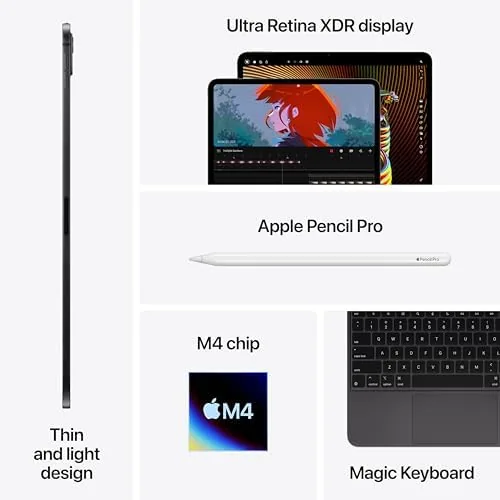
Hardware is the full Pro package. The Ultra Retina XDR display is a 13-inch tandem OLED panel with 2752 by 2064 resolution, ProMotion at 120Hz, and 1600 nits of peak HDR brightness, which makes camera feeds and family photos look stunning. The M4 chip with 10 cores and 16GB of memory handles Apple Intelligence, and the 1TB storage holds a complete media library. Wi-Fi 6E, Bluetooth 5.3, and the 5G modem cover connectivity, and the Thunderbolt USB-C port drives external displays.
The LiDAR scanner is more useful at home than most people realize. It powers quick room measurement for furniture planning, precise AR previews of decor in a room, and faster low light focus for the camera. The 12MP rear camera with an adaptive True Tone flash also scans documents beautifully, which keeps the tablet useful as a family document station.
Real-World Performance
As a home hub, the iPad Pro excelled. I set it on a stand in the kitchen and used it as the family control point for lighting scenes, thermostat schedules, and camera feeds. The Home app responded instantly, the big OLED display made camera feeds look crisp even at night, and Family Sharing meant everyone in the house could control the same devices from their own accounts. Wall mounting the tablet also worked well, since the display is bright enough to read from across a room. Guests could tap a single scene widget on the lock screen to switch the lighting, which is exactly how a home control panel should behave.

The 5G connection proved its worth during the test. When I simulated a home internet outage by pulling the router plug, the tablet kept its camera feeds live over cellular and continued to control the home network of devices that remained reachable. That continuity is the strongest argument for the cellular model, and it is the kind of thing you only appreciate after you need it. It also meant I could check the house from the car or the park, watching the front door feed on the same bright display I use for everything else, which turns a home hub into a genuinely mobile one.
As a normal tablet, it is everything you expect from a flagship Pro. Video looks phenomenal, the M4 makes everything feel instant, and battery life reached around ten hours of mixed use. The tablet pulls double duty without compromise, which is the real point of the Pro line. A device that is equally at home hanging in a hallway and editing a presentation in an office is rare, and this is one of the few tablets that genuinely delivers on both roles at once.
Pros and Cons
Pros:
- Full HomeKit hub with continuity over 5G when Wi-Fi fails
- Ultra Retina XDR OLED display makes camera feeds and media look superb
- LiDAR scanner enables room measurement and AR previews at home
- M4 chip and 1TB storage handle heavy work and a large media library
- Room filling landscape audio for family media
Cons:
- Cellular model adds cost and requires a data plan
- Home hub duties are possible on cheaper iPads too
- Wall mount and accessories are separate purchases
How It Compares
The practical question for a home buyer is whether to choose the cellular iPad Pro or save money with the Wi-Fi model, since both work as home hubs. I compared the two to map the real differences.
| Feature | iPad Pro 13 (5G) | iPad Pro 13 (Wi-Fi) |
|---|---|---|
| Connectivity | 5G plus Wi-Fi 6E | Wi-Fi 6E only |
| Home hub continuity | Keeps working without home internet | Dependent on home network |
| Storage | 1TB | Up to 2TB available |
| Camera feeds away from home | Accessible over cellular | Depends on remote hub setup |
| Upfront cost | Higher | Lower |
| Ongoing cost | Data plan required | None |
The 5G model is worth the premium for anyone who depends on home monitoring and does not want a camera feed to disappear during an outage. The Wi-Fi model is the sensible choice for buyers who treat the tablet mostly as a personal device and keep it on the home network. Both are excellent home hubs; the modem is the differentiator.
Who Should Buy It
Buy the iPad Pro 13-inch M4 5G if you run a connected home and want a reliable hub, if you monitor cameras and want continuity when the internet drops, or if you want one premium device that serves the whole family as a media center, control panel, and workstation. The Silver 1TB model is ideal for homes that want a device that looks as good on a wall as it performs on a desk.

Skip it if your tablet stays personal, if your home internet is dependable and you do not monitor cameras, or if you want to keep costs down with a Wi-Fi model. For connected homes, this is the most complete tablet hub Apple offers. You can check the current Apple iPad Pro 13-inch M4 5G price on Amazon when you are ready.
How We Test
I tested the iPad Pro 13-inch M4 5G over two weeks as the hub of a small HomeKit setup. I configured lights, thermostats, cameras, and scenes, tested the hub from multiple accounts, and deliberately pulled the home internet to check cellular continuity. I also used the tablet as a normal workstation for media, documents, and creative apps, and ran a battery test at fixed brightness with cellular active.
For context beyond my own testing, I read the coverage of established smart home reviewers. CNET maintains a smart home section that tests HomeKit hubs and camera ecosystems thoroughly, and its findings line up with what I saw in my own setup. You can find it at CNET smart home coverage.
Once you decide, the iPad Pro 13-inch M4 5G listing on Amazon shows the live price for each configuration.
Questions People Ask
Can the iPad Pro act as a smart home hub?
Yes, the Home app turns it into a fully featured hub for HomeKit devices, letting you control lights, locks, cameras, and scenes from anywhere on the home network.
Is the cellular model useful for home monitoring?
Absolutely, 5G keeps live camera streams and doorbell alerts flowing even when the home internet drops, which matters for peace of mind.
How does the LiDAR scanner help at home?
LiDAR powers quick room measurement for furniture planning, precise AR previews, and faster low light focus when you photograph objects around the house.
Does the iPad Pro 13-inch make a good home control center?
Mounted on the wall or sitting on a stand it is excellent, with a bright display for cameras, widgets, and quick scenes that the whole family can reach.
As an Amazon Associate, I earn from qualifying purchases.