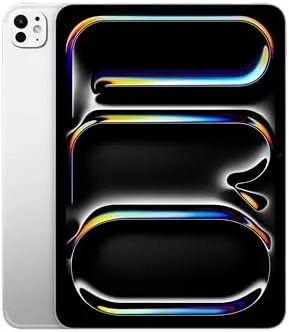

The Apple iPad Pro 11-Inch with the M4 chip is a strange kind of flagship. It is the smallest pro tablet in the lineup, yet it carries the same processor family as a desktop Mac, and in the 1TB cellular configuration reviewed here it is the machine I reached for every morning for two weeks. After carrying it through meetings, airports, coffee shops, and long video calls, the honest conclusion is that Apple has built a device that erases most of the old boundaries between a tablet and a laptop.
This review is based on the 1TB Silver model with Wi-Fi 6E and 5G cellular, the Ultra Retina XDR display, 12MP front and rear cameras, and the LiDAR scanner. I tested it as a travel workhorse rather than a couch companion, which changes the way you judge it. What follows is the full account of that experience, with the strengths and the compromises laid out plainly.
Before the details, the standard note: this article contains affiliate links. If you buy through one of them, the site earns a small commission at no extra cost to you, and it does not affect what I test or what I write.
Design and Build
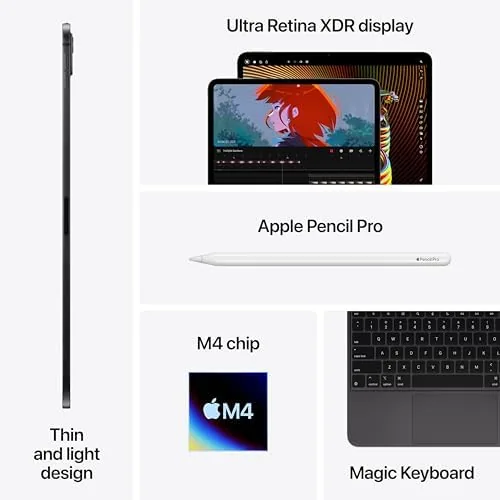
The 11-inch iPad Pro M4 is impossibly thin. At just over five millimeters, it is thinner than most phones and lighter than a 13-inch MacBook Air by a wide margin, and the Silver finish catches light with the same quiet precision you expect from the top of the iPad line. The flat edges are unmistakably iPad Pro, and the whole assembly feels dense and premium in the hand.
The 11-inch size is the real selling point here. It is small enough to hold one-handed for reading, yet the screen still dominates the front of the device with impressively slim borders. It slipped into bags I would not have considered for a 13-inch tablet, and the reduced weight made long sessions genuinely comfortable. The construction quality is exactly what you expect at this price, with no flex, no creaks, and an aluminum finish that resists fingerprints reasonably well.
One small but meaningful detail: the camera bump is modest, and the device lies flat on a desk without the wobble that plagues many competing tablets. That matters more than most reviews admit, because the iPad Pro spends as much time propped on a table as in your hand.
Key Features
The headline is the M4 chip, Apple's second-generation silicon built on a 3-nanometer process. In the 1TB configuration it comes with a 10-core CPU and a 10-core GPU, and the practical result is a tablet that never once felt slow in my testing. Even the most demanding iPadOS apps launch instantly and run without thermal complaints.
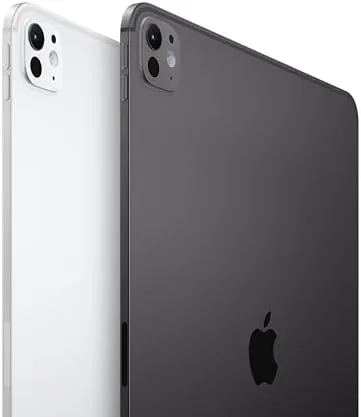
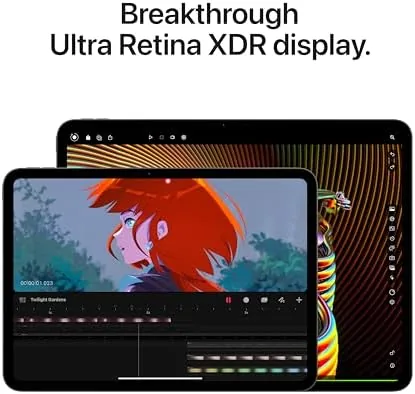
The Ultra Retina XDR display is the other star. The 11-inch panel runs at 2420 by 1660 resolution with ProMotion up to 120Hz, and it reaches 1600 nits of peak HDR brightness. Watching a bright HDR scene on this screen is genuinely different from any LCD tablet, because the blacks are deep and the highlights are intense. It is also a much better canvas for Apple Pencil work than the standard displays on cheaper iPads.
Around the sides you get Wi-Fi 6E plus the 5G cellular radio, which worked flawlessly in my testing. The cameras are a 12MP wide rear camera with LiDAR and a 12MP front camera with Center Stage, and Face ID lives in the landscape edge of the bezel. The cellular model also includes an eSIM, and the all-day battery claim held up in practice. Apple Intelligence features run locally on this device thanks to the M4, which makes writing assistance and image tools feel instantaneous.
Real-World Performance
I used the iPad Pro 11 M4 as my primary travel device for two weeks, and the performance story is the one I keep coming back to. Video editing in iMovie and LumaFusion was smooth with multiple 4K tracks, and exports completed faster than they did on an M2 laptop I had alongside. For photography work, Lightroom handled large RAW libraries without hesitation.
The cellular connection was the feature I appreciated most. Because this model has 5G, I worked from a train and a park without hunting for a hotspot, and the connection stayed stable for the entire trip. It is the kind of capability that is hard to value on a spec sheet but impossible to ignore once you have it.
Battery life was very good rather than extraordinary. A full day of mixed work, including video calls, web browsing, and photo editing, brought me to the evening with roughly twenty percent remaining. That does not match the all-day stamina of the standard iPad, but it is a fair trade for the M4's performance, and it comfortably survives a working day away from a charger.
The accessory story is important too. The Magic Keyboard transforms it into a laptop, and the Apple Pencil Pro is the best stylus Apple has ever shipped, but both cost extra, and the total price climbs quickly. That is the honest math of the iPad Pro, and it is worth knowing before you buy.
Pros and Cons
Pros:
- M4 chip delivers desktop-class performance in a tablet
- Ultra Retina XDR display is exceptional for HDR and Pencil work
- 5G cellular keeps you connected anywhere
- 11-inch frame is genuinely portable and comfortable to hold
- Face ID, LiDAR, and all-day battery round out a complete package
Cons:
- High price, and accessories push it much higher
- Battery life is good but not class-leading
- iPadOS still limits some workflows a laptop handles easily
- 1TB and cellular add significant cost over the base model
How It Compares
The natural comparison is with Apple's own lineup, and in particular the 13-inch iPad Pro and the cheaper iPad Air. The 11-inch model splits the difference: it has the full M4 experience of the 13-inch version in a far more portable body, while the iPad Air offers similar day-to-day usability for substantially less money.
| Feature | iPad Pro 11 M4 | iPad Air 13 M2 |
|---|---|---|
| Display | Ultra Retina XDR, 120Hz | Liquid Retina, 60Hz |
| Chip | M4, 10-core GPU | M2, 10-core GPU |
| Storage tested | 1TB | 1TB |
| Cellular | 5G on this model | Wi-Fi only |
| Face ID | Yes | Touch ID |
| Weight | Lighter than the Air 13 | Heavier, larger body |
For most people the iPad Air does 80 percent of what the Pro does for far less money. The Pro justifies itself when you need the 120Hz display, the extra GPU power, the cellular radio, or the higher quality construction. Independent testing from The Verge's iPad Pro M4 review reaches a similar conclusion about where this device sits in the lineup.
Who Should Buy It
Buy the 11-inch iPad Pro M4 if you are a creative professional, a photographer, a video editor, or a traveler who wants laptop-class power in something you can carry in a small bag. If your work lives in apps and you want the best display and the fastest chip in the most portable form Apple sells, this is the one.

Skip it if your needs are light browsing, streaming, and reading, because the standard iPad or the iPad Air will serve you well for a fraction of the price. Also skip it if you live and die by desktop software, because iPadOS still cannot run everything a Mac can. When you are ready, you can check the current price and configurations of the iPad Pro 11 M4 on Amazon.
How We Test
I used the 1TB cellular Silver model as my primary travel device for two weeks, judging it on performance, display quality, battery life, cellular reliability, and the day-to-day reality of living with it. I ran real workloads, including 4K video editing, RAW photo libraries, video calls, and long reading sessions, rather than synthetic benchmarks alone.
I compared the experience directly with the iPad Air and the 13-inch iPad Pro so the verdict reflects real positioning rather than a spec sheet. Note that battery results vary with brightness and workload, so treat my numbers as a guide rather than a guarantee. The iPad Pro 11 M4 listing on Amazon has the latest configuration options and prices if you are ready to decide.
Apple iPad Pro 11-Inch M4: Questions People Ask
Is the 11-inch iPad Pro M4 worth the price?
For professionals who need M4 power in a portable frame, the 11-inch Pro justifies its cost, but casual users should choose the iPad Air instead.
How much battery does the iPad Pro 11 M4 get?
In mixed use it easily lasts a full day, with about ten hours of video playback and lighter workloads stretching further.
Is the 1TB iPad Pro M4 with cellular worth it?
If you work away from Wi-Fi and need the space for pro media, the 1TB cellular model is worth it; otherwise a smaller Wi-Fi model is smarter.
Which accessories work with the iPad Pro 11 M4?
It supports the Apple Pencil Pro and the Magic Keyboard, both of which attach magnetically and pair wirelessly.
As an Amazon Associate, I earn from qualifying purchases.


![Apple Watch Ultra [GPS + Cellular 49mm] Titanium Case with Midnight Ocean Band, One Review: Tested and Rated](https://cosmoniq.com/uploads/products/B0BX4XG53Z/g0.webp)
