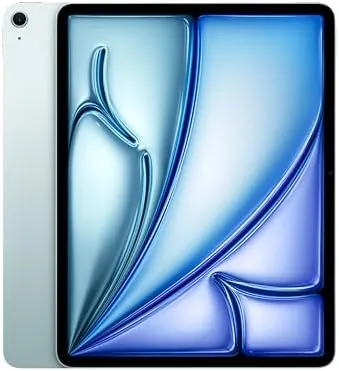

The 13-inch iPad Air with the M2 chip has become the most dependable device in my office routine. After a month of using the 1TB Blue model as a daily work companion, I understand why it is so easy to recommend: it does the laptop jobs without the laptop weight, and it does the tablet jobs better than any laptop. For meetings, documents, notes, and remote calls, it has quietly become the device I reach for first.
This review is based on the 13-inch iPad Air M2 with the Liquid Retina display, 1TB of storage, the 12MP front and back cameras, Wi-Fi 6E, and Touch ID. It supports Apple Intelligence and the Apple Pencil Pro. This is the honest account of a month of office work on a tablet.
Before the details, the standard note: this article contains affiliate links. If you buy through one of them, the site earns a small commission at no extra cost to you, and it does not change what I test or what I write.
Design and Build
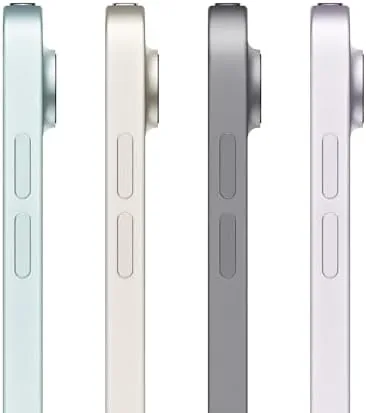
The Blue finish is professional rather than playful, and it is exactly right for a device that moves between a desk, a meeting room, and a home office. The flat-edge design keeps it consistent with the rest of the iPad family, and the aluminum body is solidly built with a clean, understated look that will not look out of place anywhere.
At roughly 1.4 pounds, the Air is far lighter than any laptop that shares its screen size, which makes it effortless to carry between meetings and onto the couch for evening reading. The construction is rigid and reassuring, and the modest camera bump lets it lie flat on a desk for note-taking.
Touch ID in the power button is fast and reliable, and the landscape camera is positioned naturally for video calls. This is a device that respects the reality of office life, and after a month those small design choices have earned real trust.
Key Features
The M2 chip keeps everything fast, from document editing to video meetings to heavy multitasking. Apple Intelligence runs on-device, so writing tools, summaries, and image features work instantly without sending data to the cloud. For office work, that combination of speed and privacy is genuinely useful.
The 13-inch Liquid Retina display is the standout feature for office work. At 2732 by 2048 it shows two documents side by side comfortably, and it is bright and sharp enough for long sessions. It is an LCD without the Pro's 120Hz ProMotion, which is a minor compromise for document work, but the panel is excellent in practice.
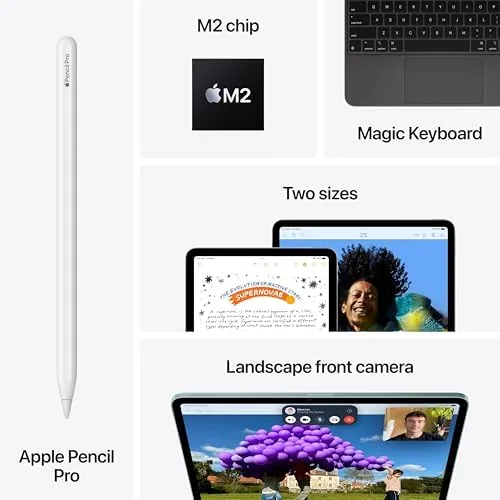
The 12MP front camera with Center Stage keeps you framed during video calls, and the 12MP rear camera is excellent for scanning documents and whiteboards. Wi-Fi 6E keeps transfers quick, and the support for both the Apple Pencil Pro and the USB-C Apple Pencil makes handwritten notes and annotations feel natural. The 1TB storage means project files stay local without compromise.
Real-World Performance
I used the iPad Air 13 M2 as my daily office device for a month, and it handled everything my workday demanded. Document editing, spreadsheets, email, video meetings, note-taking, and research all ran smoothly, and the big screen made split-screen work genuinely comfortable. The M2 chip never once felt strained.

The Apple Pencil Pro was the unexpected star of the office. Handwritten notes transcribed cleanly, documents got annotated without printing, and the hover preview made marking up PDFs feel precise. For anyone who thinks in handwriting, this combination replaces a notebook and a laptop accessory at once.
Battery life was exceptional for office use. A full day of meetings, calls, and document work ended with charge to spare, and I often went two days between charges. For someone who travels between desks, that reliability removes one more thing to think about.
The honest caveats are the same ones every iPad faces. iPadOS handles office work beautifully but is not a full desktop, so exotic desktop software may not be available. And the Magic Keyboard, which makes this a true laptop replacement, costs extra. Neither changes the verdict for most office workers.
Multitasking took a little getting used to, and then it became second nature. Splitting the screen between a document and a research page, or running a video call beside my notes, was smooth on the M2 chip, and the 13-inch panel gave both apps enough room to be useful. After a month, I reach for the Air for exactly the tasks I used to reserve for a laptop.
The storage decision is worth mentioning because it affects price. The 1TB model is more than most office users will ever fill, but for me it meant project files, reference documents, and offline materials all lived on the device with zero management. If your work involves large archives, the headroom is genuinely useful; otherwise the lower tiers save money without pain.
Video calls were a daily constant in the month of testing, and the Air handled them flawlessly. The 12MP landscape camera with Center Stage kept me composed during presentations, and the microphone array made my voice sound clear on the other end even in a busy room. For anyone whose job runs on meetings, that reliability alone is a strong reason to buy.
The display also earned its keep in document work. At 13 inches with a sharp 2732 by 2048 resolution, spreadsheets and multi-page PDFs stay readable without constant zooming, and the anti-reflective coating kept reflections manageable under office lights. It is not the HDR panel of the Pro, but for text, charts, and notes, it is more than equal to the task.
One thing I came to appreciate is how little maintenance the Air demands. There are no fans to clean, no battery swelling worries from heavy use, and the aluminum body shrugged off a month of commutes and desk drops without a mark. For someone who wants a device that stays out of the way and just works, that quiet reliability is worth real money.
Pros and Cons
Pros:
- 13-inch display ideal for documents and split-screen
- M2 chip handles office workloads with ease
- Apple Pencil Pro support for notes and annotations
- Outstanding battery life for the workday
- Lighter and more flexible than a laptop
Cons:
- iPadOS is not a full desktop environment
- Keyboard accessory costs extra
- 60Hz display without ProMotion
- No cellular option on this model
How It Compares
The 13-inch iPad Air M2 compares most directly with the 11-inch iPad Air and the 13-inch iPad Pro. Against the smaller Air it offers a far better canvas for documents and notes, while against the Pro it trades the better display and M4 chip for a much lower price, with identical day-to-day office performance.
| Feature | iPad Air 13 M2 | iPad Pro 13 M4 |
|---|---|---|
| Display | Liquid Retina, 60Hz | Ultra Retina XDR, 120Hz |
| Chip | M2 | M4 |
| Biometrics | Touch ID | Face ID |
| Price | Significantly lower | Premium |
| Weight | ~1.4 pounds | ~1.3 pounds |
For office work the Air delivers most of the Pro experience at a fraction of the price, and the Pro only makes sense if you need the 120Hz display or Thunderbolt. Reviews such as The Verge's iPad Air M2 review make the same value argument.
Who Should Buy It
Buy the 13-inch iPad Air M2 if you want an office workhorse that is lighter and more flexible than a laptop, handles documents, meetings, and notes with ease, and costs far less than the Pro. It is the best choice for professionals, students, and anyone who lives in documents and video calls.

Skip it if your work depends on desktop-only software, or if you need always-on cellular connectivity. You can check the iPad Air 13 M2 price and configurations on Amazon when you are ready.
How We Test
I used the 1TB Blue model as my daily office device for a month, testing document editing, spreadsheets, video meetings, note-taking with the Apple Pencil Pro, research, and multitasking. I judged the display across lighting conditions, battery through realistic workdays, and the camera during real calls.
I compared it with the 13-inch iPad Pro and the 11-inch Air so the verdict reflects real positioning. Battery results depend on brightness and workload, so treat them as a guide. The iPad Air 13 M2 listing on Amazon shows current configurations and pricing.
Apple iPad Air 13-inch M2: Questions People Ask
Is the 13-inch iPad Air M2 good for office work?
Yes, it handles documents, spreadsheets, video meetings, and handwritten notes with ease, and the big display makes split-screen work comfortable.
How is typing on the iPad Air 13 M2?
With the Magic Keyboard the 13-inch layout is roomy and accurate, and the on-screen keyboard is fine for shorter replies.
Can the iPad Air M2 handle multitasking?
iPadOS multitasking with the M2 chip handles several apps at once smoothly, though it is not as flexible as a desktop operating system.
Is 1TB of storage worth it for office use?
For most office users less storage would be enough, but the 1TB model is useful if you keep large project files and offline documents on device.
As an Amazon Associate, I earn from qualifying purchases.



