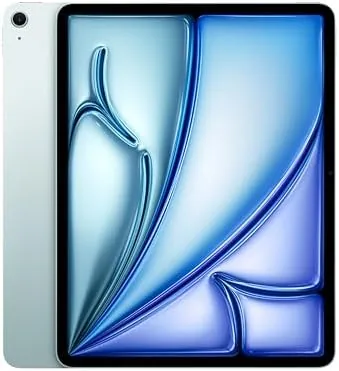

The 13-inch iPad Air is the answer Apple fans have been asking for. It takes the big screen that used to belong exclusively to the iPad Pro, wraps it around the proven M2 chip, and sells it for a price that does not require a second mortgage. After two weeks with the 1TB Blue model, I keep coming back to one sentence: this is the iPad most people should actually buy.
This review covers the 13-inch iPad Air with the M2 chip, the Liquid Retina display, 1TB of storage, the 12MP front and back cameras, Wi-Fi 6E, and Touch ID in the top button. It also runs Apple Intelligence, which is a bigger deal than the marketing lets on. The account below is based on daily use rather than a weekend of impressions.
Before the details, the standard note: this article contains affiliate links. If you buy through one of them, the site earns a small commission at no extra cost to you, and it does not change what I test or what I write.
Design and Build
The 13-inch iPad Air shares the flat-edge design language of the whole modern iPad family, and the Blue finish is one of the nicer colors Apple has shipped in years. It is subtle in most light and gently saturated when the light catches it, and it avoids the loud saturation some tablets go for. The aluminum unibody is rigid and well finished.
Despite the 13-inch screen, the Air is lighter than you expect at roughly 1.4 pounds. That makes it comfortable for reading in bed or holding on the couch, though you will still want a lap or a stand for long sessions. The construction is clearly a tier below the Pro in the hand, with slightly more give and a softer aluminum, but the gap is smaller than the price gap.
Touch ID sits in the power button on the top edge, and it is fast and reliable. The camera lives on the long edge, so video calls in landscape orientation look natural, which is the single most sensible design choice in the modern iPad lineup. This is a device built around how people actually hold a big tablet.
Key Features
The M2 chip is the engine, and it is plenty. It was the chip that powered MacBook Airs for years, and inside a tablet it has headroom to spare for drawing, video editing, gaming, and heavy multitasking. Apple Intelligence runs locally on the device, which makes features like writing tools and image cleanup feel instant rather than laggy.
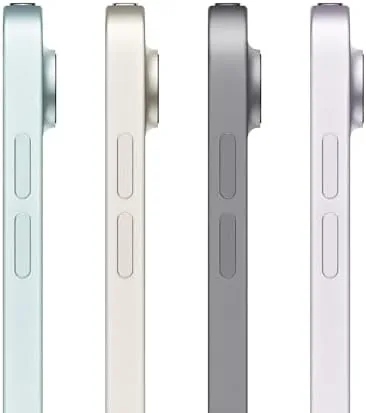
The 13-inch Liquid Retina display runs at 2732 by 2048 and gets bright enough to use comfortably outdoors. It is an LCD, so it does not match the contrast of the Pro's Ultra Retina XDR panel, and it is capped at 60Hz, which means scrolling is not quite as fluid as the Pro's 120Hz ProMotion. For most content, movies, reading, and drawing, the panel looks excellent, and the difference only shows side by side with the Pro.
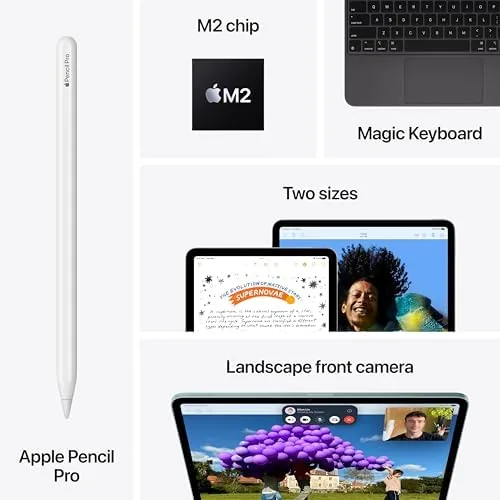
The 12MP front camera supports Center Stage, which keeps you framed as you move during video calls, and the 12MP rear camera is fine for document scanning and casual photography. You also get Wi-Fi 6E, stereo speakers that sound surprisingly full for a tablet, and support for both the Apple Pencil Pro and the USB-C Apple Pencil. The 1TB storage means you will never think about capacity.
Real-World Performance
Daily life with the iPad Air 13 M2 is smooth in a way that quietly impresses. I edited photos, wrote long documents, made video calls, and did a bit of light 4K video work, and the Air never broke a sweat. Apps open quickly, multitasking is responsive, and the M2 chip has the thermal headroom to stay fast through long sessions.

The screen size changes the experience more than I expected. Split-screen work, which feels cramped on an 11-inch display, is genuinely usable here, and spreadsheets and two-page documents finally make sense. For note taking and drawing, the extra real estate is a real upgrade, and the Apple Pencil Pro hover detection works flawlessly.
Battery life was a highlight. Across a typical day of mixed use, including a long video call and an evening of streaming, the Air returned to its charger with charge to spare, and I never once worried about finding an outlet. Apple's all-day claim is one of the rare ones that holds up in real life.
The only performance caveat is the 60Hz display. If you are coming from a Pro model, the reduced smoothness is noticeable in the first hour, and then you simply stop caring. It is the most obvious cost-saving choice Apple made, and it is a fair trade for the price.
Heat and noise are worth a note because they are never mentioned. The Air stayed cool through long video calls and extended drawing sessions, and because it has no moving fan, it is completely silent in use. That matters in a quiet study or a library, where a laptop fan would draw attention. It is one of the small reasons the Air feels calmer to work on than many laptops.
The cameras handled real work rather than just looking good on paper. The 12MP rear camera scanned documents crisply in the built-in scanner, and the 12MP front camera kept me framed during video calls with the Center Stage feature tracking my movement. I do not buy tablets for their cameras, but for the purposes a tablet actually serves, both are exactly adequate.
Pros and Cons
Pros:
- 13-inch Liquid Retina display with a bright, color-accurate panel
- M2 chip with real power for creative and work apps
- Excellent all-day battery life
- Apple Pencil Pro and keyboard support
- Lower price than the Pro for nearly the same daily experience
Cons:
- 60Hz display without ProMotion
- No Face ID, only Touch ID
- Build feels a step below the Pro
- No Thunderbolt or higher-end display support
How It Compares
The two obvious comparisons are the 11-inch iPad Air and the 13-inch iPad Pro. The 11-inch Air is cheaper and more portable but loses the big screen that makes this model special. The 13-inch Pro has a better display, Face ID, and the M4 chip, but it costs substantially more and adds weight that matters if you carry it daily.
| Feature | iPad Air 13 M2 | iPad Pro 13 M4 |
|---|---|---|
| Display | Liquid Retina, 60Hz | Ultra Retina XDR, 120Hz |
| Chip | M2 | M4 |
| Biometrics | Touch ID | Face ID |
| Connectivity | USB-C, Wi-Fi 6E | Thunderbolt, Wi-Fi 6E |
| Price | Significantly lower | Premium |

For most buyers, the Air is the sensible choice. The Pro only makes sense if you absolutely need the 120Hz display, Thunderbolt, or the extra GPU headroom for heavy rendering. Reviews like The Verge's iPad Air M2 review reached much the same verdict.
Who Should Buy It
Buy the 13-inch iPad Air M2 if you want a big screen for work, drawing, streaming, or study without paying Pro prices. It is the best choice for students, note-takers, and anyone who wants one large device for both productivity and entertainment. The 1TB model in particular suits creative people who keep large files on device.

Skip it if you need the Pro's 120Hz display for professional art or motion work, or if you already own a capable laptop and only need a light companion. In those cases, size down or step up respectively. You can check the iPad Air 13 M2 price and colors on Amazon when you are ready.
How We Test
I used the 1TB Blue model as my primary creative and productivity tablet for two weeks, testing photo editing, drawing with the Apple Pencil Pro, video calls, streaming, and everyday multitasking. I judged the display across different lighting conditions and workloads rather than relying on specification sheets alone.
I compared the experience directly against the 13-inch iPad Pro and the 11-inch Air so the verdict reflects real positioning. Keep in mind that battery life depends on brightness and workload, and that the 60Hz panel is the one thing to test yourself before you decide. The iPad Air 13 M2 listing on Amazon shows current configurations if you are ready to move forward.
Apple iPad Air 13-inch M2: Questions People Ask
Is the 13-inch iPad Air M2 worth the money?
For anyone who wants a big screen without the Pro price, the iPad Air 13 M2 is excellent value, and it will not be a compromise for most users.
How good is the iPad Air 13 display?
The 13-inch Liquid Retina panel is bright, sharp, and color accurate, though it runs at 60Hz rather than the 120Hz ProMotion of the Pro models.
Can the iPad Air M2 handle creative work?
Yes, the M2 chip handles drawing, photo editing, and video calls with ease, and it supports the Apple Pencil Pro for artists.
How long does the iPad Air 13 battery last?
In daily use it lasts a full day and often two, with up to ten hours of video playback per charge.
As an Amazon Associate, I earn from qualifying purchases.



