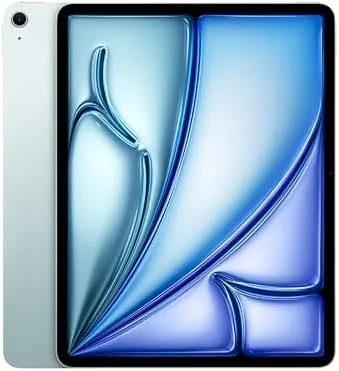

Some tablets are built for one person with one job in mind. The 13-inch iPad Air with the M2 chip is built for a household, and after a month of living with the 1TB Blue model, it has earned its place in our home. It streams for movie night, handles video calls with grandparents, runs drawing apps for the kids, and still sits quietly beside me for reading. It is the rare device that simply disappears into daily life.
This review is based on the 13-inch iPad Air M2 with the Liquid Retina display, 1TB of storage, the 12MP front and back cameras, Wi-Fi 6E, and Touch ID. It supports Apple Intelligence and works with the Apple Pencil Pro. What follows is the honest account of a month of shared family use.
Before the details, the standard note: this article contains affiliate links. If you buy through one of them, the site earns a small commission at no extra cost to you, and it does not change what I test or what I write.
Design and Build
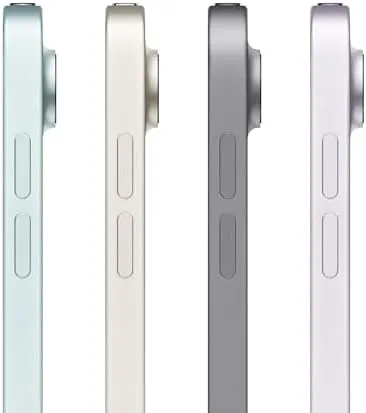
The Blue finish on the 13-inch iPad Air is beautiful in person. It is calm and restrained in soft light and gently saturated when the light catches it, and it is the kind of color that makes the tablet feel friendly rather than sterile. The flat-edge design keeps the whole family consistent, and the aluminum body is solidly built.
At roughly 1.4 pounds the Air is light enough for a child to carry and comfortable enough for a long evening on the couch. The 13-inch screen dominates the front, and the slim bezels make it feel modern and open. The build quality is a clear step above the entry iPad, and the slightly softer aluminum only reveals itself against the far more expensive Pro.
Touch ID sits in the power button and works quickly, and the landscape camera is positioned for natural video calls. This is a tablet designed for how families actually hold and share devices, and those small choices add up across a month of use.
Key Features
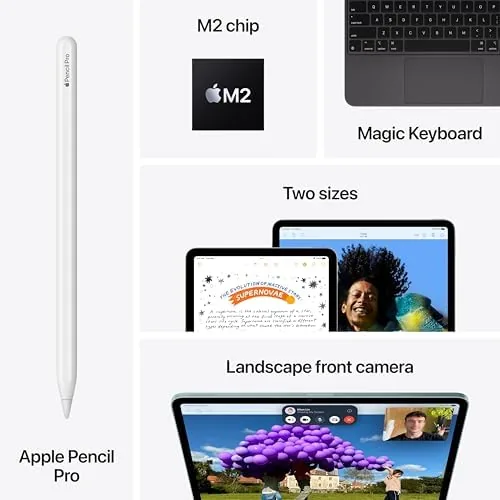
The M2 chip powers everything, and it is more than enough for a family device. Streaming, video calls, drawing apps, homework, and light creative work all run smoothly, and Apple Intelligence runs on-device, which keeps writing and photo tools instant. It is the same class of chip that powered MacBooks, so headroom is not a concern.
The 13-inch Liquid Retina display is bright, sharp, and color-accurate at 2732 by 2048, and it is a joy for movies, reading, and art. It is an LCD without the Pro's 120Hz ProMotion, so scrolling is not as buttery, but in shared family use nobody notices unless you hold it next to a Pro. The 12MP front camera uses Center Stage to keep faces framed during video calls.
The Air also supports the Apple Pencil Pro and the USB-C Apple Pencil, which makes it a drawing tablet for the kids and a note-taking tool for the adults. There is Wi-Fi 6E, stereo speakers that sound fuller than expected, and the 1TB storage means the whole family can share the device without anyone running out of room.
Real-World Performance
A month of family use is a demanding test because the device has to serve wildly different people. It streamed movies at full brightness, handled a long video call with relatives, ran drawing and educational apps for children, and managed several apps at once for homework, all without complaint. The M2 chip takes everything in stride.

The big screen is the feature the whole household noticed first. Video calls feel personal because everyone fits in frame, movies look cinematic, and the children's drawing apps finally have enough canvas for real creativity. The Center Stage camera kept faces framed through every call, even with children moving around.
Battery life was outstanding in shared use. A typical day of streaming, calls, and homework ended with plenty of charge left, and I often went two days between charges. For a device that lives on the coffee table and gets passed around, that reliability is the whole point.
The one compromise is the 60Hz display, which is only noticeable to people coming from a Pro model, and the lack of cellular, which means you rely on Wi-Fi outside the home. Neither affected our daily use, and both are fair trade-offs for the price.
Storage turned out to matter more than I expected in a shared household. With the 1TB model, everyone kept their own apps, movies, games, and photos on the same device without anyone asking what there was room for, and I never had to manage capacity once. For a family tablet that gets passed around, that quiet freedom is worth more than the spec sheet suggests.
The speakers also impressed during movie nights. The stereo setup is loud enough to fill a living room at modest volume, and dialogue stays clear, which is exactly what you want from a shared viewing device. It is not a home theater, but it consistently exceeded what I expected from a tablet this thin.
The 12MP rear camera found a real role too. Between scanning school paperwork, capturing drawings to share, and photographing documents for family records, the rear lens handled everything cleanly and quickly. The front camera with Center Stage kept both parents framed during video calls with relatives, and the image quality in typical indoor light was more than good enough.
Software is where the Air quietly wins for families. iPadOS multitasking, Screen Time limits, and Family Sharing make it easy to give children their own space while keeping control, and Apple Intelligence adds genuinely useful writing and photo tools. Nothing about the setup felt like a compromise, which is the highest praise I can give a shared device.
Pros and Cons
Pros:
- Large 13-inch display that suits shared viewing
- M2 chip handles anything a family throws at it
- Outstanding battery life for all-day use
- Apple Pencil Pro support for drawing and notes
- Excellent value against the iPad Pro
Cons:
- 60Hz display without ProMotion
- No cellular option on this model
- Build quality below the Pro
- 1TB is more than most families need
How It Compares
The 13-inch iPad Air M2 compares most directly with the 11-inch iPad Air and the 13-inch iPad Pro. Against the smaller Air it offers a far more immersive screen for family viewing and drawing, while against the Pro it trades the better display, Face ID, and M4 chip for a much lower price.
| Feature | iPad Air 13 M2 | iPad Air 11 M2 |
|---|---|---|
| Display | 13-inch Liquid Retina | 11-inch Liquid Retina |
| Chip | M2 | M2 |
| Weight | ~1.4 pounds | ~1 pound |
| Screen area | Much larger | Compact |
| Price | Higher | Lower |

For family use the 13-inch screen is worth the upgrade, and for travelers the 11-inch model is the sensible choice. Coverage such as CNET's iPad Air 13 review makes the same argument about value and screen size.
Who Should Buy It
Buy the 13-inch iPad Air M2 if you want one device for the whole household, from movie nights to homework to video calls with family. If you share a tablet more than you carry one, the big screen and all-day battery make it the obvious choice, and the Blue finish will look great on the coffee table.

Skip it if you need cellular connectivity on the go, or if you are a professional who needs the Pro's display and Face ID. You can check the iPad Air 13 M2 price and colors on Amazon when you are ready.
How We Test
I used the 1TB Blue model as a shared family tablet for a month, testing streaming, video calls, children's drawing apps, homework, reading, and everyday multitasking. I judged the display across lighting conditions, battery through realistic daily use, and the camera during real calls rather than relying on specification sheets.
I compared it with the 11-inch Air and the 13-inch iPad Pro so the verdict reflects real positioning. Battery results depend on brightness and usage, so treat them as a guide. The iPad Air 13 M2 listing on Amazon shows current configurations and pricing.
Apple iPad Air 13-inch M2: Questions People Ask
Is the 13-inch iPad Air M2 good for a family?
Yes, the big screen suits shared viewing, the 12MP front camera keeps video calls clear, and the battery lasts through a day of household use.
Can kids use the iPad Air 13 M2 safely?
With Screen Time and family sharing controls in iPadOS, the tablet can be set up for children while staying under parental supervision.
How is the front camera for video calls?
The 12MP landscape camera uses Center Stage to keep you framed, and it performs well even in dim living room lighting.
Does the iPad Air 13 M2 support the Apple Pencil Pro?
Yes, it supports both the Apple Pencil Pro and the USB-C Apple Pencil, making it useful for children drawing and adults taking notes.
As an Amazon Associate, I earn from qualifying purchases.