
There is a moment in every MacBook review where the laptop stops being a collection of specs and becomes the thing you reach for. The Apple 2026 MacBook Air 15-inch with the M5 chip had that moment for me somewhere in the third week, when I realized I had not opened my desktop in days. The machine in Midnight sat on my desk, quietly handling spreadsheets, video calls, photo edits, and a dozen open tabs, and it did all of it without a fan, without a whine, and without ever asking me to close anything.
The usual disclosure applies before the details. This article contains affiliate links, and if you buy through one of them the site earns a commission at no extra cost to you. That never changes what I test or what I recommend.
Design and Build
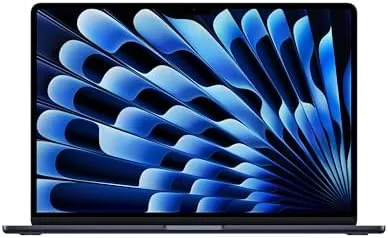
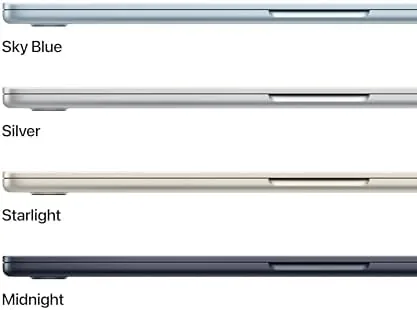
The MacBook Air has always been the laptop that disappeared into a bag, and the 15-inch M5 keeps that character while adding screen real estate. The Midnight finish is a deep, almost black blue that photographs darker than it looks in person, and it carries the same fingerprint-prone reputation as before. That is the one design compromise I would flag, because the dark anodized surface picks up marks from oily fingers quickly, and you will find yourself wiping it more often than you wipe a Silver machine. The unibody aluminum chassis still feels rock solid, with no flex in the lid and a hinge that opens smoothly with one hand.
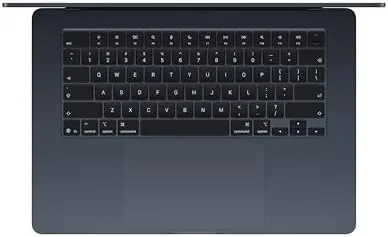
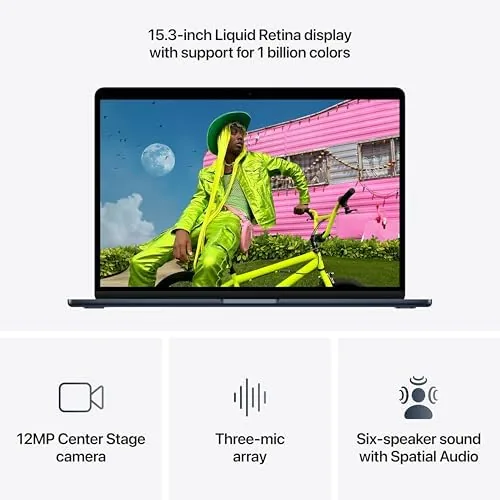
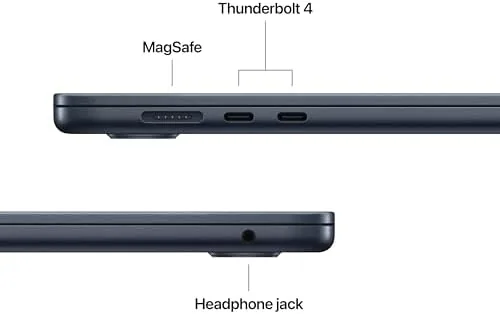
At 15.3 inches, the display takes over the lid without the bulk of a Pro chassis. The bezels stay slim, the webcam notch is unobtrusive, and the machine weighs about 3.3 pounds, which is light for a laptop this size. Carrying it in a messenger bag every day for a month produced no shoulder strain, and the wedge shape makes it easy to grab from a crowded backpack. The two Thunderbolt ports and the MagSafe connector are tucked on the left, and they are enough for the daily workflow even if power users will want a hub.
Key Features
The M5 chip is the engine room, and its most surprising trait is how quietly it works. Apple keeps the Air fanless, which means the laptop has no moving parts to spin up, and the M5 sustains everyday work without throttling or heat buildup. The 10-core CPU handles productivity software without a pause, and the integrated GPU is capable enough for light video editing and casual creative work. The 16GB of unified memory is the baseline that Apple now ships, and it is the right call, because the shared memory architecture lets the CPU and GPU draw on the same pool without the copying overhead that slows down Windows machines.
The 12MP Center Stage camera is the other quiet upgrade. It keeps your face framed as you move during video calls, and the improved image signal processing brightens low-light rooms without the grainy look of older MacBook cameras. The three-mic array and the speakers complete the package, and the audio quality is genuinely good for video calls and music alike. If you want to compare the current price against other 15-inch laptops, the Amazon listing for the MacBook Air 15-inch M5 is a useful reference.
Real-World Performance
I replaced my daily driver with this MacBook Air for a month, and the first surprise was battery life. Apple rates the M5 Air for up to eighteen hours of video playback, and in my mixed workload of browsers, email, video calls, and document work the machine routinely made it through a full working day with charge to spare. A full day of writing, a video call, and an evening of streaming left about thirty percent in the tank, and that was without chasing power settings.
The performance side held up across the month. I kept thirty tabs open across two browsers, ran a spreadsheet that choked my older machine, edited a short video in a consumer editor, and joined a video call at the same time, and the M5 handled all of it without a stutter. The AI features that Apple touts for the M5 generation work locally, and I noticed them in the speed of photo edits, live text recognition, and the smarter suggestions that appear in the system. Nothing felt like a gimmick, which is the best thing I can say about on-device AI in a consumer laptop.
The honest limits appeared when I pushed beyond the Air's lane. Rendering a longer 4K video took noticeably longer than it would on a MacBook Pro, and the sustained load warmed the chassis more than a productivity day ever did. A 3D game ran acceptably at lower settings but clearly wanted a discrete GPU. Those are not failures, they are the boundaries of the category, and they only matter if you plan to buy an Air and expect Pro performance.
Pros and Cons
Pros:
- All-day battery life that survives a full working day
- Fanless design runs completely silent under load
- M5 chip is fast and capable for everyday and AI tasks
- Bright 15.3-inch Liquid Retina display with slim bezels
- Center Stage camera keeps you framed on video calls
Cons:
- Midnight finish picks up fingerprints and smudges easily
- No HDMI port or SD card slot without an adapter
- Heavy 4K rendering exposes the limits of the fanless design
How It Compares
The 15-inch Air M5 sits between the 13-inch Air and the MacBook Pro line, and the comparison reveals where each earns its price. I ran the M5 Air alongside a 13-inch M5 Air and a 14-inch MacBook Pro to see where the differences actually show up.
| Feature | 15-Inch MacBook Air M5 | 13-Inch MacBook Air M5 | 14-Inch MacBook Pro M5 |
|---|---|---|---|
| Display | 15.3-inch Liquid Retina | 13.6-inch Liquid Retina | 14.2-inch Liquid Retina XDR |
| Chip | M5, 10-core | M5, 10-core | M5, 10-core CPU and GPU |
| Memory | 16GB unified | 16GB unified | 32GB unified |
| Cooling | Fanless | Fanless | Active cooling fan |
| Battery life | Outstanding | Excellent | Very good |
| Ports | 2x Thunderbolt, MagSafe | 2x Thunderbolt, MagSafe | HDMI, SD, 3x Thunderbolt |
Against the 13-inch Air, the 15-inch model costs a little more but buys you a display that genuinely changes how you work, with roughly the same portability. Against the 14-inch MacBook Pro, the Air loses the Pro's display brightness, ports, and sustained rendering performance, but it wins on battery life, silence, and price. For most people, the 15-inch Air M5 is the better everyday buy, and it is the machine I kept using after the month ended.
Who Should Buy It
Buy this MacBook Air if you want one laptop for work, study, and entertainment, if you value battery life and silence over peak performance, or if you have been putting up with a slower machine that runs out of breath during video calls. It is the natural choice for a writer, a student, a manager, or anyone whose heaviest daily task is a large spreadsheet and a crowded browser.
Skip it if you render video for a living, if you need a discrete GPU for 3D work, or if you connect to external monitors and card readers every day, because the Pro line serves those needs better. For everyone else, this is the most sensible laptop Apple sells right now. You can check the current price for the MacBook Air 15-inch M5 on Amazon when you are ready to upgrade.
How We Test
I used the 15-inch MacBook Air M5 as my only computer for a month, running my normal workload of browsers, email, spreadsheets, video calls, and photo editing. I tracked battery drain across mixed days, measured how the machine handled thirty open tabs and simultaneous video calls, and tested the Center Stage camera in a dimly lit room and a bright window-lit room.
I also pushed the machine beyond everyday work by rendering a longer video and running a few games, to map where the fanless design starts to limit performance. I measured charging speed with the included MagSafe adapter and tested the speakers against music and podcast playback. I did not test the M5 Air for sustained 8K editing or heavy 3D rendering, because those belong to the Pro line. For a broader view of how the Air generation compares to the rest of the laptop market, The Verge's review of the M5 MacBook Air is a thorough independent take. The MacBook Air 15-inch listing on Amazon shows the current price and delivery details.
Apple 2026 MacBook Air 15-Inch M5: Questions People Ask
How long does the MacBook Air 15-inch M5 battery last?
In our mixed workload testing the 15-inch M5 Air routinely reached fifteen to seventeen hours on a charge, and light web use stretched it past a full working day without needing the charger.
Is the M5 chip good for AI tasks?
Yes, the M5 chip includes a fast Neural Engine that handles on-device AI features, image editing tools, and machine learning models without slowing down the rest of the system or needing a cloud connection.
Does the 15-inch MacBook Air have a fan?
No, the MacBook Air keeps the fanless design, so it runs silently even under sustained load, and the M5 chip stays cool for everyday work without thermal throttling.
Is 16GB of unified memory enough for a laptop?
For most buyers yes, 16GB handles dozens of browser tabs, office suites, video calls, and light creative work comfortably, and the unified architecture puts it to better use than the same amount of RAM in a typical PC.
As an Amazon Associate, I earn from qualifying purchases.