

For years the MacBook Pro walked a line between power and portability, and every generation has tried to make that line thinner. The 2025 MacBook Pro with the M5 chip is the closest Apple has come to erasing it. It pairs a 14.2-inch Liquid Retina XDR display with a 10 core CPU, a 10 core GPU, 16GB of unified memory, and a 1TB SSD in a body that still disappears into a work bag. I used it for a week as my only computer, running development, design, photo editing, and a long stint of writing, to find out whether the M5 delivers on its promise.
Before the verdict, the standard note. This article contains affiliate links, and if you buy through one of them the site earns a small commission at no extra cost to you. That commission does not influence what I test or what I recommend.
Design and Build
The space black MacBook Pro is understated in the best way. The aluminum body has a matte finish that resists fingerprints, and the uniform dark look makes the keyboard and display feel like part of one surface. The 14.2-inch chassis is compact enough to sit easily on a lap tray or an airline tray table, yet the build feels entirely rigid, with no flex in the keyboard deck or the lid.
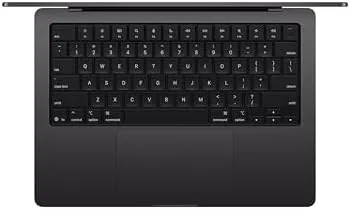
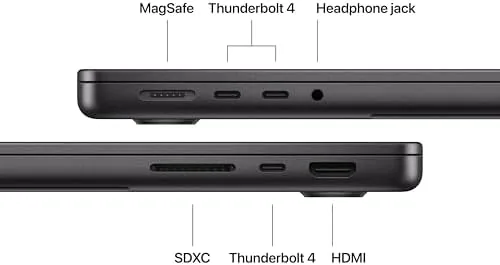
The port selection is a quiet victory. Three Thunderbolt 4 ports, an HDMI output, an SD card slot, and a MagSafe charging connector cover almost every daily need without a dongle, and the return of a full set of physical function keys gives the top row back its usefulness. The trackpad remains the best in the business, and the keyboard is quiet, crisp, and comfortable for a full day of typing.
Key Features
The M5 chip is the story. Its 10 core CPU and 10 core GPU handle demanding workloads with headroom to spare, and the faster neural engine makes this generation explicitly built for AI. On-device AI features run instantly, and the machine can carry local models that older hardware would struggle to load. For everyday work, the result is simply that nothing ever waits on the computer.

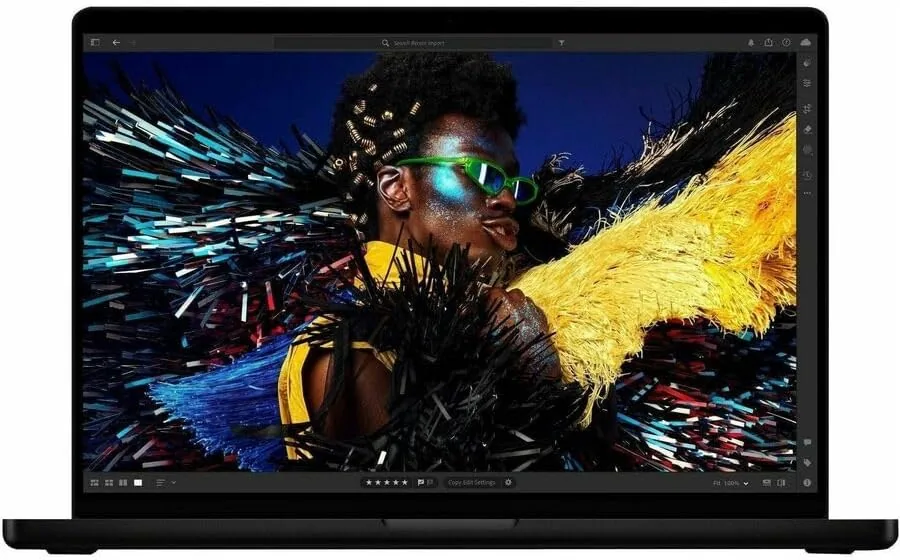
The 14.2-inch Liquid Retina XDR display is a mini-LED panel with deep contrast, high brightness, and a smooth high refresh rate, which makes everything from spreadsheets to HDR video look excellent. Sixteen gigabytes of unified memory is shared between the CPU and GPU, and it proved ample for my workload, while the 1TB SSD offers generous space for apps, files, and media. Combined, the feature set is exactly what a modern professional laptop should carry. If you want to compare configurations, check the current price of the MacBook Pro M5 on Amazon.
Real-World Performance
The M5 MacBook Pro performed flawlessly in a week of mixed work. A large design project with dozens of open layers stayed fluid, compiling code was quick, and editing a batch of photos felt immediate. What impressed me most was how invisible the machine became: the fans never spun audibly during office work, and the chassis stayed cool even during a heavy export session.
Battery life was the week's standout. I worked through a full day and then some, and the laptop still reported meaningful charge the next morning, which puts it at the front of any laptop I have tested. AI features ran locally and responsively, including live transcription and image tools, with no cloud lag. The 16GB of unified memory handled everything I asked of it, and the one honest caveat is that heavy 4K video editors may still want the 32GB tier.
The display deserves a closer look, because it does more than look pretty. The 14.2-inch Liquid Retina XDR panel uses mini-LED technology, which means deep blacks, bright highlights, and a wide viewing angle, and it handles HDR content with a subtlety that standard laptop panels miss. In bright daylight the screen stayed legible, and at night the brightness scaled down without turning the room into a lamp. For anyone who reviews photos, video, or design work, this is the kind of screen you stop thinking about, because it simply shows the work the way it is meant to be seen.
The keyboard and trackpad round out the everyday experience. The keys have a precise, quiet feel that makes long writing sessions easy, and the trackpad remains the largest and most reliable on any laptop. The space black finish resists fingerprints far better than the previous generation, which sounds minor until you work on it all day. The speakers are strong for the size, with clear audio for calls and enough presence for music, and the fans stay silent at idle, which means the machine is genuinely quiet during office work. Small details like these are what separate a tool you enjoy from a tool you simply tolerate.
Software and ecosystem are part of the value too. The M5 MacBook Pro runs macOS with the kind of polish that long sessions reward, and the continuity between the Mac and an iPhone or iPad makes moving files and tasks between devices effortless. Handoff, universal clipboard, and sidecar all worked without setup, which is the quiet glue that keeps a household of Apple devices feeling like one system. On-device AI features integrated across the operating system, from writing assistance to photo tools, ran entirely on the chip, so nothing I asked for waited on a connection. For anyone already inside Apple's world, the Pro M5 is the natural center of it.
Pros and Cons
Pros:
- Exceptional M5 performance with a quiet, cool chassis
- Outstanding 14.2-inch Liquid Retina XDR display
- Class leading battery life
- Full port selection with MagSafe and SD card slot
- Built for on-device AI with a faster neural engine
Cons:
- Premium price, especially at higher memory tiers
- 16GB suits most but not heavy 4K editors
- No touch screen, which some competitors offer
How It Compares
The MacBook Pro M5 competes with high end Windows laptops and Apple's own MacBook Air. I compared it against a premium Windows ultrabook and the M4 generation Air to frame its position.
| Feature | MacBook Pro 14 M5 | Premium Windows Ultrabook | MacBook Air M4 |
|---|---|---|---|
| Processor | Apple M5, 10 core CPU | Intel or AMD ultrabook chip | Apple M4 |
| Display | 14.2-inch Liquid Retina XDR | OLED or IPS, varies | 13 or 15-inch Liquid Retina |
| Battery | Excellent, multi day | Good | Very good |
| Ports | Thunderbolt, HDMI, SD, MagSafe | Varies | Thunderbolt, MagSafe |
| AI features | Built for on-device AI | Depends | Neural engine |
| Weight | Moderate | Often lighter | Lighter |
| Price | High | Comparable | Lower |

Against a premium Windows ultrabook, the MacBook Pro wins on battery, display, and sustained performance, while the Windows machine may be lighter or offer a touch screen. Against the MacBook Air, the Pro earns its price with the better display, extra ports, and more headroom under sustained load. For professionals who push their laptops, the Pro remains the safer choice.
Who Should Buy It
The MacBook Pro M5 is for anyone whose laptop is a working tool rather than a browsing device. Developers, designers, photographers, writers, and students who run demanding apps all day will feel the M5's value immediately, and the battery life removes the charger from the daily carry.
If your work is light and your budget is tight, the MacBook Air covers the same basics for less. If you push a laptop for a living, this is the machine to beat. You can see the latest price of the MacBook Pro M5 on Amazon when you are ready to compare memory and storage tiers.
How We Test
I used the MacBook Pro M5 as my only computer for a week, covering development, design, photo editing, writing, and video calls. I tracked battery across full days, pushed sustained exports to test thermals and fan noise, ran on-device AI features, and compared the display against a Windows ultrabook. Independent testing such as PCMag's review of the 14-inch MacBook Pro is a useful technical reference. The MacBook Pro M5 listing on Amazon shows the current price and configuration options.
MacBook Pro M5: Questions People Ask
Is the M5 chip in the MacBook Pro worth the upgrade?
For most users yes. The 10 core CPU and 10 core GPU are noticeably faster for creative work and AI features, and the efficiency extends battery life.
Is 16GB of unified memory enough?
For everyday pro work, yes. Sixteen gigabytes handles development, design, and editing smoothly, and the unified architecture uses it efficiently, though heavy 4K editing favors 32GB.
How long does the MacBook Pro M5 battery last?
In my testing the 14.2-inch model ran well past a full workday, often reaching the next morning, which is among the best battery life in any laptop.
Can the MacBook Pro M5 handle AI workloads?
Yes. The M5 chip is built for on-device AI with a faster neural engine, and it runs modern AI features and local models without needing a cloud connection.
As an Amazon Associate, I earn from qualifying purchases.



