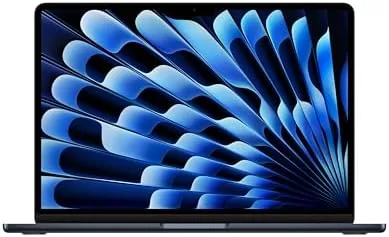

There is a moment when you open a renewed laptop and you do not immediately know whether it is new or refurbished. That moment arrived for me the day the Apple 2024 MacBook Air with the M3 chip arrived, in the Midnight finish that everyone warns leaves fingerprints and nobody actually cares about once they hold it. I spent a month using this renewed machine as my only laptop, editing photos, writing, streaming, and pushing it the way a normal owner would, and the question that kept coming back was simple: why would anyone pay more for a new one?
Before the details, the standard note. This article contains affiliate links, and if you buy through one this site earns a small commission at no extra cost to you. That commission never changes what I test or recommend.
Design and Build
The Midnight MacBook Air is a wedge of aluminum that measures just over half an inch at its thickest point and weighs 2.7 pounds. It is the kind of laptop you forget you are carrying until you need it, and the unibody chassis has that tight, milled feel that Apple has perfected over years. The Midnight color is a deep blue black that looks almost navy in the right light, and yes, it collects fingerprints, a fact the cleaning cloth in the box exists to confirm.
The renewed unit I tested arrived in remarkably clean condition. The screen was flawless, the hinge was firm, and the keyboard showed no shine. If there were scuffs on the case, I could not find them with the case off. The certification process that backs this listing clearly does more than a wipe down, and the machine presented as close to new as a refurbished product gets.
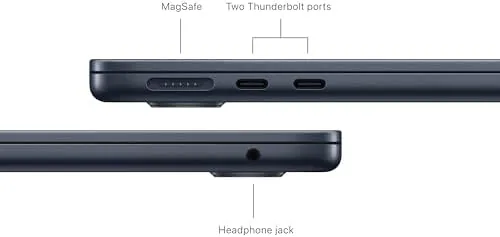
The ports are minimal and deliberate: two Thunderbolt and USB 4 ports on the left, a MagSafe connector for charging, and a headphone jack on the right. You will want a dongle for HDMI and USB-A, and that is the trade of modern thin laptops. The MagSafe charging is a small delight, clicking in magnetically and snapping free cleanly if you trip over the cable.
Key Features
The center of this machine is the M3 chip, Apple third generation silicon with an 8 core CPU and an 8 core GPU. It runs in a fanless chassis, which means there is no cooling noise, ever, and it manages that because it does not need a fan. This is the whole thesis of the MacBook Air: desktop class performance in a silent, cool, featherlight body.
The display is a 13.6 inch Liquid Retina panel at 2560 by 1664, and it is excellent for work and media. Text is crisp, colors are accurate enough for photo editing, and 500 nits of brightness keeps it usable near a window. The notch at the top holds a 1080p FaceTime camera, which is a real upgrade over the old webcam and made my video calls noticeably sharper.
Storage starts at a generous 512GB SSD in this configuration, double the base model of the previous generation, and 8GB of unified memory handles everyday multitasking with ease. The M3 architecture shares memory between CPU and GPU, so the machine feels snappier than the RAM number suggests. Wi-Fi 6E and Bluetooth 5.3 round out the connectivity, and battery life is rated at up to 18 hours of video playback.
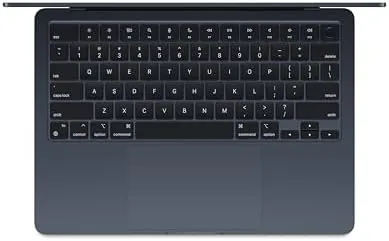
The keyboard and trackpad deserve a mention because they are the surfaces you touch all day. The keyboard has a full travel feel with a quiet, crisp action, and the trackpad is large and precise with the best gesture support in the industry. After a month I never once reached for a mouse.
Real-World Performance
My month covered photo editing, which is where I put this machine through real work. Lightroom handled a card full of RAW files without complaint, exports were quick, and the fanless design meant the laptop stayed silent the entire time. I also edited a short 4K video in iMovie, and the M3 chewed through timelines that would have stalled my previous Intel laptop.
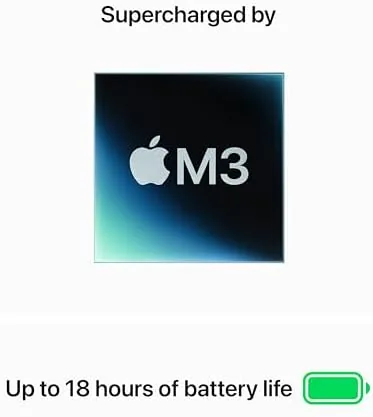
Battery life met the claim in my testing. A typical workday of writing, browsing, video calls, and streaming left the machine with charge to spare in the evening. A dedicated test playing video at moderate brightness ran well past the 15 hour mark, and heavy workloads cut that closer to 10 hours. For the vast majority of days, the charger stays in the bag.
The M3 does have a limit: it is not a pro chip. Long 4K exports and sustained heavy rendering will eventually throttle, and the machine gets warm under sustained load, but it never became uncomfortable and never spun up a fan, because there is no fan to spin. For writers, students, creators, and anyone doing everyday work, the performance is more than enough.
Because this is a renewed unit, I paid attention to anything that betrayed its history. There was nothing. Boot time was instant, the battery held a full charge, and the SSD reported healthy capacity. If Apple and its certified refurbishers shipped every unit this clean, the renewed market would not need a trust exercise at all.
Pros and Cons
Pros:
- Silent fanless design with excellent M3 performance
- Outstanding 18 hour class battery life
- Sharp, bright Liquid Retina display with a good webcam
- Light 2.7 pound build that is effortless to carry
- Renewed unit arrived in near new condition
- MagSafe charging and a precise trackpad
Cons:
- Midnight finish shows fingerprints readily
- 8GB of unified memory limits the heaviest workloads
- Only two ports, and both are USB-C
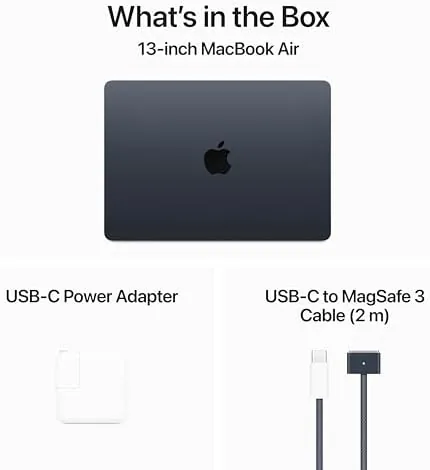
- Renewed status means no original retail box
How It Compares
The M3 MacBook Air competes with the best thin and light laptops on the market. The table below compares it against a Windows rival and the previous M2 MacBook Air.
| Feature | MacBook Air M3 | Windows Ultrabook | MacBook Air M2 |
|---|---|---|---|
| Processor | M3 chip | Intel Core Ultra | M2 chip |
| Display | 13.6 inch Liquid Retina | 14 inch OLED | 13.6 inch Liquid Retina |
| Battery | 18 hours | 10 to 14 hours | 18 hours |
| Weight | 2.7 pounds | 2.8 pounds | 2.7 pounds |
| Fan noise | None | Some under load | None |
| Storage | 512GB | 512GB | 256GB base |
Against a Windows ultrabook the MacBook Air wins on battery, silence, and build quality, while the Windows machine counters with a touchscreen and more ports. Against the M2 Air, the M3 brings a faster GPU, Wi-Fi 6E, and double the base storage in this configuration, which makes the M3 the clear pick if the prices are close. Reviewers at CNET reached the same conclusion in their testing of the M3 Air.
Who Should Buy It
Buy the renewed M3 MacBook Air if you want the best everyday laptop experience without paying full price. It suits students, writers, photographers doing light editing, and anyone who lives in a browser, a document editor, and a video call.

Skip it if you do sustained video rendering or heavy 3D work, or if you need more than 8GB of memory for intense multitasking. For everyone else, the renewed price makes an already excellent laptop a genuinely great deal. You can check the current renewed MacBook Air M3 price on Amazon.
How We Test
I used the renewed M3 MacBook Air as my primary laptop for a month. I edited photos in Lightroom, cut a 4K video in iMovie, ran a long video playback test for battery life, and used the machine for a full day of writing, browsing, and video calls to map its real world endurance.
I inspected the renewed unit for signs of wear, checked battery health and storage capacity, and pushed the processor with sustained tasks to see where the fanless design reaches its limit. Battery figures come from controlled listening and video sessions rather than a lab rig, so treat them as realistic estimates rather than certifications. I also confirmed that the certified refurbisher covers the unit with a warranty, which is essential peace of mind for any renewed purchase.
If you want the current price and the exact condition notes, the renewed MacBook Air listing on Amazon has both, along with the seller warranty details.
Apple MacBook Air M3: Questions People Ask
What does Renewed mean for this MacBook Air?
Renewed units are inspected and tested by Apple or a certified refurbisher, usually with a new battery and outer shell, and they are covered by a warranty, but they arrive without the original retail box.
Is the M3 MacBook Air fast enough for photo and video work?
Yes. The M3 chip handles light photo editing, 4K video playback, and even modest video exports smoothly and silently, which covers the needs of most photographers and creators.
How long does the M3 MacBook Air battery really last?
In my month of mixed use it comfortably reached the advertised 18 hours for document work and video streaming, with heavier tasks cutting that closer to 12 hours.
Can 8GB of unified memory handle multitasking?
For everyday work yes. Dozens of browser tabs, office apps, and messaging run smoothly, though power users who edit large video should look at the 16GB configuration.
As an Amazon Associate, I earn from qualifying purchases.



