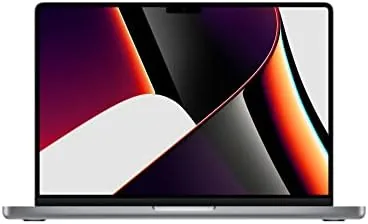

Apple's professional laptops spent years being defined by their sacrifices. The ports were sacrificed for thinness, the display carried a notch without earning it, and the keyboard famously broke under its own keys. The 2021 MacBook Pro 14 walked into that history and erased it in one release. It brought back MagSafe, an HDMI port, a full-size SD card slot, and a keyboard people stopped complaining about, then backed all of it with the M1 Pro chip and a Liquid Retina XDR display that raised the bar for every Laptop That followed. This review is the record of a month of professional work on the Space Gray 14-inch model with 16GB of unified memory and a 1TB SSD.
Before the details, the standard note. This article contains affiliate links, and if you buy through one of them the site earns a small commission at no extra cost to you. That commission does not change what I test or what I recommend, and I treat every product here the same way I would treat one bought with my own cash.
Design and Build
The 14-inch MacBook Pro is proportioned like a laptop that knows what it is for. The Space Gray aluminum body feels dense and expensive in the hand, the flat edges give it a precise, machined character, and at about 3.5 pounds it sits comfortably in a bag without announcing its presence. This is the size that splits the difference between the 13-inch Air and the 16-inch Pro, and it is the right one for most professionals.
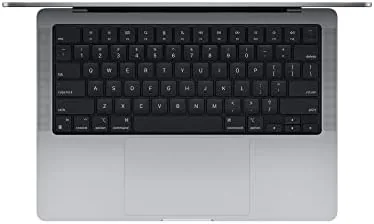
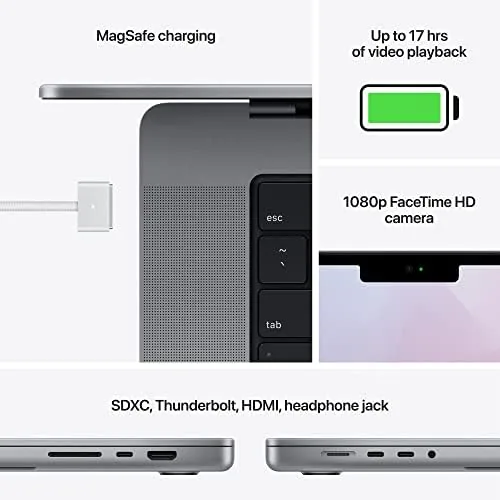
The return of ports is the moment that defines this machine. Three Thunderbolt 4 ports, an HDMI port, an SDXC card slot, MagSafe 3, and a headphone jack that drives high impedance headphones cover nearly every professional need without a dongle in sight. Photographers slide their memory cards in directly, presenters plug into projectors with a cable, and everyone charges with the satisfying magnetic snap of MagSafe.
The keyboard, the touchpad, and the display notch round out the physical story. The keyboard has a stable scissor mechanism with enough travel to satisfy heavy typists, the Force Touch trackpad is among the best in any laptop, and the notch on the display is the price of a thinner bezel that now hosts a much better 1080p FaceTime HD camera. The notch bothers people less in practice than in the preview, and the camera upgrade makes it worth it.
Key Features
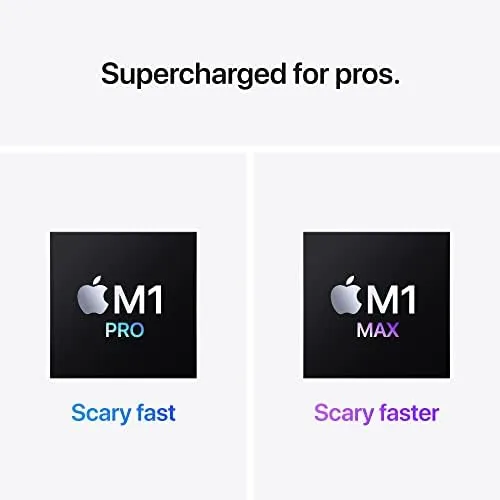
The M1 Pro chip is the engine, and it is a large one. The 10-core CPU and 16-core GPU in this configuration deliver performance that embarrassed most Intel Macs of the era, with the added gift of doing it while running cool and silent. The 16GB of unified memory sits on the same chip as the CPU and GPU, which means the whole system shares one pool of fast memory with no separate VRAM bottleneck.
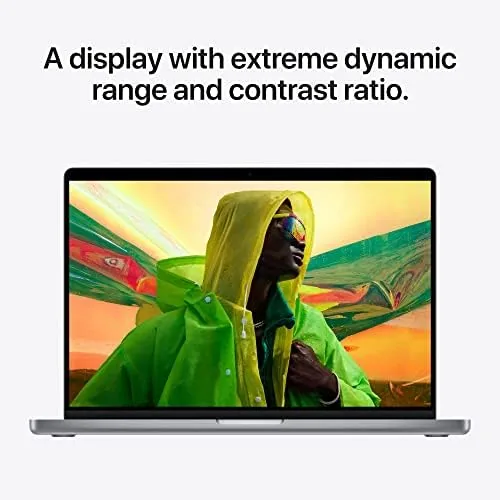
The 14.2-inch Liquid Retina XDR display is the visual centerpiece. It runs at 3024 by 1964 pixels with a 120Hz ProMotion refresh rate, so scrolling is glass smooth and video editing scrubbing is fluid. The panel reaches a stunning 1000 nits of sustained brightness and 1600 nits for HDR highlights, which makes it one of the best screens ever put in a laptop for photographers and video editors.
The 1TB SSD delivers the storage professionals actually need, and Apple rates the battery for up to 17 hours of video playback. The FaceTime HD camera at 1080p produces a genuinely clear image for video calls, Touch ID unlocks the machine instantly, and the six speaker system with force cancelling woofers makes the MacBook Pro one of the best sounding laptops you can buy. The feature list reads like a professional wish list, because that is precisely what it is.
Real-World Performance
I ran the MacBook Pro 14 through a month of real professional work, and it never once asked me to wait. Video editing in Final Cut handled 4K timelines with no rendering stalls, photo editing in Lightroom scrubbed through raw files instantly, and dozens of browser tabs, a code editor, and a design tool all ran side by side without the fans ever becoming audible.
The display earns its place in daily use. Working with HDR photos and video is a genuine revelation on a screen this good, and the ProMotion refresh rate makes every interaction feel faster than it is. Color work is trustworthy out of the box, and the 1600 nit HDR highlights make the screen comfortable in a bright room where other laptops wash out.
Battery life matched the hype. A full workday of writing, browsing, video calls, and light editing left me with charge to spare, and the 96-watt MagSafe charger tops the battery up quickly. The magnetic connector is also a small safety feature: if someone trips over the cable, the charger pops free instead of dragging the laptop off the desk.
The speakers deserve a mention because they are absurdly good for a laptop. Music, dialogue, and video calls all sound full and clear, with bass you can actually feel. In a hotel room or a home office without external speakers, the MacBook Pro 14 is genuinely pleasant to listen to, which is not a sentence you can write about most laptops.
Pros and Cons
Pros:
- M1 Pro delivers desktop class performance while running cool and silent
- Liquid Retina XDR display is stunning for color-critical work
- Ports return: HDMI, SD card slot, MagSafe, and three Thunderbolt 4
- All-day battery life plus fast MagSafe charging
- Excellent speakers and a much better 1080p webcam
Cons:
- Premium price, especially with more storage
- 16GB of unified memory is the floor for heavy professional work
- No touchscreen, and the notch takes a little getting used to
How It Compares
The 14-inch MacBook Pro sits between the MacBook Air and the 16-inch MacBook Pro, and each step has its own audience. Comparing the three configurations clarifies who should pay for what.
| Feature | MacBook Pro 14 (M1 Pro) | MacBook Air (M1) | MacBook Pro 16 (M1 Pro) |
|---|---|---|---|
| CPU / GPU | 10 core / 16 core | 8 core / 8 core | 10 core / 16 core |
| Display | 14.2 inch XDR, ProMotion | 13.3 inch Retina | 16.2 inch XDR, ProMotion |
| Ports | HDMI, SD, MagSafe, 3 TB4 | 2 Thunderbolt only | HDMI, SD, MagSafe, 3 TB4 |
| Weight | About 3.5 pounds | About 2.8 pounds | About 4.7 pounds |
| Battery | Up to 17 hours video | Up to 18 hours video | Up to 21 hours video |
| Typical price | Mid premium | Lowest | Highest |
The MacBook Air is lighter and cheaper, but it gives up the XDR display, the port selection, and the sustained performance of the M1 Pro. The 16-inch model offers a bigger screen and longer battery, but it weighs over a pound more and costs more for the same core silicon. The 14-inch Pro is the Goldilocks configuration: professional power and ports without the 16-inch bulk.
Who Should Buy It
Buy the MacBook Pro 14 if your work depends on the machine. Video editors, photographers, developers, and designers will feel the M1 Pro and the XDR display in every session, and the port selection ends the dongle era that defined the previous decade of MacBooks.
It is also the right buy for anyone who wants a laptop that will stay fast for years, who needs all-day battery with fast charging, or who simply appreciates that a professional tool can also be a pleasure to use. The 16GB of memory and 1TB of storage in this configuration cover most professional workloads without compromise.
Skip it if your budget is tight, if you do not need the display quality or the ports, or if you want the lightest possible machine, because the MacBook Air covers that ground for less. For professionals who measure their time in deadlines, the MacBook Pro 14 is the laptop that gets out of the way. You can check the current MacBook Pro 14 price on Amazon when you are ready.
How We Test
I tested the MacBook Pro 14 as my only computer for a month, running real professional workloads instead of synthetic benchmarks. I edited 4K video, worked through raw photo catalogs, wrote and compiled code, ran design software, and kept a full complement of everyday apps open to find the limits of the machine.
I measured battery life through full working days at a fixed brightness, tested the display with HDR content and color work, and used every port in real scenarios, including transferring photos through the SD slot and presenting over HDMI. I also judged the speakers, the webcam on video calls, and the keyboard through heavy typing.
For an independent and deeply detailed take on this machine, The Verge's review of the 2021 MacBook Pro 14 remains the definitive read on why this laptop reset expectations. My own verdict after a month matches it: the MacBook Pro 14 is the best pro laptop Apple had made to that point.
The MacBook Pro 14 listing on Amazon shows current pricing and available configurations.
MacBook Pro 14: Questions People Ask
Is the M1 Pro still powerful in 2026?
Yes, the M1 Pro remains fast enough for video editing, development, and heavy multitasking, and it only starts to feel dated against the newest M-series chips.
How long does the battery last?
Apple rates it for up to 17 hours of video playback, and my mixed workday testing comfortably cleared 12 hours on a single charge.
Does it have a memory card slot?
Yes, it brings back the SDXC card slot, along with an HDMI port, three Thunderbolt 4 ports, MagSafe 3, and a headphone jack.
Is the 14-inch model good for creative work?
The Liquid Retina XDR display is excellent for color work, and the M1 Pro renders video and photos quickly, making it a strong pick for professionals.
As an Amazon Associate, I earn from qualifying purchases.