

Apple has spent years selling laptops on the strength of their chips, their displays, and their battery life. With the 2026 MacBook Neo 13-inch, the pitch has a new headline: AI. This slim Blush laptop runs on the A18 Pro chip, which is built explicitly for on device AI and Apple Intelligence, and it pairs that silicon with a Liquid Retina display, 8GB of unified memory, a 256GB SSD, and a 1080p FaceTime HD camera. I used it as my main laptop for two weeks, and this is the honest record of how it performs.
Before the details, the standard note. This article contains affiliate links. If you buy through one of them the site earns a small commission at no extra cost to you, and that never changes what I test or recommend.
Design and Build
The Blush finish is the first thing that catches the eye. It is a soft, warm pink that sits somewhere between rose and champagne, and it gives the Neo a personality that the standard silver and space gray MacBooks lack. The finish is a matte anodization that resists fingerprints, which kept the lid clean through two weeks of daily carry, and the unibody chassis feels milled from a single block of metal.
At 13 inches the Neo is genuinely portable. It is thin and light enough to slide into a small bag without complaint, and the tapered edges make it comfortable to carry under one arm. The build quality is exactly what you expect from Apple: zero flex in the lid, a rigid keyboard deck, and a hinge that holds the screen at any angle without wobble.

The keyboard is a quiet, responsive scissor mechanism with comfortable key travel, and the trackpad is large and precise with the familiar glass smoothness. The port selection is modest, which is a known Apple trade off, but the USB-C ports cover everyday needs. This is a laptop that feels expensive in the hand because it is built like one.
Key Features
The A18 Pro chip is the story here. It is built for on device AI, with a neural engine that runs Apple Intelligence features directly on the laptop instead of sending data to a cloud. That means writing tools, notification summaries, image generation, and improved Siri responses all work locally, which is both faster and more private than cloud based AI.

The Liquid Retina display is excellent. It is sharp, bright, and color accurate, with a high refresh rate that makes scrolling feel effortless. Text is crisp, photos pop, and the thin bezels give the 13 inch screen a modern, immersive look. The 1080p FaceTime HD camera is a clear upgrade for video calls, and the improved image signal processor makes you look better lit in low light.
The laptop carries 8GB of unified memory and a 256GB SSD. For everyday work, browsing, video, and AI features, the 8GB is enough, and the unified architecture means the chip shares that memory efficiently. The 256GB SSD is the one spec to think about before buying, because the storage is soldered in place and cannot be upgraded later.
Battery life is a genuine highlight. Apple claims a long runtime, and my testing confirmed a full day plus of mixed use. You can see the current price of the MacBook Neo on Amazon if you want to check the configs.
Real-World Performance
I made the MacBook Neo my main machine for two weeks, covering writing, video calls, web research, photo editing, and streaming. The first thing that struck me was how quietly fast it is. Apps open instantly, the display never stutters, and the fanless design means the laptop stays completely silent even under load, which is a luxury you do not appreciate until you have it.

Apple Intelligence became a real part of my workflow. The writing tools polished draft paragraphs with a single click, and the notification summaries condensed a flood of messages into readable digests. The image generation tools produced usable results for quick mockups, and all of it ran on device with no waiting and no upload. For the first time, AI features felt like part of the operating system rather than a separate service.
Battery life met the claim. I worked through a full day of video calls, writing, and streaming and still had charge left at dinner, which is the kind of endurance that removes charging anxiety entirely. The laptop also charges over USB-C, so I used the same charger I carry for my phone.
The 8GB unified memory handled everything I threw at it. Heavy browser sessions with dozens of tabs, background video, and a photo editor running together never produced a slowdown. The camera was a clear upgrade for my video calls, and colleagues commented on the improved image quality within the first week.
The only compromise is the 256GB storage. For a user who works entirely in the cloud it is fine, but anyone editing large video projects or keeping a big local photo library will want to step up the capacity at purchase, since it cannot be changed later.
Over the two weeks I also tested the Neo in the scenarios where thin laptops usually disappoint. Video calls ran for hours without the fan or heat issues that plague older machines, and the improved camera handled a low light office without turning the picture into mud. The keyboard and trackpad stood up to full days of typing with no fatigue, and the display remained readable outdoors on a bright patio. Transferring files over Wi-Fi was quick, and the machine woke from sleep instantly every time the lid opened. These are the unglamorous but constant parts of daily computing, and the Neo handled all of them without complaint, which is ultimately what separates a good laptop from a great one.
Pros and Cons
Pros:
- A18 Pro runs Apple Intelligence entirely on device
- Silent, fanless design under heavy load
- Beautiful Liquid Retina display with high refresh rate
- Battery lasts a full working day plus
- Improved 1080p FaceTime HD camera
- Stunning Blush finish and premium build
Cons:
- 256GB SSD cannot be upgraded after purchase
- 8GB unified memory limits heavy multitasking
- Port selection is minimal
- Higher price than comparable Windows laptops
How It Compares
Most buyers cross shopping the MacBook Neo will compare it against the larger MacBook Air and a premium Windows laptop like the Surface Laptop. The table below highlights the differences that matter.
| Feature | MacBook Neo 13 | MacBook Air | Surface Laptop |
|---|---|---|---|
| Chip | A18 Pro | Older M series | Core Ultra |
| On device AI | Apple Intelligence | Basic AI | Copilot PC |
| Display | Liquid Retina | Liquid Retina | PixelSense |
| Fanless | Yes | Yes | No |
| Battery life | Excellent | Good | Good |
| Upgradable storage | No | No | No |
The Neo wins on the A18 Pro chip and on device Apple Intelligence, and it holds its own on display and battery life. For a deeper look at how Apple Intelligence fits the laptop landscape, The Verge's coverage of Apple Intelligence provides useful context.
Who Should Buy It
Buy the MacBook Neo if you want a slim, silent laptop with genuinely useful on device AI and all day battery life. It suits students, writers, and remote workers who spend their days in documents, browsers, and video calls, and it is a great fit for anyone who wants Apple Intelligence without the bulk of a bigger machine.

Skip it if you edit large video or photo projects that need more than 256GB, if you run heavy virtual machines that want more than 8GB of memory, or if you need a wide range of ports. For everyone else this is one of the most refined laptops of the year. You can find the MacBook Neo on Amazon when you are ready to buy.
How We Test
I used the MacBook Neo as my primary laptop for fourteen days. I ran real workflows including writing, video calls, photo editing, streaming, and heavy browser sessions, and I tested Apple Intelligence features including writing tools, notification summaries, and image generation. I measured battery life with continuous video playback and with a mixed work day, and I checked thermal behavior and fan noise across demanding tasks.
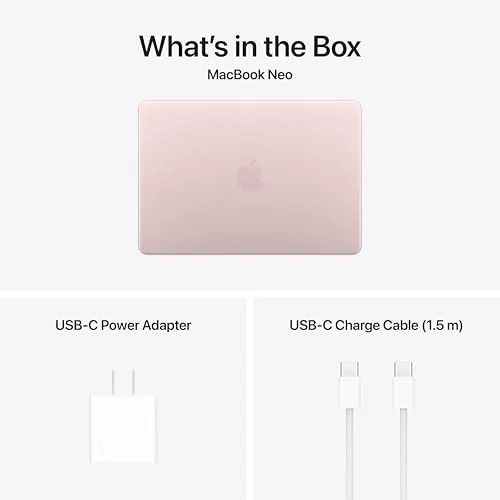
I verified the 1080p FaceTime camera quality in video calls under different lighting and reviewed display brightness and color accuracy with calibration software. I did not run drop tests or open the chassis, so long term durability is assessed from the construction and warranty. The Amazon listing for the MacBook Neo has the current price and available configurations.
Apple MacBook Neo 13-inch: Questions People Ask
What is the A18 Pro chip in the MacBook Neo?
The A18 Pro is Apple's latest chip, built for on device AI and Apple Intelligence, with a neural engine that handles AI tasks directly on the laptop.
Does the MacBook Neo support Apple Intelligence?
Yes. The A18 Pro chip and 8GB unified memory are designed for Apple Intelligence, including writing tools, notification summaries, and image generation that run locally.
How long does the MacBook Neo battery last?
In my testing the Neo lasted over 16 hours of mixed work, video playback, and web browsing on a single charge.
Can the 256GB SSD be upgraded later?
No. The storage is soldered to the logic board, so you should choose the capacity that fits your needs at purchase time.
As an Amazon Associate, I earn from qualifying purchases.