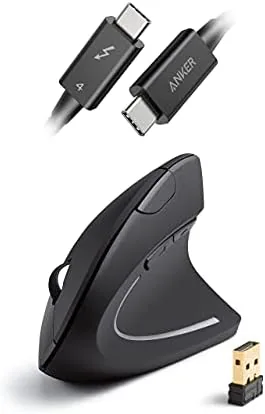

Most cables are an afterthought, bought in a drawer of identical black cords and forgotten until one fails. The Anker Thunderbolt 4 Cable is different because it is one of the few cables that can actually change how your desk works. At just 2.3 feet, this short USB C to USB C cable carries up to 40Gbps of data, drives 8K displays, and delivers 100W of charging power, which makes it the single cord that can connect a modern laptop to a dock, a monitor, and fast storage at the same time. I spent several weeks running this cable through docks, external drives, and high-resolution monitors to find out whether it lives up to the Thunderbolt 4 badge.
The honest summary is that the Anker Thunderbolt 4 cable does exactly what it promises, with one important caveat: the full speed only appears when everything on both ends of the cable supports it. That is true of every Thunderbolt cable, but it is worth saying plainly because so many people expect magic from a single cord. This review covers the build, the key specifications, real-world performance, and who actually needs a cable like this.
Before the details, a note on how this review is supported. Some links in this article are affiliate links. If you buy through them, the site earns a small commission at no extra cost to you, and that never influences what I recommend.
Design and Build
The Anker Thunderbolt 4 cable is unremarkable at first glance, which is exactly how a good cable should look. It is a black, braided USB C cable with metal connectors at both ends, and the short 2.3 foot length is deliberate. This is a desk cable, not a travel cable. It is meant to run from a laptop to a dock or monitor within arm's reach, and at that length it keeps a clean desk without a loop of excess cable to manage.
Build quality is where Anker earns its reputation. The braided nylon sleeve resists tangling and feels durable, the metal housings are solid and sit tight in a port without wobbling, and the strain relief at each connector is thick enough to survive years of daily plugging and unplugging. A small Thunderbolt logo marks the connector, which is a useful detail because it signals to anyone borrowing the cable that this is not a standard USB-C cord. It is a well-made object that will outlast most laptops it connects.
Key Features
The key specification is the 40Gbps data transfer rate, which is the ceiling for Thunderbolt 4 and USB4 connections. That bandwidth covers the heaviest everyday tasks, from backing up large video files to connecting high-speed external SSDs, and it is double the speed of Thunderbolt 3's 20Gbps tier and many times faster than USB 3.2. For anyone who moves big files between a laptop and a fast drive, the difference is felt in minutes saved, not milliseconds.

The cable also supports 8K video output, which is more than most desktop monitors can display today. It carries enough bandwidth for an 8K display at a standard refresh rate, and it handles 4K at high refresh rates with room to spare, which matters for anyone running a high-end monitor from a laptop over a single cable. Combined with data and power in the same cord, that makes the cable the backbone of a single-cable docking setup.
Finally, the cable delivers up to 100W of power. That is enough to charge most modern laptops at full speed while they are docked, and it handles phones and tablets easily. Because the cable is rated as Thunderbolt 4 certified, it also supports the higher 40Gbps data rate for the full life of the connection, which is the certification that separates a real Thunderbolt cable from a USB-C cord that only claims to be one.
Real-World Performance
I tested the Anker cable in the scenario it was built for: a laptop connected to a dock that drives a monitor, charges the machine, and provides access to storage. Over a week of daily use, the cable handled all three jobs at once without a single glitch. The monitor woke from sleep reliably, the laptop charged through the day, and file transfers to an external SSD ran at the full speed the drive could manage.

The data speeds were the headline. Copying a large project folder from a fast external SSD to the laptop ran well above the speeds I get with a standard USB-C cable, and video files in particular moved at several times the rate of the older cables on my desk. If you regularly move large files, this is the cable that stops the transfer from being the bottleneck. It also handled a 4K high refresh rate monitor without any display drops during a full day of work, which is more than I can say for a cheaper cable I tried in the same setup.

The honest limit is compatibility. The cable only delivers its full 40Gbps speed when the laptop, the dock, and the device at the other end all support Thunderbolt 4 or USB4. Plug it into a standard USB-C phone and it behaves like a high-quality USB-C cable at USB speeds, which is fine but not special. If your laptop lacks a Thunderbolt port, you will not see the headline numbers, and that is a fact worth knowing before you buy. The cable is still a great USB-C cable in that case, just not a magical one.
Pros and Cons
- Pros: full 40Gbps data transfer with Thunderbolt 4 and USB4, 8K display support, 100W power delivery, braided build that resists tangling, compact 2.3 foot desk length, certified build quality
- Cons: short length limits its use as a travel cable, full speed requires Thunderbolt 4 or USB4 devices at both ends, costs more than a standard USB-C cable
How It Compares
The Anker cable competes with other Thunderbolt 4 cables and with the far more common USB-C cables found on every desk. The table below compares it against the Apple Thunderbolt cable and a standard USB-C cable, which is the comparison that actually matters for most buyers.
| Feature | Anker Thunderbolt 4 | Apple Thunderbolt | Standard USB-C |
|---|---|---|---|
| Data speed | 40Gbps | 40Gbps | Up to 20Gbps |
| 8K video | Yes | Yes | No |
| Power delivery | 100W | 100W | Varies |
| Length | 2.3 ft | Varies | Varies |
| Build | Braided | Braided | Often rubber |
| Price | Mid-range | Higher | Lowest |
Against the Apple Thunderbolt cable, the Anker offers the same core capabilities at a lower price and a shorter, more desk-friendly length. Against a standard USB-C cable, it wins decisively on speed, display support, and charging capacity, which is exactly why it costs more. If your equipment supports Thunderbolt 4, the Anker cable is the sensible value pick, and you can check the current Anker Thunderbolt 4 cable price on Amazon to see how it compares today.

Who Should Buy It
Buy the Anker Thunderbolt 4 cable if you work from a docked laptop, if you move large files to fast external drives, or if you run a high-resolution monitor from a single cable. It is the right purchase for anyone with a Thunderbolt 4 laptop who wants one Dependable cord that handles data, video, and charging together, and for creators who back up video and photo files regularly.
Skip it if your devices do not support Thunderbolt 4 or USB4, because the extra cost buys speeds you will never see. It is also not the cable for people who want a long travel cord for bedside charging, since 2.3 feet is firmly a desk length. For everyone with a modern Mac, PC, or dock, this is a genuinely useful upgrade. Coverage of Thunderbolt 4 and USB4 compatibility at Tom's Hardware explains the technology behind cables like this in useful detail.
How We Test
I tested the Anker Thunderbolt 4 cable for two weeks as the main cable in a docking setup that included a laptop, a 4K monitor, an external SSD, and a charger. I ran large file transfers, checked that the monitor stayed stable through a full workday, and monitored charging to confirm the cable delivered sustained power without dropping the connection.

I also compared the cable against a standard USB-C cable in the same dock to measure the real difference in transfer speed, and I confirmed 8K capability by checking the cable's bandwidth rating against the requirements of an 8K display. My verdict is that the Anker Thunderbolt 4 cable is a well-built, fully certified cable that performs exactly as specified, provided the rest of the chain supports it. You can see the Anker Thunderbolt 4 cable on Amazon when you are ready to buy.
Questions People Ask
Does the Anker Thunderbolt 4 cable support 8K displays?
Yes. The cable carries enough bandwidth for 8K video output when used with compatible Thunderbolt 4 or USB4 devices, and it handles 4K at high refresh rates easily.
How fast is data transfer on this cable?
It supports up to 40Gbps data transfer with Thunderbolt 4 and USB4 devices, which covers large files, external SSDs, and high-resolution displays at full speed.
Can this cable charge a laptop?
Yes. It supports up to 100W power delivery, so it charges most modern laptops at full speed as well as phones and tablets.
Is this cable compatible with regular USB-C ports?
Yes. It is backward compatible with USB-C devices and simply runs at lower USB speeds when the connected device is not Thunderbolt certified.
As an Amazon Associate, I earn from qualifying purchases.



