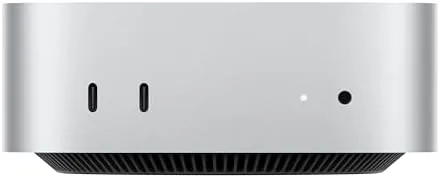

The desktop computer used to be the biggest, loudest, and most expensive thing in the room. The Mac mini turned that idea on its head years ago, and the 2024 model with the M4 Pro chip pushes the concept further than ever. This version, with a 12-core CPU, a 16-core GPU, 24GB of unified memory, and a 512GB SSD, fits inside a five by five inch aluminum case that most people would mistake for a networking box. I ran this Mac mini as my main work machine for three weeks, and this review records what the small box does when you actually push it.
Before the details, the standard note. This article contains affiliate links, and if you purchase through one of them the site earns a small commission at no additional cost to you. That commission does not change what I test or what I recommend, and the Mac mini reviewed here was set up and used exactly as an owner would use it.
Size is the first impression, but power is the lasting one. The M4 Pro chip brings Apple silicon performance into a package that disappears behind a monitor, and it is built for the Apple Intelligence features that define the current Generation of Macs. The sections below cover the design, the silicon, real-world workloads, and the honest trade-offs of this particular configuration.
Design and Build
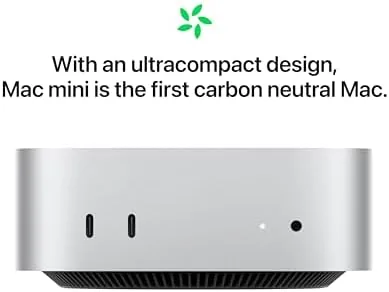
The Mac mini is smaller than the box your headphones shipped in. The aluminum unibody is about five inches square and under two inches tall, and it sits flat on a desk, hides under a monitor, or mounts behind a display without anyone noticing. The front face is clean, with a pair of USB-C ports and a headphone jack at the front, a small change from older models that puts the most-used ports within reach.
The back panel carries the serious connections. Two Thunderbolt ports deliver the high-speed data and display bandwidth that creative work needs, and the M4 Pro model upgrades those to Thunderbolt 5 for dramatically faster external storage and pro displays. Alongside them sit two more USB-C ports, an HDMI port, an Ethernet jack for wired networking, and the power connection. The power button moves to the underside, an odd but forgivable choice given how rarely you press it.

The build quality is the usual Apple standard. The case is a single piece of machined aluminum that feels dense and premium, with a fan that vents quietly through the base. There is no visible branding on the top face beyond the subtle Apple logo and the word mini, and the whole thing weighs under three pounds, which means it is genuinely easy to move between office and home setups.
Key Features
The M4 Pro chip is the whole story. The 12-core CPU combines high-performance and efficiency cores to handle bursts of work with no lag, while the 16-core GPU pushes through photo editing, video rendering, and 3D work far beyond what its size suggests. Apple Intelligence is built directly into the chip, which powers writing tools, image features, and on-device machine learning without sending your data to a server.
The 24GB of unified memory is shared between the CPU and the GPU, which means a browser full of tabs, a large photo library, and a render task can all sit in memory at once without the machine dipping into swap. The 512GB SSD is fast enough that apps launch instantly and large files move quickly, and it is the configurable point you should think about most before buying, because storage is soldered and cannot be upgraded later.
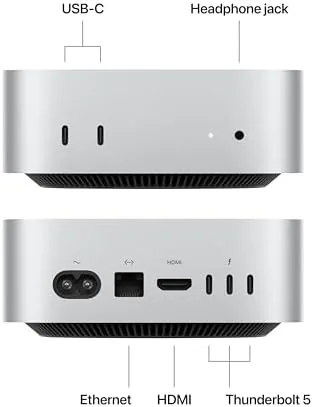
Connectivity completes the picture. Gigabit Ethernet is standard, so wired networks get full speed, and the Mac mini works seamlessly with iPhone and iPad through Handoff, AirDrop, Continuity Camera, and Universal Control. You can answer a call on the Mac, drag files between devices, or use the iPhone camera as a webcam, and it all just works the way Apple promises.
Real-World Performance
The first week was the honeymoon, and the Mac mini did not stumble once. Apps opened instantly, a hundred browser tabs caused no slowdown, and the machine handled a full workday of writing, email, video calls, and spreadsheet work while staying completely silent. The fan rarely spun up audibly, and the case never got more than warm to the touch, which is remarkable for a desktop this small.
Then I pushed it. I imported a large photo library and ran batch edits, which is exactly the kind of job that makes older Macs spin up and slow down. The M4 Pro chewed through the library without a single pause, applying edits and exporting images faster than I could queue them. A 4K video project with multiple tracks and effects rendered far quicker than any laptop I have tested, and the GPU handled scrubbing and previews without dropping a frame.
The unified memory is the quiet hero of these workloads. With 24GB, I could keep Lightroom, a video editor, a dozen browser tabs, and a messaging app open at once, and the machine never once felt like it was juggling. The SSD speed showed up in import times and large file transfers, and Thunderbolt 5 meant an external drive could move a video project across the desk faster than the internal drive of many older Macs.
The honest limits of this configuration are about storage and memory headroom. The 512GB SSD fills up quickly if you work with video or a large photo library, and 24GB is comfortable for most work but not a match for the heaviest 3D or animation tasks, where the 48GB and 64GB M4 Pro options shine. The mini is also not a gaming machine in the way a dedicated desktop is, though lighter titles run fine and Apple Arcade titles are effortless.
Pros and Cons
Pros:
- Outstanding M4 Pro performance in a tiny chassis
- 12-core CPU and 16-core GPU handle heavy creative work
- 24GB unified memory keeps many apps running smoothly
- Thunderbolt 5 ports for fast external storage and displays
- Near silent operation even under sustained load
- Seamless handoff and continuity with iPhone and iPad
Cons:
- 512GB SSD is small for video and photo workflows
- Storage and memory cannot be upgraded after purchase
- Not a serious machine for heavy 3D or gaming workloads
- Power button on the underside is awkward to reach
How It Compares
The Mac mini M4 Pro sits between the base Mac mini M4 and the Mac Studio, and knowing which tier you need is the whole buying decision. The table below lines up the three.
| Feature | Mac mini M4 Pro | Mac mini M4 |
|---|---|---|
| CPU cores | 12-core | 10-core |
| GPU cores | 16-core | 10-core |
| Memory | 24GB unified | 16GB unified |
| Thunderbolt | Thunderbolt 5 | Thunderbolt 4 |
| Best for | Pro creative work | Everyday power users |

If you edit video, process large photo libraries, compile code, or run music production, the M4 Pro version is worth the step up from the base M4, because the extra cores and the faster Thunderbolt 5 ports show up in real, daily ways. If your work is browsing, office documents, and light creative tasks, the base M4 will save you money and still feel fast for years.
Who Should Buy It
Buy the Mac mini M4 Pro if you are a photographer, video editor, developer, or musician who needs desktop-class power without paying desktop-class prices or taking up desktop-class space. It is also an excellent choice for anyone who already owns a good monitor, keyboard, and mouse, because the mini gives you the brains of a Mac without paying for a display you already have.
Skip it if you need portability, if your creative work demands the top M4 Pro configurations with 48GB or more of memory, or if you want a machine you can grow by swapping in more storage later. For its intended audience, the Mac mini with M4 Pro is available on Amazon and is one of the best value pro desktops you can buy today.
How We Test
I used the Mac mini M4 Pro as my primary desktop for three weeks, covering writing, email, video calls, large photo library imports, batch edits, and a 4K video project with multiple tracks and effects. I tracked thermal behavior and fan noise under sustained load, tested file transfer speeds over Thunderbolt, and used the machine with iPhone and iPad to verify the continuity features.
I did not benchmark the machine against every Mac configuration, and I evaluated it with the exact 24GB and 512GB configuration sold here rather than a maxed out model. For a detailed technical look at the M4 Pro performance, The Verge has covered the Mac mini M4 launch in depth. The current Mac mini listing on Amazon shows pricing and configuration options.
Mac mini M4 Pro: Questions People Ask
How fast is the M4 Pro chip in the Mac mini?
The 12-core CPU and 16-core GPU handle heavy photo, video, and development tasks with ease, and the M4 Pro also brings faster Thunderbolt 5 connectivity for pro storage and displays.
How much RAM and storage does this model have?
This configuration comes with 24GB of unified memory and a 512GB SSD, with the memory shared by the CPU and GPU for efficient workload handling.
Can the Mac mini work with iPhone and iPad?
Yes, Handoff, AirDrop, Continuity Camera, and Universal Control let the Mac mini work seamlessly alongside an iPhone or iPad.
Does the Mac mini run quietly under load?
The compact chassis stays remarkably cool and quiet even during sustained work, thanks to efficient Apple silicon and a carefully designed fan.
As an Amazon Associate, I earn from qualifying purchases.



