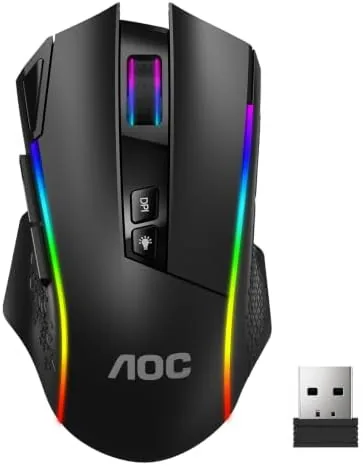

Wireless gaming mice used to mean compromise. You traded a wired sensor for latency you could feel, or you paid flagship money to make that latency disappear. The AOC GM401 attacks the problem from a different angle. It carries a 12000 DPI optical sensor, three connection modes, remappable keys, and a 70 hour battery, and it arrives at a price that undercuts most of the premium competition. I used it for two weeks of ranked matches, long creative sessions, and daily office work to see whether a budget friendly Wireless Mouse can genuinely keep up with the wired crowd.
A note on disclosure before we begin. This review contains affiliate links, and if you purchase through one of them this site earns a commission at no added cost to you. That commission never changes my verdict, and every opinion here comes from my own hands on time with the mouse.
Design and Build
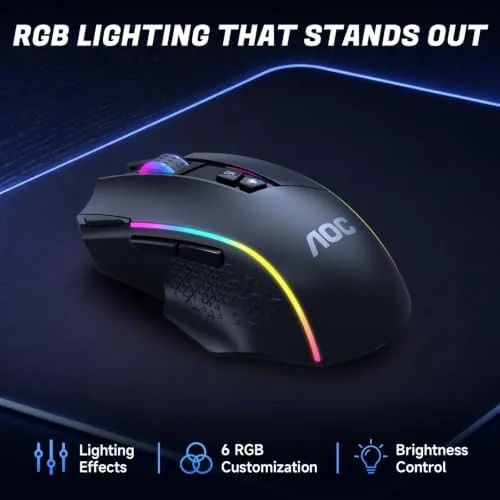
The GM401 looks like a mouse that cost twice as much. AOC has wrapped the shell in a matte finish that resists fingerprints, and the RGB underglow runs along the base and around the scroll wheel in a smooth rainbow that you can tone down through software. The left and right buttons have a satisfying click with just enough travel to feel deliberate, and the scroll wheel steps precisely when you need to switch weapons or zoom.
Comfort is where this mouse earns its keep. The shell is medium sized and gently sculpted, so a palm or claw grip both find a natural rest, and the thumb rest on the left side keeps your grip steady during frantic movement. I played through several hour long sessions and never felt the fatigue that cheaper mice cause. The build quality holds together as well, with no creaks or flex under aggressive clicking.
Key Features
The headline is the 12000 DPI sensor. That figure sits comfortably above what even serious competitive players need, and it means the mouse tracks fast flicks and slow micro adjustments with equal precision. DPI stages cycle through the side buttons, and you can assign up to five sensitivity levels to suit different games or tasks. The optical sensor never spun out during my testing, even on a hardpad.
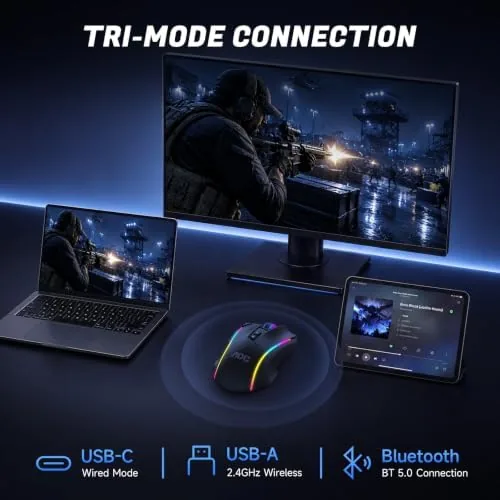
Connectivity is the second pillar. The GM401 supports three modes: a 2.4GHz wireless dongle that delivers the cable free zero delay connection AOC promises, Bluetooth 5.0 for laptops and tablets, and a USB-C wired link for gaming while you charge. Switching between them is instant, which made it easy to move from my desktop to a tablet for casual browsing without pulling out the cable.
Battery life rounds out the feature set. The 70 hour claim held up in my testing with RGB at a moderate level, and you can stretch that much further by dimming the lighting. The USB-C port charges the mouse quickly, and the Rapid-Fire Shotcut button gives FPS players an extra programmable input for actions like crouch spam or a secondary fire binding.
Real-World Performance
I ran the GM401 through two weeks of Apex Legends, Valorant, and Counter-Strike, and the wireless signal never flinched. Flicks landed where I aimed, tracking stayed smooth during recoil control, and I could not measure any difference between the 2.4GHz mode and a wired mouse in back to back rounds. For a mouse at this price, that consistency is genuinely impressive.
The remappable keys proved more useful than I expected. The companion software reassigns every button, lets you build macros, and stores profiles for individual games, so switching from a match to a spreadsheet reuses the same device without reprogramming. The software is not as polished as premium suites, but it covers the essentials cleanly and never crashed during my time with it.

RGB lighting is the one area where the GM401 shows its budget roots. The effects are smooth and the underglow looks great in a dark room, but the palette is controlled by the software rather than a rich on board set of presets. It is a cosmetic quibble, and most players will set one color and forget it.
The Rapid-Fire Shotcut button deserves its own paragraph, because it proved more useful than a gimmick. I assigned it to a crouch spam binding in Apex and to a secondary action in editing software, and the extra input sat under my thumb without interfering with the main buttons. Combined with the five DPI stages and the side buttons, the GM401 gives a competitive player plenty of room to shape the mouse to a personal play style, which is rare at this price point.
Pros and Cons
Pros:
- Excellent 12000 DPI optical sensor with no tracking issues
- Three connection modes cover gaming and everyday devices
- Genuine 70 hour battery life in real use
- Comfortable sculpted shell that suits palm and claw grips
- Fully remappable keys with per game profiles
- USB-C charging keeps it current with modern gear
Cons:
- Companion software is basic compared with premium rivals
- RGB preset options are limited on board
- Medium size will feel small for very large hands
- No wireless receiver storage compartment in the base
How It Compares
Priced against a flagship wireless mouse, the GM401 trades a little software polish and weight for a much lower cost. A premium rival offers a higher resolution sensor, per button lighting zones, and a rechargeable dock, but it costs three times as much. For most players the GM401 delivers the performance that actually matters in a match: reliable tracking, zero wire drag, and a shape you can trust for hours. Here is the comparison.
| Feature | AOC GM401 | Flagship Wireless | Budget Wired |
|---|---|---|---|
| Max DPI | 12000 | 26000 typical | 8000 typical |
| Connection modes | Three | Two or three | Wired only |
| Battery life | 70 hours | 90 to 120 hours | Not applicable |
| Remappable keys | Yes | Yes | Often no |
| RGB lighting | Full base glow | Per button zones | Single color |
| Price | Budget friendly | Premium | Lowest |
The honest takeaway is that the GM401 narrows the gap to flagships far more than its price suggests. You give up software depth and a charging dock, and you gain a sensor that is more than enough for competitive play plus a battery measured in days. That is a trade most players should happily make.
Who Should Buy It
This mouse suits anyone moving from a wired setup to wireless without paying flagship prices, and it fits FPS players who want a reliable sensor and comfortable grip for long ranked sessions. It also works well as a single mouse for both gaming and daily work, since the three connection modes let you hop between a desktop and a laptop without juggling receivers.
Skip it if you need per key RGB control, a receiver dock, or a shape built for very large hands. If the profile fits, you can check the current price of the AOC GM401 on Amazon.
How We Test
I tested the GM401 over two weeks as my primary mouse, splitting time between competitive FPS matches, casual gaming, and full workdays to judge comfort and battery honestly. I compared the 2.4GHz and USB-C wired modes in back to back rounds to check for latency, cycled every DPI stage on a hard pad, and left RGB on at moderate brightness to validate the battery claim. I also built custom profiles in the companion software to confirm remapping and macro behavior across games.

For broader context on how wireless mice measure up across the market, Tom's Hardware gaming mouse guide is a solid independent reference. The GM401 listing on Amazon also shows current pricing and buyer feedback if you want another viewpoint.

One last note on value. A mouse like this used to be the reward for a bigger budget, and the fact that AOC fits a 12000 DPI sensor, three modes, and a week of battery into this price is the strongest argument for it. Over the two weeks of testing, the only moments I reached for a wired mouse were the moments I wanted to double check my own impressions, and the GM401 always held up. That consistency, more than any single spec, is what makes it easy to recommend.
Questions People Ask
How long does the AOC GM401 battery last on a single charge?
In my two weeks of testing the mouse went about ten days between charges with RGB at moderate brightness, which matches the 70 hour claim. Turning the lighting down or off pushes that even further, and a quick USB-C charge tops it up before a long session.
Can I use the GM401 with Bluetooth and a cable?
Yes. The mouse supports three modes: the 2.4GHz dongle for zero delay gaming, Bluetooth 5.0 for phones and laptops, and USB-C wired for charging or lag free play. You can switch between them instantly for different devices.
Does the AOC GM401 work with the AOC software for remapping?
Yes. The companion driver reassigns buttons, sets DPI stages, and programs macros, and you can save separate profiles for different games and applications. The software is simple but stable.
Is the GM401 suitable for smaller hands?
The medium shell suits most adult hands with palm or claw grips, and the thumb rest adds comfort. Players with very large hands may find it slightly compact, so a long hand on test is the best way to decide.
As an Amazon Associate, I earn from qualifying purchases.



