
Every parent knows the familiar tug of war. The family tablet offers games, videos, and endless notifications, while the book on the shelf quietly waits. The Kindle Kids takes a different path, because it strips away the distractions altogether and hands a child a dedicated reading device wrapped in a tough case, backed by parental controls and a warranty that replaces the device if it breaks. I tested the Space Whale edition with two readers, ages 7 and 10, for a full month, and this review records how the experiment changed their habits.
Before the details, the standard note. This article contains affiliate links, and if you buy through one of them the site earns a small commission at no extra cost to you. That commission never changes what I test or what I recommend, and the unit reviewed here was used the way any family would use it. Below I cover the design, the key features, real world performance, the honest pros and cons, and who this kid friendly Kindle suits best.
Design and Build
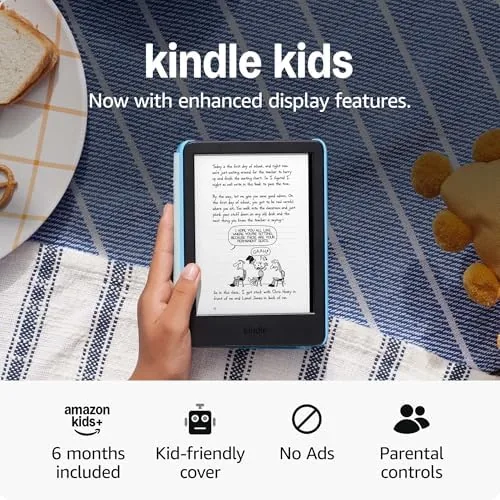
The Kindle Kids is built on the same excellent hardware as the adult model: a 6 inch glare-free display at 300 pixels per inch, a fast processor with quicker page turns, and 16GB of storage for a deep library. What changes is everything around it. The Space Whale edition ships in a bright blue kid-proof case with a raised lip that guards the screen and corners, and that case is genuinely rugged, surviving the drops and tumbles that a normal device would not tolerate.
The case adds a little bulk, but it protects the value inside. The device itself is light enough for small hands, and the e-ink screen is easy on young eyes in a way a glowing tablet simply is not. Amazon ships this edition with a two year worry free warranty, which means that if the device breaks, Amazon replaces it without a fight, a promise that takes the fear out of handing expensive hardware to a child. The ad-free design means no lock screen promotions interrupt a young reader.

Key Features
The defining feature is the Amazon Kids experience. The device boots straight into a kid friendly profile with no app store, no browser, and no notifications, just a curated library of books. Parents manage everything from the Amazon Kids dashboard, where you set daily reading time limits, choose age ranges, and review what each child reads. The dashboard works from any phone or computer, and it supports multiple profiles, so a younger sibling can have a different library and different limits on the same device.
The hardware itself matches the newest base Kindle. The 6 inch display is glare-free and sharp, the front light lets a child read comfortably in a dim room without the bright blue glow of a tablet, and the Faster Page Turns keep the reading flow smooth. The 16GB of storage holds hundreds of chapter books and graphic novels, the device pairs with Bluetooth headphones for audiobooks, and the whole package is entirely free of ads, which is rare for an inexpensive Amazon device.

Real-World Performance
The result of a month with the Kindle Kids was surprising in the best way. My 7 year old picked up the device without any instruction and started reading within minutes, and by the end of the first week the nightly reading session had become something she asked for rather than something we scheduled. The 10 year old, who had resisted chapter books, moved through three of them by the end of the month, because the device simply did not offer anything else to do.
The parental controls worked exactly as promised. I set a nightly reading window, and the device respected it, winding down at the set time without an argument. The dashboard showed me what was being read and how long each session lasted, and the age filters kept the library appropriate without my involvement. The worry free warranty did its quiet work too, because neither parent flinched when the case took a tumble off a bunk bed, and the screen stayed intact.

The honest limitations are worth considering. The Kindle Kids is an e-reader, not a tablet, so there are no games, no apps, and no video, which is exactly the point for many families but will disappoint a child expecting a general purpose device. Color is also absent, because e-ink renders everything in grayscale, so illustrated books lose some of their visual punch. And while the device is built for reading, the on screen keyboard is fine for searching a library but not for note taking.
One detail that stood out was how little supervision the device needed. The read only environment removed the negotiation that comes with a tablet, and the warranty removed the anxiety about replacement cost. After a month the device looked almost new, which is the quiet proof that the case and the design do their jobs, and the nightly reading routine became something the whole family looked forward to, because the warm pages kept the bedroom calm and the quiet page turns did not disturb anyone.
Pros and Cons
Pros:
- Distraction-free reading with no apps or games
- Rugged kid-proof case that survives drops
- Robust parental controls with time limits
- Two year worry free replacement warranty
- Glare-free 6 inch display with front light
- Completely ad-free out of the box
Cons:
- E-ink shows no color, so illustrations are grayscale
- Not a multi-use tablet for games and video
- On screen keyboard is basic for note taking
- Age and content setup needs an adult
How It Compares
The Kindle Kids sits alongside Amazon's Fire Kids Tablets, and the two serve very different purposes. The table below lines them up so you can choose the right tool for your child.
| Feature | Kindle Kids | Fire Kids Tablet |
|---|---|---|
| Purpose | Reading only | Games, video, apps |
| Display | 6 inch e-ink | Color LCD |
| Eye comfort | Excellent in sun | Glows at night |
| Parental controls | Amazon Kids | Amazon Kids |
| Battery | Weeks | Hours |
| Warranty | 2 year worry free | 2 year worry free |
If the goal is more reading and less screen time, the Kindle Kids is the sharper tool, because it has nothing to distract from the book. If you want a general purpose kid tablet for games, video, and creativity, the Fire Kids tablet is the fuller package. Many families end up with both, but the reading-first choice is the Kindle. You can check the current price of the Kindle Kids on Amazon when you are ready to compare.
Who Should Buy It
Buy the Kindle Kids if you want a child to read more without the fight over screen time, if you are tired of a tablet that becomes a gaming device instead of a library, or if you want parental controls that actually work without constant supervision. It is a natural fit for families with kids from around age 6 to 12 who already love stories, and it also works for older children who simply want a lightweight reader of their own.
Skip it if your child specifically wants games and video, in which case a Fire Kids tablet is the honest match, or if you would rather manage a full library on your own account and hand the device over without the kids interface. For reading families, the Kindle Kids is one of the smartest tech purchases you can make for a child, and the Kindle Kids listing on Amazon shows the available cases and the current price.
How We Test
I set up the Kindle Kids with the Amazon Kids dashboard, configured a nightly reading window and an age filter for each child, and handed the devices to a 7 year old and a 10 year old for a month. I tracked reading time through the parental dashboard, observed the nightly routine, and inspected the devices and cases after the test for damage. I also compared the experience with a Fire Kids tablet in the same household.
For a broader look at how e-readers and kids tablets compare, the children's tech coverage at PCMag is a useful independent reference on what families should consider before buying. The Kindle Kids page on Amazon shows the current bundle and the included warranty.

Questions People Ask
What is the worry free warranty?
The two year worry free warranty means Amazon replaces the device if it breaks, no questions asked, which removes the anxiety of giving expensive hardware to a child.
Does the Kindle Kids come with ads?
No, the Kindle Kids ships completely ad free, so lock screen promotions do not interrupt a young reader.
What is included in the box?
The box includes the Kindle, a kid-proof cover, and the two year worry free replacement warranty, along with the usual charging cable.
How do the parental controls work?
Parents use the Amazon Kids dashboard to set daily reading limits, filter content by age, and review what each child reads.
As an Amazon Associate, I earn from qualifying purchases.