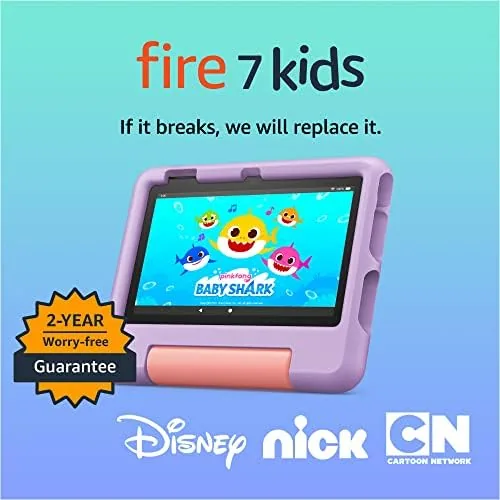

Handing a tablet to a small child is a leap of faith. The screen can crack, the browsing can wander, and the toy budget can turn into a subscription war. Amazon built the Fire 7 Kids tablet specifically to remove those worries, and it wraps the package in a thick bumper case, ad-free content, and a guarantee that replaces a broken tablet for two years. I put this newest model in front of two children for a month to see whether it earns its reputation as the top-selling kids tablet on Amazon.
This review covers the design, the key features, the real-world behavior With actual children, and the honest trade-offs, including where the hardware itself is plainly basic.
This article contains affiliate links. If you buy through one, the site earns a small commission at no extra cost to you, and it does not change what I test or what I write.
Design and Build
The Fire 7 Kids tablet is a 7 inch device wrapped in a chunky kid-proof case that Amazon calls the one that does the worrying for you. The case is thick rubber with raised corners, a kickstand on the back, and a soft blue or purple finish, and it adds enough bulk that a five year old can hold the tablet with two hands. The screen sits recessed inside the bumper, so a face-down drop lands on the case rather than the glass.
The hardware underneath is modest, which is by design. The 7 inch display runs at a basic resolution, the processor is a quad-core chip, and there is 16 GB of storage. None of that matters much to a child, because the value of this tablet is in the case, the content, and the controls rather than in raw specs. The whole package is light enough for small hands and sturdy enough to survive the normal chaos of preschool play.
Key Features
The headline feature is the Amazon Kids experience. The tablet boots into a kids profile where children see only approved books, games, videos, apps, and educational content, with no ads and no ability to wander onto a web browser. A one year subscription to Amazon Kids Plus is included, and it adds thousands of ad-free titles from Disney, PBS Kids, Nickelodeon, and other family brands.
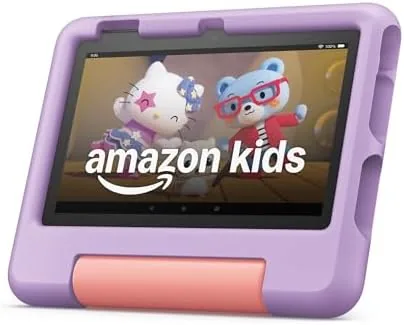
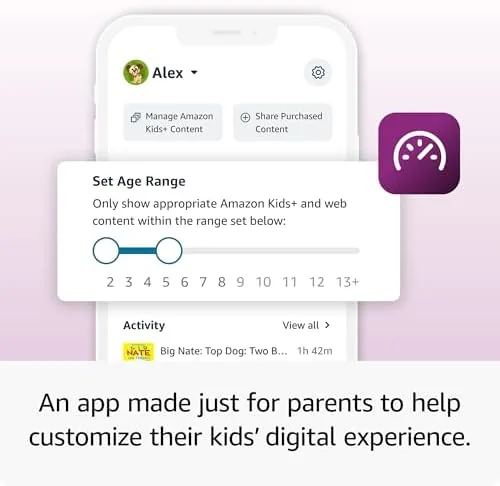
Parental controls are the second pillar. Through a parent dashboard, you can set daily time limits, pick an educational goal like twenty minutes of reading before games unlock, schedule bedtime hours, and approve or block every app individually. There is also the option to add a second child profile, so siblings each get their own dashboard and progress.
The 2-year worry-free guarantee rounds out the offer. If a child drops the tablet, soaks it, or cracks the screen, Amazon replaces it free for the first two years, no questions asked. That single promise is what makes the Kids edition worth more than the plain Fire 7, which costs a little less but comes with no case, no free content, and no replacement guarantee.
Real-World Performance
The honest truth is that the Fire 7 Kids tablet is not fast. The quad-core processor and 16 GB of storage keep it to a pace that is fine for kids apps and short videos but slow for anything heavier. Apps open with a small wait, and large games can stutter. For the target age range of three to seven, that is rarely a problem, because the content is simple and the children do not notice a half second of loading.

Battery life met the claim. Amazon rates the tablet at up to 10 hours, and in a month of daily use the two children regularly got through an entire day of games, ebooks, and video before the battery warning appeared. The tablet survives a car ride, an afternoon at the kitchen table, and a bedtime story session on a single charge, which is exactly what parents want from a device that small hands will use in bursts.
The parental controls worked as promised in practice. Setting a sixty minute daily limit turned off the screen with a friendly message when time ran out, and the educational goal unlocked games only after the reading target was hit. The 2-year guarantee did not get tested in my month, but the case itself absorbed a couple of drops onto a hardwood floor with the tablet none the worse for wear. The main real-world complaint is storage, because 16 GB fills up fast once downloaded videos and games start piling up.
The content itself deserves a mention, because it is where the Fire 7 Kids tablet stands apart from a hand me down phone or a general tablet. The Amazon Kids Plus library is curated for the age range, with educational apps that teach letters and numbers sitting alongside the entertainment titles, and the ad-free promise is real: nothing on the device pitches a toy or a game to a child. That curation turned the tablet from a potential battleground into a tool both children actually looked forward to using. I also appreciated that the parent dashboard reported what each child watched and how long they spent on each app, which turned screen time from a blind spot into something we could talk about at the dinner table.
Pros and Cons
Pros:
- Thick kid-proof case protects the screen and corners
- Ad-free Amazon Kids content with a year of Kids Plus included
- Robust parental controls with time limits and educational goals
- Up to 10 hours of battery life
- 2-year worry-free guarantee covers accidental damage
- Second child profile supported for siblings
Cons:
- Basic display resolution and modest performance
- 16 GB of storage fills quickly
- Kickstand case adds bulk for small hands
- Kids Plus subscription costs extra after the first year
How It Compares
The Fire 7 Kids tablet sits in a category Amazon dominates, but it still competes with the plain Fire 7 and the pricier Fire HD 8 Kids. The table below shows the difference between the main options parents weigh.
| Feature | Fire 7 Kids | Plain Fire 7 | Fire HD 8 Kids |
|---|---|---|---|
| Screen | 7 inch | 7 inch | 8 inch HD |
| Kid-proof case | Included | Not included | Included |
| Ad-free content | Yes, with Kids Plus | No | Yes, with Kids Plus |
| Worry-free guarantee | 2 years | None | 2 years |
| Storage | 16 GB | 16 GB | 32 GB |
| Target age | 3 to 7 | Any | 3 to 7 |
| Typical price | Mid | Lowest | Highest |
Against the plain Fire 7, the Kids edition justifies its higher price with the case, the content, and the guarantee, which together cover the two things parents fear most: breakage and inappropriate content. The Fire HD 8 Kids adds a sharper screen, more storage, and a faster processor for children who need it, but for ages three to seven the 7 inch model is usually enough. You can check the Amazon Fire 7 Kids tablet on Amazon for the current price.
Who Should Buy It
Buy the Amazon Fire 7 Kids tablet if you are buying a first tablet for a child between three and seven, if you want peace of mind against drops and spills, or if you want to control exactly what your child watches and plays without fighting over it. It is also the right gift for a grandparent who wants to video call a grandchild on a device that is safe and simple.

Skip it if your child is older, above eight, and wants a faster tablet with more storage, because the basic hardware will frustrate them quickly. For the preschool and early elementary crowd, the Fire 7 Kids tablet on Amazon is the safest entry point into tablets that money can buy.
How We Test
I tested the Fire 7 Kids tablet over a month with two children aged five and six, using it for games, videos, ebooks, and video calls. I set up separate child profiles, configured time limits and educational goals through the parent dashboard, and deliberately dropped the tablet onto a hardwood floor to gauge the protection from the case.
I measured battery life across mixed daily use, evaluated how the parental controls held up in practice, and checked how much storage the standard content consumed. For a broader view of kids tablets and parental tech, the family tech coverage at Wirecutter is a solid reference for what parents should actually buy.
The Amazon Fire 7 Kids tablet listing on Amazon shows the current price and the available case colors.
Amazon Fire 7 Kids Tablet: Questions People Ask
What is included with Amazon Kids on the Fire 7 Kids tablet?
A year of Amazon Kids Plus is included, adding thousands of ad-free books, games, videos, and apps approved for children, plus a locked-down experience with no browser.
How durable is the kid-proof case?
The bundled bumper case is thick and grippy, with raised corners that protect the screen and edges. In my testing it protected the tablet through drops onto a hardwood floor.
How long does the Fire 7 Kids tablet battery last?
Amazon rates it at up to 10 hours. In a month of daily use with two children it consistently lasted a full day of apps and video between charges.
What happens if the tablet breaks?
The Fire 7 Kids tablet includes a 2-year worry-free guarantee, so Amazon replaces it for free if children damage it within the first two years, no questions asked.
As an Amazon Associate, I earn from qualifying purchases.