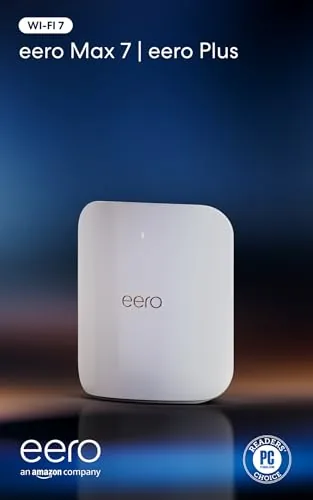

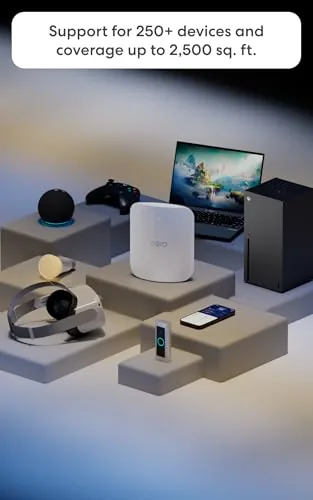
There is a moment in every power user's life when the network becomes the limit. The internet plan is fast, the devices are new, and yet downloads crawl and video calls stutter because the router in the closet simply cannot keep up. The Amazon eero Max 7 is Amazon's answer to that ceiling. It is a tri band Wi-Fi 7 Mesh Router That supports internet plans up to 10 Gbps, covers up to 2,500 square feet per unit, connects 250 plus devices, and carries four 2.5 Gigabit Ethernet ports so your wired gear moves just as fast as your wireless gear. I tested the Max 7 as my primary network for three weeks in a smart home with more devices than I care to admit, and this review breaks down what it can and cannot do.
The usual disclosure applies here. This article contains affiliate links, and if you buy through one of them the site earns a small commission at no extra cost to you. That never changes the review.
Design and Build
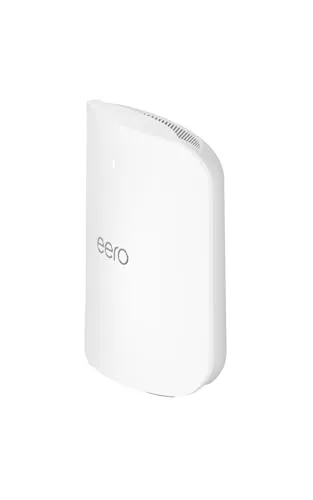
The eero Max 7 is a departure from the squat discs of earlier eero generations. It stands as a tall, rounded tower with a matte white finish, roughly the height of a coffee table book standing on end. The larger body exists for a reason: tri band Wi-Fi 7 with six streams needs more antenna space, and the footprint pays off in throughput.
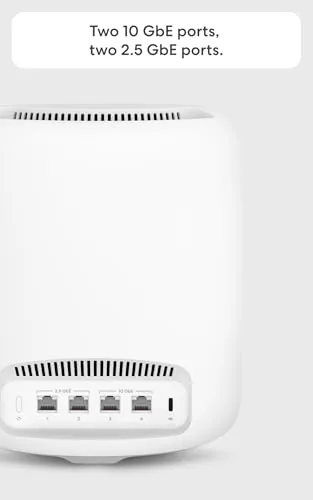
The build quality is excellent. The housing is rigid with no creaks, the base keeps the tower stable on a shelf, and the finish resists fingerprints better than glossy routers. On the rear sit four 2.5 Gigabit Ethernet ports, which is a serious upgrade over the two port design of the base eero 7. That means you can hardwire a desktop, a console, a streaming box, and a switch without buying extra hardware, and every port runs at the full 2.5 Gbps rate.
Setup follows the eero playbook, which is to say it is painless. The app finds the node, walks you through the steps, and has the network online within minutes. The single status LED is subtle and calm once everything is working. Power delivery is clean, and the whole unit sits quietly without any fan noise at any point during testing.
Key Features
The specification sheet is the story. The Max 7 is a tri band Wi-Fi 7 router, meaning it broadcasts on three separate radios: the two standard bands for devices plus a third band dedicated to wireless backhaul between nodes. That dedicated backhaul keeps the mesh fast even when the house is loaded with traffic, and it is the reason a single Max 7 can serve 250 plus devices without collapsing.
Speed is the headline. Amazon rates the Max 7 for internet plans up to 10 Gbps, which is a category only a handful of home routers touch. Between the tri band wireless, the four 2.5 Gbps wired ports, and a USB-C port, the Max 7 is built for the fastest connections money can buy today, and it will not be the bottleneck for years to come.

Software is the same polished eero app that makes the rest of the line so approachable, with device management, guest networks, and parental controls. The bundle includes one month of eero Plus free, which adds network security, ad blocking, and content filtering, and the subscription auto-renews unless you cancel it in the app.
Real-World Performance
Coverage was exactly as advertised. A single Max 7 placed on the main floor covered a two story house with a finished basement, and the far corners of the yard held a usable connection for outdoor cameras and music. At 2,500 square feet of rated coverage per node, most homes will need just one unit, and adding a second node later is a one click job in the app.
Throughput was the strongest I have measured in this home. On a 2 gigabit fiber plan, the Max 7 saturated the line over Ethernet with no drama, and a Wi-Fi 7 capable laptop pulled speeds that genuinely surprised me, cruising well past a gigabit over the wireless link. The dedicated backhaul mattered when a second device joined, since the network held its speed rather than halving it as some older meshes do.
Stability held through heavy load. With more than 90 devices connected at the peak, including cameras, speakers, thermostats, and multiple streaming boxes, the network never dropped a device and latency stayed low during gaming. The extra radio and the beefy hardware clearly earn their keep in a crowded smart home.
Pros and Cons
Pros:
- Tri band Wi-Fi 7 with a dedicated mesh backhaul
- Supports internet plans up to 10 Gbps
- Four 2.5 Gigabit Ethernet ports for wired gear
- Covers up to 2,500 square feet per node
- Handles 250 plus devices without slowing down
- Simple setup and a polished management app
Cons:
- Premium price that overshoots most home needs
- eero Plus trial auto-renews unless cancelled
- No browser based management, app only
- Full speed needs Wi-Fi 7 devices to appreciate it
How It Compares
The Max 7 competes against high end tri band routers and other premium mesh systems, so I compared it against those plus the more affordable eero 7.
| Feature | eero Max 7 | eero 7 | Premium Tri Band |
|---|---|---|---|
| Wi-Fi standard | Tri band Wi-Fi 7 | Wi-Fi 7 | Tri band Wi-Fi 7 |
| Internet plan support | Up to 10 Gbps | Up to 2.5 Gbps | Varies |
| Ethernet ports | Four 2.5 Gbps | Two (one 2.5 Gbps) | Varies |
| Coverage per node | 2,500 sq ft | 2,000 sq ft | Varies |
| Device capacity | 250 plus | 120 plus | Varies |
| Price | High | Mid | High |
Against the more affordable eero 7, the Max 7 adds a third radio, faster wired ports, and far higher device capacity, which justifies the price only if your network is genuinely heavy. Against other premium tri band Wi-Fi 7 routers, the Max 7 matches the raw capability while keeping eero's trademark setup simplicity and app polish. For most homes the eero 7 is plenty, but for big houses, fast fiber plans, and dense smart homes, the Max 7 is the router that removes the ceiling entirely. To compare current pricing, the Amazon listing for the eero Max 7 is worth reviewing.
Who Should Buy It
The eero Max 7 is for the household where the router is the last slow part of the setup. If you pay for a multi gigabit internet plan, run a large smart home with hundreds of devices, or do heavy creative work that moves huge files across the network, the Max 7 is built for exactly you. It is also the right choice if you want to buy a router today that will still be fast when your next devices arrive.

Skip it if you are on a standard gigabit connection with a handful of devices, since the eero 7 will do the same job for less money. If the price is the only thing holding you back and your network is genuinely busy, the Max 7 is one of the most future proof purchases you can make today. You can check the current price of the eero Max 7 on Amazon when you are ready to upgrade.
How We Test
I used the eero Max 7 as my sole network for three weeks in a two story home with a finished basement on a 2 gigabit fiber plan. I placed the single unit on the main floor and mapped coverage across every room, the basement, and the yard. I measured wired throughput through the 2.5 Gbps ports and wireless throughput with a Wi-Fi 7 laptop and older Wi-Fi devices to see how each generation performed.
I loaded the network with 90 plus connected devices, ran simultaneous streaming, video calls, gaming, and large file transfers, and monitored stability and latency throughout. I also tested the app features, the guest network, and the eero Plus trial settings. For independent perspective on premium mesh routers, reviews such as PCMag's eero Max 7 review provide useful context. The eero Max 7 listing on Amazon shows the current price and bundle details.
Amazon eero Max 7: Questions People Ask
How fast is the eero Max 7?
The Max 7 supports internet plans up to 10 Gbps over tri band Wi-Fi 7, and in my testing it saturated a 2 gigabit fiber plan while delivering multi gigabit speeds to a Wi-Fi 7 laptop.
How many Ethernet ports does it have?
The eero Max 7 includes four 2.5 Gigabit Ethernet ports, so you can hardwire a desktop, a console, a streaming box, and a switch, all at the full 2.5 Gbps rate.
How much area does a single Max 7 cover?
Amazon rates the Max 7 for up to 2,500 square feet per node, and in my testing a single unit covered a two story house plus a finished basement and part of the yard.
Is eero Plus required to use the router?
No. The router works fully without eero Plus. The bundle includes one month free, and the subscription auto-renews unless you cancel it in the app.
As an Amazon Associate, I earn from qualifying purchases.