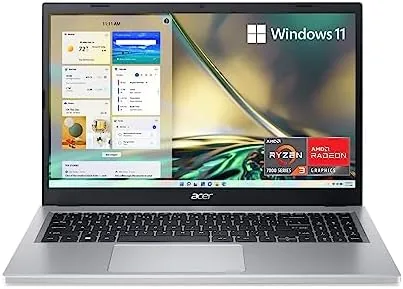

Budget laptops have a reputation for being plastic boxes that feel slow on day one and slower by the month. The acer Aspire 3 A315-24P-R7VH does a decent job of dodging that reputation. It pairs a 15.6 inch Full HD display with an AMD Ryzen 3 7320U processor, 8GB of LPDDR5 memory, and a 128GB NVMe SSD inside a slim, reasonably modern chassis. I have spent two weeks with it as my main machine for browsing, documents, video, and the occasional light game, and the experience is better than the price tag suggests.
Before the details, the standard note. This article contains affiliate links, and if you buy through one of them the site earns a small commission at no extra cost to you. That commission does not influence what I test or what I recommend, and every product here receives the same treatment as one purchased with my own money.
Design and Build
The Aspire 3 is slim by budget laptop standards. It is just over 0.7 inches thick and weighs around 3.97 pounds, which is manageable for a 15.6 inch machine even if it is not an ultralight. The chassis is plastic, but the lid has a subtle brushed texture that hides fingerprints, and the overall fit is good for the class: no creaking, no flex in the palm rest under normal typing.
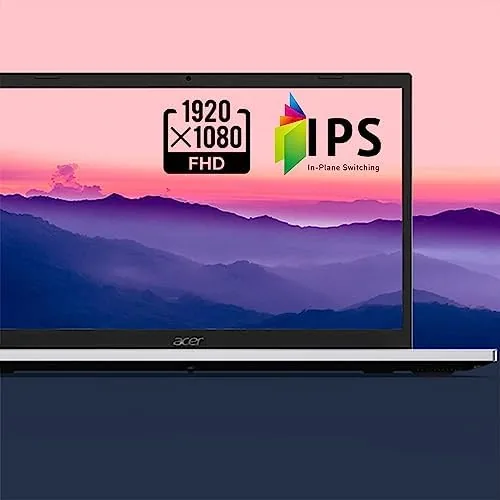
The 15.6 inch Full HD IPS display is the highlight of the physical design. At 1920 by 1080 it is sharp enough for daily work, colors are decent, and the matte coating cuts reflections so you can work near a window. The keyboard is comfortable for long typing sessions with good key travel, and the large touchpad supports multi finger gestures reliably. The webcam is a basic 720p unit with a privacy shutter, which is a thoughtful inclusion at this price.
Key Features
Under the hood sits the AMD Ryzen 3 7320U, a quad core processor with a boost clock up to 4.1 gigahertz, paired with AMD Radeon graphics. The 8GB of LPDDR5 memory is fast and integrated, and the 128GB NVMe SSD delivers quick boot times and snappy application launches, though the capacity is the machine's most obvious compromise.

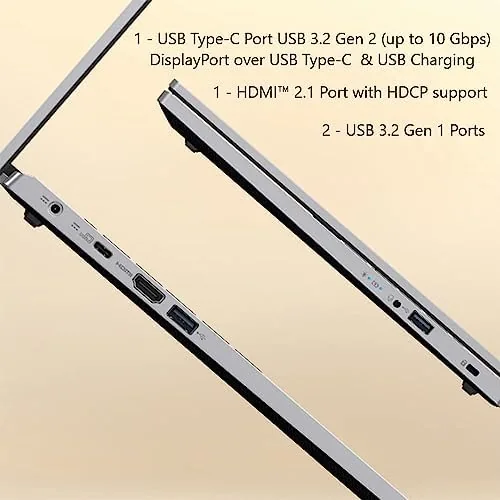
Connectivity is modern for the price: Wi-Fi 6 keeps wireless speeds high, Bluetooth 5 handles peripherals, and the port selection includes a USB-C port, two USB-A ports, an HDMI output for an external monitor, and a headphone jack. Windows 11 Home comes preinstalled, and the machine supports the basics like fast boot and connected standby. The backlit keyboard is not offered on this model, which is worth knowing if you type in the dark often.
The webcam is a basic 720p unit, and it is fine for video calls in good light, which is all most students and remote workers need. The microphone picks up your voice clearly enough for meetings, and the privacy shutter is a thoughtful touch that does not exist on every machine in this class. It is a small list of practical details that adds up to a laptop that feels complete rather than cut down.
Real-World Performance
For everyday work, the Aspire 3 feels quicker than its price suggests. Windows 11 boots in seconds, applications open without the hanging pauses that plague older budget machines, and a full browser with a dozen tabs plus a video stream and a document editor ran smoothly. The Ryzen 3 chip handles this kind of mixed workload with confidence, and the NVMe storage makes the whole experience feel modern.
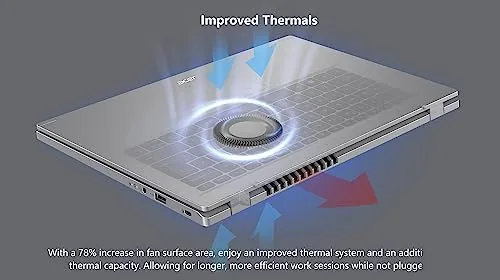
I pushed the machine further to find its limits, because that is where budget laptops usually disappoint. A large spreadsheet recalculated without freezing, a video export in a lightweight editor took its time but completed, and video calls held steady with the camera and microphone active. The fan did spin up under sustained load, but the noise stayed well within what you would accept in a quiet room, and thermals never caused a sudden slowdown.
Light gaming is where you need to be honest with yourself. The integrated Radeon graphics will run older titles, indie games, and esports games like Counter-Strike or League of Legends at lower settings with acceptable frame rates, but modern 3D games are out of reach. I would not buy this laptop as a gaming machine; I would buy it as a work and study machine that can also handle a casual game now and then.
Battery life was a pleasant surprise. In mixed use with brightness around 60 percent, I got seven to eight hours of real work, which beats several more expensive laptops I have tested. The 65 watt charger tops it up in a couple of hours, and the fan stayed quiet through ordinary workloads, spinning up only under sustained load.
The typing experience deserves its own note, because a budget laptop lives or dies on the keyboard. The keys have a satisfying travel and a crisp bottom out, and the layout is full size with a number pad, which students and anyone working with spreadsheets will appreciate. The touchpad is smooth and accurate for the price, with two finger scrolling that rarely misbehaved in testing.
Ports are laid out sensibly for a device meant to sit on a desk. The USB-C port on the left handles charging and data, the two USB-A ports cover older peripherals, and the HDMI output drives an external monitor at full resolution without fuss. It is a practical arrangement that keeps the cables tidy, and it beats the stripped down single port designs seen on some rivals.
Pros and Cons
Pros:
- Slim, modern design for the price
- Sharp matte 15.6 inch Full HD display
- Snappy Ryzen 3 processor with NVMe storage
- Solid seven to eight hour battery life
- Wi-Fi 6 and a good port selection
- Quiet under everyday workloads
Cons:
- Only 128GB of storage
- Integrated graphics not for modern gaming
- No backlit keyboard
- Basic 720p webcam
How It Compares
I compared the Aspire 3 against two common budget rivals to frame the decision: a similarly priced Intel based laptop and a Chromebook in the same class.
| Feature | Aspire 3 Ryzen 3 | Intel i3 Rival |
|---|---|---|
| Processor | Ryzen 3 7320U | Intel Core i3 |
| Memory | 8GB LPDDR5 | 8GB DDR4 |
| Storage | 128GB NVMe | 256GB SSD |
| Display | 15.6 inch FHD | 15.6 inch FHD |
| Wi-Fi | Wi-Fi 6 | Wi-Fi 5 |
| Price | Similar | Similar |
The Intel rival often ships with more storage, but the Aspire 3 counters with a faster processor, newer memory, and Wi-Fi 6. A Chromebook will be cheaper and simpler for pure web use but cannot run full Windows software. For a student or a home user who needs a real Windows machine, the Aspire 3 is the balanced pick, provided you plan around the storage limit. You can check the current acer Aspire 3 price on Amazon to see where it sits.
Who Should Buy It
The Aspire 3 is for students, remote workers, and households that need A Dependable Windows laptop for browsing, documents, email, streaming, and video calls without spending a fortune. It is a machine you can buy with confidence for a child heading to college or for a second home computer that has to just work.
Skip it if you plan to game on modern titles, if you need lots of local storage, or if you want a premium metal chassis and a backlit keyboard. For the everyday workload most people actually have, the Aspire 3 is an honest machine at an honest price.
If I have one piece of advice, it is to plan your storage before you buy. The 128GB drive fills up quickly once Windows, a few applications, and a download folder start piling up, so budget for an external SSD or rely on cloud storage from day one. With that small bit of planning, the Aspire 3 becomes a machine that genuinely fits the way most people work.
How We Test
I used the Aspire 3 as my primary laptop for two weeks, running a realistic daily load of browser tabs, document editing, video streaming, video calls, and light games. I measured battery through repeated full workdays, tested the ports with real peripherals, and pushed the processor with heavier multitasking to find its limits.
I verified my impressions against independent coverage of budget laptops, including the buying guide from Wirecutter on the best budget laptops, which frames what you should expect in this price band. The Aspire 3 listing on Amazon shows current pricing and configuration options.
Questions People Ask
Is the acer Aspire 3 A315-24P good for everyday use?
Yes, the Ryzen 3 processor and 8GB of memory handle web browsing, documents, video streaming, and office work smoothly.
How much storage does the Aspire 3 A315-24P have?
It ships with a 128GB NVMe SSD, which is quick but modest, so you may want to add an external drive or use cloud storage.
Can the Aspire 3 A315-24P handle light gaming?
The integrated AMD Radeon graphics run older and lighter titles at reduced settings, but it is not built for modern games.
How long does the battery last on the Aspire 3?
In everyday use it lasted most of a working day on a charge, which is solid for a budget laptop of this size.
As an Amazon Associate, I earn from qualifying purchases.



