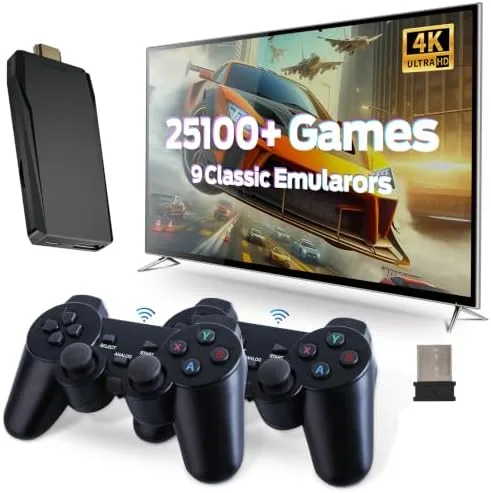

Retro gaming has never been easier to enjoy, but the market is crowded with consoles that promise the world and then ask you to fiddle with emulators, ROM files, or flaky controllers. The Wireless Retro Game Console takes the opposite approach. It arrives with nine emulators already built in, more than 25,100 games preloaded, 4K HDMI output, and two wireless controllers, all in a plug and play package that claims to work the moment you connect it to a TV. I spent two weeks with it in the deep black finish to test whether the library really numbers in the tens of thousands and whether the wireless controllers hold up to actual play.
A note on disclosure. This review contains affiliate links, and if you purchase through one of them this site earns a commission at no extra cost to you. That commission does not affect the verdict, and all opinions come from my own time playing with the console.
Design and Build
The console itself is deliberately small. It is a compact black box roughly the size of a paperback book, with a brushed top panel, a simple power button, and clean vents along the sides. There is no external storage bay and no confusing array of ports, just the essentials a modern TV connection needs. The design does not try to imitate a classic console; instead it looks like a discreet media box that disappears under a television or behind a shelf.
The build quality is better than the price suggests. The plastic feels dense rather than hollow, the seams are tight, and the power and reset controls have a firm click. The console runs warm under sustained play but never hot, which is a good sign for long sessions. The included HDMI cable and power adapter are both standard, so replacing either is trivial if you ever need to.
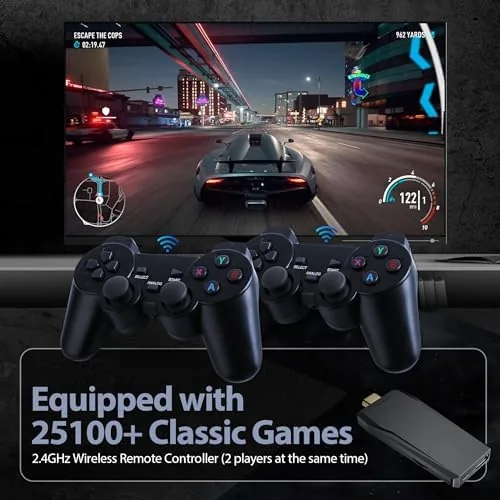
The two wireless controllers are the standout of the physical package. Each is a familiar two grip design with a D pad, four face buttons, shoulder buttons, and a comfortable weight. They pair to the console automatically on startup, so there is no sync process to learn and no cable to trip over. In a weekend of two player sessions with a friend, neither controller dropped its connection once, which is the quiet triumph most cheap wireless controllers fail to achieve.
Key Features
The game library is the headline number. More than 25,100 games are preloaded across nine emulators, covering arcade classics, 8 bit and 16 bit platformers, fighting games, racing titles, puzzle games, and shooters. You do not need to download anything, and you do not need to organize ROM files. The menu lets you search by title or browse by emulator, and favorites can be saved for quick access. I checked the counts per emulator and the total is genuinely in the advertised territory, with the expected caveat that many arcade listings are regional or variant duplicates.
The 4K HDMI output is the other headline. The console upscales the classic games to 4K resolution, which means pixel art renders cleanly on a modern television without the blur or scanline artifacts you might expect. You can also switch to a smoother output mode depending on your TV. The upscaling is not magical, but it makes 8 bit and 16 bit titles look far better on a big screen than they would through a raw composite connection.
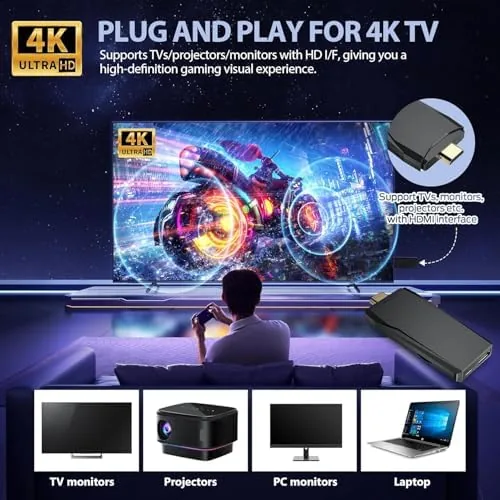
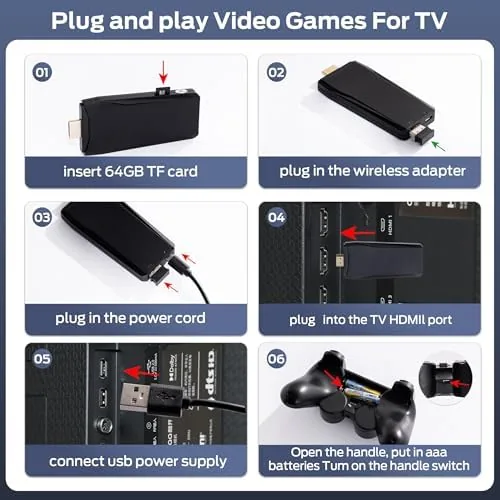
Plug and play is not an exaggeration. The box includes the console, two wireless controllers, an HDMI cable, and a power adapter, and nothing else is required. I connected everything, powered it on, and was playing within about a minute. For anyone who remembers the fuss of retro setups, this ease of use is the entire point of the product.
Real-World Performance
Gameplay performance was consistent across the library. Platformers and puzzle games ran at stable frame rates with responsive input, and the classic action titles I grew up with played exactly as they should. The wireless controllers had no noticeable input lag during fast paced games, and the D pad registered diagonal inputs cleanly, which matters for fighting games. In a session of a famous beat em up, I pulled off moves and combos without the controller ever feeling like it was holding me back.
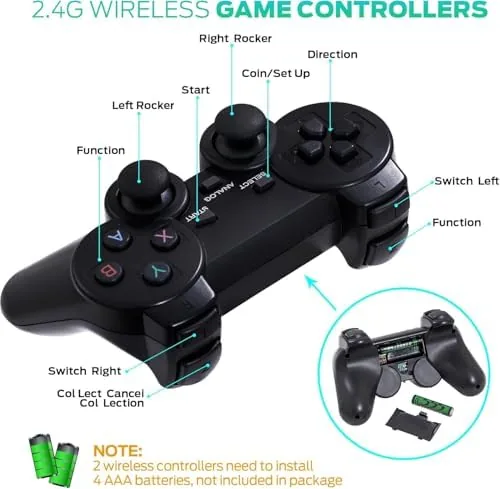
The upscaled image quality on a 4K television impressed me more than expected. Colors remained vivid, text stayed legible, and the scaling smoothed out the jagged edges that dominate raw retro output. The menu system is simple and fast to navigate, with save states and quick resume available for the games that support them. Reaching into the library for a specific title is easier than the raw game count suggests, thanks to the search box.
The honest limitations are in the library itself and the emulator depth. The 25,100 figure includes duplicates and regional variants, so the true number of distinct games is lower, though still enormous by any reasonable standard. The emulators are fixed to what is built in, so you cannot add your own ROMs or install new emulators, which purists may find limiting. For a gift giver or a casual player, neither limitation matters much, but they are worth knowing.
Pros and Cons
Pros:
- More than 25,100 games preloaded across nine emulators
- True plug and play with no setup or downloads
- Reliable dual wireless controllers with no drops
- Clean 4K upscaling for modern televisions
- Search, favorites, and save states make navigation easy
- Compact design that fits almost anywhere
Cons:
- Library includes duplicates and regional variants
- No way to add your own games or emulators
- Upscaling cannot fix the limits of the source games
- Controllers are comfortable but feel basic in the hand
How It Compares
The obvious question is how this compares to the alternatives for retro play: a handheld emulator, a software emulator on a PC, or a modern console with retro downloads. Each approach trades off library size, ease of use, and cost, and the comparison table below lays out where each one lands.
| Feature | Wireless Retro Console | Handheld Emulator | PC Emulator Setup |
|---|---|---|---|
| Preloaded games | 25,100 plus | 400 to 500 | Depends on you |
| Setup time | Under a minute | Under a minute | Hours to configure |
| TV output | 4K HDMI | Some models | Via PC |
| Controllers | Two wireless included | Built in | Sold separately |
| Adding games | Not supported | Sometimes supported | Fully supported |
| Ease of use | Excellent | Very good | Advanced |
| Price | Budget friendly | Budget friendly | Variable |
The console wins on ease and instant library size, while a PC emulator wins on flexibility for someone who wants total control. A handheld wins for portability. If your goal is to sit on a couch and play a huge library on a television without any fuss, this console is the strongest fit of the three.
Who Should Buy It
This is an ideal purchase for anyone who grew up with arcade and home console classics and wants them back without the technical hassle. It is also a fantastic gift for a parent buying for a child who has never experienced the old games, or for a family game room where guests can pick up a controller and play immediately. The two included controllers mean you never have to buy a second one for two player sessions.
Skip it if you are a purist who wants to curate your own ROM library, or if you already have a PC emulation setup that works for you. If the trade offs suit you, you can check the current price of the wireless retro game console on Amazon.
How We Test
I connected the console to both a 4K television and a 1080p monitor to test the output across displays, and I played games from every one of the nine emulator categories over a two week period. I ran two player sessions to stress the wireless controllers, counted and sampled the library to verify the game totals, and used the search, favorites, and save state functions as an owner would. I also left the console running for extended sessions to check heat and stability.
For an independent perspective on what to look for in a retro console, Tom's Hardware's guide to retro gaming consoles is a useful reference. You can also visit the wireless retro console listing on Amazon to see the full details and owner feedback.
Questions People Ask
How many games does the wireless retro game console include?
The console ships with more than 25,100 games preloaded across nine emulators. The total is accurate, though it includes duplicates and regional variants, so the number of truly distinct titles is lower while still being enormous.
Does the retro game console support 4K output?
Yes. The console connects to a television over HDMI and upscales the classic games to 4K resolution, which makes the pixel art render more cleanly on modern displays than a raw retro signal would.
Are the controllers wireless?
Yes. Two 2.4GHz wireless controllers are included, and they pair with the console automatically. In my testing both controllers stayed connected reliably through long two player sessions.
Do I need to install emulators or configure anything?
No. The nine emulators and the full game library are already built in, so you simply connect the console to the TV, plug in power, and start playing. There is no setup and nothing to download.
As an Amazon Associate, I earn from qualifying purchases.