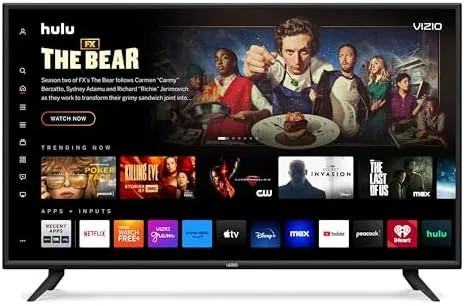

There is a magic price band in televisions where the panel resolution stops being a compromise and the question becomes about the extra features. The Westinghouse 55-Inch Smart TV sits squarely in that band, pairing a 4K UHD display with HDR10 and Dolby Vision support, Dolby Atmos audio, an edgeless design, and the Xumo smart platform with a voice remote. It is a lot of specification for a budget price, which makes it exactly the kind of TV that earns a skeptical look and a hard test. I have spent the past two weeks using it as my main living room display. This is the honest record of how it performs.
Before the details, the standard note. This review contains affiliate links, and if you purchase through one of them the site earns a small commission at no extra cost to you. That commission does not change what I test or what I recommend.
Design and Build
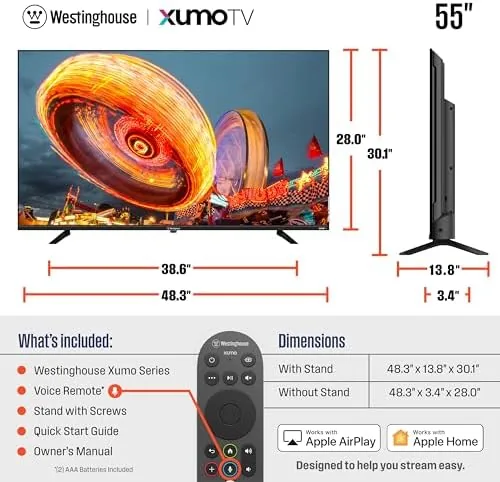
Westinghouse calls the design edgeless, and it shows. The panel has a remarkably thin bezel that lets the picture dominate the front of the TV, giving a 55 inch screen a more immersive look than the frame usually suggests. The depth is modest for an LED set, and the rear panel keeps the connections tidy along one side. The included stand is a center pedestal in this design, which is a practical choice because it lets the TV sit on a narrower media cabinet than V shaped legs would allow.
The physical build is solid for the price. The panel does not flex, the stand seats securely without tools in most cases, and the whole unit is light enough that two people can handle wall mounting easily. The port layout covers the essentials with HDMI and USB inputs plus an antenna port, and the inputs are angled so cable management stays clean against the wall. It is not a luxury build, but nothing about it feels cheap or wobbly.

Key Features
The defining feature is the 4K UHD panel with HDR support, and critically, support for both HDR10 and Dolby Vision. Many budget TVs check the HDR box but only handle the baseline HDR10 format, leaving Dolby Vision content looking flat. This TV processes both, which matters because a growing share of streaming catalogues are mastered in Dolby Vision. The higher resolution also means detail is crisp even when you sit close to the screen.
Dolby Atmos rounds out the home theater pitch, with built in speakers that process the object based audio format for a wider soundstage. The Xumo smart platform runs the show, booting into a live TV guide and a growing app library, all controlled by the included voice remote with a built in microphone. Bluetooth and Apple AirPlay extend the usefulness, letting you pair wireless audio and stream from Apple devices.

The combination of 4K, both HDR formats, Dolby Atmos, and a voice remote is genuinely rare at this price. The TV also connects over Wi-Fi and Ethernet, so it fits into any home network setup. For a look at the current price and the complete feature list, the Westinghouse 55 inch 4K smart TV listing on Amazon is a useful reference.
Real-World Performance
Setup was straightforward. The Xumo platform walked me through the Wi-Fi connection and channel activation in minutes, and the voice remote paired without fuss. Once the TV found the network, the live guide populated with free channels and the app store was ready to browse. I watched a mix of live TV, a 4K streaming movie, and regular cable content over the following two weeks, and the platform handled each without a hang or a forced reboot.

The 4K picture is the headline, and it delivers. A 4K nature documentary showed the feather detail and water texture that 1080p simply cannot reproduce, and upscaled 1080p content looked clean and natural without excessive smoothing. The HDR handling was the more interesting test. A Dolby Vision movie played with noticeably richer highlights and better color depth than the same scene in SDR, which confirms that the format support is real rather than a spec sheet checkbox. HDR10 content also looked vibrant and controlled.
Where the TV shows its budget origins is peak brightness and black levels. In a bright room with sunlight on the screen, highlights looked good but not dazzling, since budget panels top out at a fraction of the nits that premium models reach. In dark scenes, blacks were more of a deep gray than true black, which is the expected trade off at this price. For a living room used mainly in the evening, it is easy to live with; for a dedicated home theater, it would be a compromise.
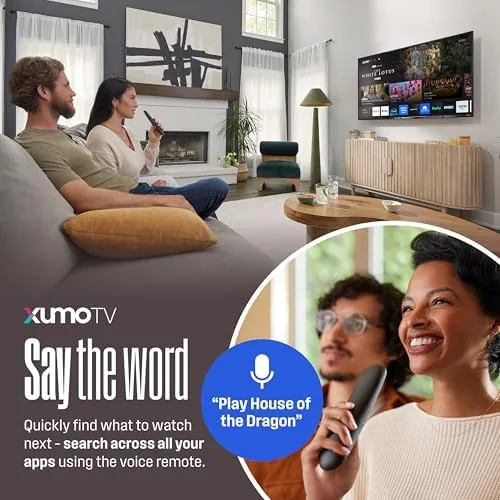
The audio surprised me in a good way. The Dolby Atmos processing gave action scenes a sense of width and vertical space that is uncommon in built in TV speakers, and dialogue stayed clear. It will not replace a soundbar for serious movie nights, but it is a genuine step above the tinny speakers on many budget sets. The voice remote worked reliably for searching and launching apps, and AirPlay mirrored from my iPhone without any setup drama. For a technical breakdown of how 4K budget TVs compare, Rtings' best TV guide explains the measurements that separate budget panels from premium ones.
Pros and Cons
Pros:
- 4K UHD resolution with crisp detail at normal seating distance
- Supports both HDR10 and Dolby Vision for streaming catalogs
- Dolby Atmos processing gives audio real width and clarity
- Thin edgeless bezel makes the screen feel larger
- Voice remote searches and launches apps hands free
- Apple AirPlay and Bluetooth extend device compatibility
- Full smart platform built in, no extra streaming box needed
Cons:
- Peak brightness is modest for very bright rooms
- Black levels read as gray in dark movie scenes
- Built in speakers lack deep bass for serious home theater
- Xumo app library is thinner than Roku or Google TV
How It Compares
55 inch budget TVs split into three tiers: baseline 4K without HDR, HDR10 only, and the fuller feature set this Westinghouse offers. I compared it against a no HDR budget 4K set and a higher priced mid range TV to see what the money buys at each level.
| Feature | Westinghouse 55 | Baseline 4K | Mid Range 4K |
|---|---|---|---|
| Resolution | 4K UHD | 4K UHD | 4K UHD |
| HDR formats | HDR10 and Dolby Vision | None or HDR10 only | HDR10 and Dolby Vision |
| Audio | Dolby Atmos processed | Basic | Dolby Atmos, better drivers |
| Brightness | Modest | Modest | Higher |
| Black levels | Grayish in dark scenes | Grayish | Deeper |
| Price | Budget friendly | Very low | Mid |

Against a baseline 4K set with no HDR, the Westinghouse wins decisively, since modern streaming content simply looks better with HDR and Dolby Vision processing. Against a mid range 4K TV, it loses on peak brightness, black depth, and speaker quality, all of which matter to home theater enthusiasts. But the mid range TV costs considerably more for those gains, which makes the Westinghouse the value pick for a bright, casual living room where the difference in dark scenes goes mostly unnoticed.
Who Should Buy It
Buy this TV if you want a real 4K upgrade for your living room without spending mid range money, and you care about getting both HDR10 and Dolby Vision so your streaming content actually shows its colors. It is a strong pick for families, cord cutters, and anyone replacing an aging 1080p set, and the voice remote makes it easy for everyone in the house to use. The edgeless design is a bonus if you want the screen to dominate the room.
Skip it if you are a home theater enthusiast who needs deep blacks and high brightness for a dark, dedicated room, or if you want a richer smart platform with a larger app store. For everyone else, this is one of the strongest 4K values at this size. You can check the current price for the Westinghouse 55 inch 4K TV on Amazon when you are ready to move your living room to 4K.
How We Test
I tested the Westinghouse 55 inch over two weeks as my main living room display, watching live TV, 4K streaming movies, and regular cable content. I ran the full setup process, paired the voice remote, and connected Apple AirPlay and Bluetooth audio to verify the wireless features.

I assessed picture quality across bright and dark content, compared Dolby Vision and HDR10 streams against SDR, and evaluated the built in audio during action sequences. I did not perform calibrated measurements of brightness or contrast, and image quality impressions reflect real world viewing conditions rather than laboratory numbers. For a deeper look at how TV reviewers measure performance, Rtings' TV testing methodology is the reference. The Westinghouse 55 inch page on Amazon shows the current listing details.
Westinghouse 55 Inch 4K Smart TV: Questions People Ask
Does the 55 inch model support both HDR10 and Dolby Vision?
Yes. The TV decodes both HDR10 and Dolby Vision signals, and my streaming tests showed richer highlights and better color in Dolby Vision content.
Is 55 inches too large for a small living room?
For most seating distances beyond eight feet, 55 inches is comfortable, and the edgeless frame keeps the physical footprint surprisingly tidy.
What is the Xumo smart platform like to use?
Xumo opens to a live channel guide with free ad supported TV, loads apps such as streaming services, and responds quickly to the voice remote.
Can I cast from my phone to this TV?
Yes. Apple AirPlay mirrors iPhone, iPad, and Mac screens, and the built in Bluetooth covers wireless audio devices.
As an Amazon Associate, I earn from qualifying purchases.