
A thermostat is the rare gadget that runs your home every day while drawing almost no attention, until the day it starts disagreeing with you. The classic programmable model hides its settings behind a tiny gray LCD and a pair of fiddly buttons, and most people simply stop touching it. The Vine smart thermostat is designed to change that. It brings a 4.3 inch color touchscreen, WiFi connectivity, voice control through Alexa and Google Assistant, a 7 day by 8 period schedule, and an unexpected addition: a built in nightlight. I installed one in my own home and lived with it for several weeks, and here is the honest assessment of what it gets right and where it asks for compromise.
This review contains affiliate links. If you buy through one of them, the site earns a small commission at no extra cost to you, and that arrangement never affects what I test or recommend. With that note out of the way, let me get into the details.
Design and Build
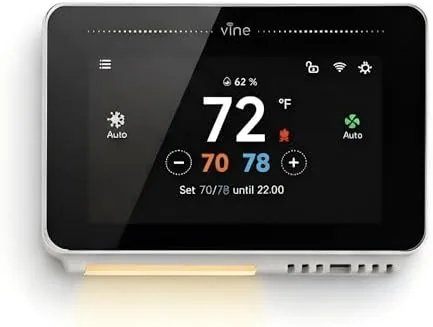
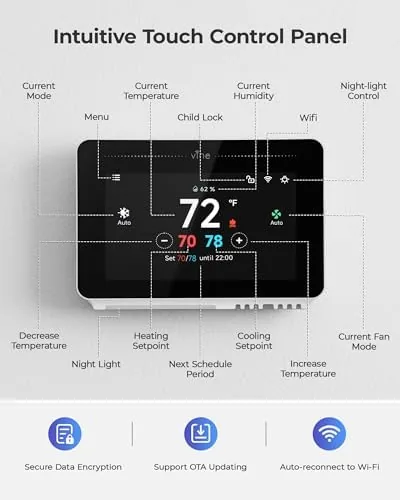
The first impression is how much the Vine looks like a premium thermostat. The 4.3 inch display dominates the front, framed by a clean white bezel that suits most interior styles, and the screen shows the temperature, mode, and schedule in large, readable type. The nightlight is a soft glow that radiates around the screen edge, and it is genuinely pleasant in a dark hallway. It is dimmable through the settings, which keeps it from becoming a nightlight you resent.
The unit is compact and mounts with the standard wall plate, and the wiring block is clearly labeled so a careful DIY installer can handle it. The touchscreen is responsive, and the menus are organized around the same logic as a phone: swipe for modes, tap to adjust temperature, and dig into the schedule section for programming. The build quality is solid, with no creaking plastic and a screen that reads cleanly from across a room.
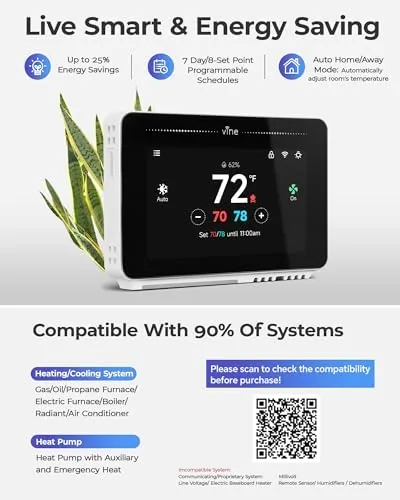
The one design catch is the C wire requirement. The thermostat needs a common wire to power the bright display and the WiFi radio continuously, and that is not something every older home has at the thermostat location. It is a predictable tradeoff for a screen this size, and it is the single most important thing to check before you commit to this unit.
Key Features
The 4.3 inch touchscreen is the centerpiece, and it does far more than a classic display. It shows the current temperature, the target temperature, the active mode, and the outdoor weather when the unit is connected to WiFi, all on one glanceable screen. The menu system handles scheduling, energy reports, and settings without the manual, and the touch targets are large enough for cold hands.
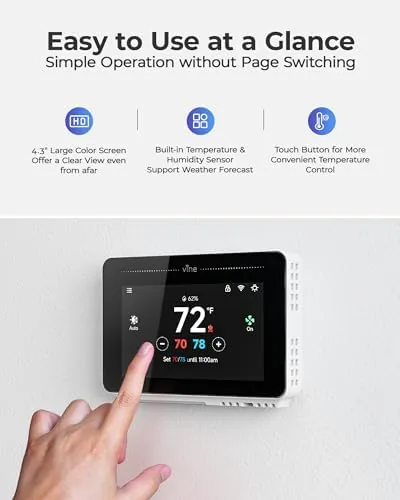
WiFi connectivity is what turns the unit into a smart home device. It connects to your home network, supports both Alexa and Google Assistant, and appears in the companion app so you can adjust the temperature from anywhere. The scheduling engine is the most flexible I have used at this price: up to eight periods per day, with each of the seven days programmed independently. That means a different comfort curve for weekdays and weekends, and separate settings for waking, work, evening, and sleep.
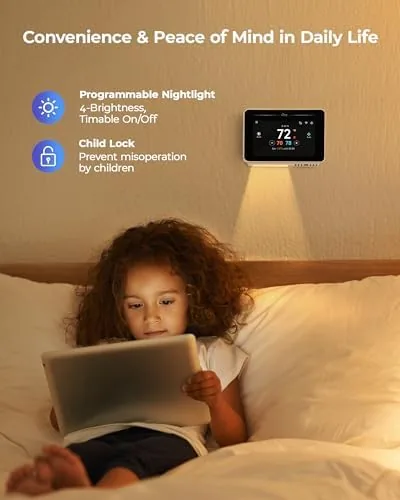
The nightlight is the feature no one asks for and everyone ends up liking. It glows softly around the screen edge, works as a hallway or bedroom guide light, and can be turned off or dimmed completely. It is a small thing, but it gives the thermostat a second life in the home. If you want to see the current price and wiring requirements, check the Vine smart thermostat on Amazon.
Real-World Performance
Installing the thermostat took about twenty minutes, and the wiring block made the process straightforward for anyone comfortable with a screwdriver. Once powered up, the screen calibrated and the WiFi connected in under a minute. The voice setup was the quickest part: Alexa found the thermostat and responded to temperature changes immediately, and Google Assistant worked just as well for the same commands.
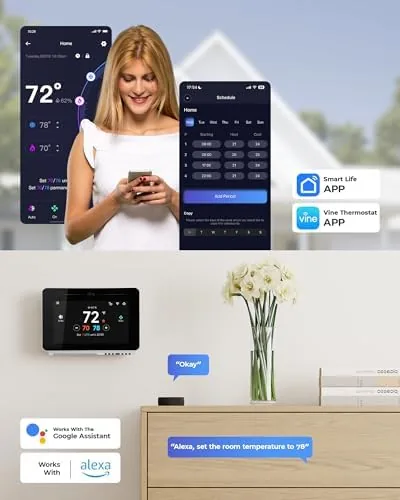
Over several weeks the schedule did the real work. I set weekday mornings to warm the house before anyone woke, an economy period during the day, a comfortable evening setting, and a cooler sleep period overnight, then gave the weekend its own rhythm. The thermostat held the schedule precisely, and the energy report in the app showed a clear drop in heating hours during the day periods, which translated to a smaller bill at the end of the month.
The touchscreen was a genuine pleasure to use. The temperature readout is large enough to see from across the room, the controls respond instantly, and the schedule edits on screen are far less painful than the multi button programming of a classic thermostat. The nightlight earned its place in the hallway, and guests noticed it before they noticed the thermostat itself, which says something about its charm.
The weak point is the mobile app. It works, and it handles remote temperature changes and schedule edits reliably, but it is more basic than the polished apps that come with premium thermostats. There is no detailed energy history, no advanced geofencing, and no learning mode that builds a schedule for you. If you want a thermostat that anticipates your routine, this unit asks you to program it yourself. For someone comfortable setting a schedule, that is not a problem.
Pros and Cons
Pros:
- Large, bright 4.3 inch touchscreen that is easy to read and use
- Built in nightlight doubles the thermostat as a hallway guide light
- Works with both Alexa and Google Assistant over WiFi
- Flexible 7 day by 8 period schedule for precise comfort control
- Remote control through the companion app from anywhere
- Straightforward wiring block for a careful DIY installation
Cons:
- C wire required, which older homes may not have
- Mobile app is basic compared with premium thermostat apps
- No learning mode to build a schedule automatically
How It Compares
Smart thermostats divide into two camps: full featured premium units with learning algorithms, and simpler connected units like the Vine that put control on a screen. I compared the Vine against a premium Learning Thermostat and a budget WiFi Thermostat without a display to see where the value really lands.
| Feature | Vine Smart Thermostat | Premium Learning Thermostat | Budget WiFi Thermostat |
|---|---|---|---|
| Display | 4.3 inch touchscreen | Compact color screen | None or basic LCD |
| Nightlight | Built in | Not standard | No |
| Schedule flexibility | 7 days x 8 periods | Learning and manual | Limited periods |
| Voice assistants | Alexa and Google | Alexa and Google | Sometimes |
| Mobile app depth | Basic | Advanced | Minimal |
| C wire needed | Yes | Usually yes | Often not |
The premium thermostat learns your habits and offers a richer app, but it costs significantly more and does not include a nightlight. The budget unit installs without a C wire and costs little, but you give up the touchscreen, the flexible schedule, and the visual appeal entirely. The Vine sits in a practical middle: most of the smart home capability at a friendlier price, with a better display than anything near its cost and a nightlight that no competitor offers.
Who Should Buy It
Buy the Vine smart thermostat if you want a large, readable screen on your wall, if you use Alexa or Google Assistant and want voice control of your climate, or if you like programming a precise schedule and are comfortable doing it on the device. It is also a strong choice for a hallway or bedroom where the nightlight earns its keep every night. You can check the current price of the Vine smart thermostat on Amazon before you decide.
Skip it if you do not have a C wire and cannot run one, if you want a thermostat that learns your schedule automatically, or if a deep mobile app with energy analytics matters to you. For a straightforward, attractive, voice friendly thermostat, this one delivers a lot for the money.
How We Test
I installed the Vine thermostat in a real home and lived with it for several weeks, running a full 7 day schedule with eight periods and tracking whether the temperature targets held precisely. I tested voice commands through both Alexa and Google Assistant, checked remote changes through the app, and evaluated the nightlight brightness and the touchscreen responsiveness in daily use.
I also reviewed the energy report against the utility bill to confirm the schedule saved measurable heating hours. For a broader look at smart home heating and how WiFi thermostats fit into a connected house, the CNET smart home section has long term guides worth reading. The Vine smart thermostat listing on Amazon shows current pricing and shipping if you are ready to buy.
Vine Smart Thermostat: Questions People Ask
Does the Vine smart thermostat need a C wire?
Yes. The thermostat requires a common wire for continuous power, because the 4.3 inch display and WiFi radio draw more than the small battery trickle some older thermostats use. Check for an unused C wire in the wall before buying, or plan for a power adapter.
How does the 7 day by 8 period schedule work?
You can program up to eight temperature changes per day, and each of the seven days can have its own schedule. This lets you set distinct comfort periods for waking, work hours, evenings, and sleep, with a different pattern for weekends if you like.
Can voice assistants control this thermostat?
Yes. It works with both Alexa and Google Assistant over WiFi, so you can adjust the temperature with a spoken command, check the current reading, and include it in larger smart home routines.
What does the built in nightlight do?
The screen edge glows as a nightlight so the thermostat doubles as a soft hallway or bedroom light. The glow is dimmable through the display settings, and it gives the unit a second use beyond temperature control.
As an Amazon Associate, I earn from qualifying purchases.