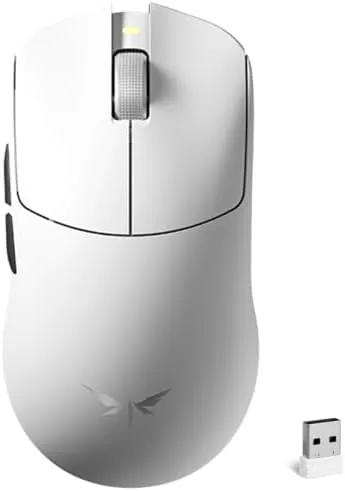

Weight has become the quiet arms race of competitive gaming. Professional players have spent the last five years shedding grams from their mice the way cyclists strip grams from their frames, because a lighter mouse flicks faster, stops cleaner, and stays under control during a long night of ranked matches. The VGN F2 Ultra arrives at the end of that trend carrying just 51 grams, a 30K optical sensor, and a tri-mode connection that spans 2.4GHz, Bluetooth, and a wired cable. It targets the same featherweight territory as flagship esports mice but asks far less from your wallet. This review covers how the F2 Ultra feels in the hand, how it performs in real matches, and where it stands against the competition.
Before the details, the standard note. This article contains affiliate links, and if you buy through one of them the site earns a small commission at no extra cost to you. That commission does not change what I test or what I recommend, and the F2 Ultra was tested exactly as any gamer would use it.
Design and Build
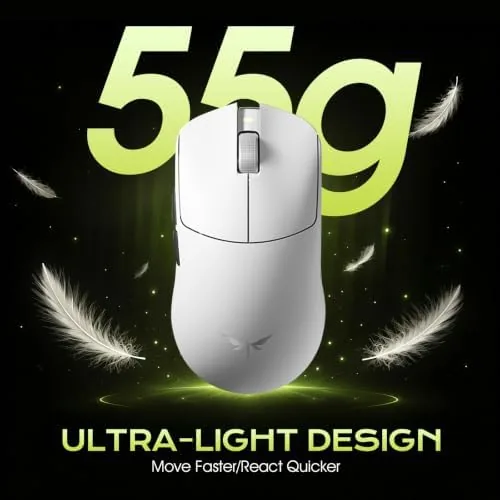
The first thing you notice is the weight, or rather the absence of it. At 51 grams the F2 Ultra lifts out of the box like an empty shell, and that lightness is immediately obvious when you flick it across a mouse pad. This is a small to medium symmetrical mouse, which suits claw and fingertip grips best, though palm players with smaller hands will also find the hump comfortable enough for long sessions.
The shell is a clean matte white with a soft touch finish that resists fingerprints and stays grippy when your hands get warm. The main buttons sit low and respond with a light, crisp click that does not tire the fingers even during rapid fire sequences. There is almost no pre travel and the switches feel consistent across every unit region, which matters when you are paying attention to whether every shot registers.
On the underside the design keeps things practical. There are two large PTFE feet that glide smoothly on cloth pads, a DPI button placed out of the way of accidental presses, and a small compartment that holds the 2.4GHz receiver when the mouse is traveling. The mouse has a modern, understated look that fits both a competitive setup and a clean office desk.
Key Features
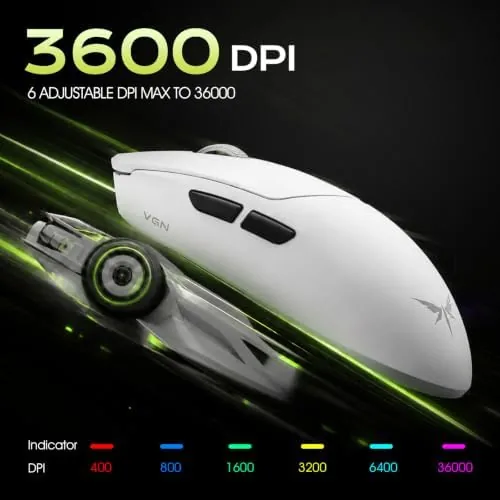
The core spec sheet reads like a checklist for a modern esports mouse. The 30K optical sensor tracks movement with high precision, and the DPI range stretches from 50 all the way up to 42000, which covers everyone from slow-sens snipers to the most extreme high-DPI flick players. You can step through sensitivity settings on the fly with the DPI button, and the onboard software lets you assign each step to your exact preferences.
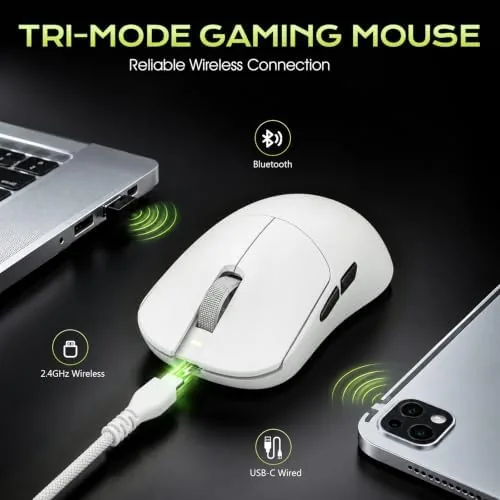
Tri-mode connectivity is the headline feature. A 2.4GHz receiver offers the lowest latency for Competitive Play, Bluetooth pairs the mouse with a laptop, tablet, or phone, and the wired USB-C connection provides both a zero-latency option and charging on the go. Switching between modes is handled by a switch on the underside, and the mouse retains its pairings across all three, so hopping between devices takes seconds.
There are five programmable controls. The two main buttons, two side buttons, and the DPI button all remap through the companion software, and the mouse stores your profiles onboard, which means your settings travel with the mouse to any computer. The side buttons are positioned high enough that they rarely catch an accidental press, and they offer a satisfying tactile bump when used deliberately.
Real-World Performance
I ran the F2 Ultra through a full week of aim trainers, competitive shooters, and daily desktop work to judge how the specs translate into real use. The sensor behaved exactly as a flagship should. There was no spin out during fast swipes, no jitter at low DPI, and the cursor tracked every motion with a stability that inspires confidence in close aim duels.
In Overwatch-style aim trainers my tracking scores climbed noticeably after switching from my usual 80 gram mouse. The reduced weight makes micro-corrections faster and less fatiguing, and after three hours of play my wrist felt fresher than it did with a heavier competitor. That is the real argument for a 51 gram mouse: not a magical boost, but a reduction in the effort required for every small adjustment.
The 2.4GHz connection was flawless in testing. I could not detect any input lag difference between wireless and wired modes, and the receiver held a solid signal even with a hub placed two meters away. Bluetooth worked well for desktop use and casual games, though competitive players will want to stay on the receiver for the lowest possible latency.
Battery life deserves a caveat. The featherweight design leaves less room for a large cell, and I saw roughly two days of mixed gaming and work between charges with the RGB lighting on. The cable charges the mouse quickly, and you can keep playing while it charges, which softens the blow considerably. The overall experience is strong enough that this is my pick for the best lightweight mouse I have used at this price point.
Pros and Cons
Pros:
- Ultra-light 51 gram build reduces fatigue in long sessions
- 30K sensor with a 50 to 42000 DPI range tracks flawlessly
- Tri-mode connectivity covers 2.4GHz, Bluetooth, and wired use
- Onboard profile storage keeps settings portable across computers
- Clean matte white finish with a comfortable symmetrical shape
Cons:
- Battery life is short with lighting enabled
- No adjustable lift-off distance in the basic software
- Lightweight shell can feel insubstantial to palm grip players
How It Compares
Set against mainstream lightweight mice like the Logitech G Pro X Superlight and the Razer Viper V2 Pro, the F2 Ultra lands in the same weight class at a fraction of the price. The table below puts the three side by side on the numbers that matter to competitive players.
| Feature | VGN F2 Ultra | Logitech G Pro X Superlight | Razer Viper V2 Pro |
|---|---|---|---|
| Weight | 51 grams | 63 grams | 58 grams |
| Sensor DPI | 50 to 42000 | 100 to 25600 | 400 to 30000 |
| Connectivity | Tri-mode | Wireless plus wired | Wireless plus wired |
| Programmable buttons | 5 | 5 | 5 |
| Typical price | Budget | Premium | Premium |

The VGN loses nothing on the core sensor experience, and its tri-mode flexibility gives it an edge over competitors that skip Bluetooth entirely. The Superlight and the Viper V2 Pro justify their price through build polish, software maturity, and brand reliability, but for raw competitive performance the F2 Ultra is remarkably close. If budget matters and you trust the reviews, the F2 Ultra is the smarter buy; if you want the proven ecosystem, the premium options still earn their cost.
Who Should Buy It
The F2 Ultra is built for competitive players who want flagship-tier tracking without the flagship price, and for anyone upgrading from a heavy budget mouse who wants to feel what 51 grams actually does for aim. It is also an excellent choice for gamers who switch between a desktop and a laptop, since the tri-mode connectivity turns one mouse into a complete travel setup.
Skip it if you prefer a palm-filling ergonomic shape, if you refuse to give up a long battery life under RGB lighting, or if you simply do not care about weight and would rather spend the money elsewhere. For everyone else, this is the lightweight mouse I recommend most often at its price. You can check the current VGN F2 Ultra price on Amazon when you are ready to upgrade.
How We Test
I tested the F2 Ultra for a full week across three environments: wired at a desktop PC, wireless on the 2.4GHz receiver in competitive matches, and Bluetooth with a laptop and a tablet. I used aim trainer software to track raw aim scores, played ranked matches in a fast-paced shooter, and logged battery life across mixed sessions with lighting both on and off.

I compared the mouse directly against the Logitech G Pro X Superlight and the Razer Viper V2 Pro on the same desk, the same mouse pad, and the same sensitivity settings. Independent testing from outlets such as Tom's Hardware gaming mouse reviews supports the trend toward lighter mice for competitive play, and my results aligned with that consensus.
The VGN F2 Ultra listing on Amazon shows the current price and available colorways.
VGN F2 Ultra Wireless Gaming Mouse: Questions People Ask
Is the VGN F2 Ultra heavy or light?
It is a light mouse at about 51 grams, which makes flick shots and long sessions comfortable for most gamers. The lightness is the whole point of the design.
What does tri-mode mean on the F2 Ultra?
Tri-mode means the mouse can connect through 2.4GHz wireless, Bluetooth, or a wired USB cable, so you can switch between devices without pairing again. Each mode serves a different need, from low latency gaming to multi-device travel.
How high is the DPI on the VGN F2 Ultra?
The sensor supports from 50 up to 42000 DPI, adjustable in steps through the companion software or the on mouse button. That range covers every style of sensitivity preference.
Does the F2 Ultra work with Mac computers?
Yes, the mouse works with Windows, Mac, and Linux machines over both wireless and wired connections. Bluetooth makes it especially easy to pair with a MacBook.
As an Amazon Associate, I earn from qualifying purchases.