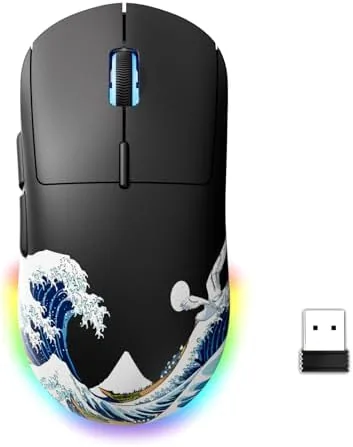

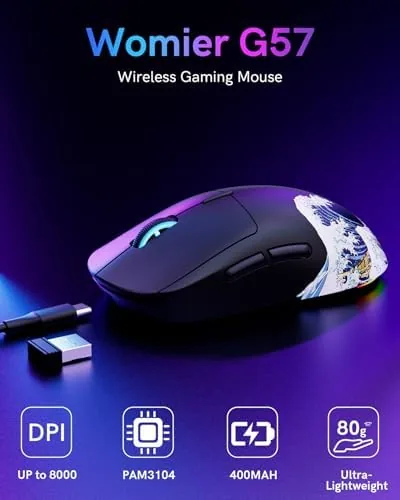
Competitive aim is often decided before the crosshair ever lands. Latency, sensor accuracy, and the weight of the mouse in your hand shape how quickly a flick registers, and a heavy or sluggish peripheral will cost rounds no matter how crisp your monitor is. The G57 wireless gaming mouse enters that crowded field with an 8000 DPI optical sensor, an 80 gram shell, and three connection modes in a package aimed squarely at budget conscious PC players. I have used it for three weeks across tactical shooters, MOBAs, and long desktop sessions, and this review records exactly how it held up under that mixed workload.
Before the results, one housekeeping note. This article includes affiliate links, and if you purchase through one of them the site earns a small commission at no added cost to you. That arrangement never changes what I test or how I score a product.
Design and Build
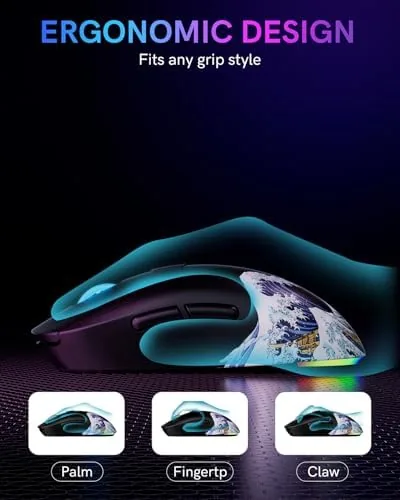
The first impression of the G57 is how little it weighs. Lifting it from the box you feel nothing like the brick of a wired office mouse, and at 80 grams it sits in the same featherweight zone as esports mice that cost three times as much. The shell is a matte black plastic with a subtle texture along the sides that gives your fingers purchase during fast sweeps without feeling abrasive after hours of use.
The shape is a symmetrical ambidextrous design with a pronounced hump in the middle, so it fills the palm for claw and fingertip grips alike. Build tolerances are respectable for the price. The shell flexes barely at all under firm pressure, and the main buttons rock smoothly without the sideways wobble that cheapens budget mice. The two side buttons sit on the left edge, which means right handed users get full access while left handed players lose a couple of quick actions, an expected trade of the ambidextrous layout.
Key Features
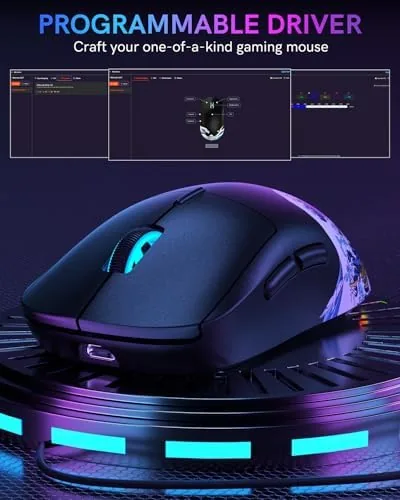
At the center of the package is the 8000 DPI optical sensor. That ceiling is far beyond what most players actually run, since the majority of competitive shooters prefer 800 to 1600 DPI with low in game sensitivity, but the headroom matters for high resolution displays and for players who like to scale sensitivity on the fly. DPI is adjustable in steps through the onboard button or the software, and the current setting shows up in the driver window each time you change it.
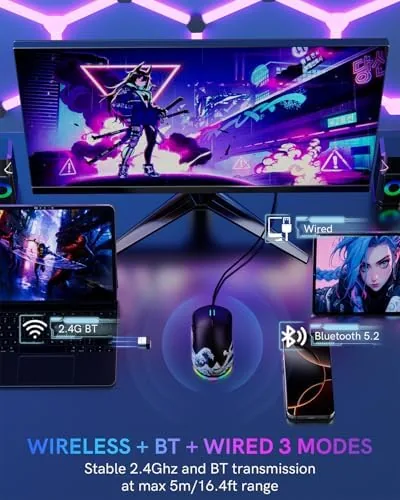
Connectivity is the more interesting story. The G57 supports three modes: a 2.4G wireless dongle for low latency gaming, Bluetooth for laptops and tablets, and a wired USB C connection. The dongle mode is what I used for most of my gaming sessions, and it felt indistinguishable from a wired mouse in practice. Bluetooth opens up pairing to a second device without touching the dongle, which is genuinely useful if you switch between a desktop and a laptop during the day.
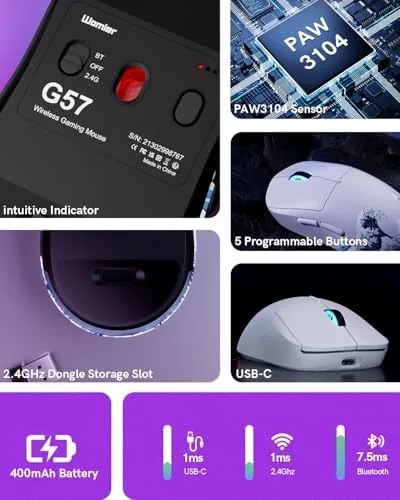
The five programmable buttons give the mouse real flexibility. Out of the box the layout covers the two side buttons, the DPI switch, and the two main clicks, and the software reassigns those roles to macros, media commands, or DPI profiles. The rechargeable battery keeps the whole package wireless, and the USB C port handles both charging and wired play when you need it.
Real-World Performance
I spent the bulk of my testing time in tactical shooters where mouse feel decides duels. In a series of deathmatch and ranked rounds, the sensor tracked fast flicks and wide sweeps with no skip and no spin out, even on a textured cloth pad. The polling rate kept the cursor where I expected it, and the 80 gram weight let me reset between shots without fighting inertia or wrist fatigue.
In MOBA and MMO style play the two side buttons were the workhorses, bound to item slots and abilities. They sit in a natural spot under the thumb and click with a firm tactile response that makes misclicks rare. The scroll wheel has a defined middle detent that is precise enough for weapon switching but comfortable enough for browsing and document work.
Battery life was the practical win. Over three weeks with the lighting turned off and the dongle as the primary connection, I charged the mouse exactly once. With RGB enabled and Bluetooth as the daily driver the runtime drops, but even then it lasted through a full week of evening sessions. The low battery indicator in the software gives plenty of warning before you need to plug in, and since the mouse keeps working while charging you are never forced out of a match.
One caution deserves a mention. The included cable is short and stiff, so wired play works best when your PC sits close to the edge of the desk. It is a small complaint about a cable that is meant mostly for charging, and the wireless connection is so solid that I rarely used the wire at all.
Pros and Cons
Pros:
- 80 gram shell feels featherweight during fast aim
- 8000 DPI sensor tracks cleanly with no spin out
- Tri mode connectivity covers dongle, Bluetooth, and wired play
- Rechargeable battery lasts weeks between charges
- Five programmable buttons handle macros and profiles
- Works with PC and Mac out of the box
Cons:
- Side buttons are only convenient for right handed use
- Included charging cable is short and stiff
- No dedicated charging dock included
- Software feels basic next to premium brands
How It Compares
Budget wireless gaming mice now compete directly with wired classics and premium wireless flagships. I compared the G57 against a typical Wired Gaming Mouse at a similar price and a premium Wireless Mouse at triple the cost to see exactly where the compromises land.
| Feature | G57 Wireless | Wired Gaming Mouse | Premium Wireless |
|---|---|---|---|
| Sensor DPI | 8000 | 16000 or higher | 26000 or higher |
| Weight | 80 grams | 100 grams or more | 55 to 70 grams |
| Connectivity | 2.4G, Bluetooth, USB C | Wired only | 2.4G, Bluetooth, USB C |
| Programmable buttons | 5 | 6 to 8 | 5 to 8 |
| Battery | Rechargeable, long | Not applicable | Rechargeable |
| Price | Budget | Budget to mid | Premium |

Against a wired mouse at the same price, the G57 wins on freedom of movement and desk clutter, while the wired option still holds the edge in raw sensor headroom and extra programmable buttons. Against a premium wireless flagship, the G57 gives up the highest DPI ceilings and the softest software, but it closes most of the gap that matters, which is feel in hand and latency in a match. For most players the sensible reading is simple: if your budget stops around the mid range, the G57 is one of the few wireless options that will not make you feel you settled.
Who Should Buy It
Buy the G57 if you are a PC gamer who wants to cut the cable without spending flagship money, if you swap between a desktop and a laptop and value Bluetooth pairing, or if you play on both Windows and Mac systems and want one mouse that covers both. It is also a sensible first gaming mouse for someone moving off a basic office peripheral.
Skip it if you demand the absolute highest DPI sensor on the market, if you need eight or more macro buttons for complex MMO rotations, or if you are left handed and rely on thumb buttons during play. For everyone else, this is a lightweight, dependable wireless mouse that punches well above its price. You can check the current price of the G57 wireless gaming mouse on Amazon when you are ready to buy.
How We Test
I tested the G57 over three weeks in three environments: ranked tactical shooters with a cloth pad, MOBA sessions with heavy side button use, and eight hour office days for comfort and battery drain. I tracked battery life across dongle and Bluetooth modes, with and without lighting enabled, and I connected the mouse to both Windows and Mac computers to confirm the tri mode promise.
I did not use the mouse on glass surfaces or test it in a tournament with professional prize stakes, and I relied on the built in polling and sensitivity ranges rather than external measurement rigs. For a broader view of what separates good gaming mice from great ones, guides such as Tom's Hardware roundup of the best gaming mice explain the metrics that matter. The G57 wireless gaming mouse listing on Amazon shows the current price and available colors.
G57 Wireless Gaming Mouse: Questions People Ask
Does the G57 wireless mouse work with a Mac?
Yes. The mouse works on PC and Mac through either the 2.4G receiver or Bluetooth, and the button remapping software supports both operating systems without extra drivers.
How long does the battery last on a full charge?
Battery life depends on the connection mode and lighting settings, but the rechargeable cell typically lasts several weeks of regular gaming between charges, and the mouse can be used while it tops back up.
Can I use the mouse while it is charging?
Yes. The USB C port sits at the front of the shell, so you can keep playing while the mouse charges through a wired connection, either as a charging pass through or as a fully wired connection.
How do I reprogram the five buttons?
The bundled software lets you assign macros, media shortcuts, and DPI profiles to the two side buttons and the other programmable controls, and the profiles stay saved in the mouse memory.
As an Amazon Associate, I earn from qualifying purchases.